


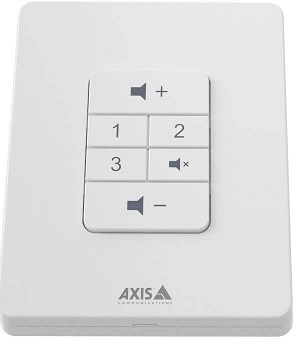
Controler de volum AXIS C8310
Instalare

Connect your AXIS C8310 Volume Controller to the I/O connector of any device in your system. We recommend that you simply choose the device that is located closest to your AXIS C8310 Volume Controller.
The volume controller 4-pin connector on AXIS C8310 is specifically designed to work with the I/O Port 1 on the connectivity hub, utilizing pins 1-4 (GND, 12V, I/O, and I/O). Once connected, those ports cannot be configured for other uses.
Nota
Dispozitivul gazdă trebuie să aibă versiunea de firmware 11.6 sau o versiune ulterioară.


Începeți
Use AXIS C8310 Volume Controller with AXIS Audio Manager Edge
For instructions, see Control audio with AXIS C8310 Volume Controller in the AXIS Audio Manager Edge user manual.
Use AXIS C8310 Volume Controller with AXIS Audio Manager Pro
You need to have AXIS Audio Manager Pro version 4.4 to use it with an AXIS C8310 Volume Controller.
For instructions, see Control audio with AXIS C8310 Volume Controller in the AXIS Audio Manager Pro user manual.
Configurați dispozitivul
Efectuați un apel SIP
Folosiți dispozitivul AXIS C8310 pentru a iniția un apel SIP de la un difuzor cu microfon încorporat către un destinatar SIP.
În acest exampSă inițiem și să încheiem apelul cu același buton. Am ales butonul sursă 1, dar puteți alege orice buton de pe AXIS C8310.
Nota
If you are using the same button for source control in AXIS Audio Manager Edge or Pro, you might want to unassign that functionality in those applications.
Pentru mai multe informații despre regulile care declanșează acțiuni, consultați Introducere în utilizarea regulilor pentru evenimente.
- Deschideți web interfața difuzorului la care este conectat dispozitivul AXIS C8310:
Introduceți adresa IP a vorbitorului într-un browser. - Go to Audio > Peripherals and make sure your AXIS C8310 is connected.
- Go to System > SIP and make sure SIP is set up and activated.
- Adăugați un destinatar:
- Go to System > Events > Recipients and click + Add recipient.
- Numiți destinatarul.
- Under Type, select SIP or VMS.
- Select SIP and enter the details.
- Faceți clic pe Salvare.
- Add rule for initiating a call:
- Go to System > Events > Rules and click + Add a rule.
- Name the rule.
- Under Condition, select I/O > Digital input is active.
- Under Port, select Source 1 button.
- To avoid initiating more than one call, we add an extra condition:
- Click + Add a condition.
- Select Call > State.
- Under State, select Idle.
- Under Action, select Calls > Make call.
- Under Recipient, select your recipient.
- Faceți clic pe Salvare.
- Add a rule for ending the call:
- Click + Add a rule.
- Name the rule.
- Under Condition, select I/O > Digital input is active.
- Under Port, select Source 1 button.
- To only perform the action if there is an ongoing call, we need to add another condition:
- Click + Add a condition.
- Select Call > State.
- Under State, select Active.
- Under Action, select Calls > End calls.
- Faceți clic pe Salvare.
Lock the device after a certain time of inactivity
- Go to Audio > Peripherals.
- Turn on Enable auto-lock.
- Under Auto-lock time, select a time.
If no buttons have been pressed on your AXIS C8310 for the selected time, all buttons will be locked. - To unlock the buttons, press the volume up and volume down buttons at the same time.
Specificații
Produs terminatview

Contactați asistența
Dacă aveți nevoie de mai mult ajutor, mergeți la axis.com/support.
T10196055
2025-06 (M4.2)
© 2023 – 2025 Axis Communications AB
Documente/Resurse
 |
Controler de volum AXIS C8310 [pdfManual de utilizare Controler de volum C8310, C8310, Controler de volum, Controler |