Introducere
Thank you for choosing the Lefant M210 Robot Vacuum Cleaner. This manual provides essential information for the safe operation, maintenance, and troubleshooting of your device. Please read it thoroughly before use and keep it for future reference.

Image: The Lefant M210 Robot Vacuum Cleaner, showcasindatorită designului său compact.
Instrucțiuni importante de siguranță
Respectați întotdeauna măsurile de siguranță de bază atunci când utilizați aparate electrice pentru a reduce riscul de incendiu, electrocutare sau vătămare corporală. Acestea includ:
- Citiți toate instrucțiunile înainte de a utiliza aparatul.
- Do not operate the vacuum cleaner in areas with flammable or combustible materials.
- Țineți părul, hainele largi, degetele și toate părțile corpului departe de deschideri și părți în mișcare.
- Nu ridicați nimic care arde sau care fumează, cum ar fi țigări, chibrituri sau cenușă fierbinte.
- Asigurați-vă că stația de încărcare este așezată lângă un perete, pe o suprafață plană.
- Only use the original power adapter and charging dock provided by the manufacturer.
Conținutul pachetului
Verificați dacă toate componentele sunt prezente în pachet:
- Robot aspirator Lefant M210
- Dock de încărcare
- Adaptor de alimentare
- Perii laterale (2 perechi)
- Filtru de înaltă performanță
- Instrument de curățare
- Manual de utilizare
Înființat
1. Prepare the Robot
- Îndepărtați toate foliile și abțibildurile de protecție de pe robot și de pe stația de încărcare.
- Attach the side brushes by pressing them onto the posts until they click into place.
2. Place the Charging Dock
- Așezați stația de încărcare lângă un perete, într-o zonă deschisă și fără aglomerație.
- Ensure there is at least 0.5 meters (1.6 feet) of clear space on either side of the dock and 1.5 meters (4.9 feet) in front.
- Conectați adaptorul de alimentare la stația de încărcare și introduceți-l într-o priză de perete.
3. Încărcați robotul
Așezați robotul pe stația de încărcare, asigurându-vă că contactele de încărcare sunt aliniate. Indicatorul luminos de pe robot va afișa starea de încărcare. Încărcați complet robotul înainte de prima utilizare (aproximativ 4-5 ore).
4. Connect to the Lefant App
- Download the "Lefant" app from the App Store or Google Play.
- Register an account and follow the in-app instructions to connect your M210 robot vacuum cleaner to your home Wi-Fi network.
Instrucțiuni de operare
Pornirea și oprirea curățării
- Început: Press the power button on the robot or use the Lefant app to start a cleaning cycle.
- Pauză: Press the power button again to pause cleaning.
- Întoarcere la doc: Apăsați butonul principal de pe robot sau folosiți aplicația pentru a trimite robotul înapoi la stația de încărcare.
Moduri de curățare
The Lefant M210 offers various cleaning modes to suit different needs:

Image: Illustration of the Lefant M210's various cleaning modes, including Random, Zigzag, Edge, and Spot cleaning.
- Curățare automată: The robot automatically cleans in a zigzag pattern, adjusting to the environment.
- Curățarea punctelor: Se concentrează pe o anumită zonă murdară, curățând în spirală.
- Curățarea marginilor: Curăță de-a lungul pereților și marginilor mobilei.
- Curățare programată: Setați timpii de curățare prin aplicația Lefant.
Efficient Cleaning Path

Image: The Lefant M210 utilizes an effective zigzag route for thorough and intelligent cleaning, avoiding random patterns.
Curățarea părului de animale
The Lefant M210 is designed to effectively pick up pet hair, making it suitable for homes with pets. Its powerful suction and brush design help manage pet dander and fur.

Image: The Lefant M210 Robot Vacuum Cleaner effectively collects pet hair, as demonstrated in a home setting with a dog and child.
FreeMove Technology 3.0
The M210 is equipped with updated FreeMove Technology 3.0, which helps the robot navigate around obstacles and avoid getting stuck, ensuring a smooth cleaning process.
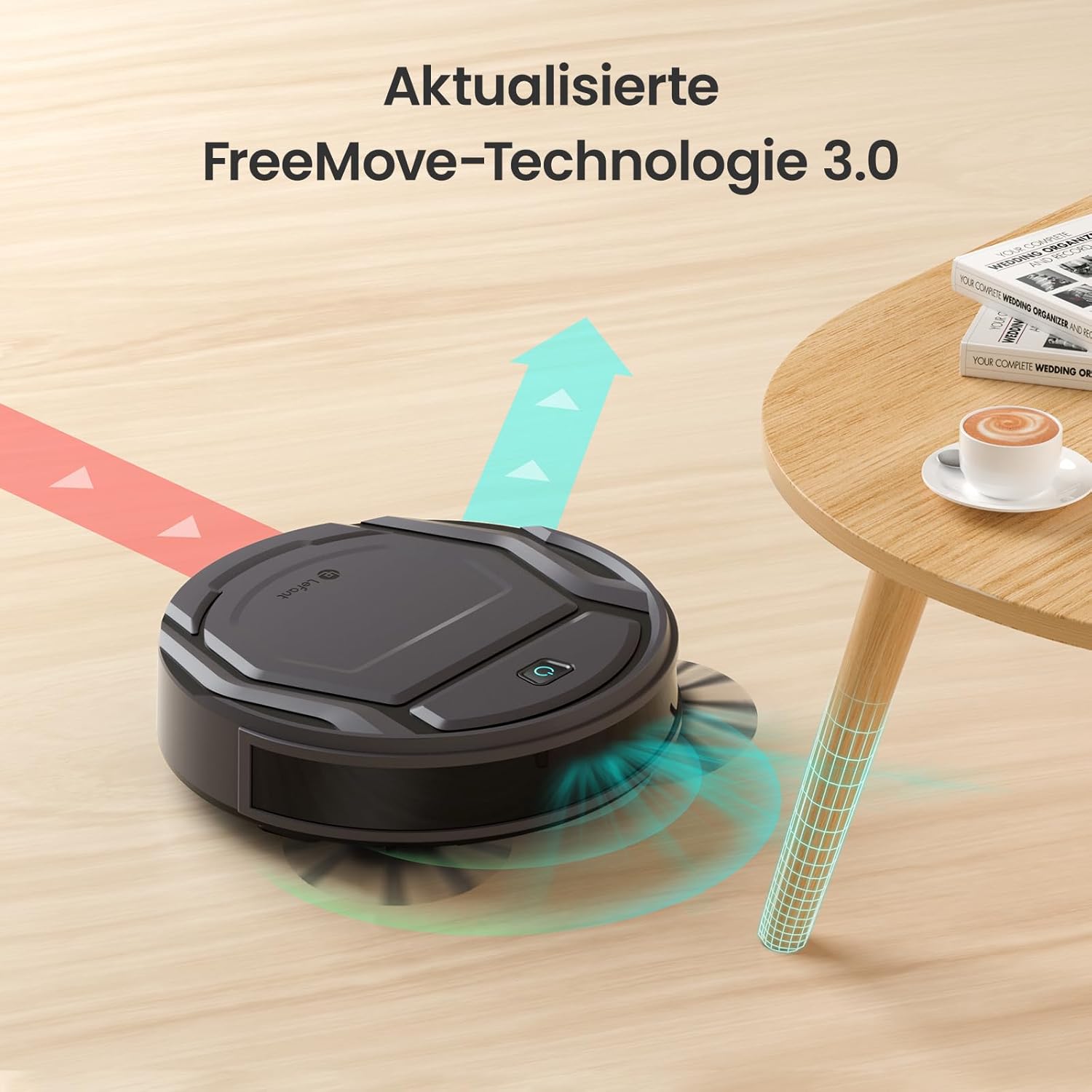
Image: The Lefant M210 demonstrating its updated FreeMove Technology 3.0 for enhanced navigation and obstacle avoidance.
Control vocal
The Lefant M210 supports voice control through Amazon Alexa and Google Home. Connect your robot to these services via the Lefant app for convenient hands-free operation.

Image: The Lefant M210 integrates with Amazon Alexa and Google Home for intelligent voice control, allowing users to start cleaning with simple commands.
Întreţinere
Regular maintenance ensures optimal performance of your Lefant M210. Always turn off the robot and disconnect it from the charging dock before performing any maintenance.
1. Emptying the Dustbin (After each use)
- Apăsați butonul de eliberare a recipientului de praf și trageți recipientul de praf afară.
- Deschideți capacul coșului de praf și goliți conținutul acestuia într-un coș de gunoi.
- Clean the filter with the provided cleaning tool or tap it gently to remove debris. Do not wash the filter with water.
- Reinsert the filter and close the dustbin cover. Place the dustbin back into the robot.
2. Cleaning the Side Brushes (Weekly or as needed)
- Trageți ușor de periile laterale în sus pentru a le scoate.
- Îndepărtați orice păr sau resturi înfășurate în jurul periilor sau al suporturilor periilor.
- Reatașați periile, asigurându-vă că se fixează la locul lor cu un clic.
3. Cleaning the Sensors and Charging Contacts (Monthly or as needed)
- Use a clean, dry cloth to wipe the anti-drop sensors on the bottom of the robot.
- Clean the charging contacts on both the robot and the charging dock.

Image: The Lefant M210 features a design optimized for easy maintenance, reducing hair tangles compared to traditional robot vacuum designs.
Depanare
If your robot vacuum cleaner encounters issues, refer to the following common problems and solutions:
| Problemă | Cauza posibila | Soluţie |
|---|---|---|
| Robotul nu pornește. | Baterie descărcată sau neîncărcată. | Așezați robotul pe stația de încărcare și asigurați-vă că este complet încărcat. |
| Robotul nu se poate întoarce la stația de încărcare. | Charging dock is obstructed or too far. | Ensure the charging dock is in an open area and free from obstacles. Manually place the robot on the dock if needed. |
| Performanța de curățare este slabă. | Dustbin full, filter clogged, or brushes tangled. | Empty the dustbin, clean or replace the filter, and clean the side brushes. |
| Robotul se blochează frecvent. | Too many obstacles or uneven surfaces. | Clear the cleaning area of loose cables, small objects, and thick rugs. |
| Probleme de conectare la aplicație. | Parolă Wi-Fi incorectă, probleme cu routerul sau robotul nu este în modul de asociere. | Ensure correct Wi-Fi credentials. Restart your router and the robot. Follow app instructions for pairing mode. |
Specificații
| Caracteristică | Detaliu |
|---|---|
| Marca | Lefant |
| Numele modelului | M210 |
| Numărul de model | M210P |
| Culoare | Negru |
| Dimensiuni produs (L x l x H) | 28 x 8 x 28 cm (11 x 3.1 x 11 țoli) |
| Greutatea articolului | 3.14 kg (6.92 lbs) |
| Capacitate gunoi | 500 litri (Note: This capacity is unusually large for a robot vacuum dustbin and may refer to a different metric or be a typo in the source data.) |
| Voltage | 220 volți |
| Material | Plastic |
| Caracteristica specială | Anti-coliziune |
| Recomandare de suprafață | Covor, Podele dure |
| Tip controler | Controlul aplicației |
| Compoziția bateriei | Litiu-ion |
| Timp de rulare | Până la 120 de minute |
| Nivel de zgomot | 55 dB |

Image: The Lefant M210 offers a long runtime of up to 120 minutes on a single charge, capable of cleaning up to 120 square meters.
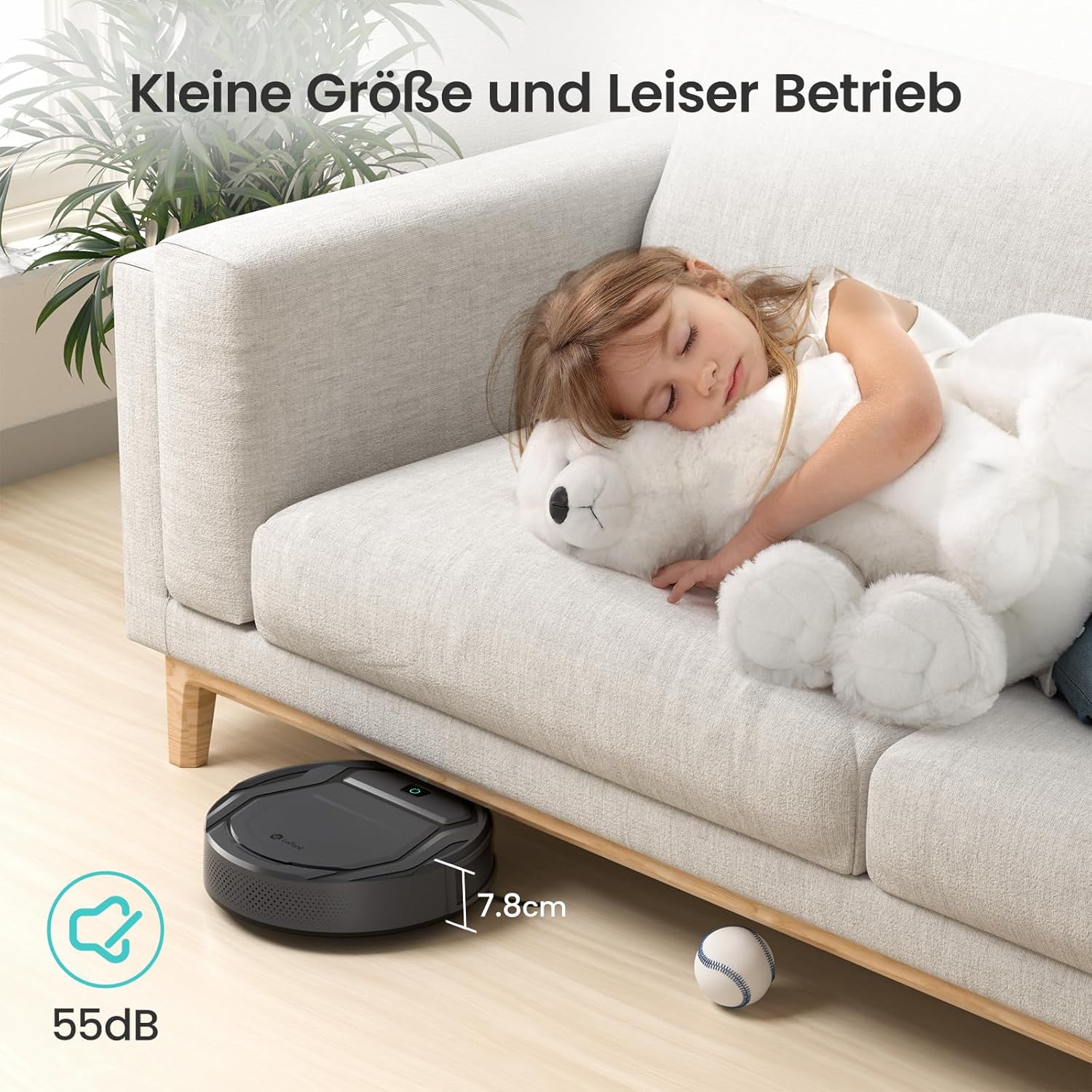
Image: The Lefant M210's compact size (7.8cm height) allows it to clean under furniture, and its quiet operation at 55dB ensures minimal disturbance.
Garanție și suport
For warranty information, technical support, or service inquiries, please refer to the official Lefant website-ul web sau contactați direct serviciul lor de asistență pentru clienți. Păstrați bonul fiscal ca dovadă a achiziției.
Lefant Official Website: www.lefant.com