1. Introducere
This manual provides essential information for the safe and efficient use of your LG 32-inch Curved FHD Monitor. Please read it thoroughly before operating the device and retain it for future reference.

Imagine: față view of the LG 32-inch Curved FHD Monitor.

Image: The monitor shown from various angles, highlighting its curved screen and sleek design.
2. Informații de siguranță
Observe the following safety precautions to prevent electric shock, fire, or damage to the monitor.
- Nu așezați monitorul lângă surse de căldură sau în lumina directă a soarelui.
- Asigurați o ventilație adecvată în jurul monitorului.
- Use only the power cord and adapter supplied by LG.
- Nu introduceți obiecte metalice în orificiile monitorului.
- If smoke, strange sounds, or odors occur, immediately unplug the monitor and contact customer support.
- Keep the monitor away from water and excessive humidity.
3. Configurare și asamblare
3.1 Peste fizicview

Image: The monitor with its physical dimensions (width, height, depth) clearly labeled.
3.2 Despachetarea
Scoateți cu grijă toate componentele din ambalaj. Asigurați-vă că sunt prezente toate piesele enumerate în lista de ambalaj.
3.3 Asamblarea suportului
Attach the stand base to the stand neck, then attach the assembled stand to the monitor panel. Ensure all screws are tightened securely. The monitor also supports VESA 100x100mm wall mounting.

Imagine: Spate view of the monitor showing stand attachment and tilt adjustment capability.
3.4 Cabluri de conectare
Connect the power adapter to the monitor and then to a power outlet. Connect your computer or other devices using the appropriate cables (HDMI, D-Sub).
- Conexiune HDMI: Use an HDMI cable to connect your device to the monitor's HDMI port.
- D-Sub Connection: Use a D-Sub cable to connect your device to the monitor's D-Sub port.
- Ieșire căști: Connect headphones or external speakers to the headphone out port.
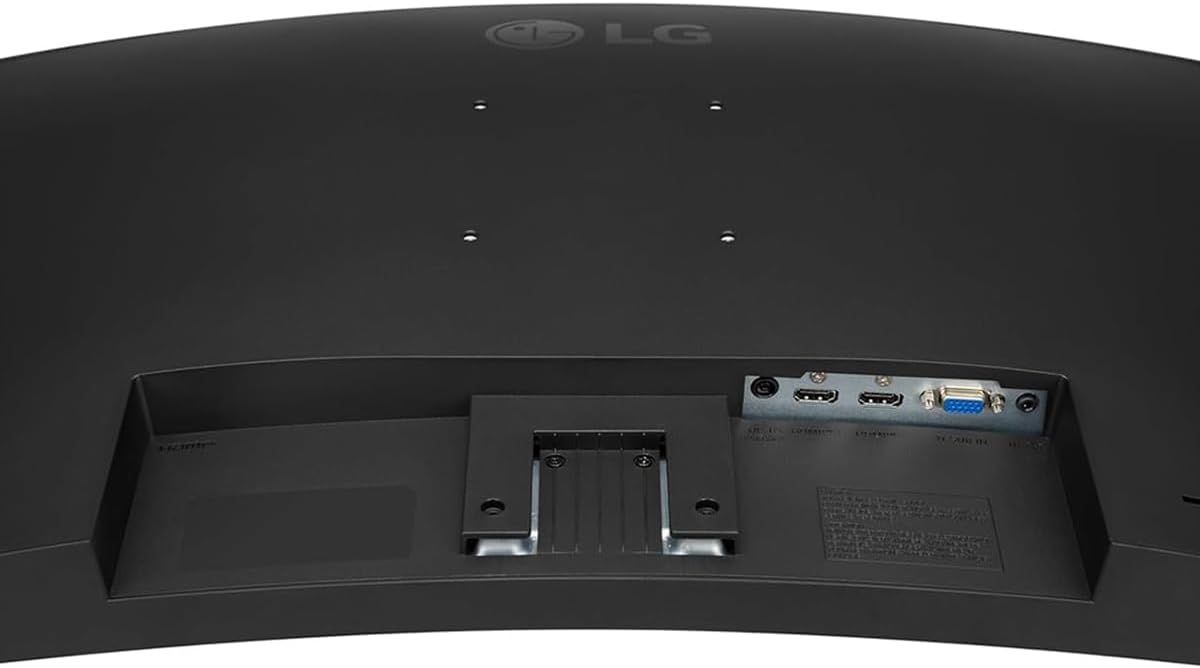
Image: Close-up of the monitor's rear panel showing HDMI, D-Sub, and power input ports.
3.5 Pornire
Press the power button (usually a joystick on the bottom center) to turn on the monitor. Select the correct input source using the OnScreen Display (OSD) menu.
4. Operarea monitorului
4.1 Basic Controls and OSD Menu
The monitor features a joystick button located at the bottom center for easy navigation of the OnScreen Display (OSD) menu. Press the joystick to access the main menu, then move it up/down/left/right to navigate and select options.
4.2 Caracteristici cheie
- Rata de actualizare 100Hz: Provides smoother motion for gaming and fast-paced content.
- AMD FreeSync: Synchronizes the monitor's refresh rate with your graphics card's frame rate to reduce screen tearing and stuttering. Enable this feature in your graphics card settings.
- Sincronizarea acțiunilor dinamice: Minimizes input lag, making real-time strategy games and fast-paced shooters more responsive.
- Stabilizator negru: Brightens dark areas in games, allowing you to see details that might otherwise be hidden.
- Reader Mode & Flicker Safe:
Modul cititor reduces blue light emissions to alleviate eye strain during long reading sessions. Flicker Safe technology minimizes screen flicker, providing a more comfortable viewexperiență.
- Control pe ecran: This software allows you to easily adjust monitor settings, split the screen into multiple sections, and manage display options directly from your computer.
- Comutator de intrare automată: Detectează automat și comută la o sursă de intrare activă.

Image: Visual comparison illustrating the difference between 60Hz and 100Hz refresh rates for smoother visuals.

Image: Screenshot demonstrating the Black Stabilizer feature, enhancing visibility in dark gaming environments.
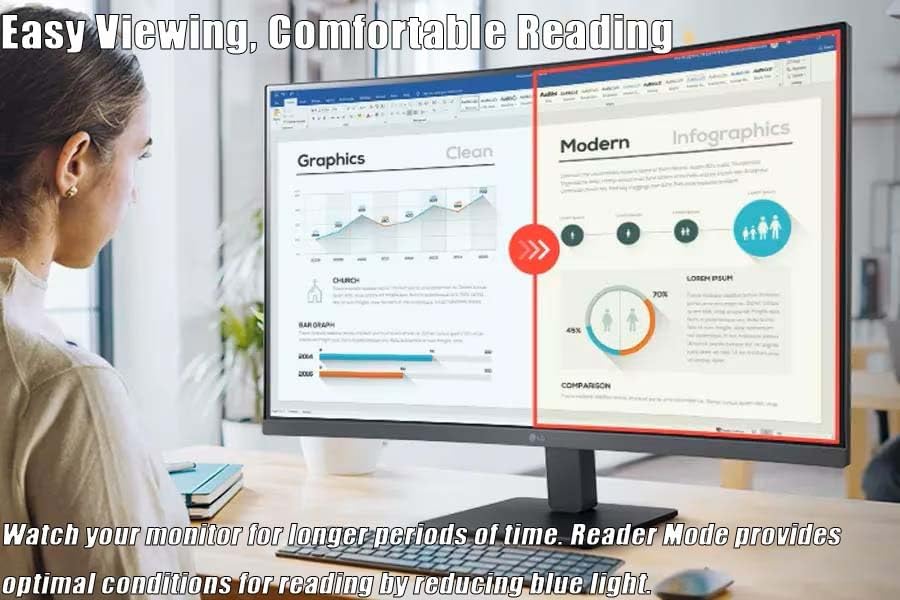
Imagine: Un utilizator viewing documents on the monitor, highlighting the benefits of Reader Mode for eye comfort.

Image: The OnScreen Control application interface, showing options for screen splitting and monitor settings.
5. Întreținere
5.1 Curăţarea monitorului
Pentru a curăța ecranul monitorului, ștergeți-l ușor cu o lavetă moale, fără scame. Pentru petele persistente, ștergeți ușorampClătiți laveta cu apă sau cu o soluție de curățare a ecranului blândă, neabrazivă. Nu pulverizați soluția de curățare direct pe ecran.
Pentru monitorul casing, use a soft, dry cloth. Avoid using strong detergents or abrasive cleaners.
5.2 Depozitare
If storing the monitor for an extended period, disconnect all cables and pack it in its original packaging to protect it from dust and physical damage. Store in a cool, dry place.
6. Depanare
Dacă întâmpinați probleme cu monitorul, consultați următoarele probleme și soluții frecvente:
| Problemă | Cauza posibila | Soluţie |
|---|---|---|
| Nicio imagine pe ecran | Power cable disconnected, video cable loose, incorrect input source. | Verificați conexiunile cablului de alimentare și video. Selectați sursa de intrare corectă prin intermediul meniului OSD. |
| Ecranul pâlpâie | Video cable issue, refresh rate mismatch, graphics driver outdated. | Ensure video cable is secure. Update graphics drivers. Check refresh rate settings in your computer's display settings. |
| Colors appear abnormal | Color settings incorrect, video cable issue. | Adjust color settings in the OSD menu. Check video cable connection. |
| Controlul pe ecran nu funcționează | Software not installed or outdated, monitor not connected to PC. | Download and install the latest OnScreen Control software from the LG website. Ensure the monitor is connected to your PC via HDMI or D-Sub. |
7. Specificații
| Caracteristică | Detaliu |
|---|---|
| Dimensiunea ecranului | 31.5 inches (32 inches standing display) |
| Tip de afișare | Panoul VA |
| Curbură | Curbat |
| Rezoluţie | 1920 x 1080 (FHD) |
| Raportul de aspect | 16:9 |
| Rata de reîmprospătare | 100 Hz |
| Timp de răspuns (GtG) | 5ms (at Faster) |
| Luminozitate (tipică) | 250 cd/m² |
| Raport de contrast (tipic) | 3000:1 |
| Gamă de culori (tip.) | NTSC 72% (CIE1931) |
| Viewunghiul ing | 178° (D/S), 178° (U/D) |
| Sincronizare adaptivă | AMD FreeSync |
| Conectivitate | HDMI, D-Sub, Headphone Out |
| Dimensiune montare pe perete | 100 x 100 mm |
| Ajustare înclinare | -5~20° |
| Intrare de putere | 100~240V (50/60Hz) |
| Dimensiuni cu suport (LxÎxA) | 27.9 cm x 20.2 cm x 9.2 cm |
| Greutate cu suport | 13.7 lbs |
8. Garanție și asistență
Pentru informații detaliate despre garanție, consultați cardul de garanție inclus împreună cu produsul sau vizitați site-ul oficial LG. website. LG oferă asistență clienților pentru solicitări de informații despre produse, asistență tehnică și service.
Asistență clienți LG:
- Website: www.lg.com/us/support
- Telefon: Refer to your region's LG support page for local contact numbers.
Please have your monitor's model number and serial number ready when contacting support.