1. Configurare și asamblare
This section guides you through the initial setup and assembly of your iScooter DX5 Electric Scooter. Please follow these steps carefully to ensure safe and proper operation.
1.1 Despachetarea și identificarea componentelor
Scoateți cu grijă toate componentele din ambalaj. Verificați dacă toate piesele enumerate în lista de ambalaj sunt prezente și nedeteriorate.

Figure 1: All components of the iScooter DX5 Electric Scooter laid out after unboxing.
1.2 Ghid video de asamblare
For a visual step-by-step guide on assembling your iScooter DX5, please watch the official installation video below. This video covers all major assembly steps from unboxing to final checks.
Video 1: Official iScooter DX5 Adults Electric Scooter with Seat Installation Video. This video demonstrates the complete assembly process, including handlebar, brake, mirror, and wheel installation.
1.3 Detailed Assembly Steps (Key Points from Video)
- Instalare ghidon: Secure the handlebar stem to the fork using the provided hex keys. Ensure all bolts are tightened evenly for stability.

Figure 2: The handlebar assembly with the 9-inch full-color LCD display and control buttons.
- Brake Lever and Mirror Attachment: Attach the brake levers and rearview mirrors to the handlebars. Adjust their positions for comfortable reach and optimal visibility.
- Organizare de cabluri: Use zip ties to neatly secure all cables along the frame, preventing interference with moving parts and ensuring a clean appearance.
- Headlight and Reflector Installation: Mount the front headlight and side reflectors onto the fork. Connect the headlight wiring securely.
- Instalare aripa fata: Attach the front fender to the fork using the designated screws. Ensure it is securely fastened and does not obstruct the wheel.
- Instalarea roții din față: Carefully align the front wheel with the fork, ensuring the brake rotor slides correctly between the brake pads. Insert and tighten the axle bolt.
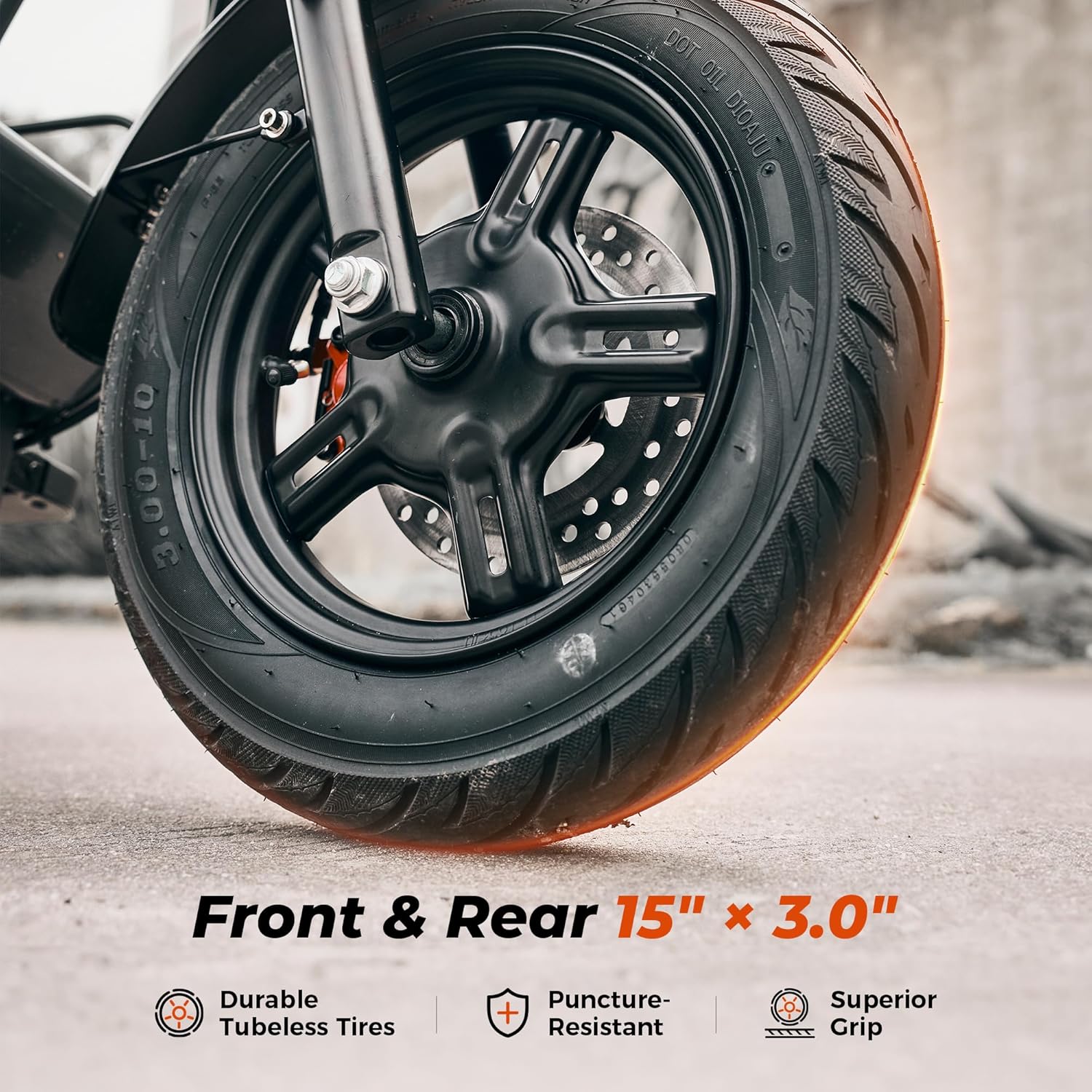
Figura 3: Detaliat view of the 15-inch vacuum pneumatic tire and front hydraulic disc brake system.
- Instalare suport pentru picioare: Attach the foldable footrests to the side of the scooter frame. Ensure they can be securely folded and unfolded.
- Instalarea scaunului: Place the seat onto the rear rack and secure it with the provided hardware.

Figure 4: The enlarged comfort saddle designed for reduced pressure and improved breathability.
- Front Basket and Scooter Bag: Install the detachable front basket and attach the scooter bag as desired for storage.

Figure 5: The iScooter DX5 featuring its detachable front basket for convenient storage.
2. Instrucțiuni de utilizare
Familiarize yourself with the controls and features of your iScooter DX5 before your first ride.
2.1 Power On/Off and NFC Unlock
- Pornire: Ensure the battery disconnect switch (located near the footrest) is in the "ON" position. Tap your NFC smart card to the display to unlock and power on the scooter.
- Oprire: Tap the NFC card again or hold the power button to turn off the scooter.

Figura 6: Pesteview of the handlebar controls, including the NFC unlock area on the display.
2.2 moduri de viteză
The iScooter DX5 offers four speed modes to adapt to various riding conditions and preferences. Use the 'S' button on the handlebar to cycle through the modes:
- Mod treapta 1: 15 MPH (Energy-saving mode)
- Mod treapta a 2-a: 21 km/h (navetă urbană, viteză constantă)
- Modul a 3-a viteză: 28 km/h (putere echilibrată, călătorie mai rapidă)
- Mod treapta a 4-a: 35 km/h (turbo sprint, putere maximă)

Figure 7: Visual representation of the four available speed modes and their corresponding speeds.
2.3 Lighting System and Horn
- Far: Press the headlight switch on the left handlebar to turn the front LED headlight on or off.
- Tail Light & Turn Signals: The tail light automatically brightens when braking. Use the turn signal button on the left handlebar to activate left or right turn signals.
- Corn: Press the horn button on the left handlebar to alert pedestrians or traffic.

Figure 8: Details of the advanced lighting system, including front headlight, tail light, and integrated turn signals.
2.4 Anti-theft Alarm Feature
The iScooter DX5 includes a built-in anti-theft alarm. When activated, any unauthorized movement of the scooter will trigger an audible alarm and lock the motor, deterring theft.
3. Întreținere
Regular maintenance ensures the longevity and optimal performance of your iScooter DX5.
- Sistem de franare: Regularly inspect the dual hydraulic disc brakes for wear and tear. Ensure brake fluid levels are adequate and brake pads are not excessively worn. Adjust as necessary or consult a professional.

Figure 9: The dual hydraulic disc brake system provides instant and reliable stopping power.
- Presiunea anvelopelor: Check the pressure of the 15" x 3.0" vacuum pneumatic tires regularly. Maintain recommended pressure for optimal ride comfort, range, and tire lifespan.

Figure 10: Rugged 15" x 3.0" tires offer superior grip and puncture resistance, supporting up to 330 lbs.
- Sistem de suspensie: Periodically inspect the front hydraulic and rear air spring suspension for any signs of damage or leaks. Ensure all mounting bolts are tight.

Figure 11: The advanced dual suspension system, featuring front hydraulic and rear air spring suspension for a smooth ride.
- Îngrijirea bateriei: To prevent battery drain from the alarm system during long periods of inactivity, ensure the battery disconnect switch is in the "OFF" position.

Figure 12: The 48V 15.6Ah long-range battery, offering up to 45 miles on a single charge.
- Curatenie generala: Curățați trotineta în mod regulat cu reclame.amp Evitați utilizarea jeturilor de apă cu presiune înaltă direct pe componentele electrice.
4. Depanare
This section addresses common issues you might encounter with your iScooter DX5.
| Problemă | Cauza posibila | Soluţie |
|---|---|---|
| Trotineta nu pornește. | Battery disconnect switch is OFF; Low battery; Loose connections. | Ensure battery switch is ON. Charge the battery. Check all cable connections. |
| Motorul nu se cuplează. | NFC card not tapped; Parking mode active; Brake engaged. | Tap NFC card to activate. Release the brake or shift gear to unlock parking mode. |
| Autonomie sau viteză redusă. | Low tire pressure; Heavy load; Uphill riding; Cold weather. | Check and inflate tires. Reduce load. Consider riding conditions. |
| Frânele se simt slabe. | Worn brake pads; Low brake fluid; Air in brake lines. | Inspect and replace brake pads. Check brake fluid. Consult a professional for bleeding brake lines. |
| Alarma se declanșează pe neașteptate. | Sensitive alarm setting; Accidental movement. | Ensure scooter is stable when armed. Refer to the full manual for alarm sensitivity adjustment. |
5. Specificații
Key technical specifications for the iScooter DX5 Electric Scooter:
- Nume model: DX5
- Motor: Peak 1500W (1000W rated) Brushless Motor
- Baterie: 48V 15.6Ah (748.8Wh) Lithium Battery
- Viteza maxima: 35 MPH (Four speed modes: 15/21/28/35 MPH)
- Interval maxim: 38-45 Miles (depending on riding conditions)
- cauciucuri: 15" x 3.0" Vacuum Pneumatic E-Motorcycle Tires
- Frane: Frâne cu disc hidraulice duble
- Suspensie: Front Hydraulic Suspension & Rear Air Spring Suspension (Dual Suspension)
- Capacitate maxima de incarcare: 330 lbs
- Dimensiuni produs (Lxlxh): 58.27 cm x 26.8 cm x 55.1 cm
- Greutatea articolului: 100 lire sterline
- Rezistenta la apa: IPX4
- Caracteristici speciale: 9" LCD Color Instrument Panel, NFC Unlocking, Anti-Theft Alarm, Removable Storage Basket, Scooter Bag

Figura 13: O pesteview of the iScooter DX5 highlighting its main features and specifications.
6. Garanție și asistență
6.1 Informații despre garanție
iScooter offers a limited warranty on different parts of the DX5 Electric Scooter. We provide a 360-day or 180-day warranty depending on the specific component. Please refer to your purchase documentation or contact customer support for detailed warranty terms and conditions.
6.2 Asistență pentru clienți
For any questions, technical assistance, or warranty claims, please contact iScooter customer support. You can find contact details on the official iScooter website sau prin intermediul platformei dvs. de achiziții.
Visit the official iScooter Store: Magazinul iScooter pe Amazon


