Introducere
This manual provides essential information for the proper setup, operation, and maintenance of your Garvee 88-Key Digital Piano Keyboard. Designed for beginners, this portable, USB-powered electric piano offers a comprehensive learning experience with Bluetooth MIDI connectivity and dual speakers. Please read this manual thoroughly before using your instrument to ensure optimal performance and longevity.
Ce este inclus
Carefully unpack your Garvee Digital Piano Keyboard and verify that all the following items are present:
Imagine: All items included in the Garvee 88-Key Digital Piano Keyboard package.
- Garvee 88-Key Digital Piano Keyboard: The main instrument.
- Geanta de transport: For convenient transport and protection.
- Book Clip (Music Stand): To hold sheet music or a tablet.
- Pedala de sustinere: For expressive playing.
- Adaptor de alimentare: To power the keyboard.
- Căști: For private practice sessions.
- Note Stickers: For key identification, especially useful for beginners.
Caracteristicile produsului
Your Garvee Digital Piano Keyboard is equipped with several features designed to enhance your musical journey:
Bluetooth & MIDI Functionality

Imagine: Bluetooth and MIDI connectivity of the Garvee digital piano with various devices and music applications.
The integrated Bluetooth and MIDI functions allow for wireless connection to external devices such as smartphones, tablets, and computers. This enables interaction with various music learning and production applications like Pop Piano, Perfect Piano, and Garageband, expanding your creative and learning possibilities.
Dual Keyboard Mode

Imagine: Two individuals playing the Garvee digital piano simultaneously in dual keyboard mode.
This feature divides the 88 keys into two independent sections, allowing two players to use the keyboard simultaneously. It is ideal for teaching scenarios where an instructor can play alongside a student, or for duets.
Rich Sound Functions

Imagine: Pesteview of the Garvee digital piano's rich sound functions.
- 129 de tone: A wide variety of instrument sounds to explore.
- 128 Polyphony: Allows for complex musical passages without notes cutting off.
- 30 Demos: Pre-recorded songs for listening and learning.
- MIDI: Musical Instrument Digital Interface for connection to other MIDI devices.
- Record & Play: Capturați și re-view performanțele tale.
- Metronom: Essential tool for rhythm practice.
Semi-Weighted, Touch-Sensitive Keys

Imagine: Visual representation of the semi-weighted, touch-sensitive keys.
The 88 full-sized keys feature a semi-weighted, touch-sensitive design, mimicking the feel of an acoustic piano. This allows for dynamic expression, where the volume and tone change based on how hard or soft you press the keys.
Design portabil
Its lightweight and foldable design makes the keyboard easy to transport and store, ideal for practice at home, lessons, or while traveling.
Quiet Practice Option
With adjustable volume and a dedicated headphone jack, you can practice privately without disturbing others, fostering focused learning.
Controale și interfețe
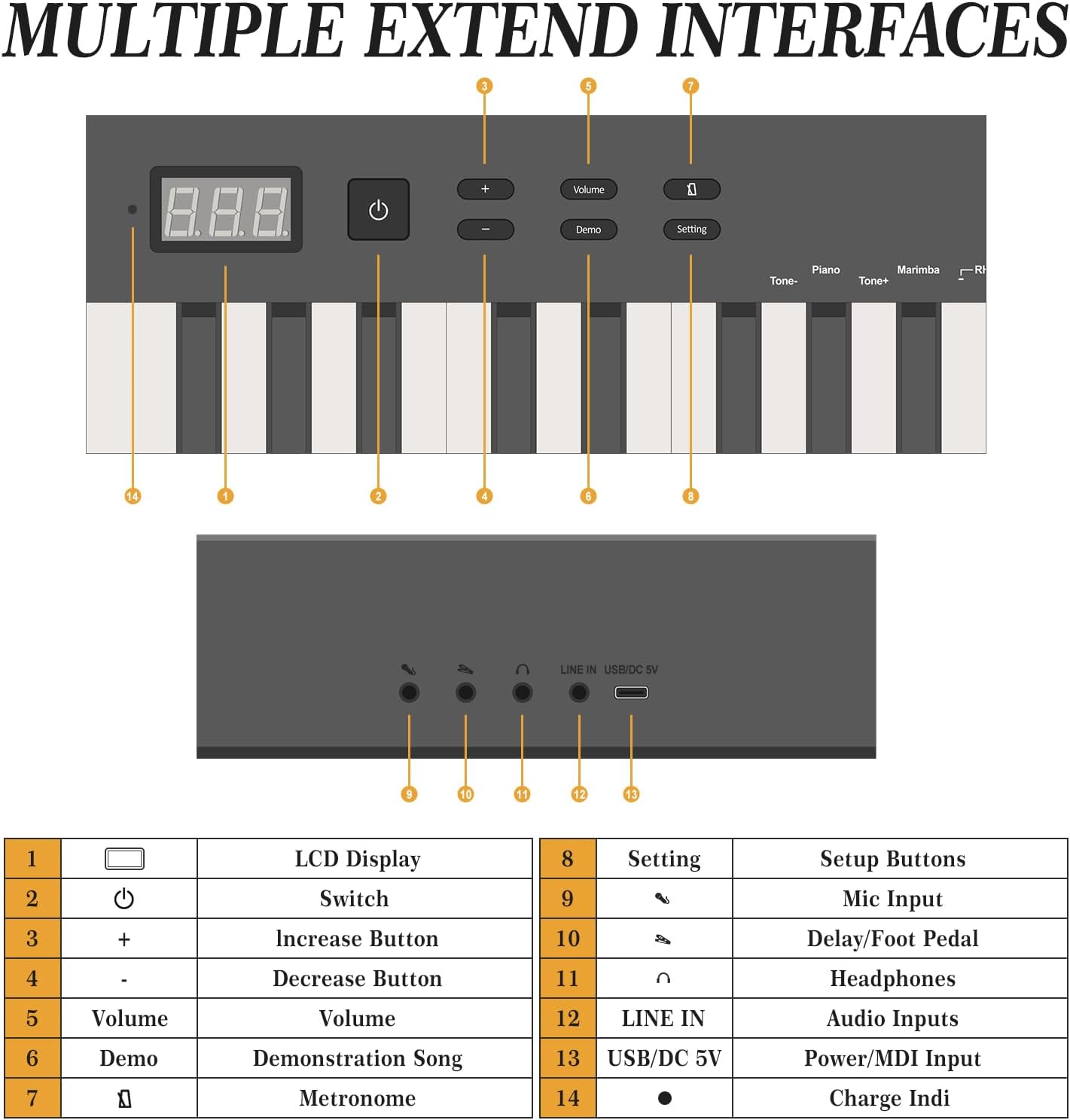
Familiarize yourself with the control panel and various input/output ports:

Imagine: Labeled diagram of the Garvee digital piano's controls and interfaces.
| Nu. | Control/Port | Funcţie |
|---|---|---|
| 1 | Display LCD | Shows current settings, tone, and other information. |
| 2 | Comutator | Buton Pornire/Oprire. |
| 3 | + | Increase button for various settings (e.g., tone, volume). |
| 4 | - | Decrease button for various settings. |
| 5 | Volum | Ajustează volumul general de ieșire. |
| 6 | Demo | Plays demonstration songs. |
| 7 | Setare | Accesses setup buttons and advanced settings. |
| 8 | Intrare microfon | Conectați un microfon extern. |
| 9 | Delay/Foot Pedal | Connect the sustain pedal or other foot controllers. |
| 10 | Căști | Conectați căștile pentru ascultare privată. |
| 11 | LINE IN | Audio input for connecting external audio sources. |
| 12 | USB / DC 5V | Power input (DC 5V) and USB port for MIDI data transfer. |
| 13 | Indicator de încărcare | Indică starea de încărcare. |
Înființat
- Despacheta: Scoateți cu grijă toate componentele din ambalaj. Păstrați ambalajul pentru transport sau depozitare ulterioară.
- Plasare: Place the keyboard on a stable, flat surface. If using the included book clip, attach it to the designated slot.
- Conexiune de alimentare: Connect the provided power adapter to the USB/DC 5V port (12) on the rear of the keyboard and plug it into a standard electrical outlet. The charge indicator (13) will illuminate.
- Pedala de sustinere: Connect the sustain pedal to the Delay/Foot Pedal port (9).
- Căști (opționale): For private practice, connect your headphones to the Headphone port (10).
Instrucțiuni de operare
Pornire/Oprire
- Apăsați tasta Comutator button (2) to turn the keyboard on. The LCD display (1) will light up.
- Apăsați tasta Comutator button (2) again to turn the keyboard off.
Reglarea volumului
- Utilizați Volum butonul (5) și butonul + (3) sau - (4) buttons to adjust the master volume.
Selecting Tones/Voices
- Apăsați tasta Tone+ or Ton- buttons (located near the right side of the keyboard, not explicitly numbered but visible in image 71qoxrO3wuL) to cycle through the available 129 tones. The selected tone will be shown on the LCD display (1).
Redarea melodiilor demo
- Apăsați tasta Demo button (6) to start playing demonstration songs.
- Presa Demo again to stop or cycle through different demo songs.
Folosind metronom
- Apăsați tasta Metronom button (located near the right side of the keyboard, not explicitly numbered but visible in image 71qoxrO3wuL) to activate the metronome.
- Utilizați + (3) și - (4) buttons to adjust the tempo.
- Apăsați tasta Metronom butonul din nou pentru a-l opri.
Înregistrare și redare
- Apăsați tasta Înregistra button (located near the right side of the keyboard, not explicitly numbered but visible in image 71qoxrO3wuL) to begin recording your performance. The record indicator will light up.
- Interpretați piesa dorită.
- Apăsați tasta Înregistra pentru a opri înregistrarea.
- Apăsați tasta Juca button (located near the right side of the keyboard, not explicitly numbered but visible in image 71qoxrO3wuL) to listen to your recorded performance.
Conexiune MIDI Bluetooth
- Ensure your Garvee keyboard is powered on.
- On your external device (smartphone, tablet, computer), enable Bluetooth.
- Open a compatible music application (e.g., Pop Piano, Perfect Piano, Garageband).
- Within the app's settings, locate the MIDI or Bluetooth device connection option.
- Select your Garvee keyboard from the list of available devices to establish a connection.
Întreţinere
- curatenie: Folosiți o lavetă moale și uscată pentru a șterge suprafața tastaturii. Pentru murdăria persistentă, ștergeți ușorampClătiți cârpa cu apă. Evitați utilizarea de produse de curățare abrazive, solvenți sau ceară, deoarece acestea pot deteriora finisajul.
- Curățarea cheilor: Ștergeți ușor tastele cu o lavetă moale și ușor tamponată.amp cloth. Do not allow liquid to seep between the keys.
- Depozitare: When not in use, store the keyboard in a cool, dry place, away from direct sunlight and extreme temperatures. Use the provided carrying bag for protection.
- Îngrijirea adaptorului de alimentare: Always handle the power adapter and cable with care. Do not bend or twist the cable excessively. Unplug the adapter from the wall when not in use for extended periods.
Depanare
Dacă întâmpinați probleme, vă rugăm să consultați următoarele probleme comune și soluții:
- Fără sunet:
- Asigurați-vă că tastatura este pornită.
- Verificați nivelul volumului folosind Volum button (5) and +/- butoane (3, 4).
- If headphones are connected, ensure they are fully plugged in and functioning. Disconnect them to check if sound comes from the internal speakers.
- Verify that the power adapter is correctly connected.
- Tastele nu răspund:
- Reporniți tastatura oprind-o și pornind-o din nou.
- Asigurați-vă că nu sunt blocate obiecte străine între taste.
- Probleme de conexiune Bluetooth:
- Ensure Bluetooth is enabled on both the keyboard and your external device.
- Make sure the keyboard is within range of the external device.
- Try restarting both the keyboard and the external device.
- Check the settings within your music application to ensure the correct MIDI device is selected.
- Power Indicator Not Lighting Up:
- Check if the power adapter is securely plugged into both the keyboard and the wall outlet.
- Asigurați-vă că priza de perete este funcțională.
- Try using a different compatible USB power source if available.
Specificații
| Caracteristică | Caietul de sarcini |
|---|---|
| Numărul de model | 82Q1wcofATAiavIyw_3k9QRvBefz |
| Numărul de chei | 88 |
| Tip cheie | Semi-weighted, Touch-sensitive |
| Polifonie | 128 de note |
| Tonuri | 129 |
| Melodii demo | 30 |
| Conectivitate | Bluetooth MIDI, USB/DC 5V, LINE IN, Headphone Out, Mic Input, Foot Pedal |
| Alimentare electrică | DC 5V (USB-powered) |
| Dimensiunile produsului | 128 cm adâncime x 12.7 cm lățime x 26.5 cm înălțime |
| Greutatea articolului | 15.43 de lire sterline (7 kg) |
| Caracteristici speciale | Foldable design, Dual Speakers |
Garanție și suport
For warranty information or technical support, please refer to the documentation provided with your purchase or contact Garvee customer service through their official website or the retailer where the product was purchased. Please have your model number (82Q1wcofATAiavIyw_3k9QRvBefz) and proof of purchase ready when contacting support.


