1. Introducere
This manual provides essential information for the safe and efficient use of your Fossibot F107 Pro 5G Rugged Smartphone. Please read it thoroughly before operating your device.
Ce este în cutie
- Fossibot F107 Pro 5G Smartphone
- Cablu USB de tip C
- Adaptor de alimentare (66W)
- Instrumentul Ejector SIM
- Manual de utilizare
- Card de garanție
2. Caracteristicile produsului
The Fossibot F107 Pro is engineered for durability and high performance, offering a range of advanced features:
- Massive 28000mAh Battery with 66W Fast Charge: Experience extended usage with a large battery and rapid charging capabilities. The OTG function allows charging of other devices.
- Sistem avansat de camere: Features a 200MP AI main camera for detailed photos, a 2MP Night Vision Camera for clear low-light imaging, and a 50MP front camera for high-quality selfies. Supports 4K video recording and various modes including underwater, HDR, and 360° panorama.
- Robust Performance and Storage: Equipped with 12GB RAM (expandable up to 18GB virtual RAM for a total of 30GB) and 512GB internal storage, utilizing DDR5 technology for faster performance and lower power consumption.
- Immersive 6.95" FHD+ Display: A 2.4K display with 2400x1080 resolution and a 120Hz Smart Dynamic Refresh Rate provides smooth visuals and responsive interaction.
- Conectivitate la rețeaua 5G: Supports 5G networks (T-Mobile compatible; Verizon and AT&T are not supported). Please verify local frequency band compatibility before purchase.
- Design robust: Built to MIL-STD-810H standards, with IP68 and IP69K ratings for water, dust, and drop resistance.
- Lanternă integrată: A powerful flashlight with a 50-meter beam distance for outdoor activities and emergencies.
- Securitate și confort: Includes NFC for contactless payments, Face ID, and Fingerprint unlock for secure and quick access.

Imagine: Pesteview of Fossibot F107 Pro's main features, highlighting its large battery, memory, camera, and rugged certifications.
3. Dispozitiv Dispozitiv
Familiarize yourself with the physical components of your Fossibot F107 Pro.

Imagine: Față și spate view of the Fossibot F107 Pro, showcasindesignul său robust și modulul camerei.

Imagine: Side profile of the Fossibot F107 Pro, indicating the location of the power button, volume rocker, and SIM/TF card slot.
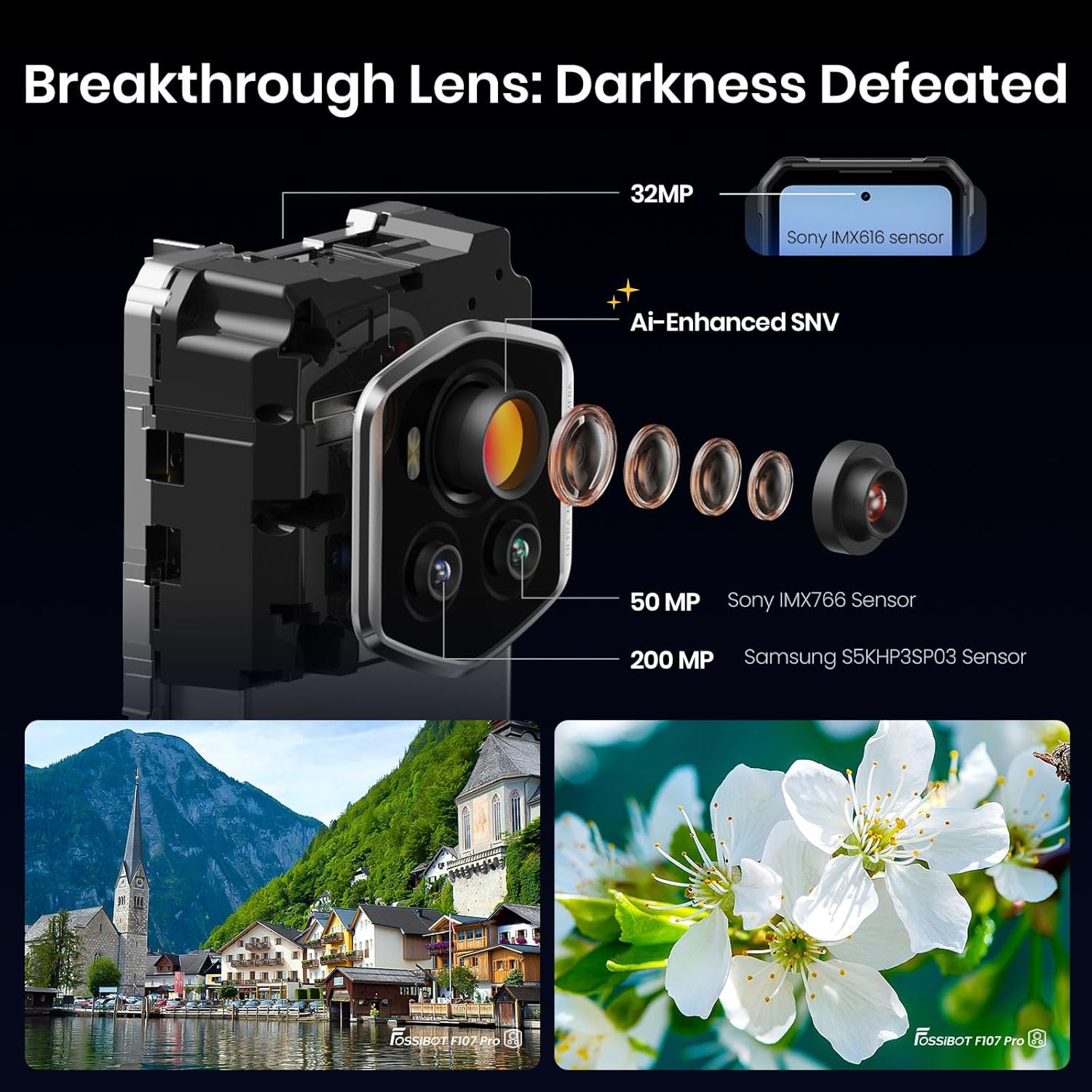
Imagine: Detaliată view of the Fossibot F107 Pro's multi-lens camera system, including the 200MP main sensor and night vision lens.
4. Configurare
4.1 Instalarea cartelei SIM și a cardului TF
- Localizați suportul pentru cartela SIM/TF pe lateralul dispozitivului.
- Introduceți instrumentul de ejectare a cartelei SIM în orificiul mic de lângă tavă și împingeți ușor până când tava iese afară.
- Place your Nano-SIM card(s) and/or TF card (microSD) into the designated slots on the tray. Ensure the gold contacts face downwards.
- Reintroduceți cu grijă tava în telefon până când se fixează în poziție cu un clic.
4.2 Încărcare inițială
Before first use, fully charge your device. Use the provided 66W power adapter and USB Type-C cable for optimal charging speed.
- Conectați cablul USB Type-C la portul de încărcare din partea inferioară a telefonului.
- Conectați celălalt capăt al cablului la adaptorul de alimentare.
- Conectați adaptorul de alimentare la o priză de perete.
- Indicatorul de încărcare va apărea pe ecran.
4.3 Pornire/Oprire
- Pentru a porni: Press and hold the Power button (located on the side) until the Fossibot logo appears.
- Pentru a opri: Apăsați și mențineți apăsat butonul de Pornire/Oprire, apoi selectați „Oprire” din opțiunile de pe ecran.
- Pentru a reporni: Apăsați și mențineți apăsat butonul de pornire/oprire, apoi selectați „Repornire” din opțiunile de pe ecran.
4.4 Configurare inițială
Upon first power-on, follow the on-screen prompts to configure your device, including language, Wi-Fi connection, Google account, and security settings.
5. Instrucțiuni de utilizare
5.1 Navigație de bază (Android 15)
Your Fossibot F107 Pro runs on Android 15. Navigate using gestures or the traditional three-button navigation bar (configurable in Settings).
- Ecranul principal: Glisați la stânga/dreapta pentru a accesa paginile aplicației.
- Sertarul de aplicații: Glisați în sus din partea de jos a ecranului la view toate aplicațiile instalate.
- Notificări și setări rapide: Glisează în jos din partea de sus a ecranului pentru a accesa notificările și setările rapide.
5.2 Utilizarea camerei
The Fossibot F107 Pro features a versatile camera system.
- Deschideți aplicația Cameră.
- Select your desired mode (Photo, Video, Night Vision, Portrait, etc.).
- Atingeți butonul declanșator pentru a face o fotografie sau a porni/opri înregistrarea video.

Imagine: Explodată view of the camera module, showing the 200MP Samsung S5KHP3SP03 sensor, 50MP Sony IMX766 sensor, and 32MP Sony IMX616 sensor.

Image: Demonstrates the difference between Starlight Night Vision (full-color) and traditional Infrared Night Vision (black and white).
5.3 Funcționarea lanternei
The powerful integrated flashlight can be accessed via Quick Settings or a dedicated button (if configured).

Image: The Fossibot F107 Pro's flashlight illuminating a path, highlighting its 50-meter beam distance.
5.4 Funcționalitate OTG
The On-The-Go (OTG) feature allows your phone to act as a power bank to charge other devices or connect USB accessories.
- Connect an OTG adapter (not included) to your phone's USB-C port.
- Connect the device you wish to charge or the USB accessory to the OTG adapter.
- Ensure OTG is enabled in your phone's settings if it doesn't activate automatically.
5.5 Security Features (Face ID, Fingerprint)
Set up Face ID or Fingerprint unlock for convenient and secure access to your device.
- Du-te la Settings > Security & privacy > Device unlock.
- Follow the on-screen instructions to register your face or fingerprint.
5.6 Setări de afișare
Customize your display experience, including the 120Hz refresh rate.

Image: Visual representation of the Fossibot F107 Pro's display specifications, including resolution, refresh rate, and brightness.
6. Întreținere
To ensure the longevity and optimal performance of your Fossibot F107 Pro, follow these maintenance guidelines:
- Rezistenta la apa si praf: The device is IP68/IP69K rated. Ensure all port covers are securely closed before exposing the phone to water or dust. Do not intentionally submerge the phone in corrosive liquids or extreme temperatures.
- curatenie: Folosiți un moale, damp o lavetă pentru curățarea suprafeței telefonului. Evitați substanțele chimice dure sau materialele abrazive.
- Îngrijirea bateriei: Avoid extreme temperatures. Do not fully discharge the battery regularly. Use the original charger for optimal battery health.
- Protecția ecranului: While the screen is durable, consider using a screen protector for added scratch resistance.
- Temperatură: Folosiți dispozitivul în intervalele de temperatură recomandate (de obicei între 0°C și 35°C).
7. Depanare
If you encounter issues with your Fossibot F107 Pro, refer to the following common solutions:
7.1 Telefonul nu pornește
- Asigurați-vă că bateria este încărcată. Conectați telefonul la încărcător timp de cel puțin 30 de minute.
- Apăsați și țineți apăsat butonul de pornire timp de 10-15 secunde pentru a forța o repornire.
7.2 Probleme de încărcare
- Verificați dacă cablul de încărcare și adaptorul sunt conectate corect și nu sunt deteriorate.
- Try using a different compatible charger and cable.
- Clean the charging port gently with a dry, soft brush to remove any debris.
7.3 Probleme de conectivitate la rețea
- Verificați dacă este introdusă corect cartela SIM.
- Ensure mobile data is enabled in Settings.
- Reporniți telefonul.
- Verify that your carrier (T-Mobile) has coverage in your area. Remember, Verizon and AT&T are not supported.
7.4 Camera nu funcționează
- Restart the Camera app or the phone.
- Check app permissions for the Camera app in Settings.
- Asigurați-vă că nu există obstrucții fizice pe lentilele camerei.
7.5 Performanță lentă
- Închideți aplicațiile de fundal inutile.
- Ștergeți datele din memoria cache pentru aplicațiile utilizate frecvent.
- Asigurați-vă că este disponibil suficient spațiu de depozitare.
- Luați în considerare o resetare la setările din fabrică ca ultimă soluție (faceți mai întâi o copie de rezervă a datelor).
8. Specificații
| Caracteristică | Caietul de sarcini |
|---|---|
| Marca | FOSSIBOT |
| Numele modelului | fossibot f107 pro |
| Sistem de operare | Android 15 |
| Dimensiunea ecranului | 6.95 inchi |
| Rezoluţie | 2400 x 1080 |
| Rata de reîmprospătare | 120 Hz |
| Dimensiunea memoriei RAM instalate | 12 GB (expandable to 30GB virtual RAM) |
| Capacitate de stocare a memoriei | 512 GB |
| Capacitatea bateriei | 28000 Miliamp Ore |
| Tehnologii de conectivitate | 5G, NFC, OTG, GPS |
| Asistență pentru operatorii de telefonie mobilă | T-Mobile (Verizon and AT&T not supported) |
| Duritate | MIL-STANDARD-810H, IP68, IP69K |
| Greutatea articolului | 3.04 lire sterline |
| Dimensiuni pachet | 9.25 x 8.19 x 2.4 inci |
| Data primului disponibil | 17 septembrie 2025 |
9. Garanție și asistență
Your Fossibot F107 Pro comes with a standard manufacturer's warranty. For detailed warranty information, please refer to the warranty card included in your product packaging or visit the official FOSSIBOT website-ul.
For technical support, troubleshooting assistance, or service inquiries, please contact FOSSIBOT customer support through their official channels. Keep your purchase receipt and product serial number handy when contacting support.
10. Videoclipul produsului de mai susview
Video: Un pesteview of the Fossibot F107 Pro, showcasing its features, ruggedness, and battery life in various usage scenarios.


