1. Produs terminatview
The Baseus BS1 NC Semi-in-Ear Noise Cancelling Earbuds offer a blend of comfort and advanced audio technology. Featuring Adaptive Hybrid Active Noise Cancellation (ANC), Hi-Res Audio with LDAC support, and a lightweight design, these earbuds are engineered for extended listening and clear communication. They are also equipped with a 6-microphone AI system for clear calls and IP55 water and dust resistance.

Image: Baseus BS1 NC Semi-in-Ear Noise Cancelling Earbuds and their charging case in black.
2. Conținutul pachetului
Asigurați-vă că toate articolele sunt prezente în colet:
- Baseus Bass BS1 NC Semi-in-Ear Earbuds (Left and Right)
- Carcasă de încărcare
- Cablu de încărcare USB-C
- Ghid de pornire rapidă

Image: The complete retail package for the Baseus BS1 NC Earbuds, showing the earbuds, charging case, USB-C cable, and quick start guide.
3. Încărcarea căștilor și a carcasei
For optimal performance, fully charge the earbuds and charging case before first use.
3.1 Încărcarea căștilor
- Așezați căștile în carcasa de încărcare. Asigurați-vă că sunt așezate corect în sloturile corespunzătoare (L pentru stânga, R pentru dreapta).
- Close the charging case. The earbuds will begin charging automatically.
3.2 Încărcarea carcasei
- Conectați cablul de încărcare USB-C furnizat la portul de încărcare de pe carcasă.
- Conectați celălalt capăt al cablului la un adaptor de alimentare USB (nu este inclus) sau la portul USB al unui computer.
- The LED indicator on the case will show the charging status:
- Verde: 75% - 100% încărcat
- Galben: 25% - 75% încărcat
- Roşu: Below 25% charged
- A full charge for the case provides up to 40 hours of total playtime for the earbuds (with ANC off). A 10-minute charge can provide up to 2 hours of playback.

Image: The Baseus BS1 NC Earbuds resting in their open charging case, highlighting the 40-hour total playtime and rapid charging capabilities.
4. Împerechere și conectivitate
4.1 Împerecherea inițială
- Deschideți carcasa de încărcare. Căștile vor intra automat în modul de asociere.
- Pe dispozitivul dvs. (smartphone, tabletă, computer), activați Bluetooth.
- Caută "Baseus Bass BS1 NC" in the list of available Bluetooth devices.
- Select "Baseus Bass BS1 NC" to connect. A voice prompt will confirm successful pairing.
4.2 Reconectare automată
Once paired, the earbuds will automatically reconnect to the last connected device when removed from the charging case and within Bluetooth range.
4.3 Conexiune multipunct
The Baseus BS1 NC supports Baseus Smart-Connect (BSC) technology, allowing simultaneous connection to two devices. This enables seamless switching between audio sources without manual re-pairing.
To use multipoint connection:
- Asociați căștile cu primul dispozitiv.
- Deconectați căștile din setările Bluetooth ale primului dispozitiv (nu le anulați).
- Asociați căștile cu al doilea dispozitiv.
- Reconnect the earbuds to the first device from its Bluetooth settings. The earbuds should now be connected to both devices.
Sunetul va comuta automat la dispozitivul care redă conținut sau primește un apel.
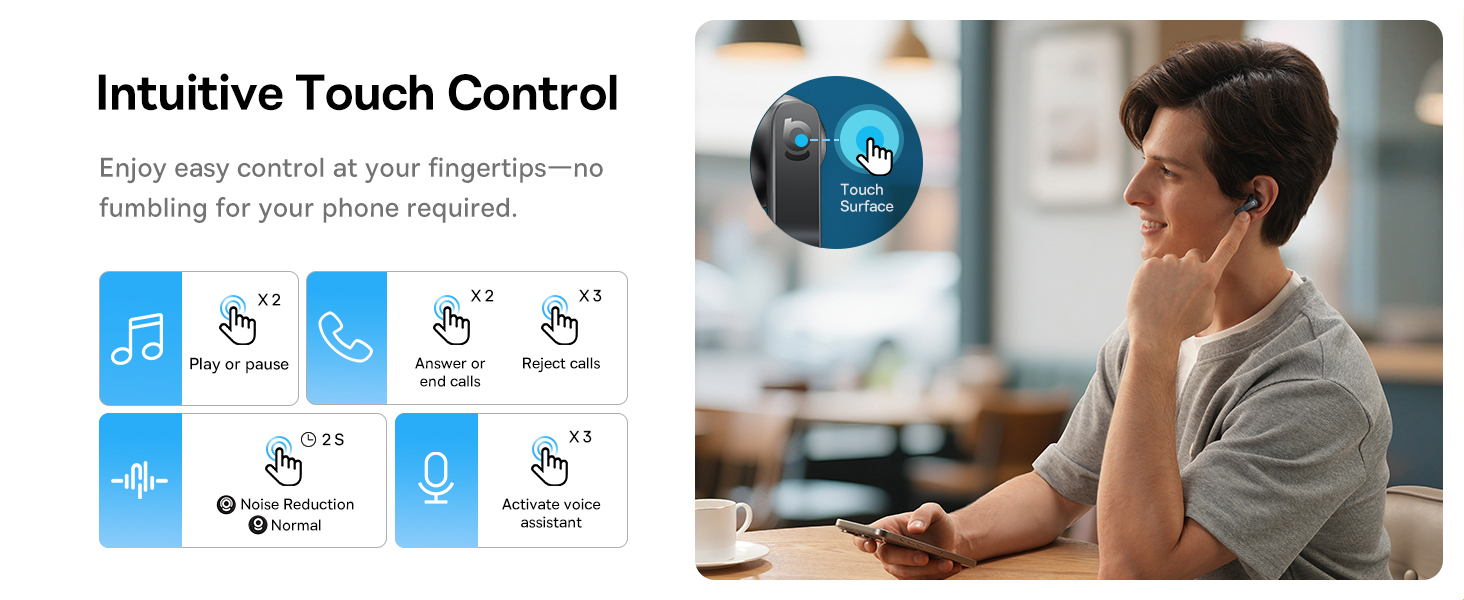
Image: A visual representation of the Baseus BS1 NC Earbuds connected to both a laptop and a smartphone, showcasing the instant multipoint connection feature.
5. Purtarea căștilor
The Baseus BS1 NC earbuds feature a semi-in-ear design for comfortable, pressure-free wear. For optimal sound quality and noise cancellation, ensure a proper fit.
- Identificați căștile din stânga (L) și din dreapta (R).
- Introduceți ușor fiecare cască în canalul auditiv.
- Adjust the earbud until it feels secure and comfortable. The stem should point slightly forward or downward.

Image: A person wearing the Baseus BS1 NC Earbuds, illustrating their ergonomic and lightweight design for all-day comfort.
6. Instrucțiuni de utilizare
6.1 Comenzi tactile
The earbuds feature intuitive touch controls on their stems. The following are default functions, which may be customizable via the Baseus app:
| Acţiune | Funcţie |
|---|---|
| Double-tap (Left or Right Earbud) | Redare / Pauză muzică, Răspuns / Terminare apel |
| Triple-tap (Left or Right Earbud) | Reject call, Activate voice assistant |
| Țineți apăsat (2 de secunde) | Switch Noise Control Mode (ANC/Normal/Transparency) |

Image: An illustration detailing the intuitive touch controls on the Baseus BS1 NC Earbuds for various functions like play/pause, call management, noise reduction, and voice assistant activation.
6.2 Moduri de control al zgomotului
The Baseus BS1 NC earbuds offer three noise control modes:
- Adaptive Hybrid ANC (Active Noise Cancellation): Reduces ambient noise for an immersive listening experience. Ideal for noisy environments.
- Modul de transparență: Allows you to hear your surroundings while still enjoying your audio. Useful for awareness in urban settings or conversations.
- Modul normal: Standard audio playback without active noise cancellation or transparency features.
Switch between modes by pressing and holding the touch area on either earbud for 2 seconds.

Image: A cutaway diagram of a Baseus BS1 NC earbud in an ear, illustrating the semi-in-ear fit and the availability of Adaptive Noise Cancelling and Transparency Mode.
6.3 Hi-Res Audio with LDAC
These earbuds support LDAC technology, enabling high-resolution audio transmission for a detailed and rich sound experience. Ensure your device supports LDAC and activate it in your device's Bluetooth settings for the best audio quality.

Image: The Baseus BS1 NC Earbuds surrounded by sound waves, emphasizing features like Hi-Res Audio, SuperBass 2.0, and 13mm dynamic drivers for powerful sound.
6.4 6-Mic AI Clear Calls
The earbuds are equipped with 6 microphones and AI noise isolation technology to ensure your voice is clear during calls, even in noisy environments. Wind noise reduction further enhances call clarity outdoors.
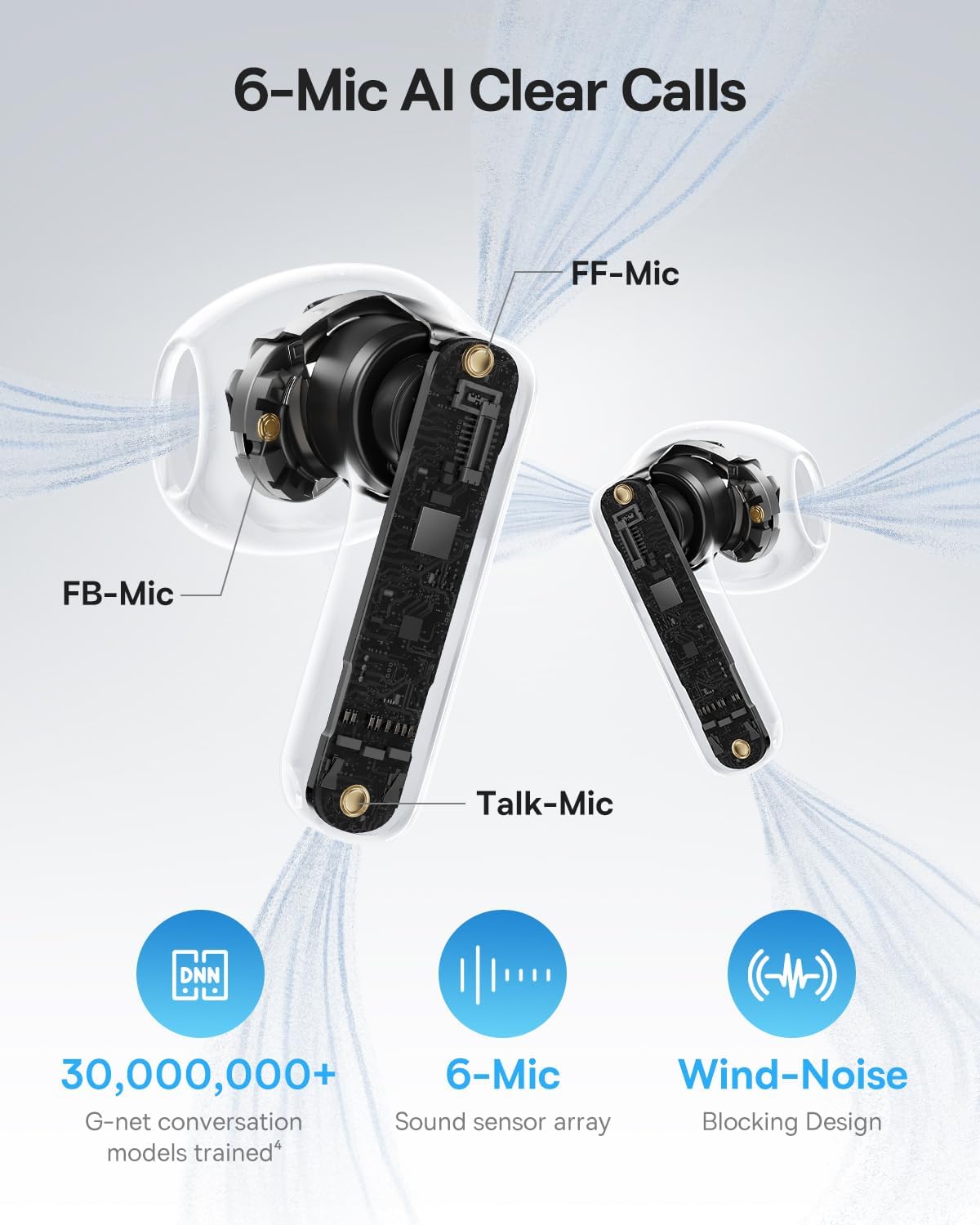
Image: A detailed diagram of the Baseus BS1 NC earbud, highlighting the placement of the FF-Mic, FB-Mic, and Talk-Mic, which contribute to the 6-Mic AI Clear Call technology and wind-noise blocking design.
6.5 Control inteligent al aplicației
Download the dedicated Baseus app for enhanced control and customization options. The app allows you to:
- Reglați nivelurile de amplificare a basului.
- Select from various EQ Modes.
- Controlează setările Acustică spațială.
- Folosește funcția „Găsește-ți căștile”.
Note: In guest mode, no account creation or permissions are required to customize features, but GPS access is needed to locate lost earbuds.

Image: A smartphone displaying the Baseus app interface, which offers various sound control options including Bass Boost, EQ Modes, Spatial Acoustics, and a "Find Your Earbuds" function.
7. Întreținere și îngrijire
7.1 Curățare
- Curățați regulat căștile și carcasa de încărcare cu o lavetă moale, uscată și fără scame.
- Nu utilizați substanțe chimice dure, solvenți de curățare sau detergenți puternici.
- Gently remove any earwax or debris from the earbud mesh and charging contacts using a small, soft brush or cotton swab.
7.2 Rezistență la apă și praf (IP55)
The earbuds are rated IP55, meaning they are protected against limited dust ingress and low-pressure water jets from any direction. This makes them suitable for workouts and light rain exposure.
- Nu scufundați căștile în apă.
- Asigurați-vă căștile sunt uscate înainte de a le pune înapoi în carcasa de încărcare pentru a preveni deteriorarea contactelor de încărcare.
- Carcasa de încărcare nu este rezistentă la apă.

Image: The Baseus BS1 NC Earbuds shown with water droplets, signifying their IP55 rating for dust and water resistance.
7.3 Depozitare
Păstrați căștile în carcasa lor de încărcare atunci când nu sunt utilizate pentru a le proteja și a le menține încărcate.
8. Depanare
If you encounter issues with your Baseus BS1 NC earbuds, refer to the following common solutions:
- Fără probleme de sunet/conexiune:
- Asigurați-vă că sunt încărcate căștile.
- Verify Bluetooth is enabled on your device and "Baseus Bass BS1 NC" is selected.
- Try placing earbuds back in the case, closing it, and then reopening to reset the connection.
- Uitați dispozitivul din setările Bluetooth și reîmperecheați.
- O cască nu funcționează:
- Asigurați-vă că ambele căști sunt încărcate.
- Place both earbuds back in the case, close, and reopen.
- Curățați contactele de încărcare de pe ambele căști și din interiorul carcasei.
- Calitate slabă a sunetului:
- Asigurați-vă că căștile sunt așezate corect în urechi.
- Clean the earbud mesh to remove any obstructions.
- Check your device's audio settings and ensure LDAC is enabled if supported.
- ANC nu este eficient:
- Ensure ANC mode is activated via touch control or the Baseus app.
- Adjust the earbuds for a better seal in your ears.
9. Specificații
| Caracteristică | Detaliu |
|---|---|
| Numele modelului | Baseus Bass BS1 NC |
| Controlul zgomotului | Anulare adaptivă a zgomotului, Anulare a zgomotului ambiental, Anulare hibridă a zgomotului |
| Tehnologia de conectivitate | Bluetooth 6.0, Fără fir |
| Tehnologia comunicațiilor fără fir | Bluetooth 6.0 |
| Gama Bluetooth | 10 metri |
| Tip de driver audio | Driver dinamic |
| Dimensiunea driverului audio | 13 milimetri |
| Raspuns in frecventa | 40 KHz |
| Latență audio | 60 de milisecunde |
| Durata de viață a bateriei (căști) | 7 ore (ANC oprit) |
| Timp total de redare (cu carcasă) | 40 ore (ANC oprit) |
| Charging Time (Rapid Charge) | 10 minute pentru 2 ore de redare |
| Nivel de rezistență la apă | IP55 (doar căști) |
| Tip control | Touch Control |
| Material | Acrilonitril butadien stiren (ABS), Policarbonat (PC) |
| Greutate articol (căști) | 4 g per cască |
| Product Dimensions (Earbuds) | 1.2 x 0.7 x 0.7 inci |
| Dispozitive compatibile | Devices with Bluetooth Audio Capability, including iOS, Android, Windows, Mac OS and Switch. |
10. Videoclip oficial al produsului
Watch the official product video for a visual guide on the Baseus BS1 NC Earbuds:
Video: An official product video from Baseus showcasing the features and usage of the Baseus BS1 NC Semi-in-Ear True Wireless Earbuds.
11. Garanție și asistență
For warranty information, technical support, FAQs, and further assistance, please visit the official Baseus support center.
Refer to the Quick Start Guide included in your package for a direct link or visit the Baseus website-ul.
Note: Protection plans may be available for purchase separately.


