1. Introducere
This manual provides comprehensive instructions for the installation, operation, and maintenance of your EmpireTech Panoramic & PTZ Wired IP POE Camera (Model: PTZ3E10X-T180). This advanced surveillance camera features an 8MP+4MP dual-lens system, 10x optical zoom, Starlight technology, Smart Dual Light, 180° wide-angle panoramic view, and Intelligent Video System (IVS) capabilities.
Caracteristici cheie:
- Panoramic View: Outputs a 180° wide-angle splicing image for comprehensive coverage.
- High-Resolution Detail: Features a 1/2.8" 4 Megapixel STARVIS CMOS sensor.
- Zoom optic: Equipped with 10x optical zoom for detailed distant viewing.
- Tehnologia Starlight: Provides superior low-light performance for clear images in challenging conditions.
- Rată de cadre ridicată: Achieves a maximum of 25/30 frames per second at 8 Megapixels.
- Lumină dublă inteligentă: Intelligent lighting system for enhanced night vision.
- Sistem video inteligent (IVS): Supports advanced analytics like Tripwire and Intrusion detection.
- Discuție în două sensuri: Built-in microphone and speaker for audio communication.
- Alimentare prin Ethernet (PoE): Simplifies installation by providing power and data over a single cable.
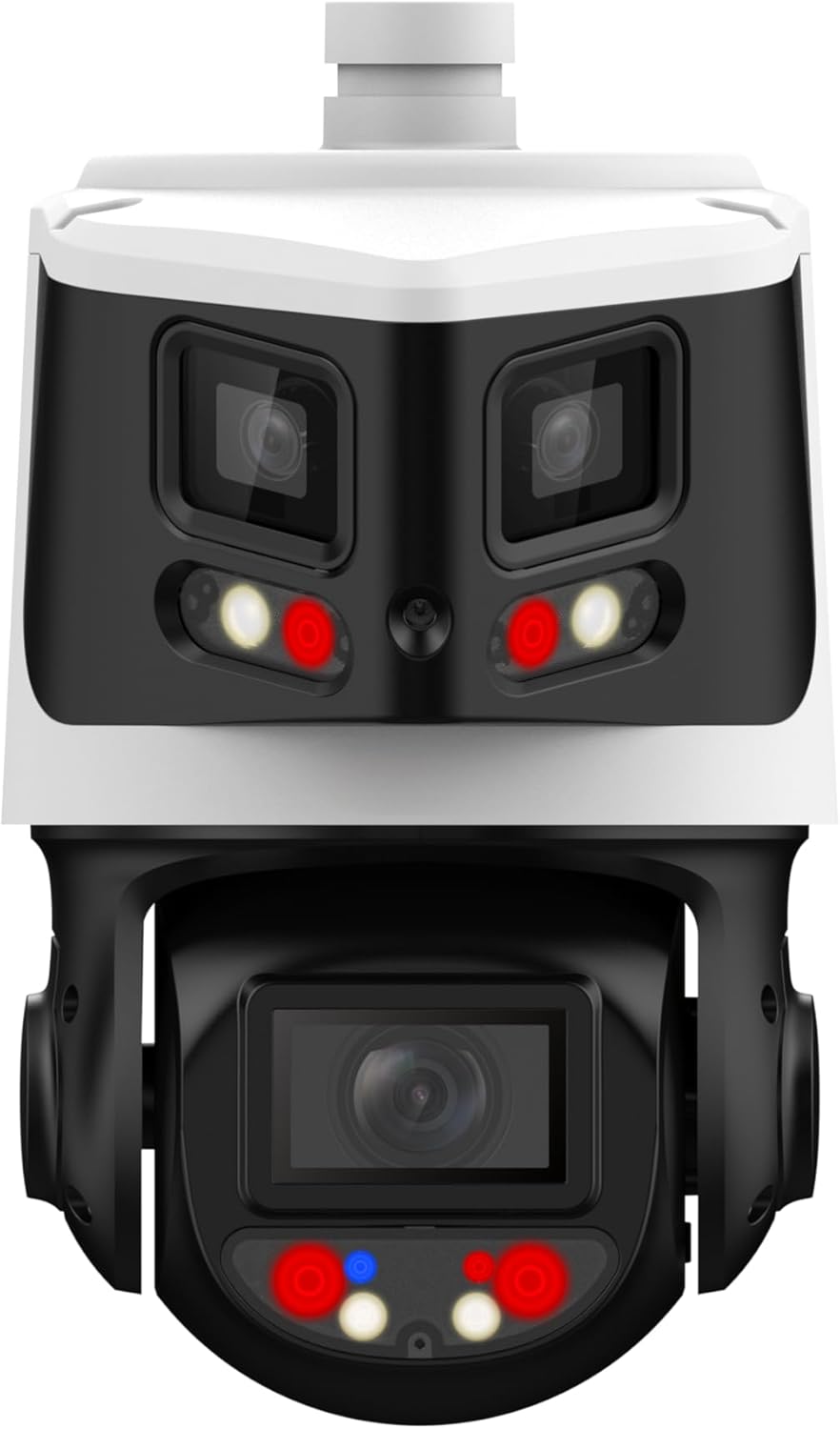
Figure 1: EmpireTech Panoramic & PTZ Wired IP POE Camera (Model: PTZ3E10X-T180)
2. Configurare și instalare
2.1 Despachetare și componente
Upon unboxing, ensure all components are present. The package typically includes the camera unit, a mounting plate, screws, and a waterproof connector for the Ethernet cable. The camera is designed for Power over Ethernet (PoE), simplifying wiring by delivering both power and data through a single Ethernet cable.

Figura 2: lateral view of the camera showing connection points.
2.2 Instalare fizică
- Locație de montare: Choose a suitable outdoor location that provides the desired 180° panoramic view și se află în raza de acțiune a rețelei dumneavoastră PoE.
- Montare sigură: Use the provided mounting plate and screws to securely attach the camera to a wall or ceiling. Ensure the mounting surface is strong enough to support the camera's weight.
- Conexiune prin cablu: Connect a standard Ethernet cable from your PoE switch/NVR to the camera's Ethernet port. Use the waterproof connector to protect the connection from environmental elements.
2.3 Initial Configuration (EPTZ Function)
To fully utilize the camera's EPTZ (Electronic Pan Tilt Zoom) and IVS features, initial configuration via the camera's web interface is required. The following video demonstrates how to set up the EPTZ function, which involves configuring IVS rules.
Video 1: Guide on setting up the EPTZ function for EmpireTech IPC-Color4K-T180/B180 cameras. This video covers configuring IVS rules and enabling EPTZ linkage for enhanced tracking.
- Acces Web Interfata: Log into the camera's web interfață folosind adresa sa IP.
- Smart Plan Setup: Navigate to the AI function and set up a "Smart Plan," typically a "General Mode" for 24/7 operation.
- IVS Rule Configuration: Enable IVS and add rules such as "Tripwire" and "Intrusion." Adjust sensitivity and define the detection areas (tripwires or intrusion zones) on the live view.
- EPTZ Linkage: Go to the PTZ module. Enable "Linkage Track" and select your preferred display mode (e.g., single view with region of interest or multi-view). Adjust the tracking duration as needed.
3. Instrucțiuni de utilizare
3.1 Panoramic and PTZ Control
The camera provides a 180° panoramic view, allowing you to monitor a wide area. The PTZ (Pan-Tilt-Zoom) functionality enables you to remotely adjust the camera's viewing angle and zoom level. The EPTZ feature, once configured, allows for digital zooming on subjects within the panoramic view without physical camera movement, providing detailed close-ups of detected events.
3.2 Sistem video inteligent (IVS)
The IVS features enhance surveillance by providing intelligent detection capabilities:
- Tripwire: Triggers an alarm when an object crosses a predefined virtual line.
- Intruziune: Triggers an alarm when an object enters or exits a predefined virtual area.
- Detectare facială: Identifies human faces within the camera's field of view.
These rules can be configured to detect humans and/or motor vehicles, providing tailored alerts.
3.3 Smart Dual Light and Starlight Technology
The camera integrates Starlight technology for exceptional low-light performance, delivering full-color images even in near-dark conditions. The Smart Dual Light system intelligently activates warm lights to provide full-time color imaging when ambient light is insufficient, ensuring clear visibility day and night.
Video 2: Demonstration of the IPC-Color4K-T camera's night video capabilities, showcasing its performance in low-light conditions.
Videoclip 3: Example footage of night sky aurora captured with the IPC-Color4K-T camera, highlighting its Starlight technology.
3.4 Conversație bidirecțională
Utilize the built-in microphone and speaker for two-way audio communication. This feature is useful for deterring intruders or communicating with visitors.
4. Întreținere
- Curățare regulată: Curățați periodic obiectivul și carcasa camerei cu o lavetă moale șiamp o lavetă pentru a asigura o claritate optimă a imaginii. Evitați substanțele de curățare abrazive.
- Actualizări firmware: Verifică-l pe cel al producătorului website regularly for firmware updates. Keeping your camera's firmware up-to-date ensures optimal performance, security, and access to new features.
- Verificarea cablului: Inspect all cables and connections for any signs of wear, damage, or corrosion, especially in outdoor environments.
5. Depanare
- Fără alimentare/Fără imagine:
- Verify the PoE connection to your switch/NVR.
- Ensure your PoE switch/NVR provides sufficient power (e.g., 25W+ for PTZ cameras).
- Verificați dacă există deteriorări la cablul Ethernet.
- Calitate slabă a imaginii:
- Curățați obiectivul camerei.
- Check network bandwidth and connection stability.
- Adjust image settings (brightness, contrast, etc.) in the web interfata.
- IVS/EPTZ Not Working:
- Ensure IVS and EPTZ linkage are enabled and correctly configured in the web interfață (consultați Secțiunea 2.3).
- Verify that detection zones are properly drawn and sensitivity is adjusted.
6. Specificații
| Caracteristică | Valoare |
|---|---|
| Nume de marcă | EmpireTech |
| Greutatea articolului | 4.78 lire sterline |
| Dimensiunile produsului | 7.15 x 9.4 x 5.52 inci |
| Numărul modelului articolului | PTZ3E10X-T180 |
| Caracteristici speciale | Panoramic & PTZ Camera, Smart Dual Light |
| Tehnologia senzorului foto | CMOS |
| Rezoluție captură video | 4K |
| Tehnologia de conectivitate | Cablat |
| Zoom optic | 10 x |
| Tip camera video | Cameră video |
| Numele modelului | IP PTZ POE Camera |
7. Informații despre garanție
This EmpireTech product is covered by a manufacturer's warranty. Please refer to the product packaging or the official EmpireTech website for specific warranty terms and conditions. Keep your proof of purchase for warranty claims.
8. Asistență pentru clienți
For technical assistance, troubleshooting, or any inquiries regarding your EmpireTech camera, please contact EmpireTech customer support. Contact information can typically be found on the product packaging or the official EmpireTech website-ul.


