1. Produs terminatview
The Bewinner MP3 Music Player with Camera is a portable multimedia device designed for music playback, photo and video recording, and other entertainment functions. It features a responsive touchscreen, Bluetooth connectivity, and expandable storage.

Imaginea 1.1: Față view of the Bewinner MP3 Player displaying time and date, alongside its USB-C charging cable.
Caracteristici cheie:
- 2.01-inch IPS HD Touchscreen Display
- Built-in 720P Digital Camera with 90-degree rotating lens
- Conectivitate Bluetooth 5.4
- Expandable Storage up to 128GB (via memory card)
- Support for multiple audio formats (MP3, WMA, WAV, APE, FLAC, AAC LC, M4A, OGG)
- Integrated Speaker and Voice Recorder
- Additional functions: FM Radio, E-book reader, Photo viewer, Alarms, Stopwatch
2. Ghid de instalare
2.1 Încărcarea dispozitivului
- Connect the provided USB-C cable to the charging port on the MP3 player.
- Conectați celălalt capăt al cablului USB-C la un adaptor de alimentare USB compatibil (nu este inclus) sau la portul USB al unui computer.
- The device will indicate charging status on the screen. A full charge typically takes approximately 2 hours.
2.2 Instalarea unui card de memorie
The device supports memory card expansion up to 128GB. A memory card is required for storing a large number of songs, photos, and videos.
- Locate the memory card slot on the side of the MP3 player.
- Gently insert the memory card into the slot until it clicks into place. Ensure the card is oriented correctly.
- Pentru a scoate cardul, împingeți ușor spre interior până când acesta iese.
2.3 Pornire/Oprire
- Pentru a porni: Apăsați și mențineți apăsat butonul de pornire/oprire până când ecranul se aprinde.
- Pentru a opri: Press and hold the Power button until the power-off prompt appears, then confirm on the touchscreen.
3. Instrucțiuni de utilizare
3.1 Navigarea prin interfață
The MP3 player features a 2.01-inch touchscreen for navigation. Swipe left/right or tap icons to access different functions.
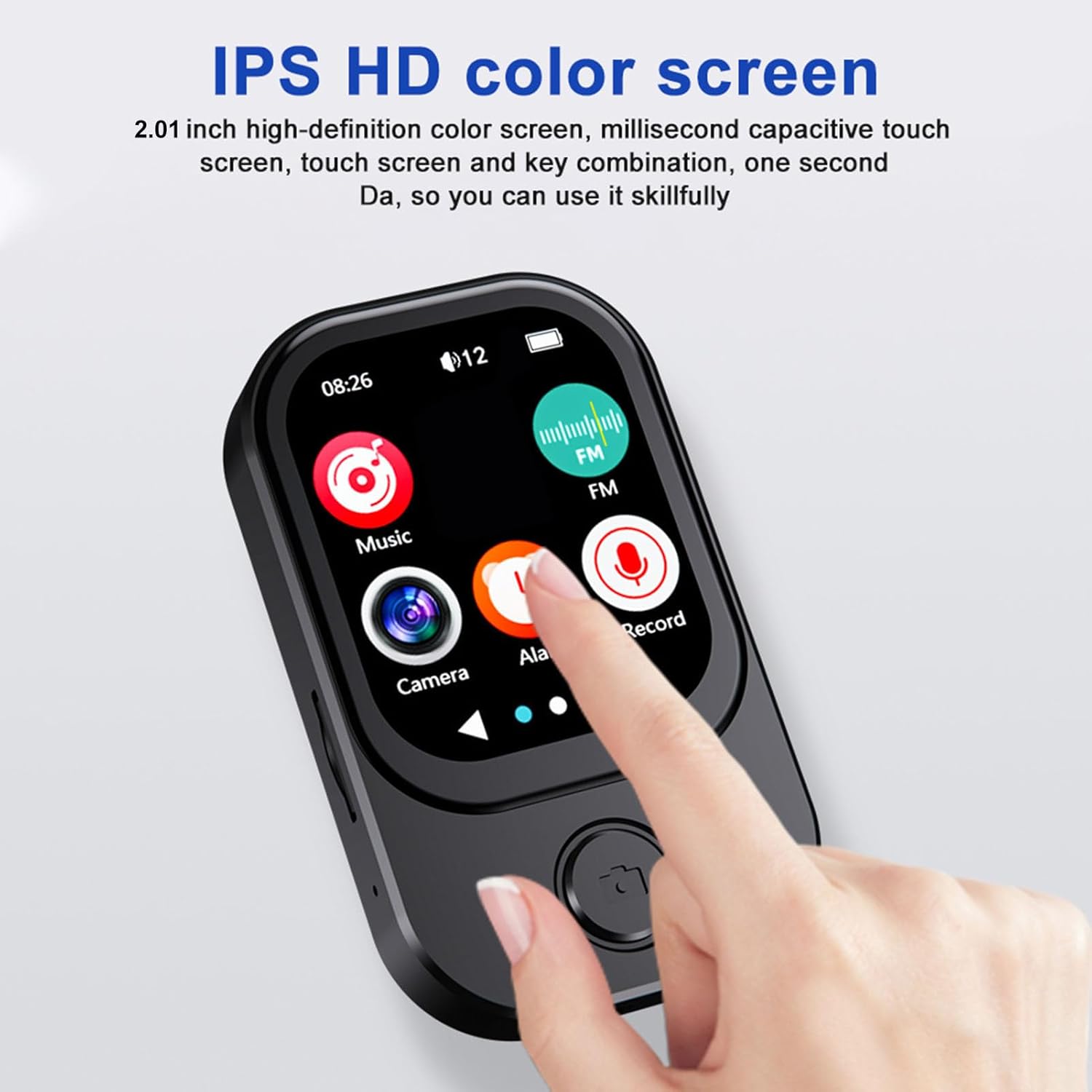
Image 3.1: A finger interacting with the responsive touchscreen interface of the MP3 player.
3.2 Redarea muzicii
- From the main menu, tap the 'Music' icon.
- Răsfoiți biblioteca muzicală după artist, album, gen sau folder.
- Atingeți o melodie pentru a începe redarea.
- Folosește comenzile de pe ecran pentru redare/pauză, omitere melodii și reglarea volumului.
3.3 Utilizarea camerei
The integrated camera allows for both photo and video recording.
- From the main menu, tap the 'Camera' icon.
- The camera lens can be rotated 90 degrees for flexible shooting angles.
- Tap the screen to take a photo or switch to video recording mode.
- Recorded photos and videos are saved to the memory card.

Image 3.2: The MP3 player highlighting its rotating camera lens and various recording functions.
3.4 Conectivitate Bluetooth
- From the main menu, navigate to 'Settings' and then 'Bluetooth'.
- Activați Bluetooth și căutați dispozitivele disponibile.
- Select your desired headphones or speaker from the list to pair.
3.5 Alte funcții
- Radio FM: Access the FM Radio app to scan for and listen to local radio stations.
- Înregistrator vocal: Use the built-in microphone to record voice memos.
- Cărți electronice: Transfer compatible e-book files to the device and read them using the e-book reader.
- Redare video: Videos may require format conversion before playback on the device. Refer to the device's software for compatible formats.
4. Întreținere
4.1 Curățare
- Use a soft, dry, lint-free cloth to clean the device's screen and body.
- Evitați utilizarea de produse de curățare abrazive, solvenți sau spray-uri cu aerosoli, deoarece acestea pot deteriora dispozitivul.
4.2 Depozitare
- Depozitați dispozitivul într-un loc răcoros și uscat, ferit de lumina directă a soarelui și de temperaturi extreme.
- When not in use for extended periods, ensure the battery is partially charged (around 50%) to prolong its lifespan.
5. Depanare
5.1 Dispozitivul nu pornește
- Asigurați-vă că dispozitivul este complet încărcat. Conectați-l la o sursă de alimentare și așteptați câteva minute înainte de a încerca să îl porniți din nou.
- If the battery is completely drained, it may take a few minutes of charging before the device responds.
5.2 Cannot Connect to Bluetooth Device
- Ensure Bluetooth is enabled on both the MP3 player and the target device.
- Make sure both devices are within the effective Bluetooth range (typically 10 meters).
- Încercați să anulați asocierea și să reasociați dispozitivele.
5.3 Calitate audio slabă
- Verificați sunetul file format and ensure it is supported.
- If using wired headphones, ensure they are fully plugged into the 3.5mm audio port.
- If using Bluetooth, ensure a stable connection and that the volume is appropriately set on both devices.
5.4 Storage Issues / Memory Card Not Detected
- Ensure the memory card is correctly inserted into the slot.
- Try removing and reinserting the memory card.
- Verify that the memory card is not damaged and is formatted correctly (e.g., FAT32).
6. Specificații
| Caracteristică | Caietul de sarcini |
|---|---|
| Numărul de model | Bewinner6rb3g52470-13 |
| Dimensiuni | Aprox. 67.5 x 41 x 13.5 mm (2.7 x 1.6 x 0.5 in) |
| Greutate | 3.74 uncii |
| Culoare | Negru |
| Baterie | Baterie litiu-ion încorporată de 500 mAh |
| Ecran | 2.01 inch IPS Screen |
| Versiune Bluetooth | BT 5.4 |
| Rezoluție foto | 1280x720 |
| Rezoluție de înregistrare video | 1280x720 |
| Port de încărcare | Tip C |
| Port audio | 3.5mm |
| Suport card de memorie | Până la 128 GB |
| Formate audio acceptate | MP3, WMA, WAV, APE, FLAC, AAC LC, M4A, OGG |
7. Garanție și asistență
For warranty information and customer support, please refer to the documentation provided at the time of purchase or contact your retailer. You may also visit the official Bewinner website pentru asistență suplimentară.


