Introducere
This manual provides detailed instructions for the setup, operation, and maintenance of your GUSTARD R30 Fully-Discrete R2R Network Streamer DAC. Please read this manual thoroughly before using the device to ensure optimal performance and longevity.
Lista de ambalare
La deschiderea pachetului, vă rugăm să verificați dacă sunt incluse toate următoarele articole:
- GUSTARD R30 Mainframe
- Cablu de alimentare
- Cablu USB
- Telecomanda
- Card de garanție

Panoul frontal deasupraview
The front panel of the GUSTARD R30 features essential controls and a display for real-time status and operations.
- Buton de alimentare: Toggles between standby and active states. The R30 can remain in standby mode when the rear power switch is ON.
- Zona de afișare: Shows the current input channel, encoding format, and sampling rate. Displays menu items when in the setup menu.
- Afișare volum: Indicates the current volume level, ranging from -63.5dB to 0dB. 'FIXED' indicates bypass mode. Displays menu options during configuration.
- Butonul '-': Normally decreases volume. Cycles through options in the menu.
- Buton de viteză: Short press switches inputs. Long press enters/exits the menu. Short press navigates items in the menu.
- Butonul „+”: Normally increases volume. Cycles through options in the menu.

Panoul din spate deasupraview
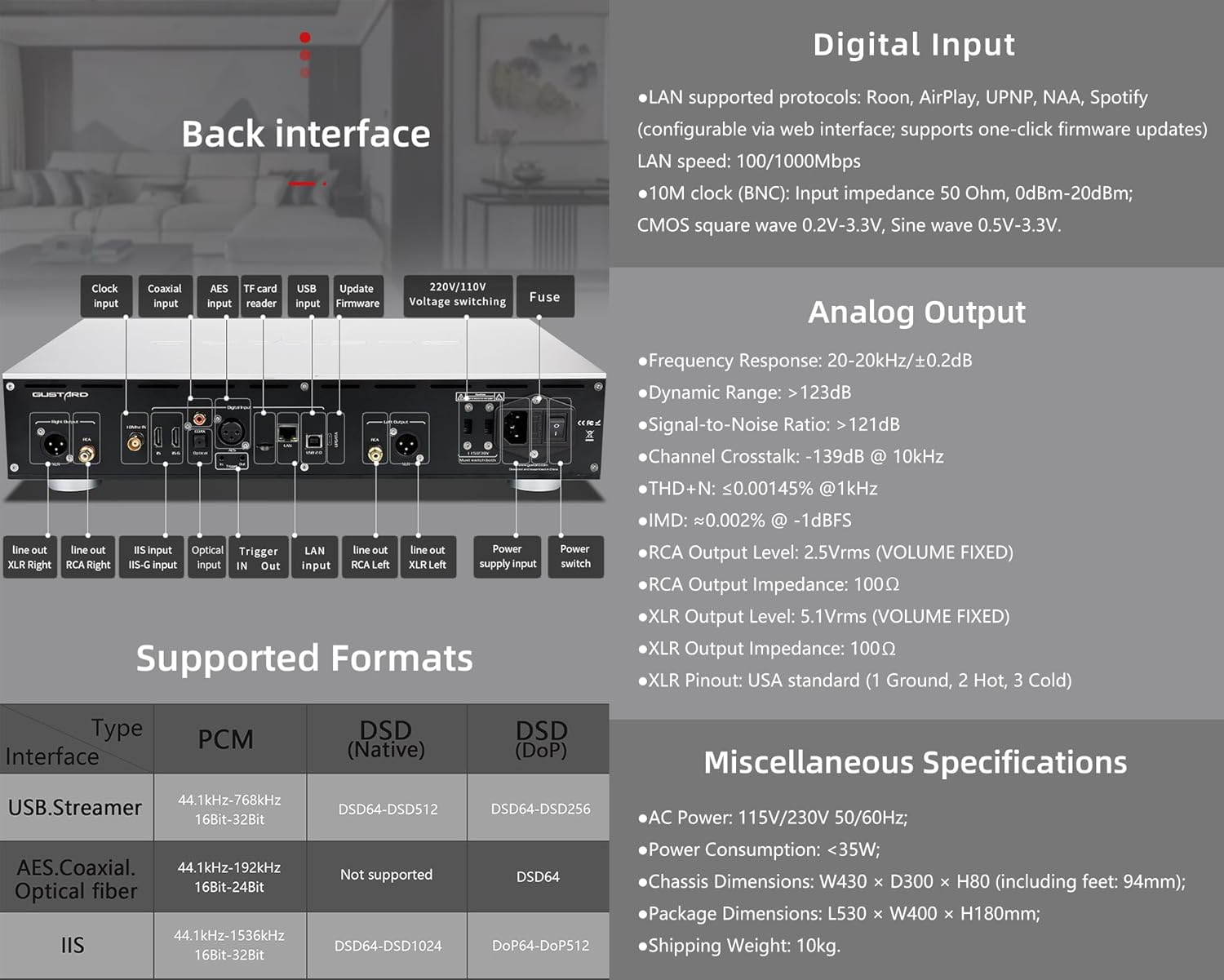
The rear panel provides various input and output connections for the GUSTARD R30.
- Intrare ceas: For external 10MHz clock synchronization.
- Intrare coaxială: Intrare audio digitală.
- Intrare AES: Intrare audio digitală.
- Intrare USB: For connecting to a computer or other USB audio source.
- Intrare LAN: For network streaming functionality.
- Cititor de carduri TF: Pentru actualizări de firmware.
- Actualizare firmware: Port USB pentru actualizări de firmware.
- 220V / 110V VoltagComutare: Selector for power voltage.
- Siguranță: Siguranta de alimentare.
- Line Out XLR Right/Left: Balanced analog audio outputs.
- Line Out RCA Right/Left: Unbalanced analog audio outputs.
- IIS Input (IIS-G): Digital audio input with Gustard pinout.
- Intrare optică: Intrare audio digitală.
- Trigger In/Out: For 12V trigger control.
- Intrare sursă de alimentare: AC power connection.
- Întrerupător: Comutator principal de alimentare.
Important: Ensure both voltagComutatoarele sunt setate la același volumtagla funcționarea sursei de alimentare de 220V/110Vtage switch, otherwise, it may damage the internal transformer upon powering on.
Comenzi de afișare și panou
The R30 utilizes a large OLED display for real-time status monitoring and functional operations. The diagram below illustrates the main interface display states.
1. Display OLED
The display shows the input channel, external clock indication, encoding format, sampling rate, and volume.
2. Input Channel Selection
R30 dispune de 7 canale de intrare. Pe interfața principală, fiecare apăsare a butonului Gear parcurge ciclic canalele disponibile în următoarea secvență: COAX → AES → OPT → USB → STREAMER → IIS(G) → IIS(M*).
***Note: IIS(G) is for fixed Gustard pinout configuration and cannot be adjusted. IIS(M*) supports adjustable pinout configuration.
3. Reglarea volumului
- When the main interface is displayed, pressing the "+" or "-" buttons directly adjusts the analog volume attenuation function of the passive preampAtenuarea variază de la 0 dB la -63.5 dB (atenuare totală de 63.5 dB).
- Pressing "+" at 0dB activates Fixed Output mode (bypassing attenuation circuit), displaying 'FIXED' indicator.
- When 'FIXED' is displayed, pressing "-" first exits bypass mode before controlling the attenuation level.

Meniul de configurare
On the main screen, long press the Gear Button to enter the settings menu (hereinafter referred to as the menu button). In this state, the menu button can sequentially switch the menu items to be modified. "+" and "-" buttons are used to adjust the currently selected menu options. When the screen is in the settings menu, long press the menu button again to return to the main screen.
Structura meniului:
- FILTRU PCM
- FILTRU DSD
- MODUL NOS
- REF CLOCK
- IIS MODE
- FAZĂ
- TRIGGER CH.
- TRIGGER VOL.
- AFIŞA

Funcții de meniu
Accesați meniul apăsând butonul Meniu de pe interfața principală. Fiecare opțiune de meniu este detaliată mai jos.
1. PCM FILTER (PCM Digital Filter Adjustment)
R30 folosește un sistem PCM de înaltă performanță dezvoltat de companieampModul de filtrare digitală Ling cu trei tipuri de filtre:
- VIVID (Default): Similar to the FAST roll-off type of traditional digital filter, but with better ringing characteristics, very small pre-ringing, and fast convergence post-ringing. It aims for a broad soundstage and sound restoration. Recommended for most music styles.
- GENTLE: Similar to the SLOW roll-off type of traditional digital filter, offering a soft listening experience.
- COMPOZIT: A hybrid digital filter, balancing characteristics between Vivid and Gentle for a good listening experience.
2. DSD FILTER (DSD Digital Filter Adjustment)
Filtrul DSD are 4 opțiuni de lățime de bandă încorporate: 47K (Default), 50K, 60K, 70K.
3. MODUL NOS (Fără over-uri)ampling Filter Mode)
When enabled, the PCM signal bypasses the oversampling filter entirely, decoded straight through the R-2R decoder module. This preserves micro-details and timing integrity. When enabled, there may be a slight clicking sound when the playback data format switches between PCM and DSD.
- DISABLE (Default)
- PERMITE
4. REF CLOCK (Reference Clock Selection)
The GUSTARD-K2, low-noise clock synthesizer, achieves ultra-low jitter performance. The R30 offers two clock options:
- INTERNAL (Default): Uses the built-in OCXO internal reference.
- EXT. 10MHz: Selects an external 10MHz reference source. It is recommended to connect to GUSTARD C16 or C18 reference 10M master clocks.
If the external clock is lost, powered off, or its frequency deviation is greater than +/-150ppm, "EXT ERR" will be displayed and flash.
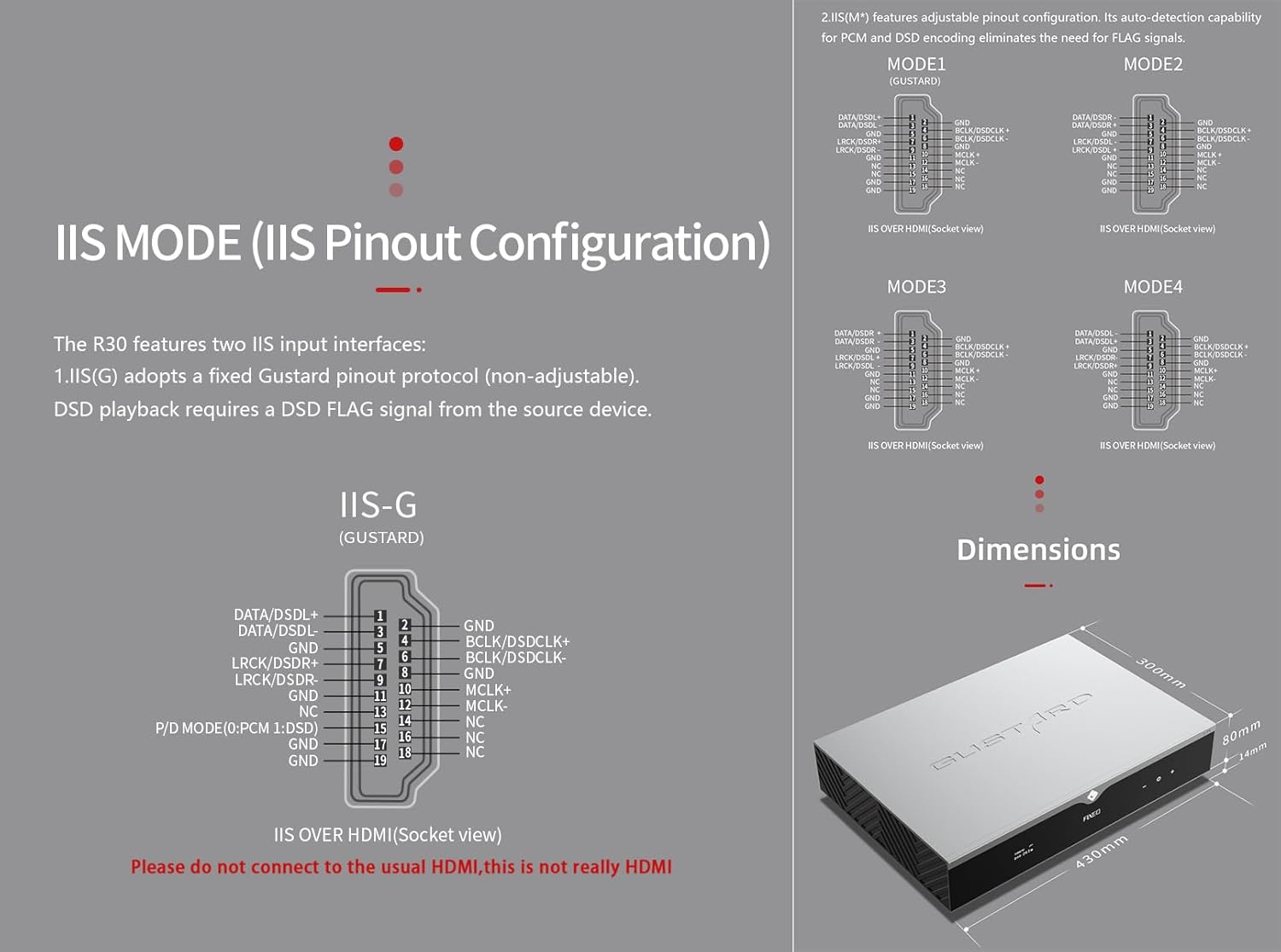
5. IIS MODE (IIS Pinout Mode Selection)
R30 dispune de două interfețe de intrare IIS:
- IIS(G): Fixed Gustard pinout protocol (non-adjustable). DSD playback requires a DSD FLAG signal from the source device.
- IIS(M*): Features adjustable pinout configuration. Its auto-detection capability for PCM and DSD encoding eliminates the need for FLAG signals.
IIS(M*) adjustable Pinout mode IIS input has four Pinouts: MODE1 (Default), MODE2, MODE3, MODE4. MODE1 is compatible with the GUSTARD mode. If you are connecting to a GUSTARD front end such as U12, U16, U18, S16, S26, etc., you can match them with MODE1, which is the former works in the Gustard output mode.
Please do not connect to the usual HDMI, this is not really HDMI.
6. PHASE (Phase Setting)
Această funcție oferă două opțiuni:
- NON-inverted (Default): When non-inverted, the RCA output of R30 is normal phase, and the XLR balanced output is American standard polarity output (1 ground, 2 hot, 3 cold).
- Inversat: When inverted, only the RCA output is reverse phase, and the XLR balanced output is Japanese/European standard polarity output (1 ground, 2 cold, 3 hot).
7. TRIGGER CH. (Linkage Trigger Start Channel Selection)
The R30 can be triggered by an external 12V linkage signal and automatically turn on from standby mode. When the 12V trigger signal ceases or drops to 0V, automatic standby activation occurs. When the R30 is working, it is switched to the input channel of this setting by the 12V trigger linkage signal.
- LAST (Default): The input channel that was in use before entering standby last time.
- Other options include COAX, AES, OPT, USB, STREAMER, IIS(G), IIS. Selecting any channel activates it upon receiving a 12V trigger signal.
8. TRIGGER VOL. (Link Trigger Boot Volume Selection)
R30 poate fi pornit din standby printr-un semnal extern de declanșare de 12V și setat automat la nivelul de volum selectat. Alternativ, în timpul funcționării, un semnal de declanșare de 12V comută ieșirea la volumul presetat. Această opțiune configurează volumul de ieșire după activarea declanșatorului.
- LAST (Default): The volume used before entering standby.
- FIX: Fixed full-scale output bypassing attenuation.
- -20dB: Output at a volume attenuated to -20dB.
- -30dB: Output at a volume attenuated to -30dB.
- -40dB: Output at a volume attenuated to -40dB.
9. DISPLAY (Screen Brightness Settings)
Long-term high-brightness use of OLED screens can cause screen burn-in or ghosting. Therefore, the R30 is designed to always select automatic screen off, or manually select automatic screen off, which can also reduce interference.
- AUTO (Default): Automatically reduce brightness.
- OPRIRE AUTOMATA: Automatically turn off the screen.
Telecomandă cu infraroșu
Când utilizați produse DAC, apăsați și țineți apăsat butonul DAC timp de peste 3 secunde pentru a intra în modul de control DAC. AMPModurile /STREAM controlează alte produse Gustard.
- Așteptare: Press once to activate R30 from standby. Press once during operation to enter standby.
- Meniu: Press to access R30's setup menu.
- Pad cu 4 taste direcționale: Up/Down navigates menu items. Left/Right adjusts selected options. Center press activates/deactivates mute.
- Spate: Returns to main interface.
- Vol-: Decreases output volume on main interface.
- Vol +: Increases output volume on main interface.
Note:
- Operational range varies with angle.
- Obstructions between remote and sensor may cause malfunction.
- Remove batteries if unused for more than 1 month.
- Thoroughly clean battery compartment if leakage occurs.
- May accidentally trigger other IR-controlled devices.

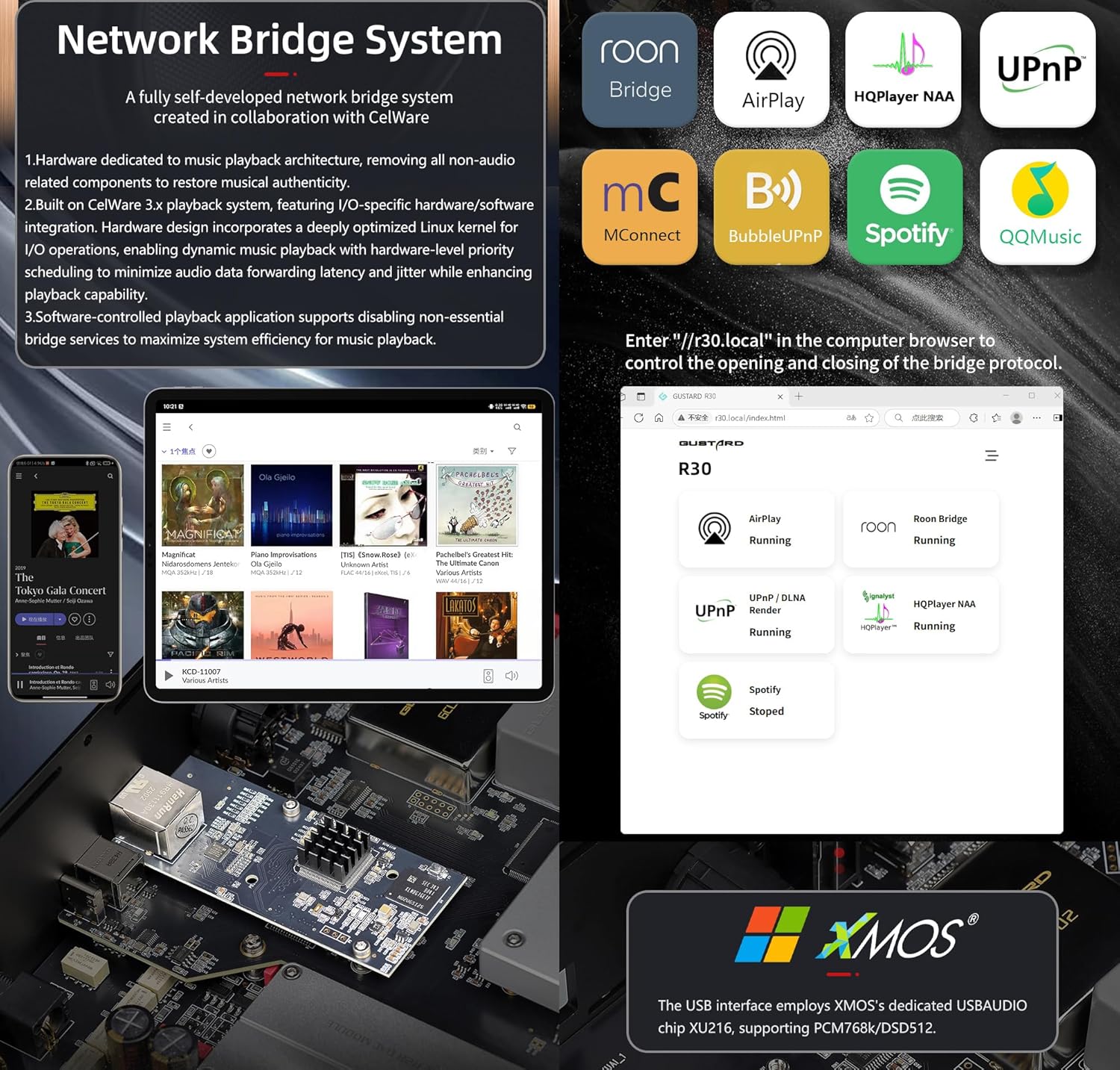
Introducere rapidă a streamerului Network Bridge
After connecting R30's RJ45 port to your local network:
- Select the STREAMER channel and await system boot (approximately 1 minute, until "DSD 24.5MHz" appears).
- Access R30's configuration page via: http://R30.local (as shown below). Disable unused streaming protocols on the web interfață pentru a maximiza eficiența sistemului. Actualizările de firmware sunt efectuate și aici.
(Funcționarea pe mobil/tabletă este în așteptare până la lansarea aplicației dedicate)
You can turn off streaming protocols that are not frequently used through the web page to maximize system music playback performance. At the same time, the online upgrade of the Streamer is also operated on the web pagină.
(După lansarea aplicației dedicate Streamer, operațiunile de mai sus pot fi efectuate în aplicație)
Official Product Video: GUSTARD R30 - User Manual
Specificațiile produsului
Digital Input Support Formats:
| Tip | PCM | DSD (nativ) | DSD (DoP) |
|---|---|---|---|
| USB.Streamer | 44.1kHz-768kHz 16Bit-32Bit | DSD64-DSD512 | DSD64-DSD256 |
| AES.Coaxial.Optical fiber | 44.1kHz-192kHz 16Bit-24Bit | Nu este acceptat | DSD64 |
| IIS | 44.1kHz-1536kHz 16Bit-32Bit | DSD64-DSD1024 | DoP64-DoP512 |
Ieșire analogică:
- Răspuns în frecvență: 20-20kHz/±0.2dB
- Gama dinamică:> 123dB
- Raport semnal-zgomot:> 121dB
- Diafonie pe canal: -139dB la 10kHz
- THD+N: ≤ 0.00145% la 1 kHz
- IMD: ≈0.002% la -1dBFS
- Nivel de ieșire RCA: 2.5Vrms (VOLUM FIX)
- Impedanță de ieșire RCA: 100Ω
- Nivel ieșire XLR: 5.1Vrms (VOLUM FIX)
- Impedanță de ieșire XLR: 100Ω
- Pinout XLR: Standard SUA (1 Împământare, 2 Conexiune Fier, 3 Conexiune Rece)
Alte specificatii:
- AC Power: 115V/230V 50/60Hz
- Consum de energie: <35W
- Chassis Dimensions: W430 × D300 × H80 (including feet: 92mm)
- Package Dimensions: L530 × W400 × H180mm
- Shipping Weight: 10kg (with package)
- 10MHz BNC Input: Input impedance 50 Ohm, 0dBm-20dBm; CMOS square wave 0.2V-3.3V, Sine wave 0.5V-3.3V.
- Trigger: IN- 12V Typ. OUT- 12V Typ.
Termenii de garanție
Thank you for choosing GUSTARD HIFI products. To safeguard your rights and interests, please read the following warranty terms carefully. You can promptly obtain comprehensive after-sales service provided by GUSTARD.
Garanția produsului
You will enjoy a 2-year free warranty and lifetime maintenance after the date of purchasing GUSTARD's HIFI product.
* Producătorul suportă numai mărfurile din China continentală. O parte din transportul și taxele generate de peste mări vor fi rezolvate de către utilizator cu negocierea cu dealer-ul.
Serviciu gratuit de garanție
GUSTARD R30 from the purchasindata g în perioada de garanție gratuită, utilizatorul utilizează produsul în mod normal și produsul se defectează din cauza unor probleme de calitate a componentelor sau de fabricație.
Dincolo de serviciul de garanție
Belonging to one of the following circumstances, products are no longer provided warranty service:
- Produsele de la data achiziției au depășit o perioadă de garanție predeterminată.
- Modelul, codurile de bare și data achiziției nu se potrivesc cu produsul real și cu cardul de garanție.
- Without GUSTARD technician permission, unauthorized modifications to the circuit, components or self-repaired product.
- Daune cauzate de forțele naturale irezistibile.
- Dincolo de utilizarea permisă a daunelor mediului.
- Deteriorări din cauza utilizării incorecte sau depozitării necorespunzătoare. Inclusiv, dar fără a se limita la: voltage este prea mare pentru a arde circuitele sau componentele; Lovitură și care rezultă în deteriorarea carcasei sau interne; deteriorare din cauza apei, uleiului, lichidului și prafului excesiv; oxidarea sau coroziunea produsului etc.
- Dincolo de perioada de garanție, cum ar fi deteriorarea unei componente individuale, aspectul cauzat de daune umane, modificările firmware-ului duc la imposibilitatea de a funcționa de către utilizatori neautorizați. GUSTARD se angajează să accepte taxe rezonabile de întreținere (cu excepția componentelor de suprafață mare sau a plăcilor de circuite arse fără reparații). Costurile de transport și întreținere, costurile materiale sunt obligate să suporte utilizatorul.
Informații de contact
Producător: Shenzhen Goshide Technology Co., LTD
Adresa: Room 302, Building 1, No. 28, Huimin 1st Road, Guanlan Sub-district, Longhua District, Shenzhen City, Guangdong Province
Tel: +86-18682080102
Website: http://www.gustard.com
E-mail: service@gustard.com


