1. Introducere
This manual provides essential information for setting up, operating, and maintaining your Machenike Mini Desktop. Please read this manual thoroughly before using the device to ensure proper functionality and longevity.
The Machenike Mini Desktop, model GTR HP8745H00, is a compact and powerful computing solution featuring an AMD Ryzen 7 8745HS processor, AMD Radeon Graphics, 32GB DDR5 RAM, and a 1TB SSD, running on Windows 11 Home.
2. Conținutul pachetului
Verificați dacă toate articolele sunt prezente în colet:
- Machenike Mini Desktop (GTR HP8745H00)
- Adaptor de alimentare
- Manual de utilizare (acest document)
- (Additional accessories may vary by region or bundle)
3. Produs terminatview
The Machenike Mini Desktop is designed for efficiency and performance in a small form factor. Below is an illustration of the device and its various ports.

Imagine: față view of the Machenike Mini Desktop, showcasing designul său compact și porturile frontale.
3.1. Aspectul porturilor
Familiarizați-vă cu porturile disponibile pentru conectarea perifericelor și a afișajelor.
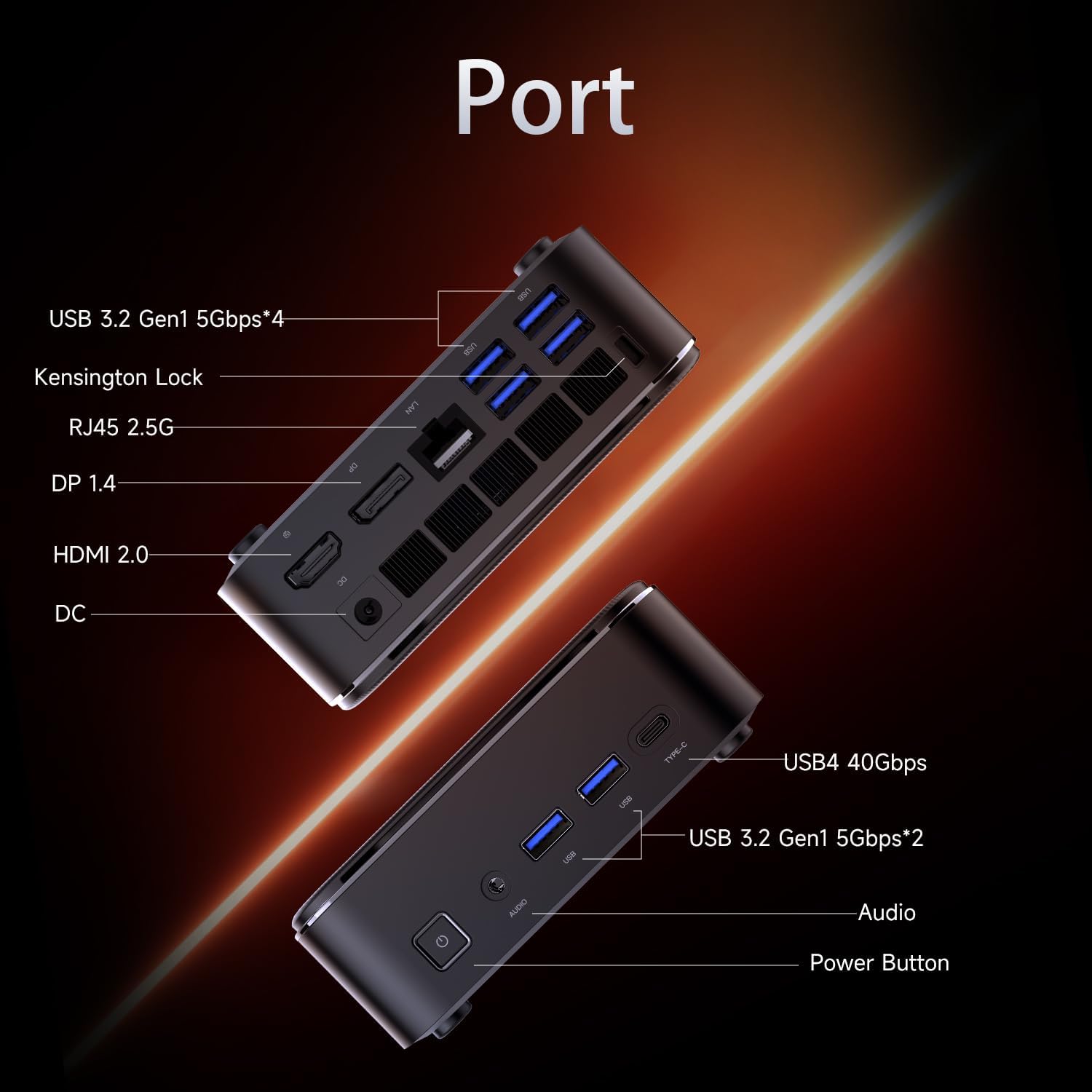
Image: Diagram illustrating the various ports on the Machenike Mini Desktop, including USB, Type-C, HDMI, DisplayPort, RJ45, and audio connections.
- Porturi frontale: Power Button, 3.5mm Audio Jack, 2 x USB 3.2 Gen1 (5Gbps), 1 x Type-C (USB4 40Gbps)
- Porturi din spate: 2 x USB 3.2 Gen1 (5Gbps), 1 x USB 3.2 Gen2 (10Gbps), 1 x Type-C, 1 x HDMI 2.1, 1 x RJ45, 1 x Display Port, DC Power Input, Kensington Lock Slot, Restart Button
4. Configurare inițială
Follow these steps to set up your Machenike Mini Desktop:
- Conectați afișajul: Connect your monitor or display to the Mini Desktop using an HDMI or DisplayPort cable. The device supports 4K resolution.
- Conectați periferice: Conectați tastatura, mouse-ul și orice alte dispozitive USB la porturile USB disponibile.
- Conectare alimentare: Connect the power adapter to the DC power input port on the Mini Desktop, then plug the adapter into a power outlet.
- Pornire: Apăsați butonul de alimentare situat pe partea frontală a dispozitivului. Sistemul va porni.
- Configurarea Windows: Urmați instrucțiunile de pe ecran pentru a finaliza configurarea inițială a Windows 11 Home, inclusiv limba, regiunea, conexiunea la rețea și crearea contului de utilizator.
5. Instrucțiuni de utilizare
5.1. Pornire/Oprire
- Pornire: Apăsați butonul de pornire de pe partea din față a dispozitivului.
- Închidere: Faceți clic pe butonul Start din Windows, apoi selectați Alimentare > Oprire.
- Repornire: Faceți clic pe butonul Start din Windows, apoi selectați Alimentare > Repornire.
5.2. Conexiune la rețea
- Wifi: The device supports Wi-Fi 6. During Windows setup or via Windows Settings, select your Wi-Fi network and enter the password.
- Prin cablu (Ethernet): Connect an Ethernet cable from your router or modem to the RJ45 port on the back of the Mini Desktop.
5.3. Conectarea dispozitivelor externe
- Dispozitive USB: Connect USB flash drives, external hard drives, printers, or other USB peripherals to any available USB 3.2 Gen1 or Gen2 ports.
- Type-C Devices: Use the Type-C ports for compatible devices, including high-speed data transfer (up to 40Gbps on the front Type-C port) or display output.
- Audio: Connect headphones or speakers to the 3.5mm audio jack on the front.
- Bluetooth: The device supports Bluetooth for wireless peripherals like keyboards, mice, and speakers. Pair devices through Windows Settings > Bluetooth & devices.
6. Întreținere
Regular maintenance helps ensure optimal performance and extends the lifespan of your Mini Desktop.
- curatenie: Use a soft, dry cloth to clean the exterior. For dust accumulation in vents, use compressed air. Ensure the device is powered off and unplugged before cleaning.
- Actualizări de software: Verificați și instalați periodic actualizări Windows și drivere pentru a asigura stabilitatea și securitatea sistemului.
- Ventilare: Ensure the Mini Desktop is placed in a well-ventilated area. Avoid blocking the air vents to prevent overheating.
- Backup de date: Faceți periodic copii de rezervă ale datelor importante pe o unitate externă sau într-un spațiu de stocare în cloud.
7. Depanare
Această secțiune abordează problemele frecvente pe care le-ați putea întâmpina.
- Fără putere:
- Ensure the power adapter is securely connected to both the Mini Desktop and a working power outlet.
- Testați priza cu un alt dispozitiv.
- Fără afișare:
- Verify that the HDMI or DisplayPort cable is securely connected to both the Mini Desktop and the monitor.
- Asigurați-vă că monitorul este pornit și setat la sursa de intrare corectă.
- Try a different cable or monitor if available.
- Fără conexiune internet:
- For Wi-Fi, check if the Wi-Fi adapter is enabled in Windows Settings and if you are connected to the correct network with the right password.
- Pentru conexiunea prin cablu, asigurați-vă că cablul Ethernet este conectat corect și că routerul/modemul funcționează.
- Probleme de conectivitate Bluetooth:
- Ensure Bluetooth is enabled in Windows Settings.
- Remove and re-pair the problematic Bluetooth device.
- Update Bluetooth drivers through Device Manager.
- Ensure the device is within range and fully charged.
- Încetinire a sistemului:
- Check Task Manager for resource-intensive applications.
- Asigurați-vă că există suficient spațiu liber pe SSD.
- Run a disk cleanup and defragmentation (for HDD, though SSDs don't need defragging).
- Perform a malware scan.
8. Specificații
Detailed technical specifications for the Machenike Mini Desktop (GTR HP8745H00):
| Caracteristică | Caietul de sarcini |
|---|---|
| Model | GTR HP8745H00 |
| Procesor | AMD Ryzen 7 8745HS (8 Cores, 16 Threads, 16MB L3 Cache, up to 5.1 GHz) |
| Grafică | Grafică AMD Radeon (integrată) |
| RAM | 32 GB DDR5 (4800 MHz) |
| Depozitare | SSD PCIe M.2 de 1 TB |
| Sistem de operare | Windows 11 Home |
| Conectivitate wireless | Wi-Fi 6 (802.11ax), Bluetooth |
| Porturi frontale | 1 x Power Button, 1 x 3.5mm Audio, 2 x USB 3.2 Gen1 (5Gbps), 1 x Type-C (USB4 40Gbps) |
| Porturi spate | 2 x USB 3.2 Gen1 (5Gbps), 1 x USB 3.2 Gen2 (10Gbps), 1 x Type-C, 1 x HDMI 2.1, 1 x RJ45, 1 x Display Port, DC Power Input, Kensington Lock, Restart Button |
| Rezoluția maximă a ecranului | 3840 x 2160 (4K) |
| Dimensiuni (Lxlxh) | 5.05 x 1.96 x 5.05 inci |
| Greutate | 3.4 lire sterline |
| Culoare | Negru |
9. Garanție și asistență
Machenike products are covered by a limited warranty. For specific warranty terms and conditions, please refer to the warranty card included with your product or visit the official Machenike website-ul.
For technical support, troubleshooting assistance, or to inquire about service, please contact Machenike customer support or visit the official brand store:


