1. Introducere
This manual provides detailed instructions for the setup, operation, and maintenance of your LIGE EF12 Smart Watch. Please read this manual thoroughly before using the device to ensure proper function and to maximize your user experience. Keep this manual for future reference.
2. Conținutul pachetului
Verificați dacă toate articolele sunt prezente în colet:
- LIGE EF12 Smart Watch (1 unit)
- Cablu de încărcare (1 unitate)
- Manual de utilizare (1 unitate)
- Strap Adjuster (1 unit)
- Straps (3 units): 1 Steel strap, 2 Silicone straps
3. Produs terminatview
The LIGE EF12 Smart Watch is designed for daily wear and fitness tracking, featuring a 1.75-inch HD display, Bluetooth 5.2 calling, and a 1000mAh battery. It includes health monitoring functions, multiple sports modes, and a built-in LED flashlight.

Imaginea 3.1: Faţă view of the LIGE EF12 Smart Watch, showcasing its round display, metal casing, and integrated flashlight. The screen displays time, date, steps, calories, heart rate, and weather information.
Caracteristici cheie:
- Afişa: 1.75" HD Touchscreen (360x360 resolution)
- Conectivitate: Bluetooth 5.2 for calls and notifications
- Baterie: 1000mAh, providing 10-15 days of typical use
- Monitorizarea sănătății: Heart Rate, SpO2, Sleep Tracking, Breath Monitor
- Urmărire fitness: 120+ Sports Modes, Activity Tracker (steps, calories, distance)
- Caracteristici speciale: Built-in LED Flashlight (3 modes), Custom Watch Faces, Music Control, Camera Control, Weather Forecast, Alarm Clock, Sedentary Alerts, Hydration Reminders, Voice Control
- Rezistenta la apa: IP68
- Compatibilitate: Android 5.1+ și iOS 9.0+
4. Configurare
4.1 Încărcarea ceasului inteligent
Before first use, fully charge your smart watch. Connect the magnetic charging cable to the charging contacts on the back of the watch and plug the USB end into a standard USB power adapter (not included) or a computer USB port. A full charge typically takes approximately 2.5 hours.

Imaginea 4.1: Illustration highlighting the 1000mAh battery capacity of the LIGE EF12 Smart Watch, indicating longer battery life and faster charging compared to other models.
4.2 Instalarea și asocierea aplicației
- Descărcați aplicația: Scan the QR code in the user manual or search for the companion app (e.g., "GloryFit" or similar, typically mentioned in the physical manual) in your smartphone's app store (Google Play Store for Android, Apple App Store for iOS).
- Instalare și înregistrare: Instalați aplicația și urmați instrucțiunile de pe ecran pentru a crea un cont sau a vă conecta.
- Activați Bluetooth: Asigurați-vă că Bluetooth este activat pe smartphone-ul dvs.
- Asociați ceasul: Open the app, navigate to the device section, and search for your LIGE EF12 Smart Watch. Select the watch from the list to initiate pairing. Confirm the pairing request on both your phone and the watch if prompted.
După ce este asociat, ceasul va sincroniza datele cu telefonul, inclusiv ora, data și notificările.
4.3 Strap Installation and Adjustment
The LIGE EF12 Smart Watch comes with three interchangeable straps. To attach a strap, align the spring bar with the lug holes on the watch body and slide it into place. Use the provided strap adjuster for the steel strap to remove or add links for a comfortable fit.

Imaginea 4.2: The LIGE EF12 Smart Watch packaging, showing the watch, charging cable, user manual, strap adjuster, and the three included straps (steel and two silicone).
5. Instrucțiuni de utilizare
5.1 Navigare de bază
- Touch screen: Swipe left/right to navigate between main screens (e.g., activity data, heart rate, weather). Swipe up/down to access quick settings or notifications.
- Butoane laterale: The watch typically has two side buttons. One usually serves as a power/home button, while the other may be a shortcut to sports modes or other functions. Refer to the specific button functions in the app or physical manual.
- Activare ecran: Raise your wrist or press a side button to wake the screen.
5.2 Apeluri și notificări Bluetooth
Once paired via Bluetooth, you can manage calls and receive notifications directly on your watch.
- Efectuarea/răspunsul la apeluri: Tap the phone icon on the watch screen to access the dial pad or recent calls. When an incoming call arrives, you can answer or reject it from the watch.
- Notificări: Ensure app notifications are enabled in your phone's settings and the companion app. Swipe down on the watch face to view recent notifications from apps like WhatsApp, Twitter, Facebook, and InstagBERBEC.
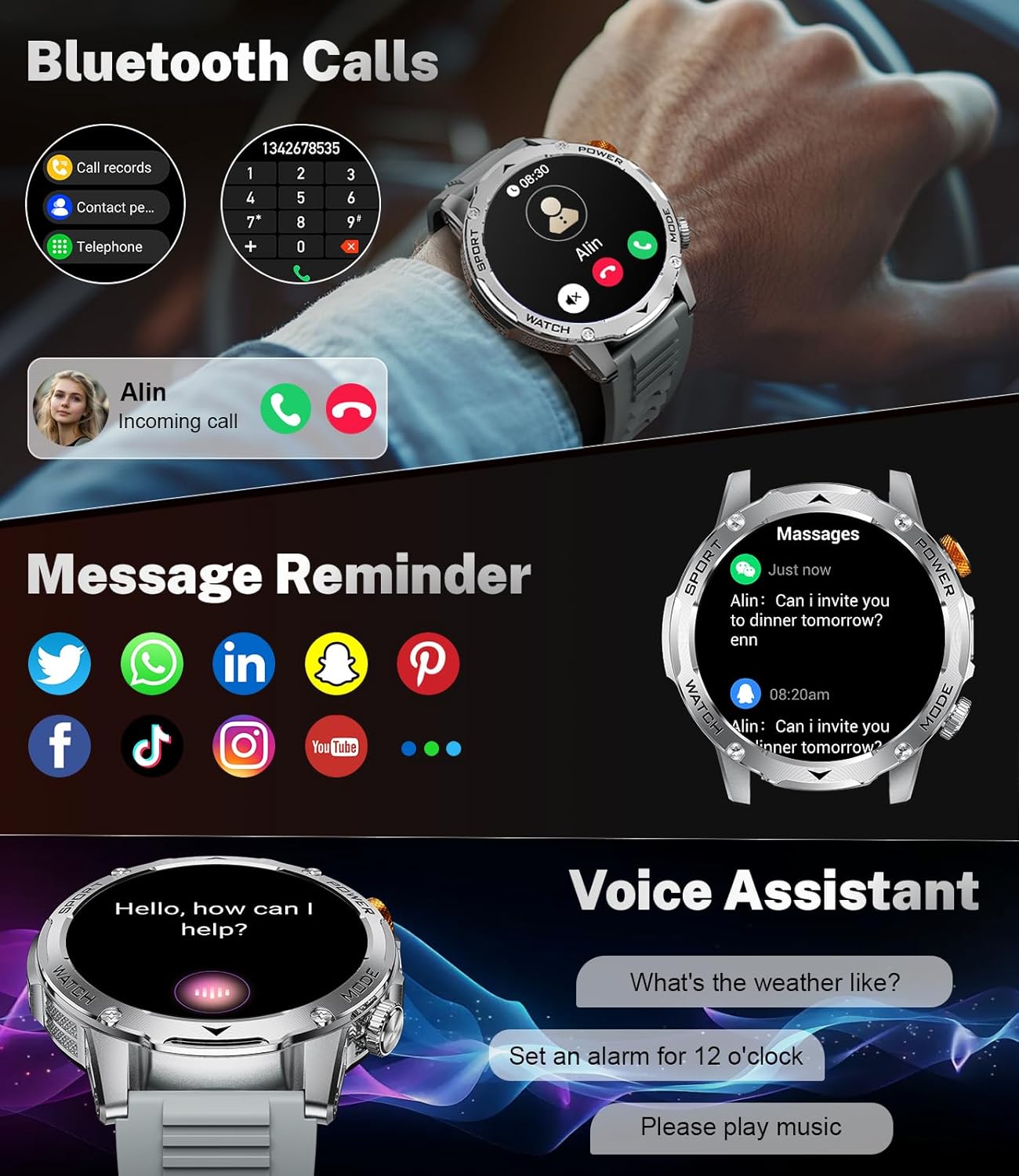
Imaginea 5.1: The LIGE EF12 Smart Watch displaying an incoming call and various app icons for message reminders, including WhatsApp, Twitter, Facebook, and InstagBERBEC.
Lanternă LED încorporată 5.3
The watch features an integrated LED flashlight with three modes:
- Lumină puternică: Oferă iluminare continuă.
- Clipește: Emits a blinking light.
- SOS: Transmits an SOS signal.
To activate, typically a long press on a designated side button or a specific gesture on the screen will toggle the flashlight modes. Refer to your physical manual for the exact activation method.

Imaginea 5.2: The LIGE EF12 Smart Watch screen, emphasizing its 1.75-inch HD display and illustrating the three flashlight modes: Constant-On, Warning (Flashing), and SOS, shown in different outdoor scenarios.
5.4 Personalizarea fețelor de ceas
The watch supports over 150 watch faces and allows for custom photo uploads. Access watch face settings through the companion app or by long-pressing the watch face on the device itself. You can switch styles to match your preference.
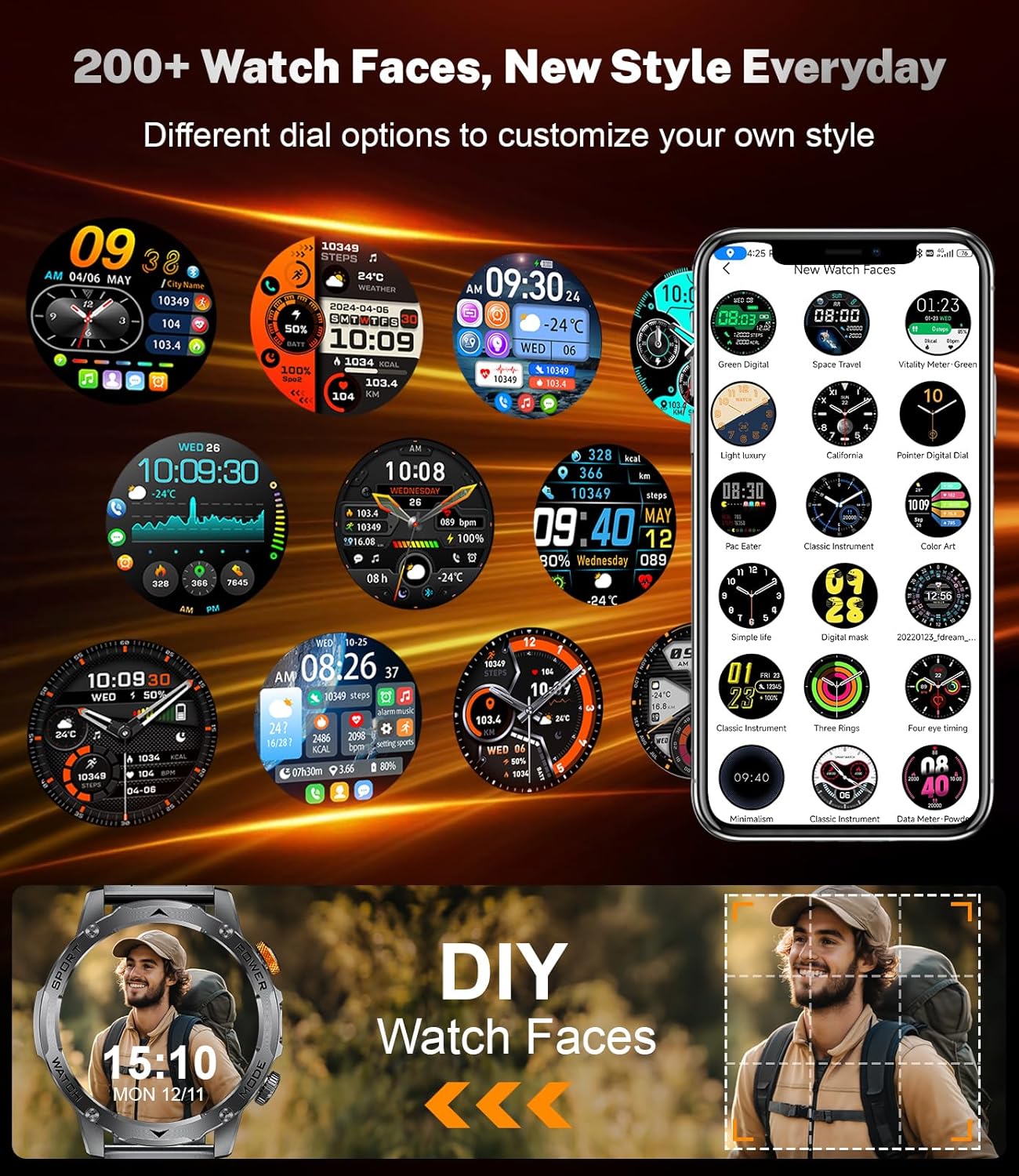
Imaginea 5.3: A collage of different watch faces available for the LIGE EF12 Smart Watch, along with an illustration of how users can create their own custom watch faces using personal photos.
5.5 Health and Wellness Tracking
The LIGE EF12 Smart Watch continuously monitors several health metrics:
- Ritmul cardiac: Monitorizare a ritmului cardiac în timp real. View date istorice în aplicație.
- SpO2 (oxigen din sânge): Măsoară nivelurile de oxigen din sânge.
- Monitorizare somn: Urmărește somnultages (profund, ușor, REM) și oferă informații despre calitatea somnului.
- Monitor de respirație: Guides breathing exercises to help reduce stress.
For accurate readings, ensure the watch is worn snugly on your wrist, about one finger's width above the wrist bone.
5.6 Moduri sportive și monitorizare a activității
The watch supports over 120 sports modes to track your workouts. It records calories burned, steps taken, and distance covered.
- Accesarea modurilor sportive: Navigate to the sports mode section on the watch or via a dedicated button. Select your desired activity to start tracking.
- Date despre activitate: View real-time data during your workout and detailed summaries in the companion app after completion.

Imaginea 5.4: An image showing the LIGE EF12 Smart Watch interface for sports modes, displaying metrics like calories, steps, and distance, along with icons representing various activities such as running, cycling, and hiking.
5.7 Other Smart Tools
- Controlul muzicii: Controlează redarea muzicii pe smartphone (redare, pauză, omitere melodii).
- Controlul camerei: Folosește ceasul ca declanșator de la distanță pentru camera telefonului.
- Prognoza meteo: View current weather and forecasts (requires app synchronization).
- Ceas cu alarmă: Set alarms through the app or directly on the watch.
- Alerte de sedentarism: Primește mementouri pentru a te muta după perioade de inactivitate.
- Hydration Reminders: Set reminders to drink water.
- Asistent vocal: Interact with your phone's voice assistant (e.g., "What's the weather like?").

Imaginea 5.5: The LIGE EF12 Smart Watch displaying various multi-functional features including music control, flashlight, camera control, weather, alarm clock, and drink reminders.
6. Întreținere
6.1 Curățare
Regularly clean your smart watch and straps to prevent skin irritation and maintain functionality.
- Ștergeți ecranul și carcasa ceasului cu o lavetă moale, fără scame. Dacă este necesar, frecați ușor.ampro pânza cu apă.
- Pentru curelele din silicon, spălați cu apă și săpun delicat, apoi clătiți bine și uscați.
- For steel straps, use a soft brush to clean crevices and wipe with a dry cloth. Avoid harsh chemicals.
6.2 Rezistență la apă (IP68)
The LIGE EF12 Smart Watch is IP68 rated, meaning it is resistant to dust and can withstand immersion in water up to 1.5 meters for up to 30 minutes. It is suitable for daily use, such as hand washing, rain, and shallow swimming. However, it is not recommended for hot showers, saunas, or diving, as steam and high water pressure can compromise the seals.
6.3 Îngrijirea bateriei
- Evitați descărcarea completă frecventă a bateriei.
- Charge the watch using the provided cable and a compatible power adapter.
- Depozitați ceasul într-un loc răcoros și uscat atunci când nu îl utilizați pentru perioade lungi de timp.
7. Depanare
| Problemă | Soluție posibilă |
|---|---|
| Ceasul nu se pornește. | Asigurați-vă că ceasul este complet încărcat. Conectați-l la încărcător timp de cel puțin 30 de minute. |
| Nu se poate conecta la smartphone. |
|
| Notificările nu sunt primite. |
|
| Date inexacte despre sănătate. |
|
| Bateria se descarcă rapid. |
|
8. Specificații
| Caracteristică | Detaliu |
|---|---|
| Numărul de model | EF12-G |
| Dimensiunile produsului | 2.36 x 0.79 x 1.18 inci |
| Greutatea articolului | 10.8 uncii |
| Dimensiunea ecranului | 1.75 inchi |
| Rezoluţie | 360x360 |
| Capacitatea bateriei | 1000 Miliamp Ore (Litiu Polimer) |
| Conectivitate | Bluetooth 5.2 |
| Compatibilitatea sistemelor de operare | Android 5.1+, iOS 9.0+ |
| Evaluare de rezistență la apă | IP68 |
| Capacitate de stocare a memoriei | 128 MB |
| Caracteristici speciale | LED Light, Activity Tracker, Breath Monitor, Distance Tracker, Heart Rate Monitor, Calorie Counter, Multisport Tracker, Music Player, Sleep Monitor, Phone Call, Touchscreen, Voice Control, Alarm Clock, Weather Forecast, Stress Monitor, Stopwatch, Timer, Calculator, Phone Finder |
9. Garanție și asistență
For warranty information and customer support, please refer to the documentation included with your purchase or contact the manufacturer directly. Our dedicated support team aims to reply to inquiries within 24 hours.
For further assistance, visit the official LIGE website-ul sau contactați serviciul pentru clienți.


