Introducere
This manual provides detailed instructions for the DIERYA DK81E 75% Mechanical Gaming Keyboard. Please read this manual thoroughly before using the product to ensure proper setup and operation. Retain this manual for future reference.
The DIERYA DK81E is a compact 75% layout mechanical keyboard designed for gaming and productivity. It features hot-swappable switches, a gasket-mount design with multi-layer sound dampening, customizable RGB backlighting, a dedicated volume knob, and a powerful web-based driver for advanced customization.
Conținutul pachetului
- DIERYA DK81E Mechanical Keyboard x 1
- Cablu USB-C la USB-A x 1
- Extractor keycap x 1
- Extractor de comutator x 1
- Manual de utilizare x 1

Înființat
- Despachetați tastatura: Carefully remove the DIERYA DK81E keyboard and all accessories from the packaging.
- Conectați cablul USB: Insert the USB-C end of the provided cable into the port on the back of the keyboard. Connect the USB-A end to an available USB port on your computer or gaming console.
- Recunoașterea sistemului: Your operating system (Windows, macOS, Linux) should automatically detect and install the necessary drivers. No additional software installation is required for basic functionality.
- Reglați picioarele tastaturii: Tastatura are douătage adjustable feet. Flip them out to achieve your preferred typing angle. The anti-slip rubber pads on the bottom ensure stability.


Instrucțiuni de operare
Funcții de bază ale tastaturii
The DIERYA DK81E operates as a standard 75% layout keyboard. All keys function as labeled. For keys that are typically present on a full-size keyboard but not on a 75% layout (e.g., F-keys, Page Up/Down, Home, End, Delete), they are accessible via the Function (Fn) key combinations. Refer to the keycap legends for specific Fn key functions.
Multimedia Volume Knob
The dedicated metal knob located on the top right of the keyboard provides convenient control over audio and media playback.
- Roteste in sensul acelor de ceasornic: Măriți volumul.
- Rotire în sens invers acelor de ceasornic: Scade volumul.
- Apăsați în jos: Redați/Întrerupeți conținut media.

Controlul iluminării de fundal RGB
The keyboard features vibrant RGB backlighting with 16.8 million colors and over 15 preset lighting effects. Specific key combinations (often involving the Fn key) are used to cycle through effects, adjust brightness, and change colors. Consult the included quick start guide or the web driver for detailed instructions on RGB customization.

Web-Based Driver for Customization
The DIERYA DK81E utilizes a browser-based driver for advanced customization, eliminating the need for software installation and ensuring zero memory footprint. This driver allows for:
- Key remapping
- Înregistrare macro
- Quick shortcuts
- In-depth RGB personalization
Pentru a accesa web driver, open a web browser and navigate to the address provided in the quick start guide or on the manufacturer's website. The driver is compatible with Windows, macOS, and Linux operating systems.

Caracteristici cheie
- Comutatoare înlocuibile la cald: The DK81E features universal hot-swappable sockets compatible with 3-pin and 5-pin mechanical switches. This allows users to easily change switches without soldering, enabling personalized typing feel and sound.
- Gasket-Mount Design with 6-Layer Dampening Foam: The advanced gasket-mount structure, combined with six layers of sound-absorbing foam, provides a flexible typing experience and a deeper, more satisfying acoustic profile.
- Pre-Lubed Linear Switches: The keyboard comes equipped with factory pre-lubricated linear switches, ensuring a smooth and consistent keystroke experience right out of the box. These switches are rated for 50 million keystrokes.
- Double-Shot Keycaps: The keycaps are manufactured using a double-shot injection molding process, which ensures legends will not fade or wear off over time, maintaining a pristine look and feel.
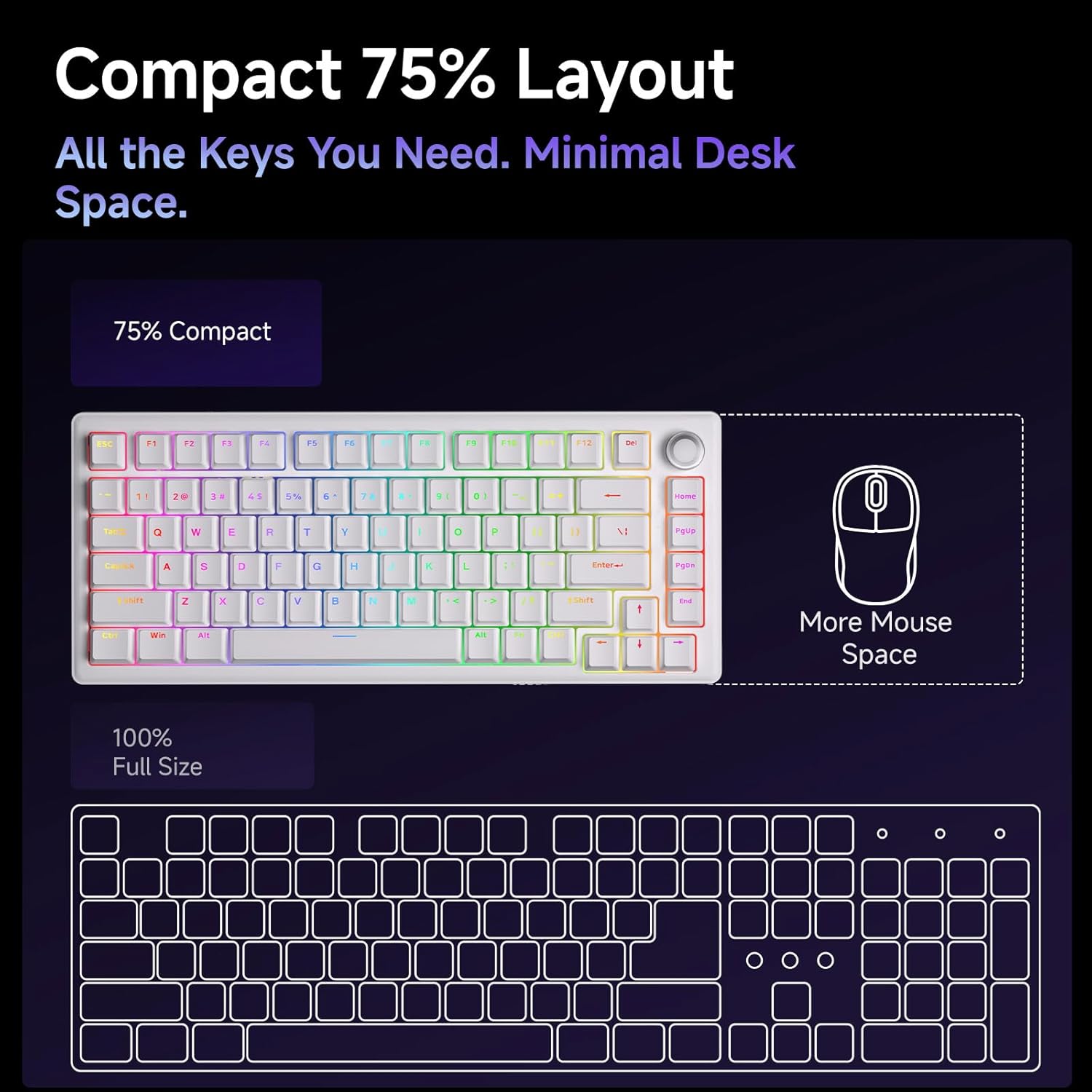
- Aspect compact 75%: The 75% layout provides all essential keys while minimizing desk space, offering more room for mouse movement.



Întreţinere
Curățarea tastaturii
Curățarea regulată ajută la menținerea performanței și aspectului tastaturii.
- Îndepărtarea prafului: Folosește o recipient cu aer comprimat pentru a îndepărta praful și resturile dintre capacele tastelor.
- Curățarea tastelor: Gently remove keycaps using the provided keycap puller. Clean them with a soft cloth dampened with a mild cleaning solution (e.g., isopropyl alcohol diluted with water). Ensure keycaps are completely dry before reattaching.
- Curățarea suprafețelor: Wipe the keyboard's surface with a soft, lint-free cloth. Avoid harsh chemicals or abrasive materials.
Switch and Keycap Replacement
The hot-swappable design allows for easy replacement of switches and keycaps.
- Îndepărtarea capacelor tastelor: Use the keycap puller to carefully grip and lift keycaps straight up.
- Scoaterea comutatoarelor: Use the switch puller to gently clamp the top and bottom clips of the switch, then pull the switch straight up from the PCB.
- Instalarea comutatoarelor: Aliniați pinii noului comutator cu orificiile de pe PCB. Apăsați ferm până când comutatorul se fixează în poziție cu un clic. Asigurați-vă că pinii nu sunt îndoiți.
- Instalarea tastelor: Align the keycap stem with the switch stem and press down gently until it is securely seated.
Depanare
- Tastatura nu răspunde:
- Asigurați-vă că este conectat corect cablul USB-C atât la tastatură, cât și la computer.
- Încercați să conectați tastatura la un alt port USB al computerului.
- Testați tastatura pe un alt computer pentru a exclude probleme specifice sistemului.
- Luminile RGB nu funcționează/nu sunt corecte:
- Check the RGB control key combinations (refer to the quick start guide) to ensure brightness is not set to zero or an incorrect mode is selected.
- Accesați web driver to verify RGB settings and apply changes.
- Cheile nu se înregistrează:
- If a specific key is not working, carefully remove its keycap and switch. Inspect the switch pins for any bends or damage. Straighten bent pins or replace the switch if damaged.
- Asigurați-vă că comutatorul este complet așezat în placa de circuit imprimat.
- Volume Knob Not Functioning:
- Verify that the keyboard is properly connected and recognized by the system.
- Test media playback in different applications.
Specificații
| Caracteristică | Detaliu |
|---|---|
| Numele modelului | DK81E |
| Marca | DIERYA |
| Aspect | 75% |
| Tip comutator | Mechanical (Pre-lubed Creamy Linear Switch) |
| Interschimbabil la cald | Da (compatibil cu 3 pini/5 pini) |
| Stil de montare | Gasket-Mount |
| Dampening | 6-Layer Sound-Absorbing Foam |
| Iluminare din spate | RGB (16.8 Million Colors, 15+ Effects) |
| keycaps | Double-Shot Injection Molded |
| Conectivitate | Wired USB-C (Detachable Cable) |
| Rata de sondare | 1000 Hz |
| Caracteristici speciale | Volume Knob, Programmable Web Șofer |
| Dispozitive compatibile | Consolă de jocuri, PC |
| Sisteme de operare | Windows, macOS, Linux |
| Greutatea articolului | 1.96 lire sterline |
| Dimensiuni pachet | 15.31 x 5.79 x 1.85 inci |
Garanție și suport
Specific warranty information for the DIERYA DK81E keyboard is not provided in this manual. For detailed warranty terms, technical support, or further assistance, please visit the official DIERYA website-ul lor sau contactați direct serviciul lor de asistență pentru clienți.
Official DIERYA Website: DIERYA Store on Amazon


