Introducere
Thank you for choosing the Hagibis Mac mini M4 Stand. This aluminum stand is designed to elevate your Mac mini M4, providing improved heat dissipation, convenient access to ports, and a tidy workspace. Its robust construction and thoughtful design ensure a secure and stable platform for your device.
Caracteristicile produsului
- Operare convenabilă: The stand's design ensures no obstruction to the power button, allowing easy access and operation of your Mac mini M4.
- Elevated Design for Cooling: Elevates the Mac mini M4, creating space for enhanced airflow and heat dissipation through bottom vents.
- Premium Alloy Material: Constructed from high-quality aluminum alloy, matching the aesthetic of the Mac mini M4 for a cohesive look. The elevated space can also be used for storage.
- Anti-slip and Protective: Features dual-sided silicone pads. The top pad protects the Mac mini from scratches, while the bottom pads provide stability and prevent slipping on your desk.
- Compatibilitate: Designed to integrate seamlessly with other Hagibis products such as the MC65 Docking Station, MC600 SSD Enclosure, and MC30/MC35/MC40 USB4 SSD Enclosures.
Conținutul pachetului
- 1 x Hagibis Mac mini M4 Stand (Model: MMS07)

Image: The Hagibis Mac mini M4 Stand and its retail packaging.
Configurare și instalare
- Despachetați suportul: Carefully remove the Hagibis Mac mini M4 Stand from its packaging.
Video: Un pesteview of the Hagibis Mac mini M4 Stand, demonstrating its features and how it integrates with the Mac mini.
- Place the Mac mini: Gently place your Mac mini M4 onto the stand. Ensure the Mac mini is centered within the circular opening of the stand. The stand's top silicone pad will protect the Mac mini's base.

Image: The Hagibis Mac mini M4 Stand shown with a Mac mini M4 securely placed on it, highlighting the elevated design.
- Asigurarea stabilității: Verify that the stand is placed on a flat, stable surface. The bottom silicone pads will prevent movement.
- Cabluri de conectare: Connect all necessary cables (power, display, peripherals) to your Mac mini. The elevated design provides ample space for cable management underneath.

Image: A Mac mini M4 positioned on the Hagibis stand, demonstrating easy access to the power button and connected cables.
Instrucțiuni de operare
The Hagibis Mac mini M4 Stand is a passive accessory designed to enhance the functionality and aesthetics of your Mac mini. No active operation is required.
- Flux de aer îmbunătățit: The elevated position allows for better air circulation around the Mac mini, aiding in passive cooling and heat dissipation.

Image: The Hagibis stand elevating a Mac mini M4, illustrating improved airflow for heat dissipation.
- Easy Power Button Access: The stand's design ensures the Mac mini's power button remains easily accessible from the bottom.
- Spațiu de lucru organizat: The space created underneath the Mac mini can be utilized for storing small items or routing cables, contributing to a cleaner desktop.

Image: The Hagibis stand elevating a Mac mini M4, illustrating how the space underneath can be used for storing small accessories like a smartphone and pen.
- Integration with Other Products: The stand is designed to be compatible with other Hagibis accessories, allowing for modular expansion of your Mac mini setup.
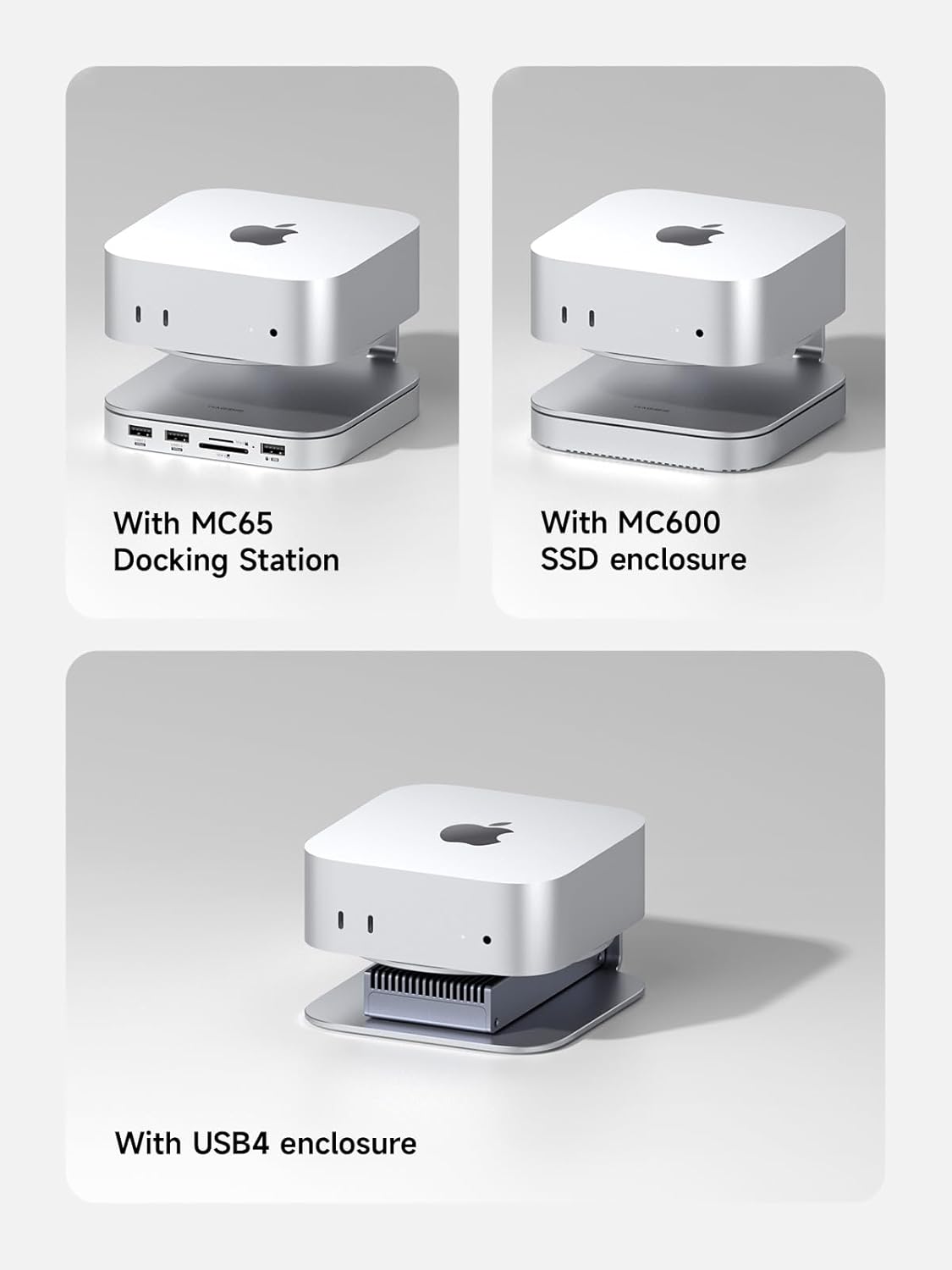
Image: Demonstrates the Hagibis Mac mini M4 Stand's compatibility and modularity with other Hagibis products, including docking stations and SSD enclosures.
Întreținere și îngrijire
- curatenie: Ștergeți suportul cu o cârpă moale și uscată. Pentru petele persistente, ștergeți ușoramp Se poate folosi o lavetă, urmată de uscarea imediată. Evitați substanțele de curățare abrazive sau solvenții.
- Tampoane din silicon: Ensure the silicone pads remain clean and free of debris to maintain their anti-slip properties and protect your Mac mini.

Imagine: Detaliată view of the double-sided silicone pads on the Hagibis Mac mini M4 Stand, designed for protection and stability.
- Plasare: Place the stand on a stable, level surface to prevent accidental tipping.
Depanare
As a passive accessory, the Hagibis Mac mini M4 Stand has minimal troubleshooting requirements.
- Instabilitate: If the stand appears unstable, ensure it is placed on a flat, even surface. Check that the silicone pads are clean and intact.
- Mac mini Not Fitting: Ensure you are using a compatible Mac mini model (M4 / M4 Pro). The stand is specifically designed for these dimensions.
Specificații
| Marca | Hagibis |
| Numărul de model | MMS07 |
| Dimensiunile produsului | 5.28 x 5 x 1.38 inci (aproximativ 134 mm x 127 mm x 35 mm) |
| Greutatea articolului | 7.1 ounces (201g approx.) |
| Material | Aluminum Alloy + Silicone |
| Culoare | Argint |
| Dispozitive compatibile | Mac mini M4 / M4 Pro |

Image: Technical diagram illustrating the dimensions of the Hagibis Mac mini M4 Stand.
Garanție și suport
For warranty information or technical support, please refer to the official Hagibis website-ul lor web sau contactați direct serviciul lor de asistență pentru clienți. Păstrați bonul fiscal pentru reclamații în garanție.
Official Hagibis Website: Magazinul Hagibis pe Amazon


