1. Introducere
This manual provides detailed instructions for the setup, operation, and maintenance of your LETSUNG GoLite 11 Mini PC. The GoLite 11 is a compact and powerful desktop computer designed for various applications, including home, office, and educational use. It features an Intel Celeron N4000 processor, 8GB of RAM, and a 128GB NVMe PCIe SSD, offering efficient performance for daily computing tasks.
Vă rugăm să citiți cu atenție acest manual înainte de a utiliza dispozitivul pentru a asigura funcționalitatea corectă și a maximiza durata de viață a acestuia.
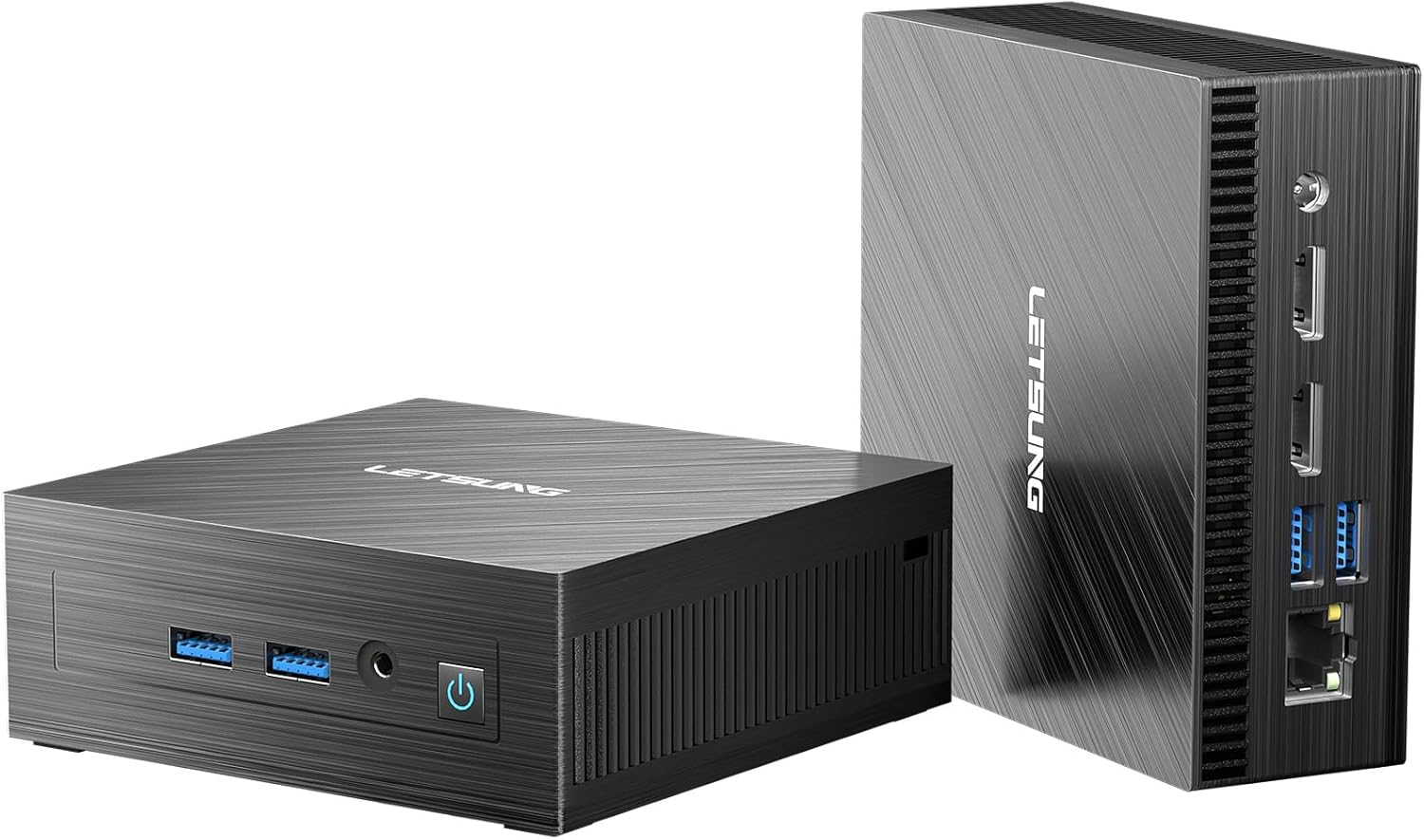
Image: The LETSUNG GoLite 11 Mini PC, showcasing its compact design and various ports from both front and rear perspectives.
2. Ce se află în cutie
La deschiderea pachetului, vă rugăm să verificați dacă sunt incluse toate următoarele articole:
- 1 x Golite 11 Mini PC
- 1 x cablu HDMI
- 1 x VESA Mount
- 1 x adaptor de alimentare
- 1 x Ghid de utilizare
3. Produs terminatview
3.1. Design și dimensiuni
The GoLite 11 Mini PC is designed for ultra-portability, measuring approximately 4.5 × 4.4 × 1.6 inches and weighing under 10 ounces. Its compact form factor allows it to fit easily into bags or even pockets, making it ideal for users who require computing power on the go. A VESA mount is included for convenient installation behind a monitor, optimizing desktop space.

Image: The GoLite 11 Mini PC demonstrating its compact size next to a laptop and smartphone, with an illustration of its VESA mount installation on the back of a monitor.
3.2. Porturi și conexiuni
The GoLite 11 Mini PC is equipped with a variety of ports to support diverse connectivity needs:
- Panoul frontal: Power Button, 2x USB 3.2 Gen 1 ports, 3.5mm Audio Jack.
- Panoul din spate: RJ45 LAN port, 2x USB 3.2 Gen 1 ports, 2x HDMI 1.4 ports, DC-IN port.

Imagine: Detaliată view of the GoLite 11 Mini PC's front and rear panels, with labels indicating the Power Button, USB 3.2 Gen 1 ports, 3.5mm Audio Jack, RJ45 LAN, HDMI 1.4, and DC-IN ports.
4. Ghid de instalare
4.1. Pornirea inițială
- Connect the power adapter to the DC-IN port on the rear of the Mini PC and plug it into a power outlet.
- Apăsați butonul de alimentare situat pe panoul frontal. Indicatorul luminos de alimentare se va aprinde.
4.2. Conectarea perifericelor
- Monitor: Connect your monitor(s) to the HDMI ports on the rear of the Mini PC using the provided HDMI cable or other compatible cables.
- Tastatura mouse: Connect your USB keyboard and mouse to any of the available USB 3.2 Gen 1 ports.
- Audio: For external speakers or headphones, connect them to the 3.5mm audio jack on the front panel.
4.3. Conexiune la rețea
- Conexiune prin cablu: Connect an Ethernet cable from your router or modem to the RJ45 LAN port on the rear of the Mini PC.
- Conexiune wireless: The GoLite 11 supports WiFi 5. Once the system boots, you can connect to your wireless network through the Windows operating system settings.
4.4. Configurarea afișajului dual
The GoLite 11 Mini PC supports dual displays via its two HDMI ports, allowing for extended desktop functionality at 1920x1080 resolution and 60Hz refresh rate. Connect two monitors to the HDMI ports and configure display settings within the Windows operating system.

Image: The GoLite 11 Mini PC positioned between two monitors, illustrating its capability to support a dual display setup for enhanced productivity.
5. Instrucțiuni de utilizare
5.1. Performanța sistemului
The GoLite 11 is powered by an 11th Gen Intel Celeron N4000 processor (2 cores, 2 threads, 4MB cache, up to 2.6GHz), providing reliable performance for everyday computing tasks such as web browsing, document editing, and multimedia consumption. The integrated Intel UHD Graphics supports 4K resolution for clear visuals.

Image: A graphic illustrating the performance metrics of the Intel N4000 processor, highlighting its 4MB cache and 1.10GHz-2.60GHz CPU frequency, with comparative bars against other processors.
5.2. Stocare și memorie
The Mini PC comes with 8GB of dual-channel LPDDR4 memory and a 128GB M.2 SATA SSD. The SSD offers significantly faster performance compared to traditional hard drives. The storage is upgradeable to 512GB, providing flexibility for your data needs.

Image: The GoLite 11 Mini PC connected to a monitor displaying various application icons, symbolizing its ample memory and flexible storage expansion capabilities for productivity and creative software.
5.3. Conectivitate wireless
The GoLite 11 supports WiFi 5 and Bluetooth 4.2, enabling seamless wireless connections for internet access and peripheral devices. This allows for a clutter-free workspace and easy integration into your existing wireless environment.

Image: The GoLite 11 Mini PC on a desk with a monitor, keyboard, and mouse, accompanied by symbols for WiFi 5 and Bluetooth 4.2, indicating its wireless office capabilities.
5.4. Porturi USB 3.2
Equipped with four USB 3.2 Gen 1 ports, the GoLite 11 offers high-speed data transfer for external drives, flash drives, and other USB devices, significantly reducing file transfer times compared to older USB standards.

Image: The GoLite 11 Mini PC with USB flash drives inserted into its USB 3.2 ports, alongside a graph comparing the read and write speeds of USB 2.0, USB 3.0, and USB 3.2.
6. Întreținere
6.1. Sistem de răcire
The GoLite 11 features a low-power and low-noise cooling system designed to maintain optimal operating temperatures and ensure stable performance. To ensure efficient cooling, keep the ventilation openings clear of obstructions and regularly clean any dust accumulation.

Image: An illustration of the GoLite 11 Mini PC's low-power and low-noise cooling system, showing airflow patterns for heat dissipation.
7. Depanare
This section provides solutions to common issues you might encounter with your GoLite 11 Mini PC.
- Fără putere: Asigurați-vă că adaptorul de alimentare este conectat corect atât la Mini PC, cât și la o priză funcțională. Încercați o altă priză dacă este necesar.
- Fără afișare: Verify that the HDMI cable is firmly connected to both the Mini PC and the monitor. Ensure the monitor is powered on and set to the correct input source. Try a different HDMI port or cable.
- Fără conexiune internet: For wired connections, check the Ethernet cable and router. For wireless, ensure Wi-Fi is enabled in Windows settings and you are connected to the correct network with the correct password.
- Performanță lentă: Închideți aplicațiile inutile. Verificați dacă există procese în fundal care consumă multe resurse. Asigurați suficient spațiu de stocare liber pe SSD.
- Periferic nedetectat: Ensure USB devices are properly inserted. Try a different USB port. Reinstall or update device drivers if necessary.
If issues persist, please refer to the warranty and support information for further assistance.
8. Specificații
Below are the detailed specifications for the LETSUNG GoLite 11 Mini PC:
| Caracteristică | Caietul de sarcini |
|---|---|
| Marca | LETSUNG |
| Numărul de model | Golite 11 |
| Procesor | Intel Celeron N4000 (1.1 GHz, până la 2.6 GHz) |
| Nuclee/Fire de execuție CPU | 2 Cores, 2 Threads |
| Dimensiune cache | 4 MB |
| RAM | 8 GB LPDDR4 (Dual Channel) |
| Depozitare | 128 GB M.2 SATA SSD (Upgradeable to 512GB) |
| Coprocesor grafic | Intel UHD Graphics 600 |
| Rezoluția maximă a ecranului | 1920x1080 Pixels @ 60Hz |
| Ieșire afișată | 2x HDMI 1.4 (Dual Display Support) |
| Porturi USB | 4x USB 3.2 Gen 1 |
| Tip fără fir | WiFi 5, Bluetooth 4.2 |
| LAN | Ethernet RJ45 |
| Audio | 3.5mm Audio Jack |
| Sistem de operare | Windows (Instant-On System) |
| Greutatea articolului | 1.9 lire sterline |
| Dimensiuni pachet | 11 x 7.5 x 3.3 inci |
| Culoare | Negru |
9. Garanție și asistență
LETSUNG provides a 3-year warranty for the GoLite 11 Mini PC from the date of purchase. This warranty covers any failures caused by design or craftsmanship. Our dedicated customer service team is committed to meeting your needs and ensuring you enjoy using your Mini PC to the fullest.
For technical support, warranty claims, or any inquiries, please contact LETSUNG customer service through the official channels provided at the point of purchase or on the LETSUNG website-ul.


