Introducere
This manual provides comprehensive instructions for setting up, operating, maintaining, and troubleshooting your HP OMEN Ultra Slim RTX 5070 Gaming Laptop. Please read this manual thoroughly to ensure optimal performance and longevity of your device. Keep this manual for future reference.
Înființat
Follow these steps for the initial setup of your HP OMEN gaming laptop:
- Unboxing: Carefully remove the laptop and all accessories from the packaging. Ensure all components listed in the 'What's in the Box' section are present.
- Conectare alimentare: Plug the AC adapter into the laptop's power port and then into a wall outlet. The laptop may have some charge, but it is recommended to fully charge it before first use.
- Prima pornire: Open the laptop lid and press the power button. Follow the on-screen instructions to complete the Windows 11 Home setup, including language selection, network connection, and user account creation.
- Cooler Setup: If bundled with a PCO Notebook Fold Radiator, Cooler, position it beneath the laptop to enhance airflow and cooling during use.

Image: HP OMEN Ultra Slim RTX 5070 Gaming Laptop with included PCO Notebook Fold Radiator, ready for initial setup.
Video: Un pesteview of the HP OMEN Slim laptop, demonstrating its design and features relevant to initial setup and daily use.
Funcționează
This section details the primary operational aspects of your laptop.
Afişa
Your laptop features a 16-inch WQXGA (2560 x 1600) display with a 240 Hz refresh rate and 3ms response time. This IPS panel offers micro-edge design, anti-glare properties, Low Blue Light technology, 500 nits brightness, and 100% sRGB color accuracy for a clear and vibrant visual experience.

Image: Close-up of the 16-inch WQXGA display showcasing its 240Hz refresh rate.
Tastatură și touchpad
The laptop is equipped with an RGB backlit keyboard and a numeric keypad for enhanced usability and customization. The touchpad provides precise navigation and multi-touch gesture support.
Porturi și conectivitate
The HP OMEN TPN-Q304 offers a variety of ports for connectivity:
- 3 x Superspeed USB Type-A
- 1 x Superspeed USB Type-C
- 1 x HDMI 2.1
- 1 x RJ-45 (Ethernet)
- 1 x Headphone/Microphone Combo Jack
- AC Smart Pin (Power Input)
Wireless connectivity includes Wi-Fi 6 and Bluetooth for high-speed internet and peripheral connections.

Imagine: Laterală view of the HP OMEN laptop highlighting the available ports.
Caracteristici
Key features of your HP OMEN laptop include:
- Procesor: Intel Core Ultra 9 285H (16 Cores, 16 Threads, 24MB L3 Cache, up to 5.4GHz Max Turbo Frequency). This processor is designed for demanding applications and multitasking.
- Grafică: NVIDIA GeForce RTX 5070 (8GB GDDR7). This dedicated graphics card provides high-performance rendering for gaming and creative tasks.
- Memorie: 32GB DDR5 RAM for smooth multitasking and application performance.
- Depozitare: 1TB PCIe NVMe M.2 Solid State Drive for fast boot-up times and rapid data access.
- Sistem de operare: Windows 11 Home, offering a modern interface and enhanced features.

Imagine: Detaliată view of the Intel Core Ultra 9 285H processor specifications.
Image: Visual representation of the NVIDIA GeForce RTX 5070 graphics card.
Întreţinere
Proper maintenance ensures the longevity and performance of your laptop.
- curatenie: Folosiți o lavetă moale, fără scame, pentru a curăța ecranul și exteriorul. Pentru pete persistente,ampCurățați laveta cu apă sau cu un produs de curățare sigur pentru ecran. Evitați substanțele chimice dure.
- Ventilare: Keep the laptop's vents clear of obstructions to prevent overheating. Regularly clean dust from the vents using compressed air.
- Cooling Pad: Utilize the bundled PCO Notebook Fold Radiator, Cooler, especially during extended gaming or heavy workload sessions, to maintain optimal operating temperatures.
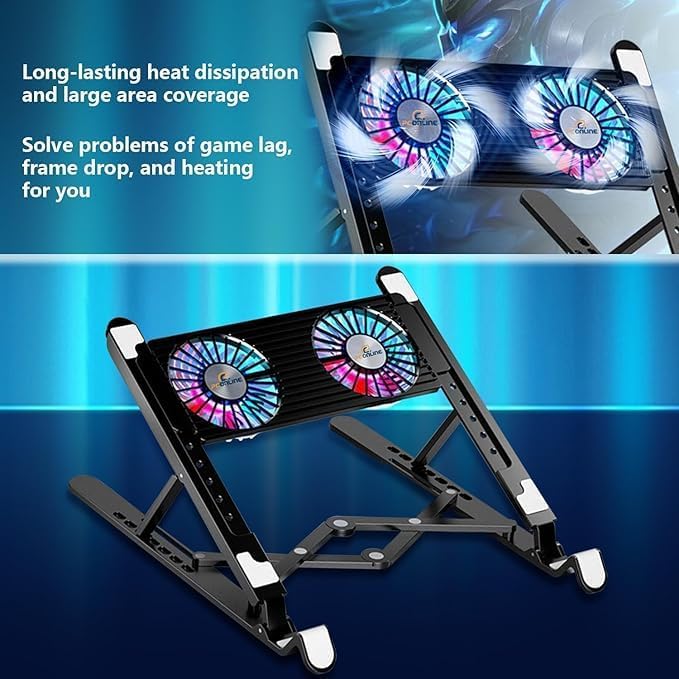
Image: The PCO Notebook Fold Radiator, Cooler, designed for long-lasting heat dissipation and large area coverage to prevent game lag, frame drop, and heating.
Depanare
Here are solutions for common issues you might encounter:
- Fără putere: Ensure the AC adapter is securely connected to both the laptop and a working power outlet. Try a different outlet if necessary.
- Probleme de afișare: Dacă ecranul este gol, încercați să conectați un monitor extern pentru a verifica dacă problema este la afișajul laptopului. Reporniți laptopul.
- Întârziere de performanță: Close unnecessary applications. Ensure the laptop is well-ventilated and consider using the cooling pad. Update graphics drivers.
- Probleme de conectivitate: For Wi-Fi issues, restart your router and the laptop. For wired connections, check the Ethernet cable.
Specificații
| Caracteristică | Caietul de sarcini |
|---|---|
| Marca | HP |
| Numele modelului | TPN-Q304 |
| Dimensiunea ecranului | 16 inchi |
| Rezoluția ecranului | WQXGA (2560 x 1600) |
| Rata de reîmprospătare | 240 Hz |
| Timp de răspuns | 3 ms |
| Procesor | Intel Core Ultra 9 285H (până la 5.4 GHz) |
| Coprocesor grafic | NVIDIA GeForce RTX 5070 (8GB GDDR7) |
| RAM | 32 GB DDR5 |
| Hard Drive | SSD M.2 PCIe NVMe de 1 TB |
| Sistem de operare | Windows 11 Home |
| Tip fără fir | 802.11ax (Wi-Fi 6) |
| Porturi | 3x USB Type-A, 1x USB Type-C, 1x HDMI 2.1, 1x RJ-45, 1x Headphone/Mic Combo |
| Caracteristici speciale | RGB Backlit Keyboard, Numeric Keypad |
| Culoare | Negru |
| Greutatea articolului | 49.8 pounds (Note: This weight seems unusually high for a laptop and may include packaging or accessories. Please refer to product packaging for accurate device weight.) |
| Dimensiunile produsului | 14.07 x 10.59 x 0.78 inci |
Garanție și suport
Your HP OMEN Ultra Slim RTX 5070 Gaming Laptop comes with standard manufacturer's warranty. For specific warranty terms and conditions, please refer to the documentation included with your product or visit the official HP support website. Extended protection plans may be available for purchase separately.
For technical support, driver downloads, or service inquiries, please visit the official HP support portal or contact HP customer service.