1. Introducere
Thank you for choosing the DEATTI 1080P Body Camera Pen. This device is designed for discreet video and picture recording, offering a portable solution for capturing important moments. This manual provides essential information on how to set up, operate, and maintain your device to ensure optimal performance.
2. Conținutul pachetului
Vă rugăm să verificați pachetul pentru următoarele articole:
- DEATTI 1080P Body Camera Pen (DECM43)
- Cablu de date/încărcare USB
- Manual de instrucțiuni (acest document)
3. Produs terminatview
Familiarize yourself with the components of your DEATTI Body Camera Pen:

Figura 3.1: Diagram illustrating the various parts of the DEATTI Body Camera Pen, including the ON/OFF button, FHD 1080P lens, LED indicator, Reset button, Mode Switch USB port, SD Card Slot, and pen refill.
- Buton ON/OFF: Located at the top, used for powering the device on and off, and initiating recording functions.
- FHD Lens 1080P: The camera lens, capable of capturing 1080P high-definition video.
- Indicator LED: Provides visual feedback on the device's status (e.g., power on, recording, low battery).
- Buton de resetare: A small, recessed button to reset the device if it becomes unresponsive.
- Mode Switch USB Port: Used for connecting to a computer for data transfer and charging.
- Slot pentru card SD: For inserting a microSD (TF) card, which is required for storing recordings.
- Pen Refill: The functional writing component of the pen.
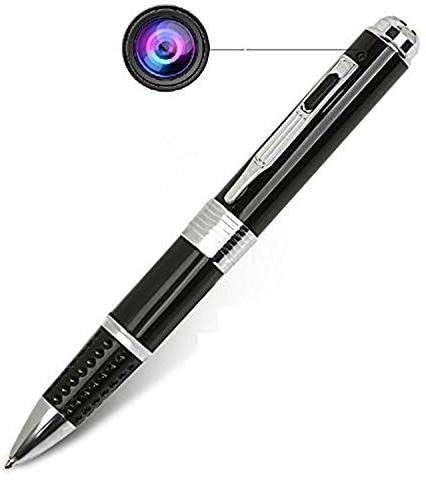
Figura 3.2: The DEATTI 1080P Body Camera Pen, showcasindatorită designului său compact și discret.
4. Configurare
4.1. Încărcarea dispozitivului
Before first use, fully charge the device. The pen camera has a built-in 240 mAh lithium battery, providing up to 85 minutes of continuous recording. It also supports recording while charging.
- Connect the USB charging/data cable to the pen's USB port.
- Plug the other end of the cable into a USB power adapter (not included) or a computer's USB port.
- The LED indicator will show the charging status (refer to LED indicator section for details).
- Odată încărcată complet, deconectați cablul.
4.2. Introducerea cardului SD
A microSD (TF) card is required for storing video and picture files. The device does not have internal storage.

Figura 4.1: Visual guide for inserting a TF card and the power on/off process, showing LED indicator behavior.
- Locate the SD card slot on the pen (refer to Figure 3.1).
- Gently insert a formatted microSD (TF) card into the slot until it clicks into place.
- If the device is powered on, the indicator light will flash once and then remain green when a TF card is detected. If no TF card is detected, the indicator light will flash red 7 times and the device will power off automatically.
5. Instrucțiuni de utilizare
5.1. Pornire/Oprire
- Pentru a porni: Long press the top operation key for approximately 2 seconds. The indicator light will turn green, indicating the device is on standby.
- Pentru a opri: Long press the top operation key for approximately 3 seconds. The indicator light will turn off.
5.2. Înregistrare video
Specific instructions for starting and stopping video recording are not detailed in the provided information. Typically, a short press of the ON/OFF button while in standby mode initiates recording, and another short press stops it. The LED indicator will change to reflect recording status (e.g., flashing red).
5.3. Realizarea de fotografii
Specific instructions for taking photos are not detailed. Often, a different button press sequence or a mode switch is used. Please observe the LED indicator for changes in mode or status after pressing the operation key.
5.4. Ghid indicator LED
The LED indicator provides crucial information about the device's status:
- Verde continuu: Device is powered on and in standby mode.
- Flashing Green (once, then solid green): TF card detected upon power-on.
- Flashing Red (7 times, then off): No TF card detected.
- (Inferred) Flashing Red: Device is currently recording video.
- (Inferred) Solid Red: Low battery or charging status.

Figura 5.1: The DEATTI Body Camera Pen positioned discreetly on a desk next to a notebook, illustrating its intended use for hidden recording.
6. Conectarea la un computer
Pentru a accesa înregistrarea files or charge the device via a computer:
- Ensure the pen camera is powered off.
- Connect the pen camera to your computer using the provided USB cable.
- The computer should recognize the device as a removable disk.
- Deschideți discul amovibil la view, copy, or delete your video and picture files.
- The device will also charge while connected to the computer.
7. Întreținere
- curatenie: Use a soft, dry cloth to clean the pen's body. For the lens, use a specialized lens cleaning cloth to avoid scratches.
- Îngrijirea bateriei: Pentru a prelungi durata de viață a bateriei, evitați descărcarea completă frecventă a bateriei. Încărcați dispozitivul în mod regulat, chiar dacă nu îl utilizați pentru perioade lungi de timp.
- Card SD: Periodically format the microSD card to maintain optimal performance and prevent data corruption. Back up important files înainte de formatare.
- Depozitare: Depozitați dispozitivul într-un loc răcoros și uscat, ferit de lumina directă a soarelui și de temperaturi extreme.
- Pen Refill: The pen refill can be replaced like a standard ballpoint pen refill when it runs out of ink.
8. Depanare
| Problemă | Cauza posibila | Soluţie |
|---|---|---|
| Dispozitivul nu pornește. | Baterie descărcată; dispozitiv blocat. | Charge the device fully. Press the reset button with a small pin. |
| Cannot record video/take pictures. | No SD card; SD card full/corrupted; incorrect operation mode. | Insert a formatted SD card. Delete old files or replace SD card. Ensure correct button presses for desired function. |
| Poor video/picture quality. | Lentilă murdară; iluminare insuficientă. | Clean the camera lens. Ensure adequate lighting in the recording environment. |
| Dispozitivul nu este recunoscut de computer. | Faulty USB cable/port; device not powered off. | Try a different USB cable or port. Ensure the pen camera is powered off before connecting. |
9. Specificații
| Caracteristică | Detaliu |
|---|---|
| Marca | DEATTI |
| Numărul de model | DECM1 (Product Variant: DECM43) |
| Rezoluție captură video | 1080p |
| Tip memorie flash | SD (microSD/TF card required) |
| Format de captură video | MPEG-4 |
| Tehnologia de conectivitate | USB |
| Caracteristici speciale | One-Key Operation, Discrete Design, Multi-Functional Recording |
| Baterie | 240 mAh high-performance polymer lithium battery |
| Timp de înregistrare | Up to 85 minutes continuous recording |
| Dispozitive compatibile | Personal Computer, Laptop, WiFi-enabled Devices (Note: WiFi functionality not explicitly detailed in product features) |
| Dimensiunile produsului | 10 x 5 x 10 cm |
| Greutatea articolului | 330 g |
10. Garanție și asistență
10.1. Informații despre garanție
Standard warranty terms for the DEATTI 1080P Body Camera Pen are typically provided by the seller or manufacturer at the time of purchase. Please retain your proof of purchase for any warranty claims. An optional 1-year extended warranty plan may be available from third-party providers like Onsitego.
10.2. Asistență pentru clienți
For technical assistance, troubleshooting beyond this manual, or warranty inquiries, please contact the retailer or the DEATTI customer support channel through which you purchased the product. Refer to your purchase documentation for specific contact details.


