1. Introducere
This manual provides detailed instructions for the installation, operation, and maintenance of your EmpireTech IPC-T54PRO-ZE 4MP Turret IP Camera. Please read this manual thoroughly before using the product to ensure proper functionality and safety.
The EmpireTech IPC-T54PRO-ZE is a high-performance 4-megapixel IP camera featuring a 1/1.8" CMOS image sensor, motorized vari-focal lens (2.7mm-12mm), built-in IR and warm dual lights, two-way talk capability, and Intelligent Video System (IVS) functions. It is designed for both indoor and outdoor surveillance applications.
2. Conținutul pachetului
Verify that all items are present and in good condition. If any items are missing or damaged, contact your vendor immediately.
- EmpireTech IPC-T54PRO-ZE 4MP Turret IP Camera
- Elemente de montare (șuruburi, ancore de perete)
- Conector impermeabil pentru cablu Ethernet
- Ghid de pornire rapidă
- Șablon de foraj
3. Produs terminatview
The following image illustrates the main components of the EmpireTech IPC-T54PRO-ZE camera.
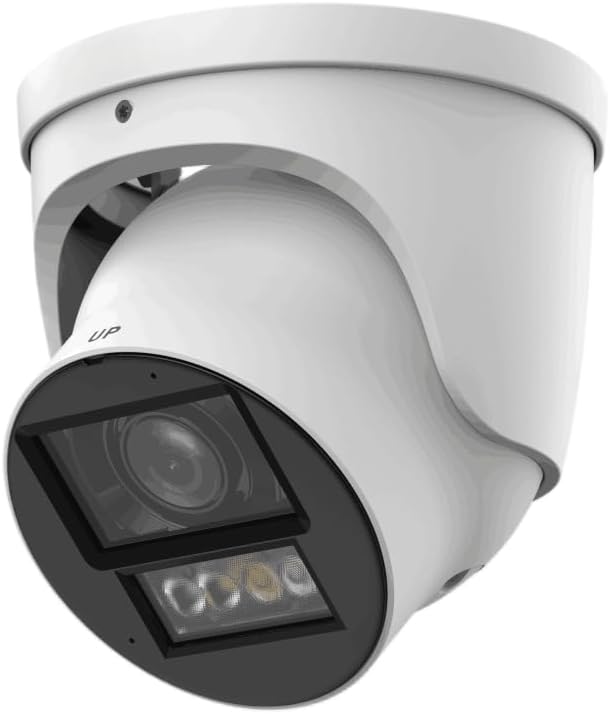
Figure 3.1: EmpireTech IPC-T54PRO-ZE Turret IP Camera. This image shows the front and side view of the white turret camera, highlighting the lens, IR/warm lights, and the adjustable mounting bracket.
- Obiectivul camerei: 2.7mm-12mm Motorized vari-focal lens.
- Iluminatoare IR: Provides infrared light for night vision up to 60m.
- Lumini calde: Provides visible light for color night vision up to 50m and active deterrence.
- Microfon: Built-in dual microphone for audio input.
- Vorbitor: Built-in speaker for two-way talk functionality.
- Port Ethernet (PoE): For network connection and Power over Ethernet.
- Putere de intrare: Intrare alimentare 12 V CC.
- Slot pentru card Micro SD: Supports up to 1 TB Micro SD card for local storage.
- I/O alarmă: 1 input, 1 output.
- I/O audio: 1 input, 1 output.
- Port RS-485: For control and communication.
4. Configurare și instalare
4.1 Măsuri de siguranță
- Asigurați-vă că sursa de alimentare este deconectată înainte de instalare sau întreținere.
- Use only specified power adapters (12 VDC or PoE).
- Evitați expunerea camerei la temperaturi extreme sau umiditate.
- Do not attempt to disassemble the camera. Refer servicing to qualified personnel.
4.2 Montarea camerei
- Alegeți o locație: Select a suitable indoor or outdoor location that provides the desired viewing angle and is within range of your network and power source. The camera is IP67 and IK10 rated for outdoor use.
- Pregătiți suprafața: Use the provided drill template to mark the screw holes on the mounting surface.
- Găuri: Drill pilot holes for the mounting screws and insert wall anchors if necessary.
- Securizați camera: Attach the camera base to the mounting surface using the provided screws.
- Reglarea unghiului: Loosen the adjustment screws to position the camera lens to the desired viewing angle, then tighten the screws to secure it.
4.3 Conexiuni de cablare
- Conexiune Ethernet: Connect an Ethernet cable to the camera's RJ45 port. If using PoE, this will also provide power. Use the waterproof connector for outdoor installations.
- Conexiune la alimentare (opțională): If not using PoE, connect a 12 VDC power adapter (not included) to the camera's power input port.
- Audio/Alarm/RS-485 (Optional): Connect external audio devices, alarm sensors, or RS-485 control devices as required.
- Instalare card micro SD: Locate the Micro SD card slot (usually under a cover) and insert a Micro SD card (up to 1 TB) for local storage. Ensure the camera is powered off before inserting/removing the card.
5. Instrucțiuni de utilizare
5.1 Initial Setup and Network Configuration
- Pornire: Connect the camera to power (PoE or 12V DC adapter).
- Acces la rețea: The camera will obtain an IP address via DHCP by default. Use the manufacturer's IP Search Tool (available on the EmpireTech website) to find the camera's IP address on your network.
- Web Acces la interfață: Deschide a web browser and enter the camera's IP address. Log in using the default username and password (refer to the Quick Start Guide or manufacturer's documentation for default credentials).
- Schimbaţi parola: Din motive de securitate, schimbați parola implicită imediat după prima conectare.
- Setări de rețea: Configure network settings (e.g., static IP address) if required.
5.2 Video Surveillance and Recording
- Trăi View: Accesați fluxul video în direct prin intermediul web interface or a compatible NVR/VMS software.
- Motorized Lens Control: Use the zoom and focus controls in the web interface to adjust the 2.7mm-12mm motorized vari-focal lens for optimal clarity.
- Înregistrare: Configure recording schedules, motion detection recording, or continuous recording to the Micro SD card, NVR, or network storage.
- Smart H.264+/H.265+ Encoding: The camera supports advanced compression for efficient storage and bandwidth usage.
5.3 Dual Light Modes (IR and Warm Light)
- The camera features built-in IR illuminators for black and white night vision and warm lights for full-color night vision.
- Lumină dublă inteligentă: The camera can automatically switch between IR and warm light modes based on detected events or ambient light conditions. Configure these settings in the camera's web interfata.
5.4 Conversație bidirecțională
- Utilize the built-in dual microphone and speaker for two-way audio communication through the camera's web interface or compatible mobile application.
5.5 Sistem video inteligent (IVS)
- The camera supports IVS features such as tripwire and intrusion detection. Configure these functions in the camera's web interface to enhance surveillance capabilities and trigger alarms.
6. Întreținere
- Curățare regulată: Periodically clean the camera lens and housing with a soft, dry cloth. For stubborn dirt, use a mild cleaning solution and a soft cloth. Do not use abrasive cleaners.
- Actualizări firmware: Check the EmpireTech official website regularly for firmware updates. Updating firmware can improve performance, add new features, and enhance security. Follow the provided instructions carefully when updating.
- Gestionarea parolelor: Regularly change your camera's password to maintain security.
- Managementul stocării: Dacă utilizați un card Micro SD, reîncărcați periodicview și gestionați foo înregistratetage to ensure sufficient storage space.
7. Depanare
| Problemă | Cauza posibila | Soluţie |
|---|---|---|
| Fără flux video | Lipsă de alimentare; Problemă de conexiune la rețea; Adresă IP incorectă. | Check power supply (PoE or 12V DC). Verify Ethernet cable connection. Use IP Search Tool to confirm IP address. |
| Calitate slabă a imaginii | Dirty lens; Incorrect focus; Low light conditions. | Clean the lens. Adjust the motorized vari-focal lens focus via the web interface. Ensure IR/warm lights are enabled for low light. |
| Nu se poate accesa web interfață | Incorrect IP address; Network firewall; Browser issues. | Verify IP address. Check network firewall settings. Try a different web browser. |
| Convorbirea în două sensuri nu funcționează | Microphone/speaker settings; Network bandwidth. | Check audio settings in the web interface. Ensure sufficient network bandwidth. |
8. Specificații
| Caracteristică | Detaliu |
|---|---|
| Numărul de model | IPC-T54PRO-ZE |
| Senzor de imagine | CMOS de 4 MP și 1/1.8" |
| Max. Rezoluţie | 4 MP (2688 × 1520) @25/30 fps |
| Tip de lentile | 2.7mm-12mm Motorized Vari-focal |
| Distanța IR | Până la 60 m (196.85 ft) |
| Warm Light Distance | Până la 50 m (164.04 ft) |
| Compresie video | ROI, SVC, SMART H.264+/H.265+, AI H.264/H.265 |
| Audio | Built-in Dual Mic, 1-ch Speaker, Two-Way Talk |
| Depozitare | Micro SD card (max. 1 TB) |
| I/O alarmă | 1 in, 1 out |
| Alimentare electrică | 12 VDC/PoE (ePoE support) |
| Putere de ieșire | 12 VDC, max. 165mA |
| Protecţie | IP67, IK10 |
| Dimensiuni | 5.02 x 4.8 x 5.02 inci |
| Greutate | 2.03 lire sterline |
| Protocol de conectivitate | Ethernet |
| Utilizări specifice | Surveillance (Indoor, Outdoor) |
9. Informații despre garanție
EmpireTech products typically come with a limited manufacturer's warranty. For specific warranty terms and conditions, please refer to the warranty card included with your product or visit the official EmpireTech webPăstrați dovada achiziției pentru reclamații în garanție.
10. Asistență pentru clienți
If you encounter any issues or have questions regarding your EmpireTech IPC-T54PRO-ZE camera, please contact EmpireTech customer support through their official website-ul sau informațiile de contact furnizate în documentația produsului.
- Resurse online: Vizitați Magazinul EmpireTech pe Amazon pentru informații despre produse și actualizări.
- Suport tehnic: Refer to the contact details provided in your product packaging or on the official EmpireTech website pentru asistență tehnică.


