1. Introducere
This manual provides detailed instructions for the installation, operation, and maintenance of your BOTSLAB G980H 3-Channel 4K Dash Cam. Please read this manual thoroughly before using the device to ensure proper functionality and safety. Keep this manual for future reference.
2. Conținutul pachetului
Verificați dacă toate articolele enumerate mai jos sunt incluse în colet. Dacă lipsesc sau sunt deteriorate articole, vă rugăm să contactați serviciul de asistență pentru clienți.

Image: Contents of the BOTSLAB G980H Dash Cam package, including the main unit, rear camera, cables, and accessories.
- BOTSLAB G980H Multi-Channel Dash Cam Unit
- Rear Camera (6.5M cable)
- Card MicroSD de 128 GB
- Car Charger (3.5M cable)
- Installation Pry Bar
- Electrostatic Film (x2)
- 3M Tapes (x2)
- Manual de utilizare
- Card de avertizare
3. Produs terminatview
The BOTSLAB G980H is a 3-channel dash camera system designed to record video from the front, rear, and interior of your vehicle. It features 4K front recording, 1080P for rear and cabin cameras, a 3.18-inch touch screen, voice control, built-in GPS, and 5.8GHz Wi-Fi for fast file transferuri.
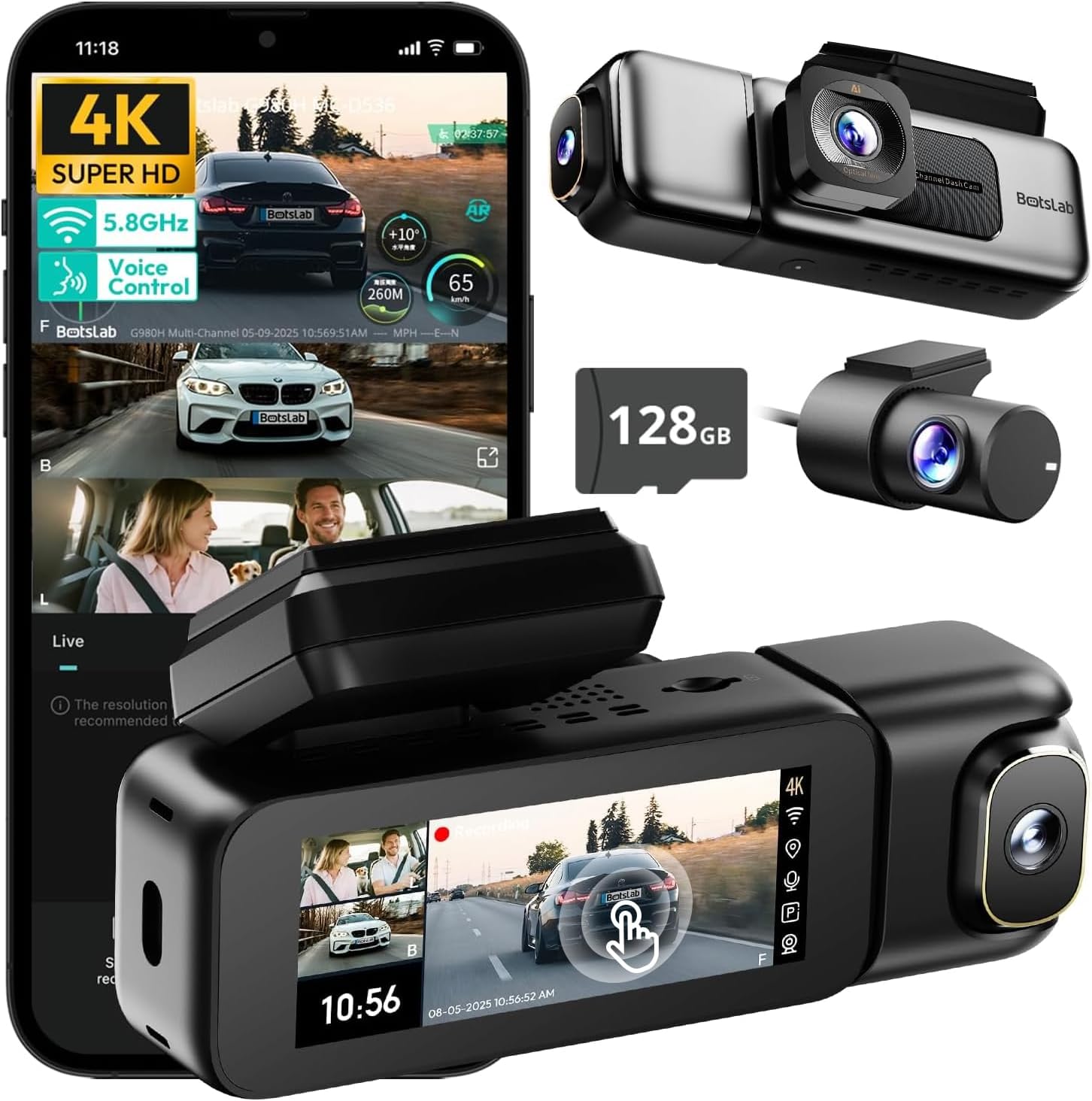
Image: The BOTSLAB G980H 3-Channel Dash Cam, showing the main unit, detachable cabin camera, rear camera, and a 128GB MicroSD card.

Image: Visual representation of the dash cam's wide viewing angles: 170° for the front camera (4K), 120° for the cabin camera (1080P), and 150° for the rear camera (1080P).

Image: Diagram illustrating the dash cam's low-light performance features, including F1.8 aperture, 940nm infrared lights, WDR technology, and a 6-lens system for clear footage.

Image: Illustration highlighting the supercapacitor's role in maintaining data safety during sudden power loss and its resistance to extreme temperatures (-20°C to 70°C).
Caracteristici cheie:
- Înregistrare pe 3 canale: Simultaneous 4K front, 1080P rear, and 1080P cabin recording.
- Lat View Unghiuri: 170° front, 150° rear, and 120° cabin for comprehensive coverage.
- Ecran tactil de 3.18": Intuitive interface for settings adjustment and playback.
- Control vocal: Hands-free operation for common functions.
- GPS încorporat: Records speed, location, and routes.
- Wi-Fi de 5.8 GHz: Rapid file transfer and app connectivity.
- Monitor de parcare: Three modes (Sentry, Time-Lapse, Collision Detection) for 24/7 surveillance (requires hardwire kit).
- Supercondensator: Enhanced durability and safety in extreme temperatures.
- WDR & HDR: Optimized imaging in varying light conditions.
- Înregistrare în buclă: Continuous recording, overwriting oldest files când cardul este plin.
- Senzor G: Blocează automat mâncareatage în timpul coliziunilor.
4. Configurare și instalare
Follow these steps to properly install your BOTSLAB G980H Dash Cam in your vehicle.

Image: The dash cam's adjustable design, featuring a magnetic snap-on mechanism for the cabin camera and 90-degree vertical and 360-degree horizontal rotation for optimal view personalizare.

Image: A simplified diagram showing the typical installation points for the G980H Multi-Channel Dash Cam, including the main unit on the windshield, the rear camera, and the car charger connection.
- Pregătiți cardul MicroSD: Insert the provided 128GB MicroSD card into the dash cam's card slot. Ensure the card is correctly oriented.
- Montați camera frontală:
- Curățați zona parbrizului unde intenționați să montați camera de bord.
- Apply the electrostatic film to the chosen area on the windshield.
- Attach the dash cam mount to the electrostatic film using the 3M adhesive tape. Ensure a secure fit.
- Slide the main dash cam unit onto the mounted bracket.
- Instalați camera spate:
- Identify a suitable location on your rear windshield for the rear camera. Clean the area.
- Attach the rear camera using its adhesive.
- Route the rear camera cable to the main dash cam unit, tucking it along the vehicle's headliner and pillars using the pry bar.
- Conectați cablul camerei spate la portul corespunzător de pe unitatea principală a camerei de bord.
- Conectare alimentare:
- Connect the car charger cable to the main dash cam unit.
- Plug the car charger into your vehicle's 12V power outlet (cigarette lighter socket).
- Traseați cablul de alimentare cu grijă pentru a evita obstrucționarea.
- Ajustați unghiurile camerei: Power on the dash cam and adjust the front, cabin (if detachable), and rear camera angles to ensure optimal coverage. The cabin camera features a magnetic snap-on design and can be rotated 90 degrees vertically, while the main unit allows 360-degree rotation for the front lens.
5. Operare de bază
Learn how to use the primary functions of your dash cam.
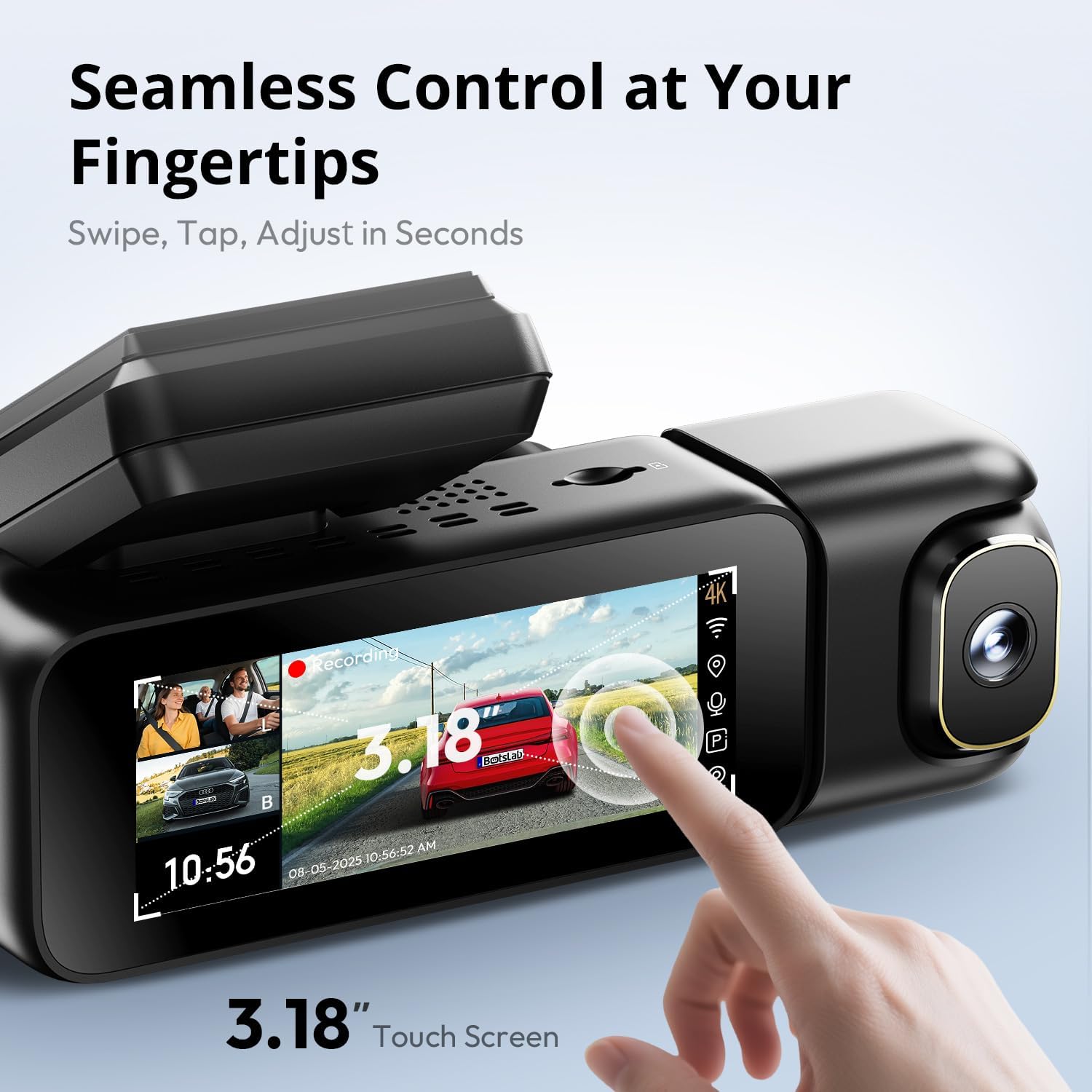
Image: A close-up of the dash cam's 3.18-inch touch screen, showing the live view from multiple cameras and on-screen controls for recording and settings.
Pornire/Oprire:
- Camera de bord se va porni automat și va începe înregistrarea atunci când contactul vehiculului este cuplat.
- Se va opri automat la scurt timp după ce contactul este oprit.
Înregistrare:
- Înregistrare normală: The dash cam continuously records in a loop. When the MicroSD card is full, the oldest unlocked files sunt suprascrise.
- Înregistrare de urgență (senzor G): In the event of a sudden impact or collision, the built-in G-sensor will automatically detect the event and lock the current video segment (including 8 seconds prior to the event) to prevent it from being overwritten.
Funcționarea ecranului:
- The 3.18-inch touch screen allows you to navigate menus, adjust settings, and view trăi footage or recorded videos.
- Swipe and tap gestures are used for control.
6. Caracteristici avansate
Control vocal:
Operate your dash cam hands-free using voice commands for safer driving. The dash cam responds to specific phrases.
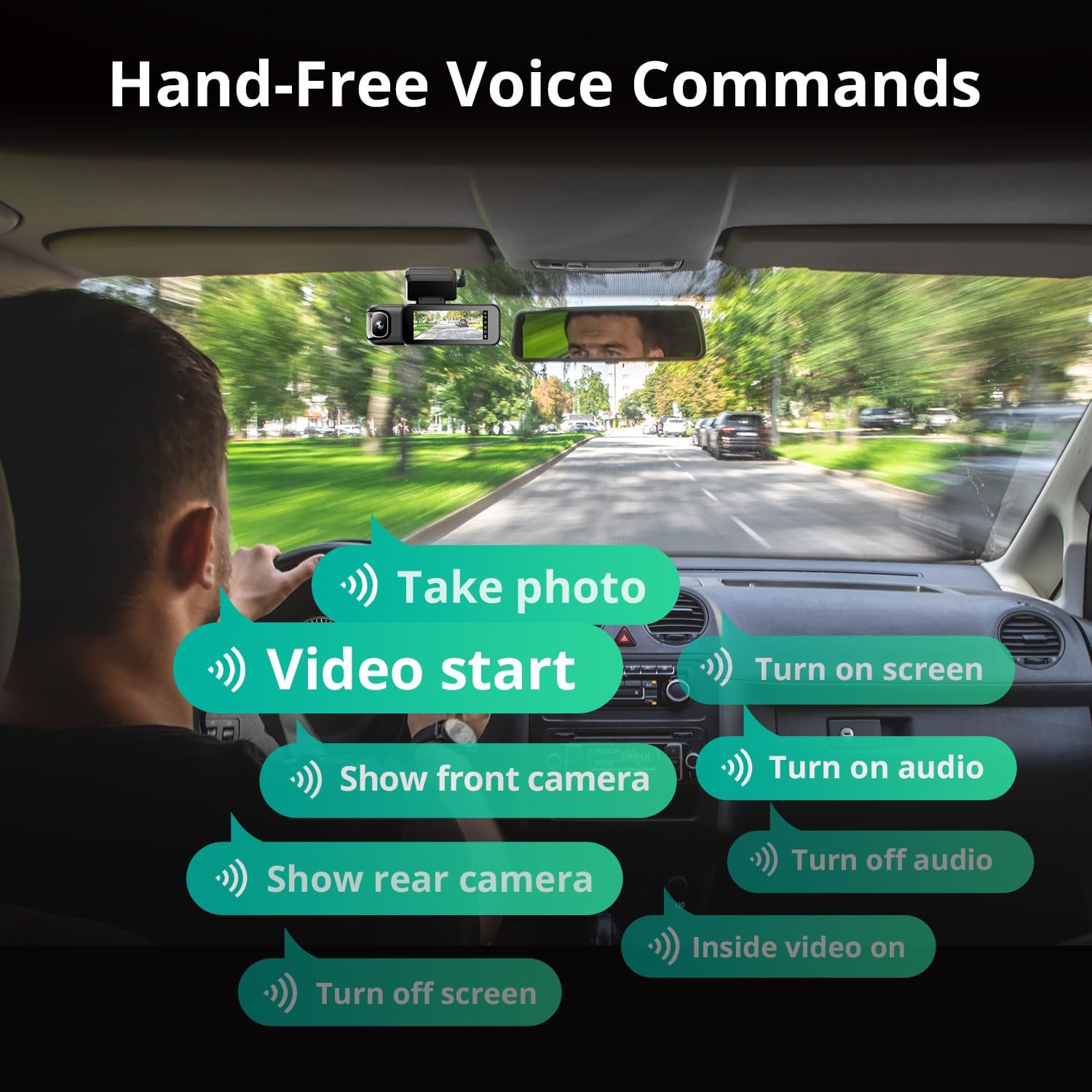
Image: A visual guide to the available voice commands, such as "Take photo," "Video start," "Turn on screen," "Show front camera," "Show rear camera," "Turn on audio," "Turn off audio," "Inside video on," and "Turn off screen."
Common voice commands include:
- „Fă o fotografie”
- „Început videoclip”
- „Porniți ecranul”
- „Afișează camera frontală”
- „Afișează camera din spate”
- „Activează sunetul”
- „Dezactivează sunetul”
- "Inside video on"
- „Opriți ecranul”
Monitor de parcare 24/7:
The dash cam offers continuous surveillance when your vehicle is parked. A hardwire kit (ASIN: B0FH2H9DDB) is required for this functionality.
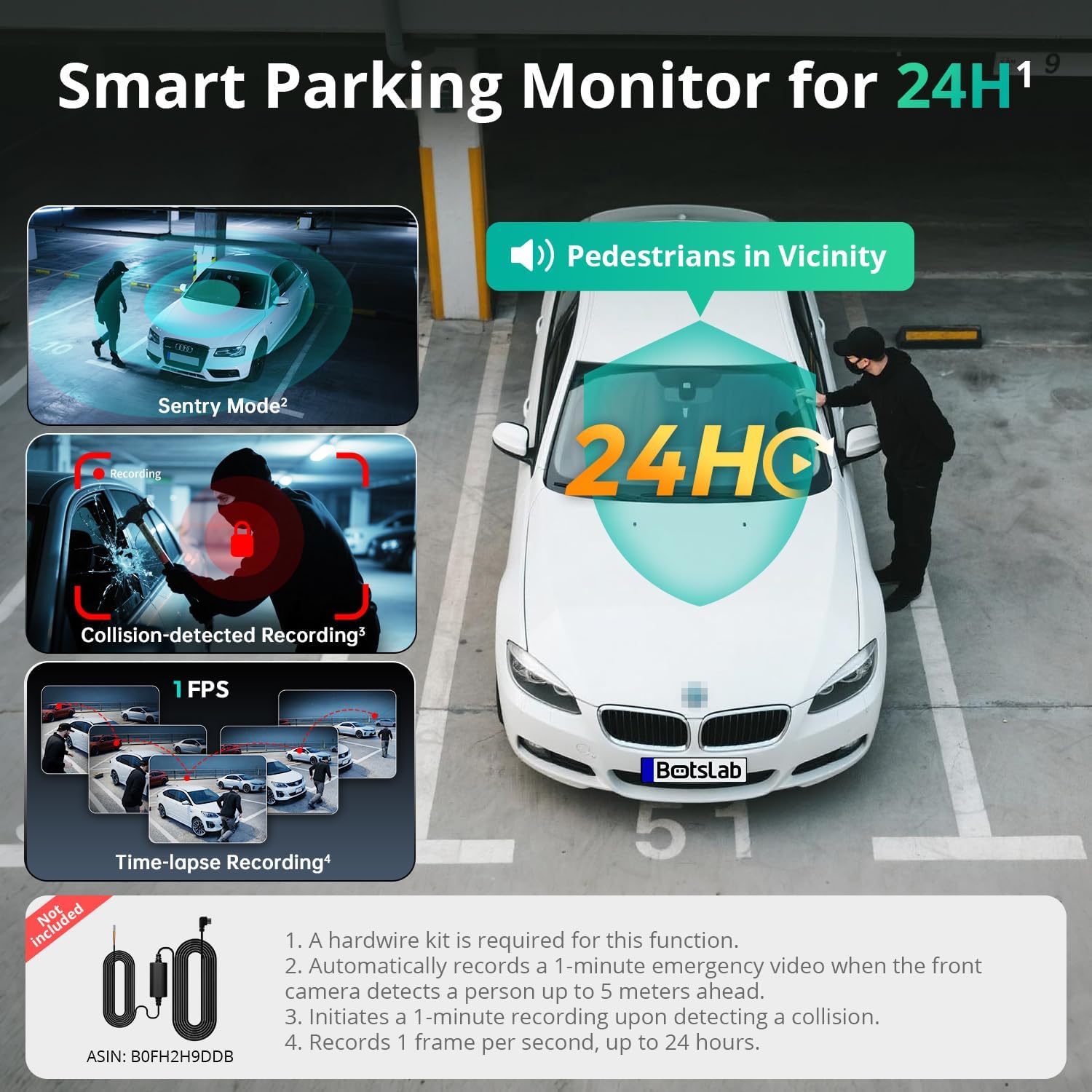
Image: An illustration of the three parking monitor modes: Sentry Mode (detects people within 5 meters), Collision-detected Recording (locks footage on impact), and Time-lapse Recording (1 frame per second for extended surveillance).
Moduri disponibile:
- Sentry Mode: Automatically records a 1-minute emergency video when the front camera detects a person within 5 meters.
- Interval de timp: Records at 1 frame per second for extended surveillance, up to 24 hours.
- Detectarea coliziunilor: Locks 1-minute footagla detectarea unui impact.
GPS încorporat:
The integrated GPS module records your vehicle's speed, location, and driving routes. This data can be viewed via Google Maps integration through the BOTSLAB App or a dedicated PC player.

Image: A visual showing the dash cam's built-in GPS functionality, displaying recorded routes, speed, and location data integrated with Google Maps on a smartphone and computer.
5.8GHz Wi-Fi & BOTSLAB App:
Connect your dash cam to the BOTSLAB App on your smartphone via 5.8GHz (or 2.4GHz) Wi-Fi for fast file transfers, live view, settings configuration, video editing, and sharing.

Image: An illustration demonstrating the 5.8GHz Wi-Fi capability for 5X faster file transfer speeds, enabling quick preview and playback of recorded videos on a smartphone.

Image: Screenshots of the Botslab App interface on a smartphone, showing options to capture, edit, and share video footage, as well as a timeline for video playback and management.
Image: A smartphone displaying the Botslab App icon, with logos for Google Play and the App Store, indicating where to download the application.
To use the app:
- Download the BOTSLAB App from the Google Play Store or Apple App Store.
- Register and sign in to your account.
- Follow the in-app instructions to connect your dash cam via Wi-Fi.
7. Întreținere
- Curățați lentilele: Curățați periodic lentilele camerei cu o lavetă moale, fără scame, pentru a asigura o calitate video clară.
- Card MicroSD: Format the MicroSD card periodically (e.g., once a month) through the dash cam's settings to maintain optimal performance and prevent data corruption. Back up any important files înainte de formatare.
- Actualizări firmware: Check for firmware updates via the BOTSLAB App to ensure your dash cam has the latest features and improvements.
- Temperatură: Avoid exposing the dash cam to extreme temperatures for prolonged periods when not in use. The supercapacitor design supports a wide operating temperature range of -20°C to 70°C.
8. Depanare
| Problemă | Cauza posibila | Soluţie |
|---|---|---|
| Camera de bord nu pornește. | Fără alimentare; încărcător auto defect; conexiune slăbită. | Verificați conexiunea încărcătorului auto; încercați o altă priză de 12V; asigurați-vă că contactul vehiculului este pus. |
| Înregistrarea se oprește sau se blochează. | MicroSD card error; card full; incompatible card. | Format the MicroSD card; replace with a high-quality U3 or higher speed card; ensure card capacity is supported (up to 512GB). |
| Calitate video slabă. | Obiectiv murdar; folie de protecție încă pe obiectiv; setări de rezoluție incorecte. | Clean lenses; remove any protective films; check video resolution settings in the menu. |
| Probleme cu conexiunea Wi-Fi. | Incorrect password; distance from phone; app issues. | Ensure correct Wi-Fi password; keep phone close to dash cam; restart app and dash cam. |
| Comanda vocală nu răspunde. | Loud environment; incorrect commands; microphone obstructed. | Speak clearly and directly to the dash cam; ensure correct commands are used; check for obstructions near the microphone. |
| Monitorul de parcare nu funcționează. | Hardwire kit not installed; incorrect settings. | Ensure the hardwire kit (ASIN: B0FH2H9DDB) is correctly installed; verify parking monitor settings are enabled. |
9. Specificații
| Caracteristică | Detaliu |
|---|---|
| Numele modelului | G980H 3 Channel Dashcam |
| Rezoluția camerei frontale | 4K (2160p) |
| Rear/Cabin Camera Resolution | 1080P |
| Câmpul de View | Front: 170°, Rear: 150°, Cabin: 120° |
| Afişa | 3.18" Touch Screen |
| Conectivitate | Wi-Fi 2.4/5.8GHz |
| GPS | GPS încorporat |
| Depozitare | Suportă carduri MicroSD de până la 512 GB (inclusiv 128 GB) |
| Sursa de alimentare | Supercondensator |
| Temperatura de operare | -20°C până la 70°C (-4°F până la 158°F) |
| Dimensiuni | 3.5 x 3.5 x 1.18 inci |
| Greutatea articolului | 1.78 lire sterline |
10. Garanție și asistență
BOTSLAB is committed to providing excellent customer service and support for your product.

Imagine: Un pesteview of Botslab Care services, including 365-day professional service, lifetime technical help, 30-day free returns, and 24/7 customer support.
Image: Contact information for Botslab support, including the Botslab APP, global.botslab.com, service@botslab.com, and Botslab Users Group on Facebook.
- Garantie: Your BOTSLAB G980H Dash Cam comes with a comprehensive 12-month warranty.
- Suport tehnic: Lifetime technical support is available for all BOTSLAB products.
- Contactați asistența: If you encounter any issues or have questions, please contact us through the Amazon Message Center or via the following channels:
- BOTSLAB App: Download the app, then navigate to Me > Support.
- Website: Vizita global.botslab.com
- E-mail: service@botslab.com
- Comunitate: Join the Botslab Users Group on Facebook.


