
Introducere
This manual provides essential instructions for the safe and efficient operation of your Crayola Kids Bluetooth PA Stereo Speaker System. Please read this manual thoroughly before use and retain it for future reference.

Image: The Crayola Kids Bluetooth PA Stereo Speaker System in black, shown with its wired microphone.
Înființat
1. Unboxing și inspecție inițială
- Scoateți cu grijă toate componentele din ambalaj.
- Verify that the package contains the speaker unit, one wired microphone, and a USB-C charging cable.
- Inspect the unit for any signs of damage. If damage is present, do not use the product and contact customer support.
2. Încărcarea difuzorului
- Înainte de prima utilizare, încărcați complet difuzorul.
- Connect the supplied USB-C charging cable to the USB-C charge port on the speaker.
- Conectați celălalt capăt al cablului la un adaptor de alimentare USB compatibil (nu este inclus).
- Indicatorul luminos de încărcare se va aprinde. După încărcarea completă, lumina își poate schimba culoarea sau se poate stinge.
- O încărcare completă oferă aproximativ 2 de ore de redare.
3. Pornire/Oprire
- Localizați butonul de alimentare pe panoul de control.
- Press and hold the power button for a few seconds to turn the speaker ON or OFF.
Instrucțiuni de operare
1. Asociere Bluetooth

Image: The Crayola speaker shown with icons representing connectivity to a phone, MP3 player, iPad, and TV, illustrating its multifunctional Bluetooth capabilities.
- Ensure the speaker is powered ON and in Bluetooth mode. The speaker will typically enter Bluetooth pairing mode automatically upon power-on, indicated by a flashing LED.
- Pe dispozitivul dvs. (smartphone, tabletă etc.), activați Bluetooth și căutați dispozitivele disponibile.
- Select "Crayola Speaker" from the list of devices.
- După conectare, difuzorul va emite un sunet de confirmare, iar indicatorul LED va înceta să clipească.
2. Utilizarea microfonului
- Plug the wired microphone into the designated microphone input port on the speaker.
- Asigurați-vă că comutatorul ON/OFF al microfonului este în poziția ON.
- Speak into the microphone. The sound will be amplificat prin difuzor.
- Note: The microphone volume is fixed and cannot be adjusted independently from the main speaker volume.
3. Împerechere stereo True Wireless (TWS)
TWS allows two Crayola Bluetooth speakers to connect wirelessly for a stereo sound experience.
- Ensure both speakers are powered ON and in Bluetooth mode, but not yet paired with any device.
- On one speaker, press and hold the 'MODE' button until you hear a pairing tone. This speaker will become the primary unit.
- Cele două difuzoare se vor conecta automat unul la celălalt. Se va auzi un ton de confirmare după conectare.
- Now, pair your device with the primary speaker via Bluetooth as described in the "Bluetooth Pairing" section.
4. Funcția radio FM
- Press the 'MODE' button to switch to FM Radio mode.
- Apăsați butonul „SCANARE” pentru a scana automat și a salva posturile de radio FM disponibile.
- Use the 'V-/K' and 'V+/L' buttons to navigate between saved stations.
5. Comenzi și funcții

Image: A hand pressing one of the control buttons on the top panel of the Crayola speaker, demonstrating user interaction.
| Buton | Funcţie |
|---|---|
| MOD | Switches between Bluetooth, FM Radio, and other input modes. Long press for TWS pairing. |
| V-/K | Short press: Volume Down. Long press (in FM mode): Previous Station. |
| SCANĂ | Short press: Play/Pause (Bluetooth). Long press (in FM mode): Auto-scan FM stations. |
| V+/L | Short press: Volume Up. Long press (in FM mode): Next Station. |
Întreţinere
- curatenie: Folosiți o lavetă moale și uscată pentru a curăța exteriorul difuzorului. Nu utilizați agenți de curățare lichizi sau materiale abrazive.
- Depozitare: Depozitați difuzorul într-un loc răcoros și uscat, ferit de lumina directă a soarelui și de temperaturi extreme.
- Îngrijirea bateriei: Pentru a prelungi durata de viață a bateriei, evitați descărcarea completă frecventă a bateriei. Reîncărcați difuzorul în mod regulat, chiar dacă nu este utilizat pentru perioade lungi de timp.
- Expunerea la apă: Această boxă nu este impermeabilă. Evitați expunerea la apă sau umiditate excesivă.
Depanare
| Problemă | Soluție posibilă |
|---|---|
| Difuzorul nu pornește. | Ensure the battery is charged. Connect the USB-C cable and charge for at least 30 minutes before attempting to power on again. |
| Niciun sunet din difuzor. | Check the volume level on both the speaker and your connected device. Ensure the speaker is correctly paired via Bluetooth or in the correct mode (e.g., FM radio). |
| Asocierea Bluetooth nu reușește. | Ensure the speaker is in pairing mode. Turn off Bluetooth on your device and turn it back on. Move the speaker closer to your device. Disconnect any other Bluetooth devices from the speaker. |
| Microphone has excessive echo. | The microphone's volume is fixed. Ensure you are not too close to the speaker when using the microphone, as this can cause feedback or echo. |
| Recepția radioului FM este slabă. | Relocate the speaker to an area with better signal. Perform an auto-scan again to find stronger stations. |
Specificațiile produsului
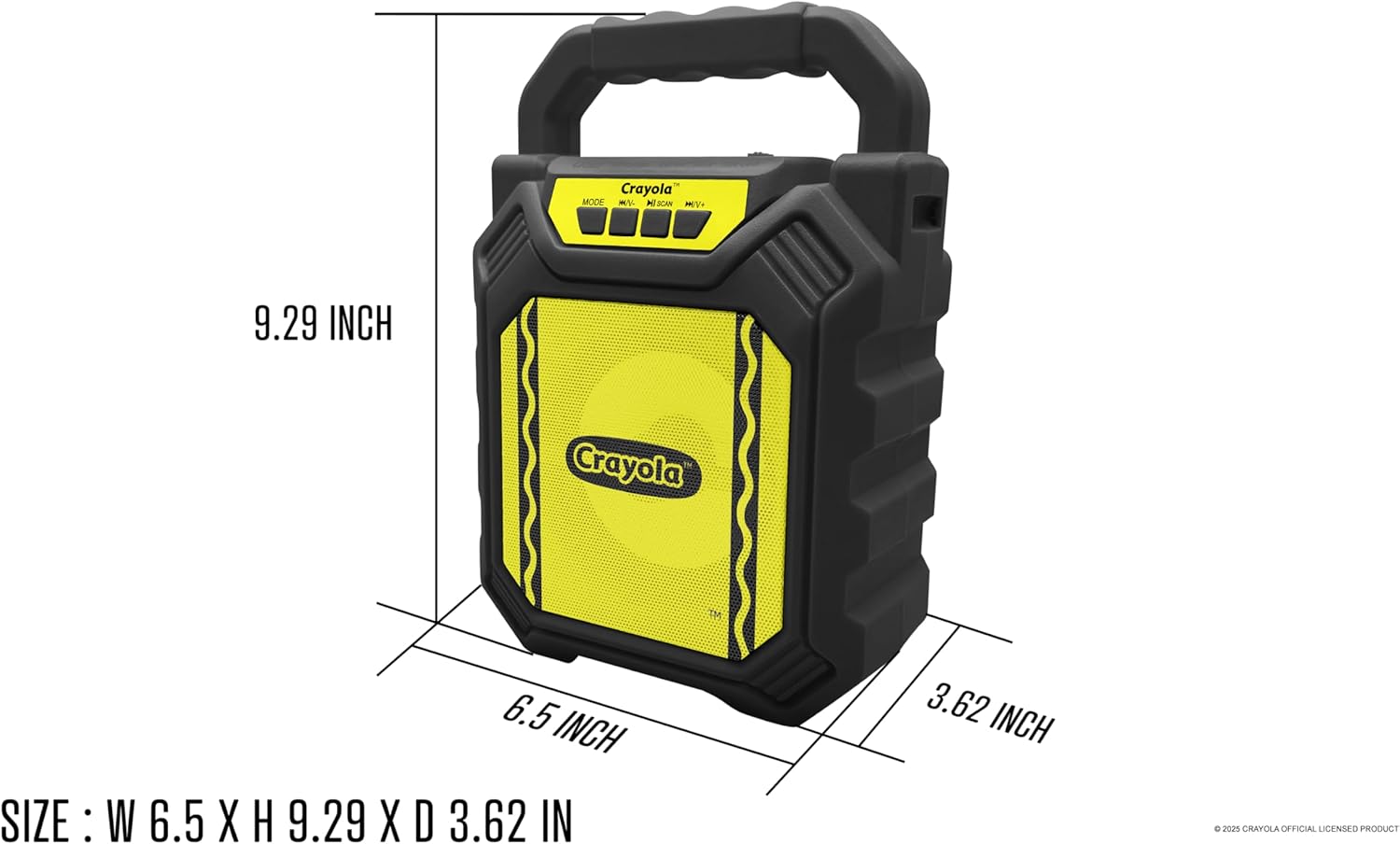
Image: Diagram illustrating the dimensions of the Crayola Kids Bluetooth PA Stereo Speaker System.
| Caracteristică | Detaliu |
|---|---|
| Numărul de model | B0FGYDFH7M |
| Marca | Crayola |
| Tehnologia de conectivitate | Bluetooth 5.0 |
| Dimensiunea driverului | 4 inci |
| Puterea de vârf | 10W |
| Capacitatea bateriei | 1200mAh |
| Timp de redare | Până la 2 ore (la o singură încărcare) |
| Sensibilitate | >85dB |
| Port de încărcare | USB-C |
| Caracteristici | Bluetooth, TWS, FM Radio, Microphone Input, LED Lights |
| Dimensiuni (L x l x H) | 6.49 x 3.72 x 1.57 inci |
| Greutatea articolului | 1.58 lire sterline |
| Material | Plastic |
| UPC | 605832373966 |
Garanție și suport
For warranty information and customer support, please refer to the documentation included with your purchase or visit the official Crayola webPăstrați dovada achiziției pentru reclamații în garanție.


