1. Introducere
This manual provides detailed instructions for the safe and effective use of your POSEIDON Wireless Tattoo Pen Kit. Please read this manual thoroughly before operating the device to ensure proper function and longevity of the equipment. This kit is designed for both beginners and experienced artists.
2. Conținutul pachetului
The POSEIDON Wireless Tattoo Pen Kit includes the following components:
- 1x Wireless Tattoo Pen
- 20x Assorted Tattoo Needle Cartridges (5x1205RL, 5x1207RL, 5x1209RS, 5x1207CM)
- 2x 1800mAh High-Capacity Batteries
- 11x Tattoo Ink Bottles (Black and assorted colors)
- Ink Cups
- Practice Skin
- Stencil Paper
- Marker Pen
- Prinderi
- Cablu de încărcare USB-C

Imaginea 2.1: Pesteview of all items included in the POSEIDON Wireless Tattoo Pen Kit.
3. Produs terminatview
3.1 Wireless Tattoo Pen
The tattoo pen features a high-performance motor, an ergonomic non-slip handle, and a universal needle opening compatible with most cartridge needles. The integrated LED display shows voltage, session timer, and battery level.

Image 3.1: Key features of the POSEIDON Wireless Tattoo Pen, including the high-performance motor, non-slip handle, and needle opening.
3.2 Baterii
The kit includes two 1800mAh lithium polymer batteries, providing 5-8 hours of operation per charge. Each battery has a digital display indicating current voltage, frequency, and session time. Charging time is approximately 2 hours via USB-C.

Image 3.2: The two 1800mAh batteries, showing their digital displays for voltage and session time.
4. Configurare
4.1 Încărcarea bateriei
- Connect the provided USB-C charging cable to the battery's charging port.
- Conectați celălalt capăt al cablului la un adaptor de alimentare USB compatibil (nu este inclus).
- The battery display will indicate charging status. A full charge takes approximately 2 hours.
4.2 Assembling the Tattoo Pen
- Ensure the tattoo pen is clean and sterilized according to standard hygiene practices.
- Twist the battery clockwise onto the top of the tattoo pen until securely fastened.
- Select the desired needle cartridge.
- Insert the needle cartridge into the front opening of the pen by pushing it firmly until it clicks into place.
- To remove, twist the cartridge counter-clockwise and pull it out.
5. Instrucțiuni de utilizare
5.1 Pornire/Oprire
- To power on, press and hold the power button (usually marked with a circle or power symbol) for a few seconds until the display illuminates.
- Pentru a opri, apăsați și țineți apăsat din nou butonul de pornire până când afișajul se stinge.
- To start/pause operation, short press the power button.
5.2 voitage Ajustare
- Voltage can be adjusted from 4V to 12V in 0.1V increments.
- Use the "+" button to increase voltage.
- Use the "-" button to decrease voltage.
- Volumul curenttage is displayed on the LED screen.
5.3 Stroke Length Adjustment
The tattoo pen features 7 adjustable stroke settings, ranging from 2.4mm to 4.2mm. Adjust the stroke length by rotating the grip section of the pen.
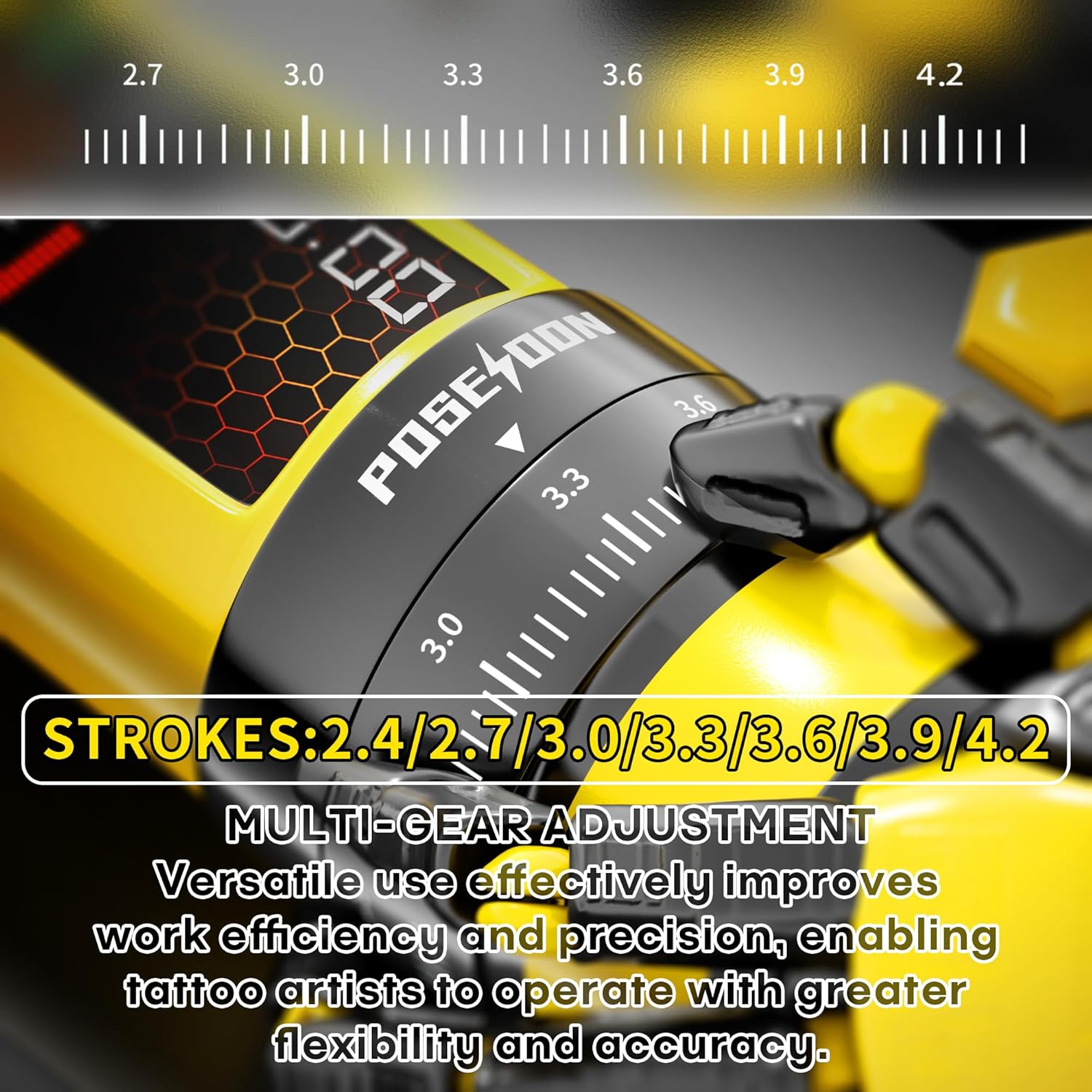
Image 5.1: Detail of the stroke length adjustment mechanism on the tattoo pen.

Image 5.2: Visual guide to the multi-gear stroke adjustment and control buttons for voltage and mode selection.
5.4 Working Modes (Normal/Dot)
- The pen supports two working modes: Normal mode (standard operation) and Dot mode (for precise dotwork/stippling).
- To switch between modes, long press the function switch key (usually marked 'M'). The display will indicate the active mode.
5.5 Session Timer
The integrated digital timer on the LED display tracks the duration of your tattooing session. This feature assists with time management during appointments.
6. Întreținere
6.1 Curățare și Sterilizare
- Always disconnect the battery from the pen before cleaning.
- Wipe the exterior of the tattoo pen with a sterile wipe or a cloth dampened with an approved disinfectant solution after each use.
- Do not immerse the tattoo pen or battery in liquid.
- Needle cartridges are single-use and must be disposed of properly after each session.
6.2 Depozitare
- Store the tattoo pen and accessories in a clean, dry place away from direct sunlight and extreme temperatures.
- Ensure batteries are partially charged (around 50%) before long-term storage to maintain battery health.
7. Depanare
Consultați tabelul de mai jos pentru problemele comune și soluțiile acestora:
| Problemă | Cauza posibila | Soluţie |
|---|---|---|
| Stiloul nu se aprinde. | Battery is discharged or not properly connected. | Charge the battery. Ensure the battery is securely twisted onto the pen. |
| Needle not moving or moving weakly. | Vol. Scăzuttage setting, faulty needle cartridge, or motor issue. | Creșteți voltage. Replace the needle cartridge. If problem persists, contact support. |
| Bateria nu se încarcă. | Faulty USB-C cable or power adapter. | Try a different USB-C cable and power adapter. Ensure connections are secure. |
| Performanță inconsecventă. | Low battery, incorrect stroke setting, or worn-out needle. | Ensure battery is fully charged. Adjust stroke length. Replace needle cartridge. |
8. Specificații
| Caracteristică | Detaliu |
|---|---|
| Numărul de model | TK208-UK |
| Capacitatea bateriei | 2 x 1800mAh Lithium Polymer |
| Vol. De lucrutage | 4-12V (adjustable in 0.1V increments) |
| Stroke Settings | 7 settings (2.4mm - 4.2mm) |
| Viteza motorului | 8V, 8000RPM |
| Timp de încărcare | Aproximativ. 2 ore |
| Timp de lucru | 5-8 hours per battery |
| Dimensiuni pachet | 8.54 x 7.87 x 3.9 inci |
| Greutate | 2.69 lire sterline |
| UPC | 716597329713 |
9. Informații de siguranță
- This device is intended for professional use or supervised training.
- Always follow proper sterilization and hygiene protocols to prevent cross-contamination.
- Use only compatible needle cartridges.
- Nu lăsați dispozitivul la îndemâna copiilor.
- Do not attempt to disassemble or modify the device, as this may void the warranty and pose safety risks.
- Consult a medical professional if you experience any adverse reactions or complications.

Image 9.1: Illustration of the internal silicone safety system designed to reduce skin lesions and protect the machine.
10. Garanție și asistență
For warranty information, technical support, or service inquiries, please contact POSEIDON customer service through the retailer where the product was purchased or visit the official POSEIDON brand store online. Please retain your proof of purchase for warranty claims.


