1. Introducere
Thank you for choosing the KAWA 2K Tiny Dash Cam. This manual provides detailed instructions for the installation, operation, and maintenance of your device. Please read this manual thoroughly before use to ensure proper functionality and to maximize your driving safety and recording experience.
The KAWA Tiny Dash Cam features 2K 1296P QHD recording, voice control, built-in WiFi for app control, G-sensor for emergency recording, WDR/3D DNR for enhanced image quality, and 24-hour parking mode capabilities. A 32GB TF card is included to get you started.
2. Conținutul pachetului
Vă rugăm să verificați dacă toate articolele sunt prezente în coletul dumneavoastră:
- KAWA 2K Tiny Dash Cam (Model CJ5512) x 1
- 32GB Micro SD Card x 1
- Manual de utilizare x 1
- Bandă adezivă 3M x 1
- Electrostatic Stickers x 1
- Split Car Charger x 1

Image: KAWA 2K Tiny Dash Cam and its accessories, including a 32GB Micro SD card.
3. Produs terminatview
The KAWA Tiny Dash Cam is designed for discreet installation and powerful performance. Below are its key features and physical dimensions.
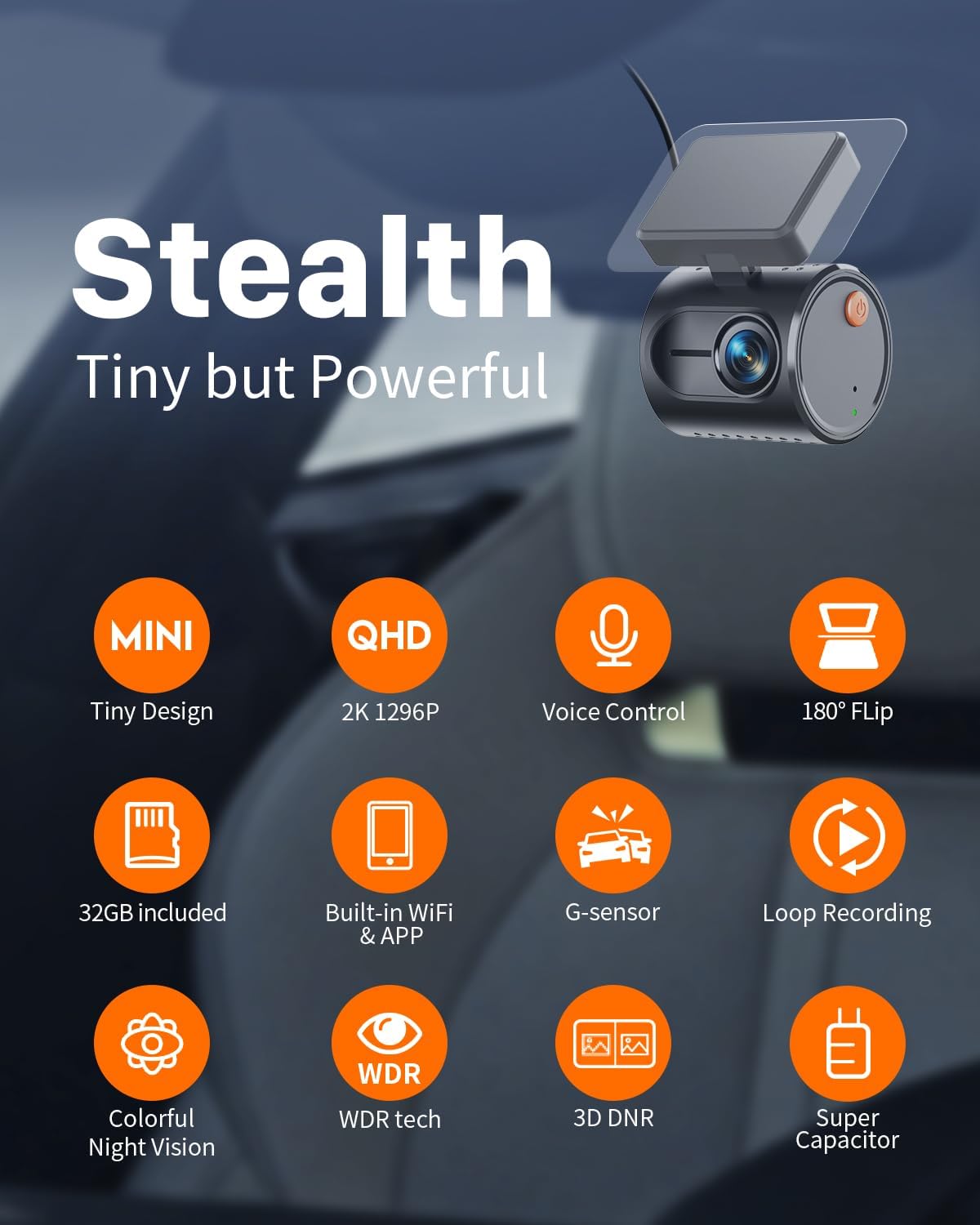
Imagine: Pesteview of the KAWA Tiny Dash Cam's features, including its compact size, 2K resolution, voice control, and various recording technologies.

Image: The compact size of the dash cam, illustrated with dimensions and examples of discreet placement within a vehicle.
4. Configurare și instalare
4.1 Introducerea cardului Micro SD
- Asigurați-vă că camera de bord este oprită.
- Locate the Micro SD card slot on the dash cam.
- Insert the provided 32GB Micro SD card (or another Class 10 or higher card, up to 128GB) into the slot until it clicks into place.
- Pentru a scoate cardul, împingeți ușor cardul până când se aude un clic, apoi eliberați-l.
4.2 Montarea camerei de bord
- Clean the chosen area on your windshield, preferably behind the rearview oglindă, pentru a asigura o vizibilitate clară view și obstrucție minimă.
- Apply an electrostatic sticker to the cleaned area. This helps protect your windshield and makes removal easier.
- Attach the 3M adhesive tape to the dash cam mount.
- Press the dash cam firmly onto the electrostatic sticker for at least 30 seconds.
- Adjust the camera angle to ensure it captures the road ahead effectively.
4.3 Conexiune la alimentare
Connect the dash cam to your vehicle's power source using the provided split car charger cable. Route the cable discreetly along the windshield edge and pillar to avoid obstructing your view.

Image: Discreet cable routing for the dash cam power supply and the KAWA app interface on a smartphone.
4.4 Descărcarea aplicației și conexiunea WiFi
- Download the KAWA app from the App Store (iOS) or Google Play Store (Android).
- Porniți camera de bord.
- Open the KAWA app on your smartphone.
- Follow the in-app instructions to connect to the dash cam's built-in WiFi network. The default WiFi name and password can usually be found on the device or in the app.
5. Instrucțiuni de utilizare
5.1 Înregistrare automată
Once powered on, the dash cam will automatically begin continuous loop recording. Older files will be overwritten when the Micro SD card is full, ensuring continuous operation.
5.2 Control vocal
The dash cam supports smart voice commands for hands-free operation. Speak clearly and directly to the device.
- „Fă o fotografie”: Capturează o imagine statică.
- „Blochează videoclipul”: Saves the current recording segment to the emergency folder, preventing it from being overwritten.
- „Activează WiFi-ul”: Activates the dash cam's WiFi for app connection.
- „Dezactivează WiFi-ul”: Deactivates the dash cam's WiFi.
- „Activează sunetul”: Enables audio recording.
- „Dezactivează sunetul”: Disables audio recording.

Image: Illustration of voice control functionality while driving, showing various commands.
5.3 Înregistrare de urgență (senzor G)
The built-in G-sensor detects sudden impacts or sharp turns. When triggered, it automatically locks the current video segment, protecting it from being overwritten by loop recording.
5.4 Controlul aplicației
Once connected via WiFi, the KAWA app allows you to:
- View trăi footage de la camera de bord.
- Redare videoclipuri înregistrate.
- Download videos to your smartphone.
- Share videos to social media or other platforms.
- Reglați setările camerei de bord.
6. Caracteristici avansate
6.1 2K Ultra-Clear Resolution
The dash cam records in 2K 1296P QHD resolution, providing clear and detailed footage, essential for capturing license plates and other critical information.
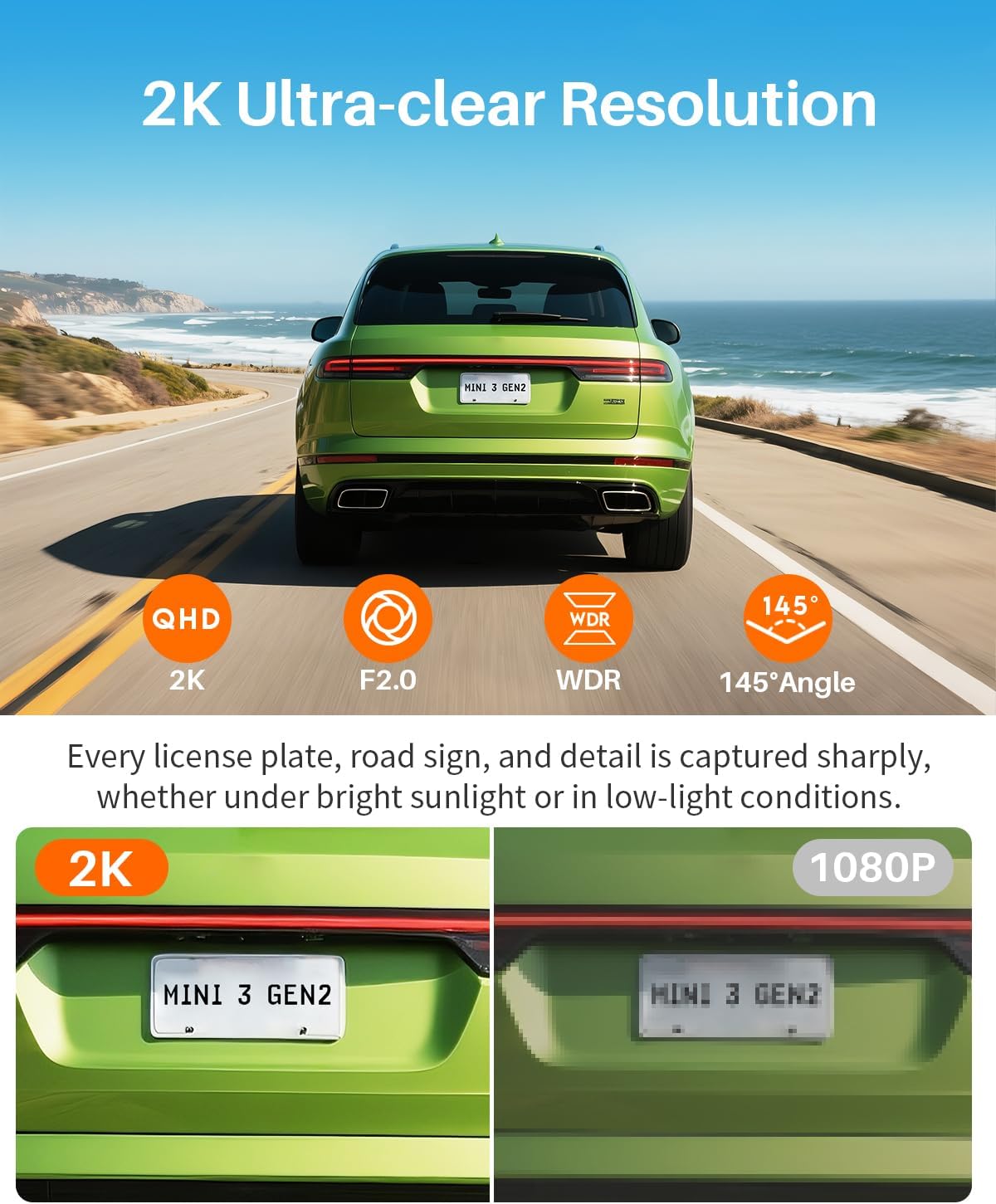
Image: Visual comparison highlighting the clarity of 2K resolution versus 1080P, particularly for license plate readability.
6.2 WDR (Wide Dynamic Range) & 3D DNR (Digital Noise Reduction)
These technologies enhance image quality in challenging lighting conditions, such as bright sunlight, tunnels, or low-light environments, ensuring balanced exposure and reduced noise.
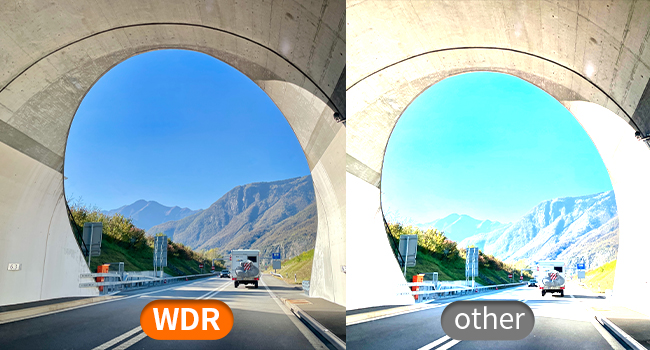
Image: Demonstration of WDR technology providing balanced exposure in high-contrast scenes, such as entering or exiting a tunnel.
Viziune nocturnă Super 6.3
Equipped with advanced sensors, the dash cam provides enhanced visibility and detail in low-light and nighttime driving conditions.
6.4 Monitorizare parcare 24 de ore
When your vehicle is parked, this feature detects unusual motion or impacts and automatically starts recording, providing surveillance for your car. This feature requires a hardwire kit (sold separately) for continuous power.

Image: Visual explanation of 24-hour parking monitoring, highlighting the need for a hardwire kit and its benefit in recording incidents while parked.
6.5 Time-lapse Recording
In parking mode, time-lapse recording compresses long parking sessions into shorter video files, saving storage space while retaining critical event footage. De example, 30 minutes of recording can be compressed into 1 minute.
Întoarcere video 6.6 la 180°
This feature allows for flexible installation. If the dash cam is mounted upside down, the video can be flipped 180° via the app to ensure correct image display.

Image: Demonstration of the 180-degree video flip feature, allowing for flexible mounting orientations.
7. Întreținere
7.1 Gestionarea cardului Micro SD
It is recommended to format the Micro SD card regularly (e.g., once a month) through the dash cam's settings via the app. This helps maintain optimal recording performance and prevents data corruption.
7.2 Curățarea lentilei
Gently wipe the dash cam lens with a soft, lint-free cloth to ensure clear video quality. Avoid using abrasive cleaners.
7.3 Mediul de operare
The dash cam is designed to operate within a working temperature range of -4°F (-20°C) to 149°F (65°C) and a storage temperature range of -22°F (-30°C) to 176°F (80°C). Avoid exposing the device to extreme temperatures outside these ranges to prevent damage.
8. Depanare
- Camera de bord nu pornește: Ensure the power cable is securely connected to both the dash cam and the car charger, and that the car charger is properly inserted into the vehicle's power outlet. Check if the vehicle's power outlet is active.
- Probleme de înregistrare: Ensure a Micro SD card is inserted and formatted. Check if the card is full; if so, format it. If issues persist, try a different Micro SD card (Class 10 or higher).
- WiFi connection failure: Ensure the dash cam's WiFi is enabled (can be activated via voice command or app if previously connected). Restart both the dash cam and your smartphone. Try reconnecting through the KAWA app.
- Comanda vocală nu răspunde: Speak clearly and ensure there is minimal background noise. Verify that the voice control feature is enabled in the app settings.
- Calitate video slabă: Clean the dash cam lens. Ensure the protective film has been removed from the lens. Check app settings for resolution and WDR options.
- Monitorizarea parcării nu funcționează: Ensure a hardwire kit is installed correctly and providing continuous power to the dash cam. Verify parking mode settings in the app.
For further assistance, please refer to the support section or contact KAWA customer service.
9. Specificații
| Caracteristică | Detaliu |
|---|---|
| Marca | KAWA |
| Numele modelului | CJ5512 |
| Rezoluție video | 2K 1296P QHD |
| Caracteristici speciale | Voice control, Built-in WiFi, G-sensor, 24h Parking Monitoring, Time-lapse, WDR, Night vision, Loop recording, 180° Video Flip |
| Tehnologia de conectivitate | Wifi |
| Dispozitive compatibile | Smartphone, PC |
| Greutatea articolului | 6.4 uncii |
| Dimensiunile produsului | 7 x 14 x 11 inches (Packaging), Device: 1.82 x 1.53 x 1.42 inches |
| Componente incluse | Dash Cam, 32GB Micro SD Card, User Manual, 3M adhesive tape, Electrostatic Stickers, Split Car Charger |
| Temperatura de operare | -4°F (-20°C) până la 149°F (65°C) |
| Temperatura de depozitare | -22°F (-30°C) până la 176°F (80°C) |
10. Garanție și asistență
KAWA provides a 1-year free replacement warranty for this product. Our customer service team is committed to responding to all inquiries within 24 hours.
Pentru asistență, vă rugăm să ne contactați la: support@kawa-in.com


