1. Introducere
This manual provides detailed instructions for the setup, operation, maintenance, and troubleshooting of your DIERYA DK68 Wireless Mechanical Keyboard. Please read this manual thoroughly before using the product to ensure proper functionality and to maximize your user experience.
2. Conținutul pachetului
Verificați dacă toate articolele sunt prezente în colet:
- 1 x DIERYA DK68 68-Key Wireless Mechanical Keyboard
- 1 receptor wireless 2.4G
- 1 x cablu USB-C la USB-A
- 1 x Manual de instrucțiuni (acest document)
3. Produs terminatview
The DIERYA DK68 is a compact 68-key mechanical keyboard featuring triple-mode connectivity (wired USB-C, 2.4GHz wireless, and Bluetooth 5.0). It is equipped with linear red mechanical switches and customizable RGB backlighting.

Image: The DIERYA DK68 Wireless Mechanical Keyboard in white, showcasing its compact 68-key layout and RGB backlighting.
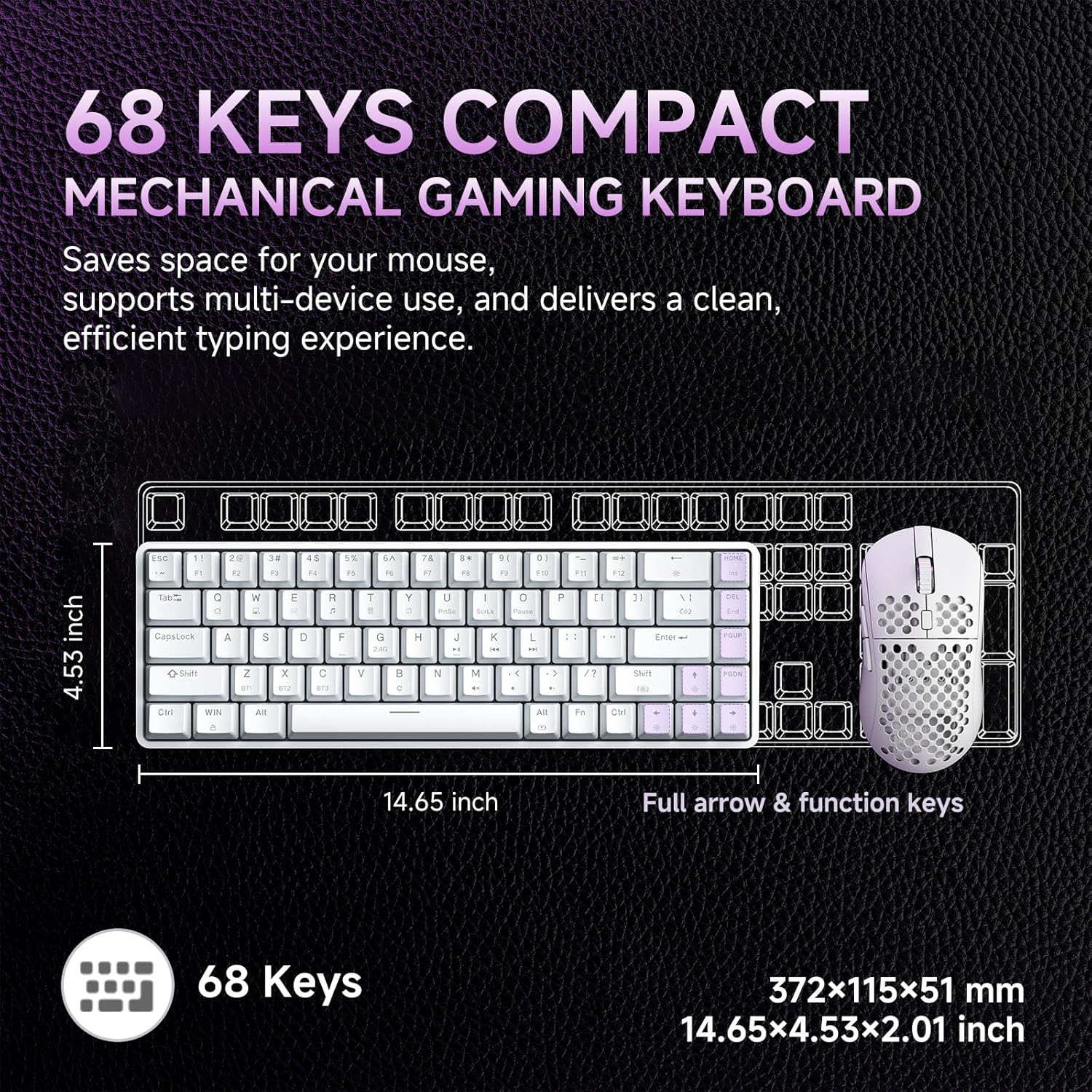
Image: A diagram illustrating the compact dimensions of the DIERYA DK68 keyboard, measuring 14.65 inches in length and 4.53 inches in width.
4. Configurare
4.1 Conexiune prin cablu (USB-C)
- Conectați cablul USB-C furnizat la portul USB-C al tastaturii.
- Connect the other end of the USB-C cable to an available USB-A port on your computer.
- Tastatura va fi recunoscută automat și gata de utilizare.
4.2 Conexiune wireless de 2.4 GHz
- Locate the 2.4G wireless receiver included in the package.
- Plug the 2.4G receiver into an available USB-A port on your computer.
- Turn on the keyboard using the switch located on the back or side of the keyboard.
- The keyboard should automatically connect to the receiver. If not, press Fn + R pentru a iniția împerecherea.
4.3 Conexiune Bluetooth 5.0
The keyboard supports connecting up to three Bluetooth devices.
- Asigurați-vă că tastatura este pornită.
- Apăsați și mențineți apăsat Fn+Z, Fn + X, sau Fn+C for 3-5 seconds to enter pairing mode for Bluetooth device 1, 2, or 3 respectively. The indicator light will flash rapidly.
- On your device (PC, laptop, tablet, smartphone), enable Bluetooth and search for new devices.
- Select "DIERYA DK68" from the list of available devices to pair.
- După asociere, indicatorul luminos va înceta să clipească și va rămâne aprins continuu timp de câteva secunde.
- Pentru a comuta între dispozitivele Bluetooth asociate, apăsați Fn+Z, Fn + X, sau Fn+C scurt.

Image: Visual representation of the DIERYA DK68's triple-mode connectivity options: USB-C, Bluetooth 5.0, and 2.4GHz wireless, compatible with various operating systems.
5. Instrucțiuni de utilizare
5.1 Funcții de bază ale tastaturii
The DK68 features a 68-key layout. Many standard functions are accessed via the Fn key combinations.
- Fn + 1-12: F1-F12 function keys.
- Fn + Q/W/E/R/T/Y: Multimedia controls (specific functions may vary).
- Fn + Taste săgeată: Page Up, Page Down, Home, End.
- Fn + Backspace: Delete.
5.2 Controlul iluminării RGB
The keyboard offers 20 built-in RGB lighting effects and 16.8 million customizable colors.
- Fn + Backspace: Turn backlight On/Off.
- Fn+Shift: Switch light colors (for certain modes).
- Fn + |\: Switch light modes (cycle through 20 effects).
- Fn + săgeată sus: Creșteți luminozitatea.
- Fn + Săgeată în jos: Reduceți luminozitatea.
- Fn + Săgeata la stânga: Decrease light speed.
- Fn + Săgeata dreapta: Increase light speed.

Image: A visual guide to controlling the RGB backlighting on the DIERYA DK68 keyboard using Fn key combinations for mode, color, brightness, and speed adjustments.
5.3 Managementul bateriei
The keyboard is equipped with a 3000mAh lithium battery.
- Încărcare: Connect the keyboard via the USB-C cable to a power source (computer USB port or USB wall adapter). The charging indicator light will show charging status.
- Durata de viață a bateriei: Up to 12 hours with backlighting on, and up to 333 hours with backlighting off.
- Auto-Sleep: The keyboard enters auto-sleep mode after 3 minutes of inactivity to conserve power. Press any key to wake it up.

Image: An infographic detailing the 3000mAh battery capacity, showing 12 hours of use with lights on, 333 hours with lights off, 3-minute auto-stop, and Type-C charging.
5.4 Personalizarea software-ului
For advanced customization of keys, macros, and lighting effects, download the dedicated software from the official DIERYA website. Acest software permite:
- 16.8 million customizable lighting colors.
- Music-sync lighting effects.
- Full-key macro programming.
- Macro recording and editing.
- Custom shortcut keys.
6. Întreținere
- curatenie: Use a soft, dry cloth to wipe the keyboard surface. For deeper cleaning, use compressed air to remove dust and debris from between keycaps. Avoid using liquid cleaners directly on the keyboard.
- Depozitare: Depozitați tastatura într-un loc răcoros și uscat, ferit de lumina directă a soarelui și de temperaturi extreme.
- Îndepărtarea capacului tastelor: If removing keycaps for cleaning or switch replacement, use a keycap puller to avoid damage.
7. Depanare
| Emisiune | Soluţie |
|---|---|
| Tastatura nu răspunde (cu fir) | Asigurați-vă că cablul USB-C este conectat corect atât la tastatură, cât și la computer. Încercați un alt port USB sau un alt cablu. |
| 2.4GHz wireless connection unstable or not connecting | Ensure the 2.4G receiver is plugged in and the keyboard is powered on. Re-pair by pressing Fn + R. Move the receiver closer to the keyboard. Avoid interference from other wireless devices. |
| Probleme de conexiune Bluetooth | Asigurați-vă că Bluetooth este activat pe dispozitiv. Reintrați în modul de asociere (Fn + Z/X/C) and re-pair. Forget the device on your computer/phone and try pairing again. Ensure the keyboard is charged. |
| RGB backlighting not working | Presa Fn + Backspace to toggle the backlight. Check brightness settings (Fn + Săgeată sus/jos). Ensure the keyboard battery is not critically low. |
| Keys not registering (Anti-Ghosting) | The keyboard features full N-Key Rollover (NKRO). If specific keys are not registering, try cleaning under the keycap or contact support. |
| Keyboard not charging | Verify the USB-C cable and power source are functional. Try a different cable or charging port. |
8. Specificații
| Caracteristică | Detaliu |
|---|---|
| Model | DIERYA DK68 |
| Conectivitate | USB-C cu fir, wireless 2.4GHz, Bluetooth 5.0 |
| Tip comutator | Comutatoare mecanice liniare roșii |
| Număr de chei | 68 Keys (60% Layout) |
| Iluminare din spate | RGB (16.8 milioane de culori, 20 moduri) |
| Capacitatea bateriei | 3000mAh |
| Durata de viață a bateriei | Up to 12 hours (backlight on), 333 hours (backlight off) |
| Anti-Ghosting | Full N-Key Rollover (NKRO) |
| Material Keycap | Acrylonitrile Butadiene Styrene (ABS) Double-shot |
| Dispozitive compatibile | Laptop, PC, Smartphone |
| Dimensiuni | 14.65 x 4.53 x 2.01 inchi (372 x 115 x 51 mm) |
| Greutatea articolului | 1.83 lire (820 g) |
| Componente incluse | Keyboard, 2.4G Receiver, USB Cable, Instruction Manual |
9. Garanție și asistență
DIERYA products are designed for reliability and performance. For warranty information, technical support, or service inquiries, please refer to the official DIERYA website-ul lor sau contactați direct serviciul de asistență pentru clienți. Păstrați bonul fiscal ca dovadă a achiziției pentru reclamațiile în garanție.
For the latest drivers and software, please visit: www.dierya.com


