Introducere
Mulțumesc pentru achizițieasing the Dierya DK68 Wireless Mechanical Gaming Keyboard. This manual provides detailed instructions on how to set up, operate, and maintain your keyboard. Please read this manual thoroughly before use to ensure optimal performance and longevity of your device.

Image: The Dierya DK68 wireless mechanical gaming keyboard, showcasing its compact 60% layout and RGB backlighting.
Caracteristici cheie
- Aspect compact 60%: 68-key design for space efficiency, with all functions accessible via FN key combinations. Ideal for portability and maximizing desk space.
- Tri-Mode Seamless Connectivity: Supports USB-C wired, Bluetooth, and 2.4GHz wireless receiver connections. Easily switch between up to 3 devices (PC, Mac, smartphone/tablet).
- Customizable 16.8 Million Color RGB Backlight: Features 21 dynamic lighting effects. Adjust effects and colors using FN key combinations.
- Long-Lasting Battery & Standby: Equipped with a 3000mAh battery, providing approximately 8 hours of continuous use with backlight on, or up to 90 hours with backlight off. Standby time up to 360 hours (approx. 15 days).
- Întrerupătoare mecanice durabile: Utilizes Dierya's proprietary mechanical switches with a 60 million keystroke lifespan. Red switches (linear, silent) are suitable for gaming and office work.
- N-Key Rollover (NKRO): Ensures all key presses are registered accurately, even during simultaneous inputs, for competitive gaming.
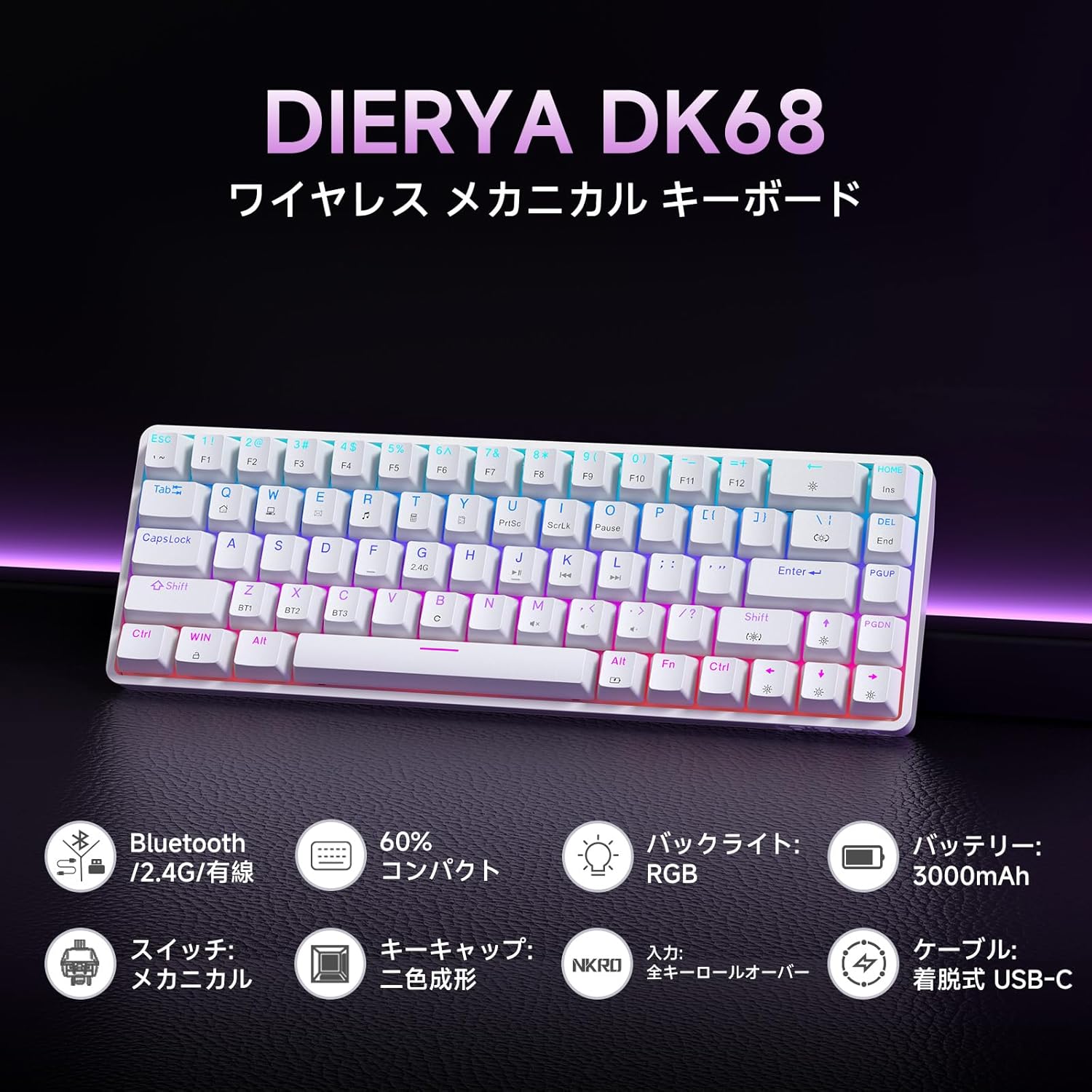
Imagine: Un pesteview of the Dierya DK68 keyboard's main features, including Bluetooth/2.4G/Wired connectivity, 60% compact design, RGB backlight, 3000mAh battery, mechanical switches, double-shot keycaps, N-Key Rollover, and a detachable USB-C cable.
Înființat
1. Încărcarea tastaturii
Before first use, fully charge the keyboard using the provided USB-C cable. Connect the cable to the keyboard's USB-C port and to a power source (e.g., computer USB port, USB wall adapter).
- Indicatorul luminos de încărcare va afișa starea de încărcare.
- O încărcare completă durează de obicei câteva ore.
2. Conectarea tastaturii
The DK68 supports three connection modes: USB-C wired, 2.4GHz wireless, and Bluetooth.
Conexiune prin cablu USB-C
- Conectați cablul USB-C furnizat la portul USB-C al tastaturii.
- Conectați celălalt capăt al cablului la un port USB disponibil de pe computer.
- Tastatura va fi recunoscută automat și gata de utilizare.
Conexiune wireless de 2.4 GHz
- Locate the 2.4GHz USB receiver (usually stored in a compartment on the keyboard or packaging).
- Conectați receptorul USB la un port USB disponibil de pe computer.
- Porniți tastatura. Tastatura ar trebui să se conecteze automat la receptor.
- If connection is not established, press FN + R to switch to 2.4GHz mode.
Conexiune Bluetooth
The keyboard can store up to three Bluetooth device pairings.
- Porniți tastatura.
- Apăsați și mențineți apăsat FN + Z, FN + X, sau FN + C for 3-5 seconds to enter pairing mode for BT1, BT2, or BT3 respectively. The indicator light will flash rapidly.
- On your device (PC, Mac, smartphone, tablet), enable Bluetooth and search for new devices.
- Select "Dierya DK68" from the list of available devices.
- Odată împerecheat, indicatorul luminos va înceta să clipească și va rămâne fix.
- Pentru a comuta între dispozitivele Bluetooth asociate, apăsați FN + Z, FN + X, sau FN + C scurt.

Image: Diagram illustrating the three connection modes: USB-C wired, Bluetooth, and 2.4GHz wireless, along with compatibility icons for Windows, Mac, iOS, Android, Xbox, PC, Laptop, and Tablet.
Instrucțiuni de operare
1. FN Key Combinations
Due to the compact 60% layout, many functions are accessed using the FN cheie în combinație cu alte taste.
| Combinaţie | Funcţie |
|---|---|
| FN + 1-0 (top row) | F1-F10 |
| FN + - = | F11, F12 |
| FN + Backspace | Toggle Backlight ON/OFF |
| FN + Shift | Schimbați culoarea luminii de fundal |
| FN + | | Schimbați modul de iluminare de fundal |
| FN + săgeată sus | Măriți luminozitatea luminii de fundal |
| FN + Săgeată în jos | Reduceți luminozitatea luminii de fundal |
| FN + Săgeată stânga | Reduceți viteza iluminării de fundal |
| FN + Săgeată dreapta | Măriți viteza luminii de fundal |
| FN + Z/X/C | Switch Bluetooth Device (BT1/BT2/BT3) |
| FN + R | Switch to 2.4GHz Wireless Mode |
| FN + T | Switch to USB-C Wired Mode |
| FN + WIN | Blocați/Deblocați cheia Windows |

Image: A visual guide to customizing the RGB backlight on the Dierya DK68 keyboard using FN key combinations for turning the light on/off, changing colors, modes, brightness, and speed.
2. Personalizarea iluminării de fundal RGB
The keyboard features over 20 dynamic RGB lighting effects. Use the FN key combinations listed above to personalize your lighting experience.
- Presa FN + Backspace to toggle the backlight on or off.
- Presa FN + Shift pentru a alterna între diferite culori de iluminare de fundal.
- Presa FN + | to switch between various lighting effects.
- Utilizare FN + Săgeată sus/jos to adjust brightness and FN + Săgeată stânga/dreapta to adjust effect speed.
3. Modul de economisire a energiei
To conserve battery life, the keyboard will automatically enter sleep mode after approximately 3 minutes of inactivity. Press any key to wake it up.
Întreţinere
- curatenie: Use a soft, dry cloth to wipe the keyboard surface. For deeper cleaning, you may use a can of compressed air to remove dust and debris from between the keycaps. Avoid using harsh chemicals or abrasive materials.
- Depozitare: Depozitați tastatura într-un loc răcoros și uscat, ferit de lumina directă a soarelui și de temperaturi extreme.
- Îngrijirea bateriei: To prolong battery life, avoid fully discharging the battery frequently. Charge the keyboard regularly, especially if it will be stored for an extended period.
- Îndepărtarea capacului tastelor: If you need to remove keycaps for cleaning or switch replacement, use a keycap puller to avoid damage. Pull straight up with gentle force.
Depanare
- Tastatura nu răspunde:
- Asigurați-vă că tastatura este pornită.
- Verificați nivelul bateriei și încărcați-o dacă este necesar.
- Verify the correct connection mode (USB-C, 2.4GHz, or Bluetooth) is selected.
- For 2.4GHz, ensure the receiver is properly plugged in.
- For Bluetooth, re-pair the device if connection is lost.
- Încearcă conectarea prin cablu USB-C pentru a exclude problemele legate de conexiunea wireless.
- Cheile nu se înregistrează sau se tastează de două ori:
- Clean under the keycaps to remove any debris.
- Ensure the switches are properly seated.
- RGB backlight not working:
- Ensure the backlight is turned on (FN + Backspace).
- Check battery level; low battery might disable backlighting.
- Conexiune Bluetooth instabilă:
- Ensure the keyboard is within range of the device.
- Minimizează interferențele de la alte dispozitive wireless.
- Încearcă să reasociezi tastatura cu dispozitivul.
Specificații
| Caracteristică | Detaliu |
|---|---|
| Marca | DIERYA |
| Numărul de model | DK68 |
| Aspect | 60% (68 de taste) |
| Conectivitate | Wireless 2.4 GHz, Bluetooth, USB-C cu fir |
| Tip comutator | Mechanical Red Switches (Linear, Silent) |
| Forța de acționare | 45gf (±15gf) |
| Cursă de acționare | 2.0mm (±0.6mm) |
| Durata de viață a apăsărilor de taste | Aproximativ. 60 de milioane |
| Iluminare de fundal | RGB (16.8 million colors, 21+ effects) |
| Capacitatea bateriei | Baterie cu litiu de 3000 mAh |
| Battery Life (Backlight ON) | Aproximativ. 8 ore |
| Battery Life (Backlight OFF) | Aproximativ. 90 ore |
| Timp de așteptare | Aproximativ. 360 de ore (15 zile) |
| Compatibilitate | Windows, Mac, iOS, Android, Xbox, PC, Laptop, Tablet |
| Dimensiuni (L x l x H) | 372 x 115 x 51 mm |
| Greutate | 830 g |
| keycaps | Double-shot (OFS height) |
| Anti-Ghosting | Full N-Key Rollover (NKRO) |

Image: A diagram showing the compact 60% layout of the Dierya DK68 keyboard with its dimensions: 372mm length, 115mm width, and 51mm height, highlighting its 68-key configuration.

Imagine: Prim-plan view of the Dierya DK68's mechanical red switches, detailing their linear and silent operation, 45gf actuation force, 2.0mm travel, and pre-lubricated design for smooth keystrokes.

Image: An exploded diagram of the Dierya DK68 keyboard, showing its internal layers including ABS keycaps, mechanical switches, positioning plate, EVA mat, PCB, high-density sound-absorbing foam, and bottom case, highlighting its robust construction.
Garanție și suport
DIERYA products are designed for durability and performance. For warranty information or technical support, please refer to the official DIERYA website-ul lor web sau contactați direct serviciul lor de asistență pentru clienți. Păstrați bonul fiscal ca dovadă a achiziției pentru reclamațiile în garanție.


