Introducere
Thank you for choosing the GNCC 1080P Indoor Security Camera. This manual provides detailed instructions for setting up, operating, and maintaining your camera to ensure optimal performance and security for your home. This camera offers high-definition video, advanced detection features, and two-way audio communication.
Ce este în cutie
Vă rugăm să verificați conținutul coletului. Dacă lipsesc sau sunt deteriorate articole, contactați serviciul de asistență pentru clienți.
- Camera de interior
- Adaptor de alimentare
- Manual de instructiuni
- Șurub de montare
- cablu de alimentare de 2 m
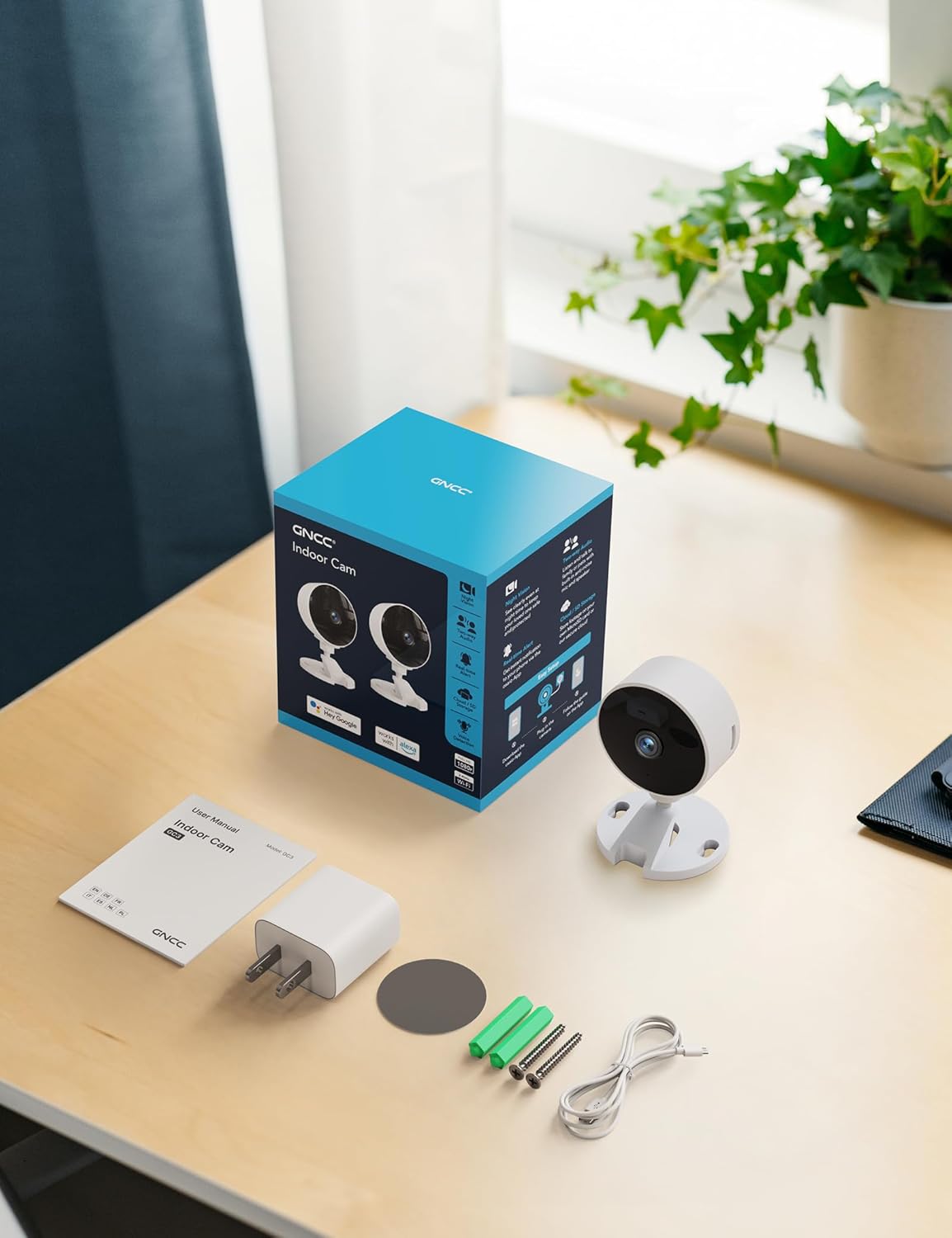
Image: All components included in the GNCC Indoor Camera package, neatly laid out on a wooden surface.
Caracteristicile produsului
The GNCC Indoor Security Camera is equipped with several features designed to enhance your home security and monitoring experience:
- Rezoluție Full HD 1080P: Oferă monitorizare video clară și detaliată.
- Viziune nocturnă de 15 m: Built-in infrared LEDs enable clear vision up to 15 meters in low-light conditions.
- Smarter AI Detection: Advanced AI (subscription required) for identifying people, pets, vehicles, and packages, reducing false alerts.
- Opțiuni flexibile de stocare: Supports local recording with a 128GB Micro SD card (not included) and offers a 14-day free cloud storage trial.
- Configurare ușoară: Can be installed quickly using 3M tape or included screws for wall mounting.
- Modul de confidențialitate: One-tap privacy mode to disable the lens and LED for enhanced privacy.
- Audio bidirecțional: Microfon și difuzor încorporate pentru comunicare în timp real.
- Integrare inteligentă: Compatible with Alexa and Google Home for voice control.
- Partajarea familiei: Allows sharing access with up to 3 users.

Image: Visual representation of the camera's core functionalities, including HD resolution, night vision, and two-way audio.
Înființat
1. Pornire
- Conectați adaptorul de alimentare furnizat la portul de intrare a camerei.
- Conectați adaptorul de alimentare la o priză electrică standard.
- Camera se va porni, iar un indicator luminos va afișa starea acesteia.
2. Instalarea aplicației și crearea contului
- Download the official GNCC app from your smartphone's app store (iOS App Store or Google Play Store).
- Deschide aplicația și urmează instrucțiunile de pe ecran pentru a crea un cont nou sau pentru a te conecta dacă ai deja unul.
3. Adăugarea camerei la aplicație
- In the GNCC app, tap the "+" icon to add a new device.
- Select "Security Camera" or the specific model if prompted.
- Urmați instrucțiunile aplicației pentru a conecta camera la rețeaua Wi-Fi de 2.4 GHz. Note: This camera is not compatible with 5GHz Wi-Fi networks.
- You may be required to scan a QR code displayed on your phone with the camera lens or enter a code manually.
- Once connected, name your camera and assign it to a specific room or location.

Image: The GNCC camera alongside a smartphone showing the camera's live feed and app interface, demonstrating connectivity.
4. Opțiuni de montare
The camera offers flexible mounting options:
- Plasare pe masă: Simply place the camera on a flat surface like a shelf, table, or desk.
- Montare pe perete: Use the included 3M adhesive tape for a drill-free installation, or use the provided screws for a more permanent fixture. Ensure the mounting surface is clean and dry before applying adhesive.
Instrucțiuni de operare
Trăi View și monitorizare la distanță
Once connected, you can access the live video feed from your camera anytime, anywhere, through the GNCC app.

Image: A smartphone screen showing the live feed from the GNCC camera, illustrating remote monitoring capabilities.
Audio bidirecțional
The camera features a built-in microphone and speaker, allowing for two-way communication. Tap the microphone icon in the app to speak, and release to listen. This is ideal for communicating with family members or pets.

Image: A visual representation of the two-way audio feature, showing a child and a pet, with text bubbles indicating conversation.
Vedere de noapte
The camera automatically switches to night vision mode in low-light conditions, providing clear black and white images up to 15 meters. This ensures continuous monitoring even in complete darkness.

Image: A baby sleeping in a crib, demonstrating the camera's clear night vision capabilities in a dark environment.
Detectarea mișcării și a sunetului
The camera can detect motion and sound, sending instant alerts to your smartphone. With an optional AI subscription, the camera can differentiate between people, pets, vehicles, and packages, reducing false alarms. You can customize motion detection zones within the app.

Image: Children and a dog triggering motion and sound detection, with example alert notifications shown.
Opțiuni de stocare
Your GNCC camera supports two primary storage methods for recorded footage:
- Card Micro SD: Insert a Micro SD card (up to 128GB, not included) into the camera's slot for continuous local recording.
- Stocare în cloud: A 14-day free trial of cloud storage is included. Cloud storage provides secure, off-site backup of your recordings, accessible from anywhere.

Image: The camera with visual cues for both SD card and cloud storage, highlighting flexible recording options.
Modul de confidențialitate
To ensure privacy, the GNCC camera features a one-tap privacy mode within the app. Activating this mode will fully disable the camera lens and LED indicator, preventing any recording or live viewing.
Întreţinere
- curatenie: Folosiți o cârpă moale și uscată pentru a curăța obiectivul și corpul camerei. Evitați utilizarea de produse de curățare lichide sau materiale abrazive.
- Actualizări firmware: Regularly check the GNCC app for firmware updates. Keeping your camera's firmware up-to-date ensures optimal performance, security, and access to new features.
- Plasare: Asigurați-vă că așezați camera într-un loc stabil, ferit de lumina directă a soarelui, surse de căldură și umiditate excesivă.
Depanare
| Problemă | Cauză/Soluție posibilă |
|---|---|
| Camera nu se conectează la Wi-Fi |
|
| Fără flux video / Stare offline |
|
| Calitate video slabă |
|
| Alertele de mișcare/sunet nu au fost primite |
|
| Audio bidirecțional nu funcționează |
|
Specificații
| Caracteristică | Detaliu |
|---|---|
| Numele modelului | GC3B-1P |
| Utilizare în interior/exterior | De interior |
| Rezoluție captură video | Full HD 1080p |
| Gama de vedere nocturnă | 15 metri |
| Tehnologia de conectivitate | Wireless (Wi-Fi) |
| Frecvența Wi-Fi | 2.4 GHz (nu este compatibil cu 5 GHz) |
| Sursa de alimentare | Electric cu fir |
| Tip controler | Amazon Alexa, Google Home |
| Tip de montare | Suport de masă, suport de perete |
| Opțiuni de stocare | Card Micro SD (până la 128 GB, nu este inclus), Stocare în cloud |
| Audio bidirecțional | Da |
| Detectare AI | Motion, Sound (AI features require subscription) |
| Dimensiunile produsului | 2.56 x 2.76 x 3.54 inci |
| Greutatea articolului | 2.24 uncii |
| Culoare | Alb |
| Componente incluse | Indoor camera, Power Adapter, Instruction Manual, Mounting Screw, 2m power cord |
Garanție și suport
GNCC products are designed for reliability and performance. For specific warranty details, please refer to the warranty card included with your product or visit the official GNCC website-ul.
If you encounter any issues or have questions regarding your GNCC 1080P Indoor Security Camera, please contact GNCC Customer Support through the following channels:
- Official GNCC Website: Look for the "Support" or "Contact Us" section.
- Asistență prin e-mail: Refer to the contact information provided in the GNCC app or on the product packaging.
- Asistență în aplicație: Some issues can be resolved directly through the help section within the GNCC application.
Please have your product model (GC3B-1P) and purchase information ready when contacting support.


