1. Introducere
Thank you for choosing the AULA SC680 Wireless Gaming Mouse. This manual provides detailed instructions to help you set up, operate, and maintain your device for optimal performance. The SC680 features tri-mode connectivity, a high-performance PAW3395 sensor, and customizable options designed for both gaming and professional use.

Imagine: Sus view of the AULA SC680 Wireless Gaming Mouse in black, showcasing its ergonomic design and primary buttons.
2. Caracteristici cheie
- Conectivitate trimodală: Supports USB-C wired, 2.4GHz wireless, and Bluetooth 5.2 connections for versatile use across multiple devices and operating systems (Windows 7/8/10, Vista, XP, Mac, Windows 2000, Linux).
- High-Performance PAW3395 Sensor: Delivers precise tracking with up to 26000 programmable DPI, 650 IPS speed, 50g acceleration, and an 8000Hz polling rate.
- Durable & Responsive Buttons: Equipped with switches rated for up to 80 million clicks, ensuring longevity and quick response.
- Design ultra-ușor: Weighs only 58g for comfortable, extended use, reducing hand fatigue. Includes anti-slip and sweat-proof stickers for enhanced grip.
- Durată lungă de viață a bateriei: Built-in 500mAh rechargeable battery provides up to 75 hours of continuous use.
- Software personalizabil: Allows users to personalize DPI settings, button functions, macro files, and polling rates (Windows systems only for driver functionality).

Image: Diagram illustrating the PAW3395 flagship sensor and its performance specifications including DPI adjustment, IPS, and accelerated speed.
3. Conținutul pachetului
Vă rugăm să verificați pachetul pentru următoarele articole:
- Mouse pentru jocuri fără fir AULA SC680
- Cablu de încărcare/date USB-C
- Receptor USB de 2.4 GHz
- Anti-slip Stickers (optional application)
- Spare Foot Pads
- Manual de utilizare (acest document)
4. Configurare și conectare
4.1 Încărcarea mouse-ului
Before first use, it is recommended to fully charge the mouse. Connect the provided USB-C cable to the mouse's front port and the other end to a USB power source (e.g., computer USB port, USB wall adapter). The indicator light on the mouse will blink red while charging and turn solid when fully charged. A full charge provides up to 75 hours of battery life.

Image: The AULA SC680 mouse connected via USB-C cable for charging, highlighting its 500mAh battery and up to 75 hours of battery life.
4.2 Conectarea mouse-ului (Tri-Mode)
The AULA SC680 offers three connection modes: 2.4GHz Wireless, Bluetooth 5.2, and USB-C Wired.
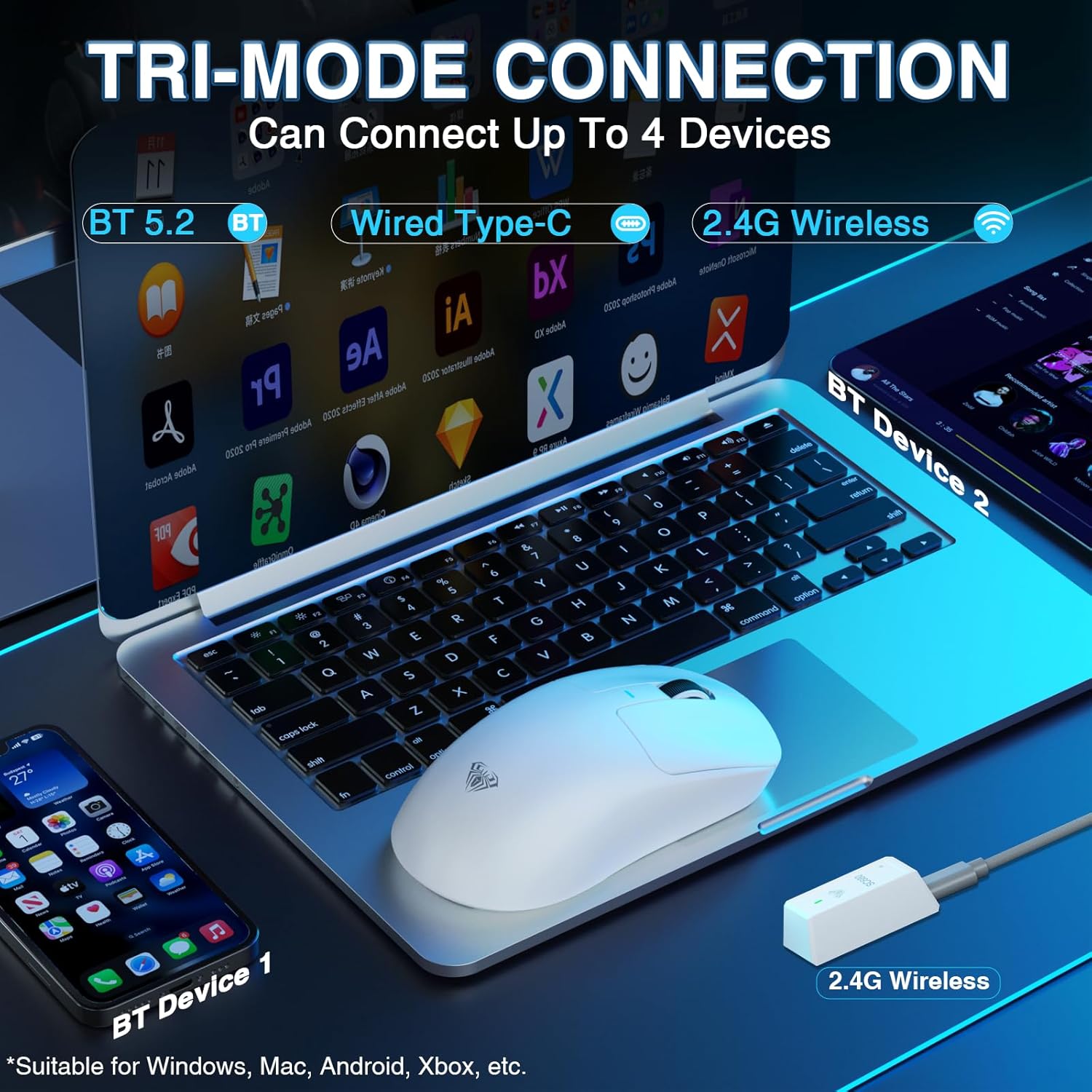
Image: The AULA SC680 mouse demonstrating its tri-mode connection capabilities, including Bluetooth, wired USB-C, and 2.4GHz wireless with a receiver.
- Mod wireless de 2.4 GHz:
- Locate the 2.4GHz USB receiver (often stored in a compartment on the bottom of the mouse).
- Conectați receptorul la un port USB disponibil de pe computer.
- Slide the switch on the bottom of the mouse to the "2.4G" position. The mouse should connect automatically.
- Mod Bluetooth 5.2:
- Glisați comutatorul din partea inferioară a mouse-ului în poziția „BT”.
- On your device (PC, laptop, Mac, PS5), go to Bluetooth settings and search for new devices.
- Select "AULA-SC680" from the list to pair. The mouse supports two Bluetooth connections (BT1 and BT2).
- For BT1: Hold down the DPI key for 5 seconds; the blue light will flash.
- For BT2: Hold down the middle key + back key for 5 seconds; the green light will flash.
- To switch between BT1 and BT2: Hold down the middle key + forward key for 5 seconds.
- Mod USB-C cu fir:
- Connect the provided USB-C cable to the mouse and to your computer's USB port.
- Mouse-ul va funcționa ca un mouse cu fir și se va încărca simultan.
Video: An official product video demonstrating the AULA SC680 Tri-Mode Wireless Gaming Mouse, highlighting its features and connectivity options.
5. Instrucțiuni de utilizare
5.1 Funcțiile butoanelor
The AULA SC680 mouse features several programmable buttons:
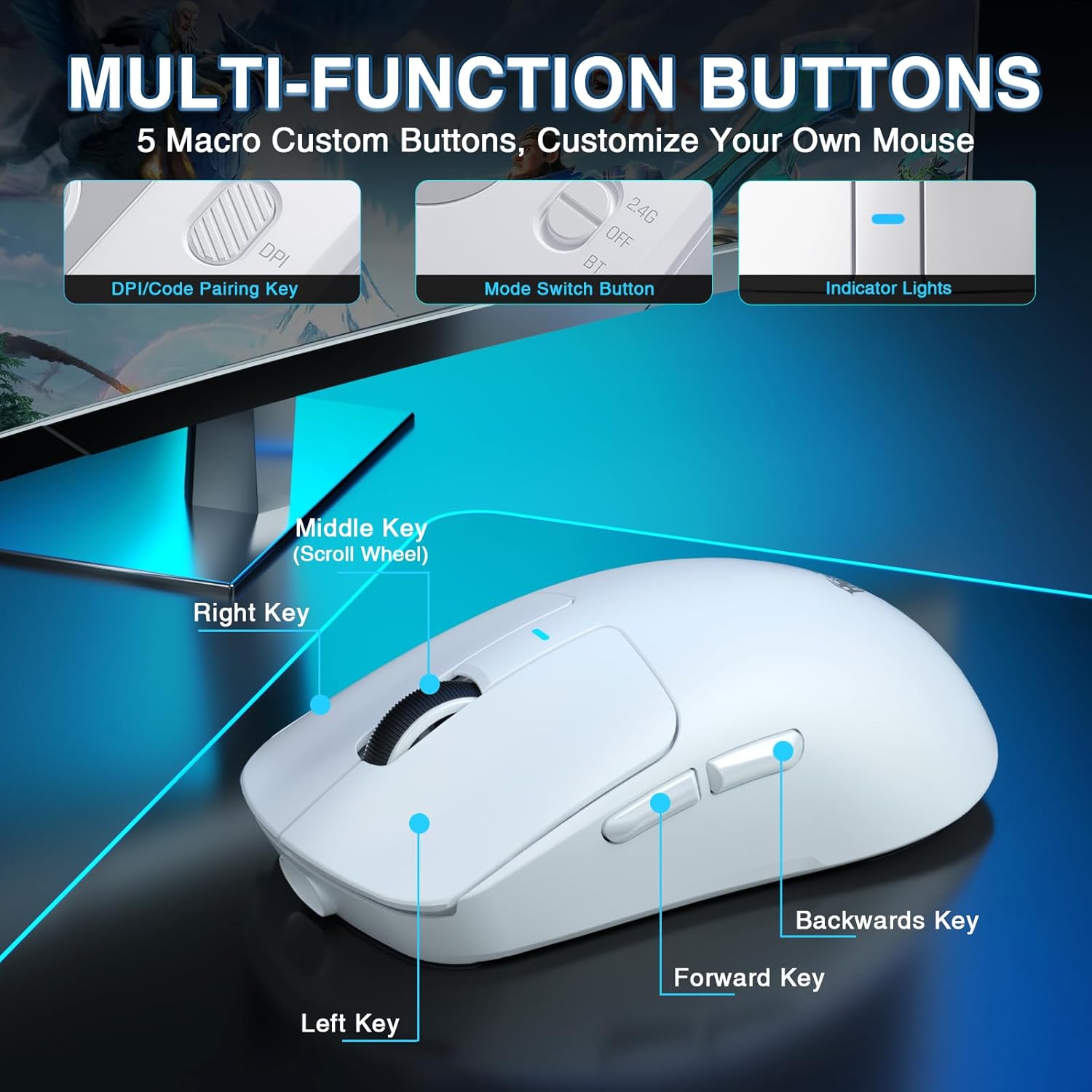
Image: A detailed diagram labeling the multi-function buttons on the AULA SC680 mouse, including Left Key, Right Key, Middle Key (Scroll Wheel), Forward Key, Backwards Key, DPI/Code Pairing Key, Mode Switch Button, and Indicator Lights.
- Click stânga: Clic principal standard.
- Click dreapta: Clic secundar standard.
- Tasta din mijloc (rotița de derulare): Scroll up/down, click for middle button function.
- Tasta de redirecționare: Navighează înainte în web browsere sau file exploratori.
- Backwards Key: Navighează înapoi în web browsere sau file exploratori.
- DPI/Code Pairing Key (Bottom): Cycles through DPI settings and initiates Bluetooth pairing.
- Mode Switch Button (Bottom): Toggles between 2.4G, OFF, and BT modes.
5.2 Ajustare DPI
The mouse supports up to 26000 programmable DPI. You can cycle through preset DPI levels using the DPI button on the bottom of the mouse. The indicator light on the mouse will change color to indicate the current DPI setting. Default levels are typically 400-800-1600-3200-6400.
5.3 Customizable Software
For advanced customization, including precise DPI settings, macro programming, and button remapping, download the official AULA driver software.
- Descărcare driver: Vizita bit.ly/m/AULA
- Notă de compatibilitate: The gaming driver is compatible only with Windows systems and supports 2.4GHz wireless mode and USB-C wired mode. For Bluetooth connection mode, Windows 10 or higher is required.
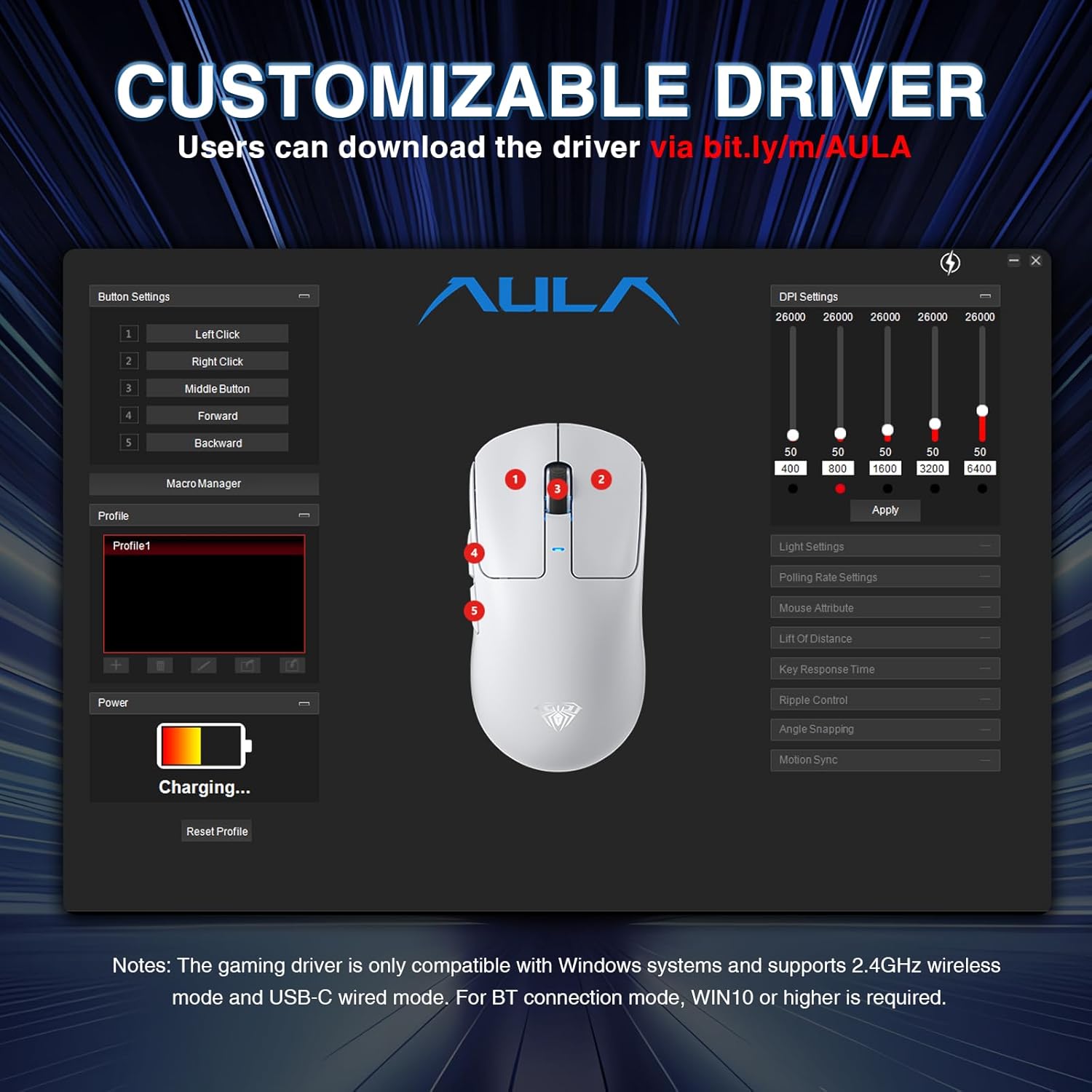
Image: A screenshot of the AULA customizable driver software, showing options for button settings, DPI adjustments, polling rate, and other mouse attributes.
6. Întreținere
To ensure the longevity and optimal performance of your AULA SC680 mouse, follow these maintenance guidelines:
- curatenie: Folosiți o lavetă moale și uscată pentru a șterge suprafața mouse-ului. Pentru murdăria persistentă, ștergeți ușor suprafața mouse-ului.amp Se poate folosi o cârpă, dar asigurați-vă că nu pătrunde umezeală în componentele interne. Evitați substanțele chimice dure sau produsele de curățare abrazive.
- Depozitare: When not in use for extended periods, store the mouse in a cool, dry place.
- Îngrijirea bateriei: Evitați descărcarea completă frecventă a bateriei. Încărcați mouse-ul când indicatorul bateriei este descărcat.
- Îngrijirea cablului: Do not sharply bend or pull the USB-C cable to prevent damage.
- Pernițe pentru picioare: The mouse comes with spare foot pads. Replace them if the original pads show significant wear to maintain smooth gliding.
- Anti-slip Stickers: Apply the included anti-slip stickers for improved grip and a personalized aesthetic. Ensure the mouse surface is clean and dry before application.

Image: The AULA SC680 mouse with colorful anti-slip stickers applied, demonstrating the customizable grip and aesthetic options.
7. Depanare
If you encounter issues with your AULA SC680 mouse, please refer to the following common solutions:
- Mouse-ul nu răspunde:
- Ensure the mouse is charged. Connect it via USB-C cable to charge and check if it works in wired mode.
- Verify the connection mode switch (2.4G/OFF/BT) on the bottom of the mouse is set correctly for your desired connection type.
- Pentru 2.4 GHz: Asigurați-vă că receptorul USB este conectat corect la un port USB funcțional. Încercați un alt port USB.
- For Bluetooth: Ensure Bluetooth is enabled on your device and the mouse is paired correctly. Re-initiate pairing if necessary (refer to Section 4.2).
- Reporniți computerul sau dispozitivul.
- Conexiune cu întârziere sau intermitentă:
- Move the mouse closer to the 2.4GHz receiver or Bluetooth device to reduce interference.
- Ensure there are no large metal objects or other wireless devices causing interference between the mouse and receiver/device.
- Verificați nivelul bateriei; o baterie descărcată poate afecta performanța wireless.
- Update mouse drivers (if applicable, via customizable software).
- DPI Settings Not Changing:
- Ensure you are pressing the correct DPI button on the bottom of the mouse.
- If using customizable software, ensure the settings are applied and the mouse is in a compatible mode (2.4GHz or wired).
- Butoanele nu funcționează:
- Check if the buttons are remapped in the customizable software. Reset to default if unsure.
- Ensure the mouse is clean and there's no debris obstructing the buttons.
8. Specificații
| Caracteristică | Detaliu |
|---|---|
| Marca | AULA |
| Model | SC680 |
| Tehnologia de conectivitate | Wireless 2.4GHz, Bluetooth 5.2, USB-C cu fir |
| Senzor | Senzor optic PAW3395 |
| DPI (puncte pe inch) | Up to 26000 (Programmable), Default: 400-800-1600-3200-6400 |
| IPS (inci pe secundă) | 650 |
| Accelerare | 50 g |
| Rata de sondare | 8000 Hz |
| Durata de viață a butonului | 80 de milioane de clicuri |
| Tip baterie | Litiu-ion (inclus) |
| Capacitatea bateriei | 500mAh |
| Durata de viață a bateriei | Până la 75 ore |
| Greutatea articolului | 58g (Ultra-Lightweight) |
| Caracteristici speciale | Ergonomic Design, Lightweight, Programmable Buttons, Rechargeable |
| Compatibilitate | Windows 7/8/10, Vista, XP, Mac, Windows 2000, Linux (BT requires WIN10+) |
9. Garanție și asistență
For warranty information and technical support, please refer to the official AULA website-ul web sau contactați distribuitorul. Păstrați bonul fiscal pentru reclamații în garanție.
For further assistance or to download the latest drivers and software, please visit the AULA official support page.


