1. Introducere
This manual provides comprehensive instructions for the installation, operation, and maintenance of the Hanwha Vision ANO-L7012R 4MP IR Bullet Camera. Please read this manual thoroughly before using the product to ensure correct usage and optimal performance. Keep this manual for future reference.
The Hanwha Vision ANO-L7012R is a compact 4MP IR bullet camera designed for reliable outdoor surveillance. Featuring a 3mm fixed lens with a 98.3° horizontal field of view, this camera captures sharp video at 2560x1440 resolution and 30fps. It includes intelligent motion detection, defocus, tampering, and directional detection capabilities. With a 20-meter IR range, H.265 compression, and IP66 weatherproof protection, this camera is suitable for high-performance surveillance installations.
2. Informații de siguranță
- Sursa de alimentare: Use only the specified power adapter or Power over Ethernet (PoE) compliant devices. Incorrect power sources can damage the camera and void the warranty.
- Instalare: Installation should be performed by qualified personnel and comply with all local codes. Ensure the mounting surface can support the camera's weight.
- Apă și umiditate: Although the camera is IP66-rated for outdoor use, avoid submerging it in water or exposing it to high-pressure water jets.
- curatenie: Do not use liquid or aerosol cleaners. Use a soft, dry cloth for cleaning.
- Temperatura de functionare: Operate the camera within the specified temperature range to prevent malfunction.
- dezasamblarea: Nu încercați să dezasamblați sau să modificați camera. Aceasta va anula garanția și poate provoca deteriorări.
3. Conținutul pachetului
Verificați dacă toate componentele sunt prezente în pachet:
- Hanwha Vision ANO-L7012R 4MP IR Bullet Camera
- Manual de instructiuni
- Mounting Screws and Anchors (may vary by region)
- Waterproof Cap for Ethernet Cable (if applicable)
4. Produs terminatview
The Hanwha Vision ANO-L7012R is a high-performance bullet-style network camera designed for robust surveillance applications.
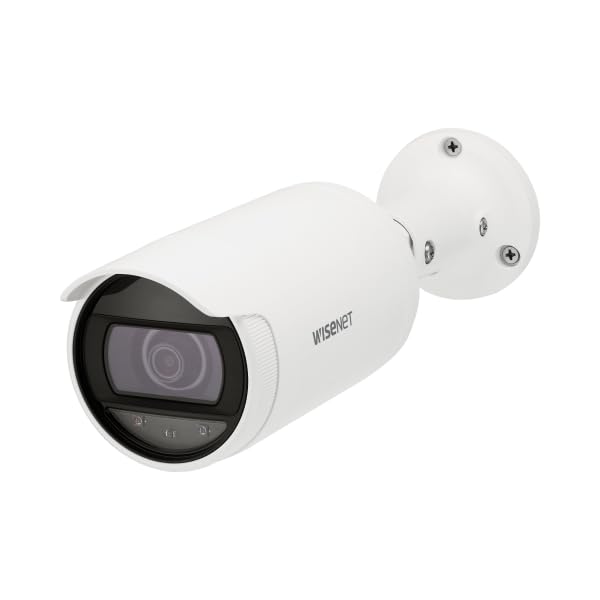
Figure 4.1: Hanwha Vision ANO-L7012R 4MP IR Bullet Camera. A white bullet-style security camera with a dark lens and a mounting base. The camera body has 'WISENET' printed on its side.
Caracteristici cheie:
- Rezoluție 4MP: Captures clear video at 2560x1440.
- Lentila fixa: 3mm lens with a 98.3° Horizontal Field of View (HFoV).
- Viziune de noapte IR: Up to 20 meters (65.6ft) in low-light conditions.
- Intelligent Analytics: Motion detection, directional detection, tampering, and defocus detection.
- Compresie eficientă: Supports H.265/H.264/MJPEG with WiseStream II for optimized bandwidth and storage.
- Edge Storage: MicroSD slot (up to 128GB) with SD encryption.
- Rezistent la intemperii: IP66-rated housing for outdoor durability.
- Alimentare prin Ethernet (PoE): Simplifică instalarea prin furnizarea de energie și date printr-un singur cablu.
5. Configurare și instalare
5.1 Montarea camerei
- Selectați locația: Choose a suitable indoor or outdoor location, typically a ceiling or wall, ensuring a clear field of view and access to network cabling.
- Pregătiți suprafața: Use the mounting template (if provided) to mark drill holes. Drill pilot holes for the mounting screws.
- Bază sigură: Attach the camera's mounting base securely to the surface using the provided screws and anchors.
- Reglarea unghiului: Slăbiți șuruburile de reglare de pe corpul camerei pentru a poziționa camera în unghiul dorit. viewing angle. Tighten screws once adjusted.
5.2 Wiring and Network Connection
- Conexiune Ethernet: Connect a standard Ethernet cable from your PoE-enabled network switch or injector to the camera's RJ45 port. If not using PoE, connect a separate 12V DC power adapter (not included) to the camera's power input.
- Protecție impermeabilă: For outdoor installations, ensure the Ethernet cable connection is protected using the provided waterproof cap or appropriate sealing methods to maintain the IP66 rating.
- Configurarea Rețelei: Once powered, the camera will obtain an IP address via DHCP (if available). Use the Hanwha Vision Device Manager software (available on the manufacturer's website) to discover the camera, change its default IP address, and configure network settings.
- Autentificare inițială: Accesați camera web interfață folosind a web browser and its IP address. The default login credentials are typically provided in a separate quick start guide or on the camera itself. Change default passwords immediately for security.
6. Operarea camerei
6.1 Operare de bază
- Trăi View: Accesați camera web interface or a compatible Video Management System (VMS) to view fluxuri video live.
- Înregistrare: Configurați setările de înregistrare prin intermediul web interface. Options include continuous recording, scheduled recording, and event-triggered recording (e.g., motion detection). Recordings can be stored on a microSD card (if installed) or a Network Video Recorder (NVR).
- Vedere de noapte: The camera automatically switches to IR night vision mode in low-light conditions, providing clear black and white video up to 20 meters.
6.2 Caracteristici avansate
- Detectarea mișcării: Configure detection zones and sensitivity to trigger alarms or recordings when movement is detected.
- Directional Detection: Set up rules to detect objects moving in specific directions across a virtual line.
- TampDetectarea eroărilor: Receive alerts if the camera's view is obstructed or if the camera is tampered cu.
- Defocus Detection: Alerts if the image becomes out of focus, indicating a potential issue or tampering.
- WiseStream II: Enable this feature to dynamically control encoding, reducing bandwidth and storage requirements without compromising image quality.
- Card MicroSD: Insert a microSD card (up to 128GB) for local storage. Ensure SD encryption is enabled for data security.
7. Întreținere
- curatenie: Periodically clean the camera lens and housing with a soft, dry cloth to remove dust and dirt. Do not use abrasive cleaners or solvents.
- Actualizări firmware: Regularly check the Hanwha Vision website for firmware updates. Keeping the firmware updated ensures optimal performance, security, and access to new features.
- Verificarea cablului: Periodically inspect all cables for signs of wear or damage, especially in outdoor installations.
- Backup de configurare: Back up your camera's configuration settings regularly to easily restore them if needed.
8. Depanare
| Problemă | Cauza posibila | Soluţie |
|---|---|---|
| Nu se alimentează/Camera nu pornește | Incorrect power source; PoE not active; faulty cable. | Verify power connection and source. Ensure PoE switch/injector is active. Check Ethernet cable for damage. |
| Fără flux video | Network connectivity issue; incorrect IP address; firewall blocking. | Check network cable. Verify camera's IP address. Ensure no firewall is blocking ports. Restart camera and network devices. |
| Calitate slabă a imaginii | Dirty lens; improper focus; low light conditions; network bandwidth issues. | Clean the lens. Check camera settings for focus (if adjustable) and exposure. Ensure sufficient lighting or proper IR function. Check network bandwidth. |
| Detectarea mișcării nu funcționează | Setări de sensibilitate incorecte; zone de detectare neconfigurate; problemă de firmware. | Adjust motion detection sensitivity and configure detection zones in the web interface. Update firmware if available. |
9. Specificații
| Caracteristică | Detaliu |
|---|---|
| Numele modelului | ANO-L7012R |
| Rezoluţie | 4 MP (2560x1440) |
| Senzor de imagine | CMOS de 1/3" |
| Obiectiv | Obiectiv fix de 3 mm |
| Câmp orizontal de View (HFoV) | 98.3° |
| Gama de vedere nocturnă | 20 meters (65.6ft) IR |
| Compresie video | H.265, H.264, MJPEG (with WiseStream II) |
| Gama dinamică largă (WDR) | 120 dB |
| Depozitare | MicroSD slot (up to 128GB) with SD encryption |
| Evaluare de protecție la pătrundere (IP). | IP66 (rezistent la intemperii) |
| Sursa de alimentare | PoE (Power over Ethernet) |
| Dimensiuni (L x l x H) | 3.07 x 10.31 x 10.31 inci |
| Greutate | 0.86 lb |
| Protocol de conectivitate | RTSP |
| Utilizări recomandate | Securitate interioară, securitate exterioară |
10. Garanție și asistență
For warranty information, please refer to the warranty card included with your product or visit the official Hanwha Vision website-ul.
For technical support, software downloads, and additional resources, please visit the Hanwha Vision support portal.
- Oficial Website: www.hanwhavision.com (Examplinkul, linkul real poate varia)
- Sprijin: Consultați ambalajul produsului sau instrucțiunile oficiale website for specific support contact details.


