1. Introducere
This manual provides essential information for the safe and effective operation of your Ortur R2 Laser Engraver and Cutter. The Ortur R2 is a smart 20W machine designed for engraving and cutting various materials, including wood and metal. Please read this manual thoroughly before using the device.

Figure 1: Ortur R2 Laser Engraver and Cutter with its accompanying 40L Air Assist Pump.
2. Informații de siguranță
The Ortur R2 is a Class 1 laser product, meaning it is designed with safety features to prevent exposure to laser radiation during normal operation. However, it is crucial to adhere to all safety guidelines to ensure safe use.
- Folosiți întotdeauna dispozitivul într-o zonă bine ventilată.
- Do not attempt to bypass or disable any safety features.
- Ensure the enclosure is properly closed during operation.
- The built-in flame detection system will automatically shut off power if unusual heat or flames are detected. Do not interfere with this system.
- Țineți copiii și animalele de companie departe de zona de operare.
- Refer to local regulations for proper disposal of materials and waste.

Figure 2: The Ortur R2 is a Class 1 Safety Certified device, ensuring a high level of user protection.
3. Caracteristicile produsului
The Ortur R2 Laser Engraver and Cutter incorporates several advanced features for enhanced performance and user experience:
- Plug-and-Play Minimalist Experience: Designed for immediate use with no complex installation required. Simply connect power to begin.
- 20W TOP Cutting Capability: This laser engraver offers powerful cutting capabilities, comparable to industrial CNC cutters. It can cut 10mm basswood plywood, 15mm pine board, and 8mm black acrylic in a single pass.
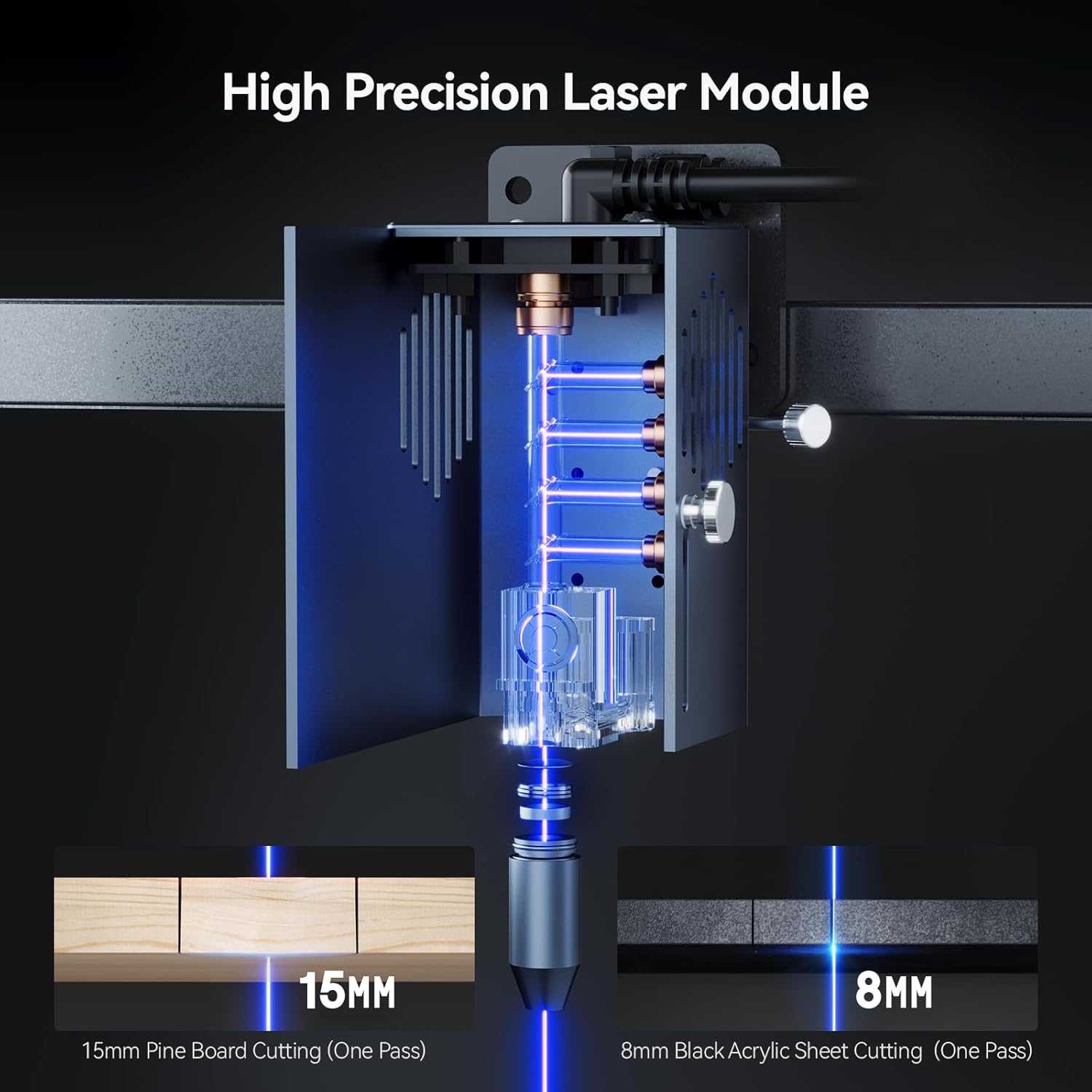
Figure 3: The high-precision laser module demonstrating its ability to cut 15mm pine board and 8mm black acrylic in one pass.
- APP with Built-in AI Assist Function: The companion application features AI algorithms to optimize images for engraving, reducing design barriers. It supports hand-drawn engraving, a puzzle mode for customizable designs, and QR code generation from text, photos, or videos for permanent engraving.

Figura 4: Pesteview of the Ortur R2 mobile application, highlighting its one-app solution, 1-tap pairing, extensive template library, and user community features.

Figure 5: The AI-powered engraving assistant within the Ortur R2 app, showing how it enhances image suitability for engraving.
- Smart Camera for Enhanced Precision: An HD full-frame camera provides a clear view of the workspace, allowing precise positioning of designs by dragging and dropping them onto the material.
- Visual High-definition Display Screen: Real-time monitoring of device status, supporting self-checks and offline processing. The device preserves engraving history across devices for seamless batch production.
- Flip-UP Touch Screen: Offers ergonomic comfort and viewing flexibility, allowing users to find the perfect angle for productive work.
- Military-grade Safety Protection System: Includes a built-in flame detection system that instantly shuts off power upon detecting unusual heat or flames.
- 40L Air Assist Pump: Equipped with a dedicated air assist pump to improve cutting precision and efficiency.
- Engraving Performance: Features an engraving stroke of 11.81" x 8.26" (300 x 190mm) and a super engraving efficiency of 20000mm/min. The laser spot size is 0.01mm.

Figura 6: Detaliat view of the Ortur R2's engraving area, speed, HD camera position, and precise laser spot size.
4. Configurare
The Ortur R2 is designed for a minimalist setup. Follow these steps to prepare your device for operation:
- Unboxing: Scoateți cu grijă toate componentele din ambalaj. Verificați dacă sunt prezente toate piesele enumerate în lista de ambalaj.
- Plasare: Place the Ortur R2 on a stable, level surface in a well-ventilated area, away from flammable materials. Ensure adequate space around the machine for air circulation and access.
- Conexiune de alimentare: Connect the power adapter to the device and then to a suitable power outlet.
- Conectarea pompei de asistență cu aer: Connect the 40L air assist pump to the designated port on the Ortur R2. Ensure the hose is securely attached.
- Pornire inițială: Press the power button to turn on the device. The high-definition display screen will illuminate.
5. Instrucțiuni de utilizare
Operating the Ortur R2 involves preparing your design, setting up the material, and initiating the engraving or cutting process.
5.1. Pregătirea materialului
- Place the material to be engraved or cut securely within the working area of the machine.
- Ensure the material is flat and properly aligned.
- The Ortur R2 can engrave and cut a wide range of materials, including but not limited to:
- Wood (basswood, pine, plywood)
- Acril
- Metal (for engraving)
- Bambus
- Cauciuc
- Pâslă
- Hârtie
- Ceramică (pentru gravare)
- Stainless Steel (for engraving)
- Slate Stone (for engraving)
- Sticlă (pentru gravare)
- Cake (for engraving)
- Aluminum (for engraving)
- Piele

Figura 7: Examples of various materials that can be processed by the Ortur R2 for cutting and engraving applications.
5.2. Design and Operation
- Folosind APP:
- Download and install the Ortur R2 companion application on your mobile device.
- Pair your device with the Ortur R2 via the app (1-tap pairing).
- Import or create your design within the app. Utilize AI assist functions for image optimization, hand-drawn engraving, or puzzle mode.
- Use the smart camera preview to drag and drop your design precisely onto the material on screen.
- Adjust laser power, speed, and passes as needed for your material.
- Initiate the engraving/cutting process from the app.
- Offline Processing:
- Designs can be prepared and saved to the device for offline operation.
- Use the visual high-definition display screen to select and start saved projects without needing a connected device.
- The flip-up touch screen provides ergonomic control and monitoring.

Figure 8: The Ortur R2's display screen allows for offline operation and is designed for comfortable viewing whether standing or sitting.
- Monitorizare: Monitor the progress of your engraving/cutting job via the display screen or the app. The flame detection system provides an additional layer of safety during operation.
6. Întreținere
Regular maintenance ensures the longevity and optimal performance of your Ortur R2. Always power off and unplug the device before performing any maintenance.
- Curățarea lentilei laserului: Periodically inspect and gently clean the laser lens with a lint-free cloth and appropriate lens cleaning solution. Dust and debris can affect laser performance.
- Curățarea zonei de lucru: Remove any debris, dust, or material scraps from the engraving bed after each use.
- Air Assist Pump: Ensure the air assist pump is free from obstructions and operating correctly. Refer to the pump's specific manual for maintenance if provided separately.
- Curatenie generala: Ștergeți exteriorul mașinii cu o lavetă moale șiamp pânză. Evitați utilizarea substanțelor chimice dure.
7. Depanare
This section provides solutions to common issues you might encounter. If the problem persists, please contact Ortur customer support.
| Problemă | Cauza posibila | Soluţie |
|---|---|---|
| Dispozitivul nu pornește. | Cablul de alimentare nu este conectat; problemă cu priza. | Asigurați-vă că este conectat corect cablul de alimentare. Testați priza cu un alt dispozitiv. |
| Laser not firing or weak. | Dirty laser lens; incorrect power settings; material too far/close. | Clean the laser lens. Verify power settings in the app. Ensure material is properly positioned. |
| Engraving/cutting results are inconsistent. | Material not flat; incorrect speed/power settings; material type. | Ensure material is flat and secured. Adjust speed and power settings based on material. |
| App cannot connect to device. | Bluetooth/Wi-Fi issue; device not in pairing mode. | Restart both the device and your mobile device. Ensure Bluetooth/Wi-Fi is enabled. Follow app pairing instructions. |
8. Specificații
| Atribut | Detaliu |
|---|---|
| Marca | Ortur |
| Numărul de model | 2025060601 |
| Culoare | Gri |
| Dimensiunile produsului | 40 x 21.4 x 47 cm |
| Greutatea articolului | 14.2 kilograme |
| ASIN | B0FC62F933 |
| Data primului disponibil | 12 iulie 2025 |
| Putere de ieșire laser | 20W |
| Zona de gravură | 300 x 190 mm (11.81" x 8.26") |
| Viteza de gravare | Până la 20000 mm/min |
| Dimensiunea spotului laser | 0.01mm |
| Pompa de asistare a aerului | 40L included |
| Clasa de siguranță | Clasa 1 |
9. Garanție și asistență
For warranty information and technical support, please refer to the official Ortur website-ul lor web sau contactați direct serviciul lor de asistență pentru clienți. Păstrați bonul fiscal ca dovadă a achiziției pentru reclamațiile în garanție.
Pentru asistență suplimentară, puteți vizita Ortur Oficial Website-ul or contact their support team through the contact information provided on their site.


