Produs terminatview
The GDFStudio Modern LED Coffee Table is designed to enhance your living space with its sleek high-gloss finish, wood grain texture, and integrated LED lighting. This versatile table features a tempered glass top and a convenient storage compartment, making it a functional and stylish addition to any room.
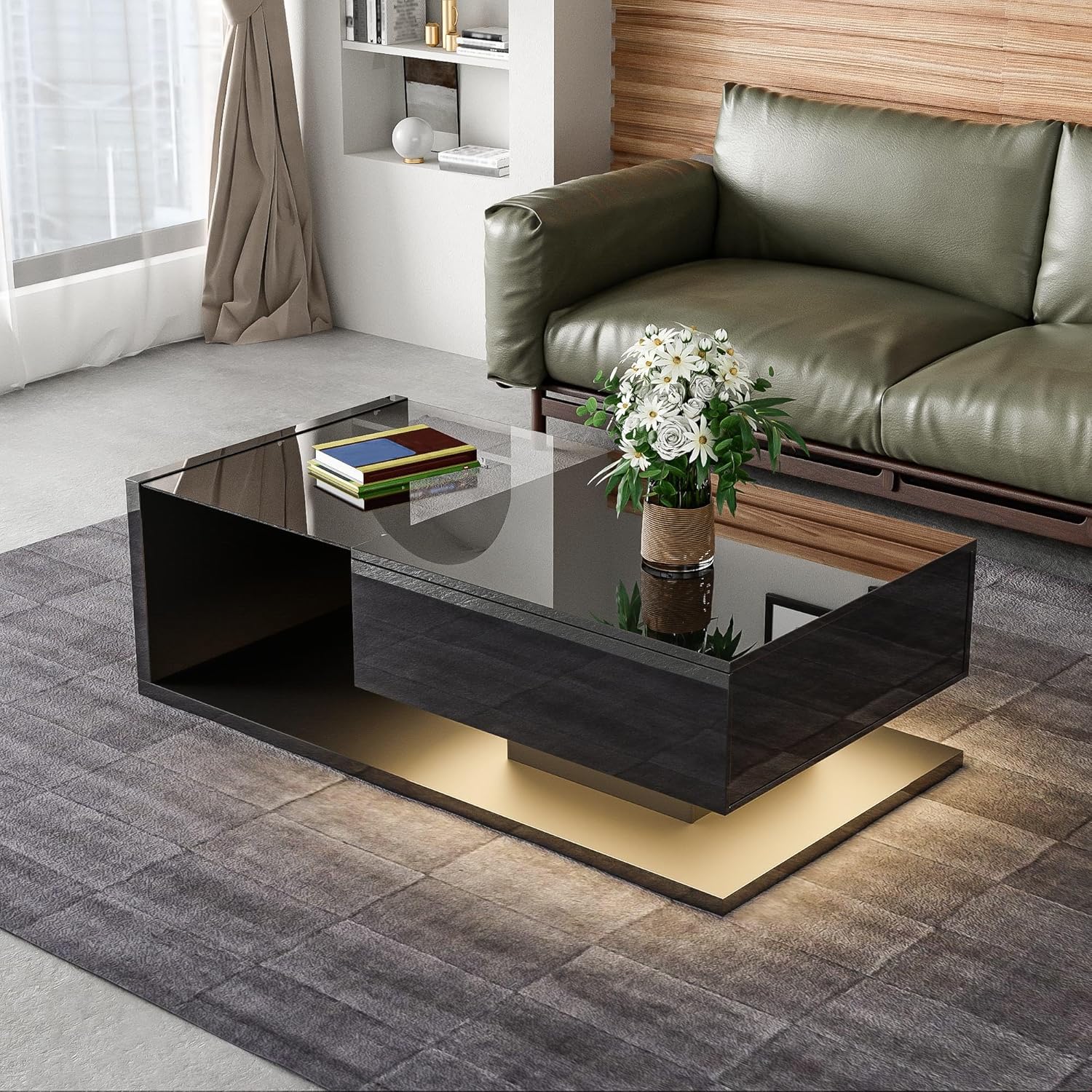
Image: The GDFStudio Modern LED Coffee Table, showcasing its black high-gloss finish and tempered glass top, positioned in a contemporary living room.
Caracteristici cheie:
- Modern High-Gloss Design: Sleek black high-gloss surface with wood grain accents.
- Glass Top with LED Lighting: Tempered glass tabletop with 16-color adjustable LED lights.
- AmpSpațiu de stocare: Built-in compartment for organizing items.
- Construcție robustă și durabilă: Made from high-quality particle board with a solid base.
Informații de siguranță
Vă rugăm să citiți și să înțelegeți toate instrucțiunile de siguranță înainte de asamblare și utilizare. Nerespectarea acestor instrucțiuni poate duce la vătămări corporale sau la deteriorarea produsului.
- Nu depășiți capacitatea maximă de greutate a 130 lbs (59 kg) pe blatul mesei.
- Asigurați-vă că toate șuruburile și elementele de fixare sunt strânse bine în timpul asamblării și verificați periodic dacă sunt slăbite.
- A protective film is applied to the high-gloss surfaces. Please remove this film completely before use to reveal the intended finish.
- A nu se lăsa la îndemâna copiilor piesele mici și uneltele de asamblare.
- Evitați așezarea obiectelor fierbinți direct pe suprafață fără protecție.
Configurare și asamblare
Assembly of the GDFStudio Modern LED Coffee Table is required. All necessary instructions and tools are included in the packaging. It is recommended to assemble the table on a soft, clean surface to prevent scratches.
Înainte de a începe:
- Despachetați toate componentele și verificați-le în funcție de lista de piese furnizată în manualul de asamblare.
- Asigurați-vă că aveți suficient spațiu pentru asamblare.
- Have a Phillips head screwdriver and any other basic tools ready, though most specialized tools should be included.
Pași de asamblare (îndrumări generale):
- Identify and separate all components according to the assembly diagram.
- Attach the main support structures using the provided hardware.
- Assemble the storage compartment and integrate it into the main structure.
- Așezați cu grijă blatul de sticlă securizată pe zona desemnată.
- Connect the LED lighting system according to the specific wiring instructions.
- Strângeți bine toate elementele de fixare, dar nu strângeți prea mult.
- Remove the protective film from all high-gloss surfaces.

Image: The coffee table with its integrated storage compartment revealed, demonstrating its functional design for organizing items.
Operating Instructions (LED Lighting)
The GDFStudio Modern LED Coffee Table features built-in 16-color adjustable LED lights to create the perfect ambiance. The LED system is controlled via a remote control or a compatible mobile application (if applicable, refer to your specific LED kit instructions).
Caracteristici LED:
- 16 Changing Colors: Select from a wide spectrum of colors to match your mood or decor.
- moduri multiple: Includes Flash mode (single or multi-color) and Gradient mode (single or multi-color) for dynamic lighting effects.
- Luminozitate reglabilă: Reduceți sau intensificați luminile după preferințe.

Image: An illustration detailing the 16 available LED color options and the different lighting modes (Flash and Gradient) that can be controlled, possibly via a smartphone application.
Operație de bază:
- Ensure the LED power adapter is securely plugged into a wall outlet.
- Use the provided remote control (or app) to turn the lights ON/OFF.
- Select your desired color from the color palette on the remote/app.
- Toggle between Flash and Gradient modes using the dedicated buttons.
- Adjust brightness using the brightness control buttons.
Întreținere și îngrijire
Proper care will ensure the longevity and appearance of your GDFStudio Modern LED Coffee Table.
- Curățarea suprafețelor: For the high-gloss and wood grain surfaces, wipe with a soft, damp Evitați produsele de curățare abrazive sau substanțele chimice dure care pot deteriora finisajul.
- Îngrijirea sticlei temperate: Clean the glass top with a glass cleaner and a lint-free cloth. Do not use sharp objects on the glass.
- Lumini LED: The LED lights are designed for long-term use and typically do not require maintenance. If issues arise, refer to the troubleshooting section.
- Film de protecție: As mentioned, ensure the protective film is removed from all high-gloss surfaces before initial use.
- Distribuția greutății: Distribute weight evenly on the tabletop and within the storage compartment to prevent stress on the structure.
Depanare
If you encounter any issues with your coffee table, please refer to the common problems and solutions below. For persistent issues, contact customer support.
| Problemă | Cauza posibila | Soluţie |
|---|---|---|
| Luminile LED nu se aprind. | Power adapter unplugged, remote battery dead, loose connection. | Check power connection. Replace remote battery. Ensure all LED wiring connections are secure. |
| Masa pare instabilă după asamblare. | Fasteners not fully tightened, uneven floor. | Re-tighten all assembly screws. Ensure the table is on a level surface; use furniture pads if necessary. |
| Scratches on high-gloss surface. | Protective film not removed, abrasive cleaning. | Ensure protective film is fully removed. Use only soft cloths and non-abrasive cleaners. |
Specificații
| Atribut | Detaliu |
|---|---|
| Marca | GDFStudio |
| Numărul de model | 337250 |
| Culoare | Negru |
| Material principal | Particle Board, Tempered Glass |
| Dimensiuni produs (L x l x H) | 41.5" L x 21.5" l x 12.5" H (105.41 x 54.61 x 31.75 cm) |
| Greutate netă | 57.9 lbs (26.26 kg) |
| Capacitate de greutate | 130 lbs (59 kg) |
| Caracteristica LED | 16-color adjustable lights included |
| Asamblare | Required (Instructions & Tools Included) |

Image: A detailed diagram illustrating the dimensions of the coffee table in inches, including length, width, and height, as well as internal compartment measurements.
Garanție și suport
For any questions, concerns, or assistance with your GDFStudio Modern LED Coffee Table, please contact the seller or manufacturer directly. Refer to your purchase documentation for specific warranty terms and contact information.
Vânzător: GDF Studio CA
POLITICA DE RETURNARE: 30-day refund/replacement policy through the seller.
It is recommended to retain your proof of purchase for warranty claims or support requests.


