1. Produs terminatview
Negrulview Acebook 6 is a portable laptop designed for general computing tasks, featuring a 15.6-inch Full HD IPS display, an Intel N150 Quad-Core processor, 16GB DDR4 RAM, and a 512GB SSD. It operates on Windows 11 and supports 100W Type-C fast charging.

Imagine: Negrulview Acebook 6 laptop displaying the Windows 11 operating system interface.
2. Conținutul pachetului
Verificați dacă toate articolele sunt prezente în colet:
- Negruview Acebook 6 Laptop
- Power Adapter (100W Type-C)
- Mouse fără fir
- Geanta laptop
- Manual de utilizare (acest document)
3. Ghid de instalare
3.1 Încărcare inițială
Before first use, fully charge the laptop. Connect the provided 100W Type-C power adapter to the laptop's Type-C port and a power outlet. The charging indicator light will illuminate.

Image: The laptop's Type-C port connected to the fast charging cable, illustrating the charging process.
3.2 Pornire/Oprire
- Pentru a porni: Press and hold the power button located on the top right of the keyboard until the screen illuminates.
- Pentru a opri: Click the Windows Start button, then select Power > Shut down. Alternatively, press and hold the power button for several seconds to force a shutdown (use only when necessary).
3.3 Conectarea perifericelor
The Acebook 6 features various ports for connecting external devices:
- Porturi USB 3.2 Gen 1 (x2): Pentru transfer de date de mare viteză cu dispozitive USB.
- Port USB 2.0 (x1): For standard USB devices like mice or keyboards.
- Full-featured Type-C Port (x1): Supports 5Gbps data transfer, fast charging, and DisplayPort 1.4 video output.
- Port HDMI 2.0 (x1): Connect to external displays or projectors for up to 4K resolution at 60Hz.
- Mufă audio de 3.5 mm (x1): Pentru căști sau difuzoare externe.
- TF Card Slot (x1): For memory card expansion (Max 25MB/s data transfer).

Imagine: Detaliată view of the laptop's left and right sides, highlighting the USB, Type-C, HDMI, audio, and TF card ports.
4. Instrucțiuni de utilizare
4.1 Caracteristici de afișare
The 15.6-inch Full HD (1920x1080) IPS display offers clear visuals. It features TÜV Rheinland Low Blue Light Certification to reduce eye strain during extended use.

Imagine: Ecranul laptopului se afișeazăasing its TÜV SÜD Low Blue Light Certification for eye comfort.
4.2 Performanță și stocare
The laptop is equipped with an Intel N150 Quad-Core processor, 16GB DDR4 RAM, and a 512GB M.2 SSD for efficient performance and ample storage. The SSD can be expanded up to 2TB.

Image: The laptop screen showing various applications running, emphasizing the 16GB RAM and 512GB SSD with 2TB expansion capability.
4.3 Managementul bateriei
The Acebook 6 features a 45Wh battery. You can select from different power modes to optimize battery life or performance:
- Modul de economisire a energiei: Limits background activities to extend battery life.
- Mod echilibrat: Optimizes performance and battery life for everyday tasks.
- Modul de performanță: Prioritizes maximum performance for demanding tasks.

Image: An illustration detailing the laptop's battery capacity and the three available power management modes.
4.4 Conectivitate fără fir
- Wifi: Supports dual-band 5G Wi-Fi for stable and fast internet connections.
- Bluetooth: Pentru conectarea perifericelor wireless, cum ar fi căști, mouse-uri și tastaturi.
4.5 Tastatură numerică
The integrated independent numeric keypad allows for efficient data entry, useful for financial reports or detailed document creation.

Image: A close-up of the laptop's keyboard, highlighting the independent numeric keypad for enhanced productivity.
5. Întreținere
5.1 Curățare
- Folosiți o lavetă moale, fără scame, pentru a curăța ecranul și exteriorul.
- Evitați utilizarea substanțelor chimice dure sau a materialelor abrazive.
- Pentru pete persistente, ștergeți ușorampClătiți laveta cu apă sau cu o soluție de curățare a ecranului.
5.2 Managementul căldurii
The Acebook 6 features an expansive cooling area with a gaming-grade shark fin fan, operating at up to 4500 RPM, and thickened copper pipes to maintain optimal operating temperatures and quiet performance.

Imagine: O imagine internă view of the laptop's heat dissipation system, showing the fan and copper pipes.
5.3 Actualizări de software
Regularly check for and install operating system and driver updates to ensure optimal performance and security. These updates are typically managed through Windows Update.
6. Depanare
6.1 Probleme comune și soluții
- Laptopul nu pornește: Ensure the laptop is charged or connected to the power adapter. Try a hard reset by holding the power button for 10-15 seconds.
- Ecranul este gol: Check if the laptop is powered on. Connect an external monitor via HDMI to verify if the issue is with the laptop's display.
- Probleme de conectivitate Wi-Fi: Asigurați-vă că Wi-Fi este activat în setările Windows. Reporniți routerul și laptopul.
- Performanță lentă: Close unnecessary applications. Check for available system updates. Ensure sufficient free storage space on the SSD.
For persistent issues, refer to the support section or contact Blackview serviciu clienți.
7. Specificații
| Caracteristică | Caietul de sarcini |
|---|---|
| Numele modelului | ACEBOOK 6 |
| Procesor | Intel N150 Quad-Core (Up to 3.6GHz) |
| RAM | 16 GB DDR4 SDRAM |
| Depozitare | 512GB M.2 SSD (Expandable up to 2TB) |
| Afişa | 15.6 Inches FHD IPS (1920x1080 Pixels) |
| Coprocesor grafic | Grafică Intel (integrată) |
| Sistem de operare | Windows 11 |
| Tip fără fir | Dual-band 5G Wi-Fi, Bluetooth |
| Porturi | 2x USB 3.2 Gen 1, 1x USB 2.0, 1x Full-featured Type-C, 1x HDMI 2.0, 1x 3.5mm Audio, 1x TF Card Slot |
| Baterie | 45Wh Litiu Ion |
| Greutatea articolului | 3.74 lire (1.7 kg) |
| Dimensiunile produsului | 14.1 x 0.7 x 9 inchi (35.8 x 1.8 x 22.8 cm) |
| Caracteristica specială | Numeric Keypad, TÜV Rheinland Eye Care |
8. Garanție și asistență
8.1 Informații despre garanție
Negrulview Acebook 6 laptop comes with a 2 ani garanție. This warranty covers manufacturing defects and hardware malfunctions under normal use conditions.
8.2 Suport tehnic
Negruview prevede Suport tehnic pe viață for the Acebook 6. For assistance with any issues, you can:
- Refer to the troubleshooting section in this manual.
- Vizitați pagina oficială Blackview sprijin website pentru întrebări frecvente și resurse suplimentare.
- Contact Blackview serviciul clienți direct.
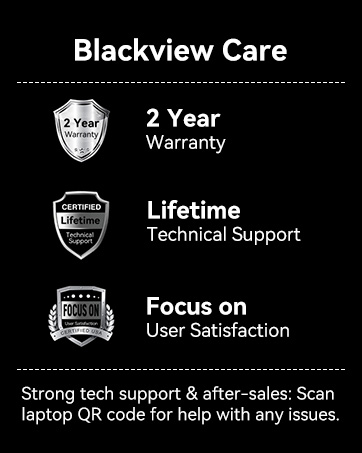
Imagine: Negruview Care details, including 2-year warranty and lifetime technical support commitment.


