Introducere
This manual provides detailed instructions for the installation, operation, and maintenance of your Blaupunkt Raleigh 910 10.1" Touchscreen Double DIN AM/FM Stereo Receiver and the accompanying Blaupunkt BPS-E694 6x9" 4-Way Car Speakers. Please read this manual thoroughly before use to ensure proper functionality and to maximize your audio experience.
Conținutul pachetului
Verificați dacă toate articolele sunt prezente în colet:
- Blaupunkt Raleigh 910 10.1" Touchscreen Double DIN AM/FM Stereo Receiver
- Four (4) Blaupunkt BPS-E694 6x9" 4-Way Car Speakers
- 50 de picioare de cablu de difuzor de calibru 16
- Speaker Grilles (for BPS-E694 speakers)
- Mounting Hardware (for speakers)

Image: Complete package contents including the Raleigh 910 receiver, four 6x9 inch speakers, and speaker wire.
Produs terminatview
Blaupunkt Raleigh 910 Receiver
The Raleigh 910 is a 10.1-inch touchscreen double DIN car stereo receiver designed for modern vehicle integration. It features a high-resolution display and runs on a Linux OS, offering a user-friendly interface.
- Afişa: 10.1" TFT capacitive touchscreen (1024 x 600 px)
- Sistem de operare: Sistemul de operare Linux
- Conectivitate: Built-in Bluetooth (HFP, A2DP, PBAP) for hands-free calling and audio streaming, Wireless/USB Apple CarPlay, Wireless/USB Android Auto.
- Tuner: AM/FM Tuner.
- Intrări: Spateview Camera input, A/V Input, Steering Wheel Control (SWC) compatible.
- Ieșiri: RCA Line-Out x5 (Front, Rear, Subwoofer), AV Output.
- Audio: 13-Band EQ, 4 x 45 Watts Max Power.
- USB: 2x Rear USB (Audio & Video, 2A).

Imagine: față view of the Blaupunkt Raleigh 910 receiver displaying the user interface with various app icons.
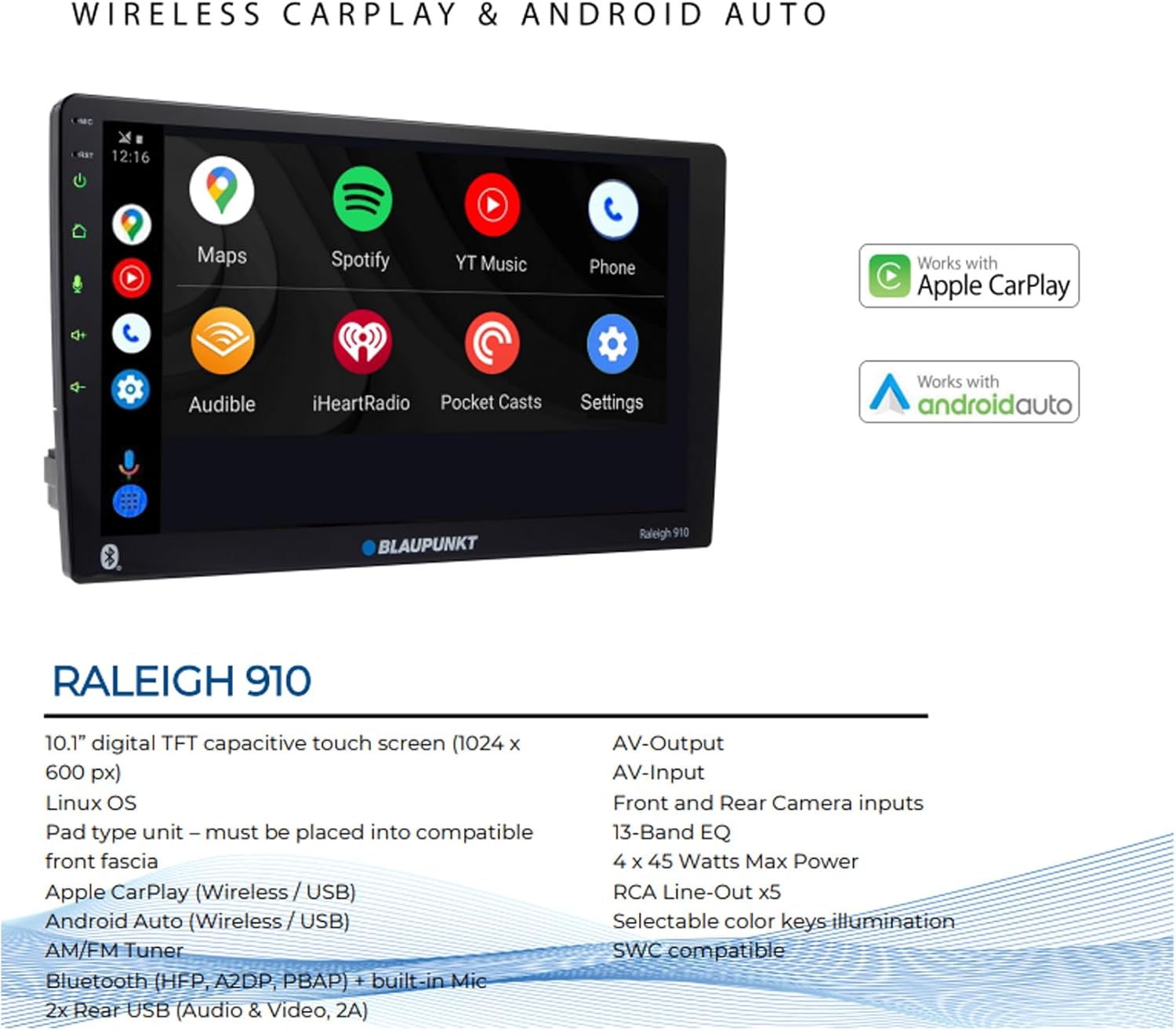
Image: The Raleigh 910 receiver highlighting its compatibility with Wireless Apple CarPlay and Android Auto.
Blaupunkt BPS-E694 6x9" 4-Way Car Speakers
The BPS-E694 speakers are designed to deliver a rich and detailed sound profile, complementing the Raleigh 910 receiver. They feature a multi-component design for comprehensive audio reproduction.
- Tip: Difuzor coaxial cu 4 căi, 6x9"
- Componente: 6x9" woofer, 2" midrange, 1.2" tweeter, and 0.5" super tweeter.
- Manevrarea puterii: 70 Watt Max (per speaker), 35 Watt RMS (per speaker).
- Impedanta: 4 ohmi.
- Raspuns in frecventa: 45Hz - 20kHz.
- Sensibilitate: 85.3dB.
- Constructie: PP cone woofer with rubber surround, steel basket, neodymium tweeter magnet, ferrite midrange magnet.

Image: A Blaupunkt BPS-E694 6x9 inch 4-Way car speaker shown with and without its protective grille.
Configurare și instalare
Professional installation is recommended for optimal performance and safety. Incorrect wiring can damage the unit or your vehicle's electrical system. Always disconnect the vehicle's battery before beginning installation.
Receiver Installation (Raleigh 910)
- Preparare: Ensure the vehicle's battery is disconnected. Remove the existing head unit from the dashboard.
- Ham de cabluri: Connect the Raleigh 910's wiring harness to your vehicle's factory harness using an appropriate adapter (sold separately) or by carefully matching wires. Ensure power, ground, accessory, and speaker wires are correctly connected.
- Antenă: Conectați antena AM/FM.
- Conexiuni externe: If using a rearview camera, connect its video input to the designated input on the receiver. Connect any other A/V inputs or USB cables as needed.
- Montare: Secure the double DIN receiver into the dashboard opening. The unit is a pad-type unit and must be placed into a compatible front fascia.
- Testare: Reconectați bateria și efectuați un test de funcționare de bază înainte de a reasambla complet tabloul de bord.
Instalare difuzoare (BPS-E694)
- Locaţie: Identificați locații potrivite pentru difuzoarele de 6x9" în vehicul (de exemplu, pe platformă, pe panourile ușilor).
- Montare: Use the provided mounting hardware to secure the speakers. Ensure a tight fit to prevent vibrations.
- Cablaj: Connect the 16-gauge speaker wire to the speaker terminals, observing correct polarity (positive to positive, negative to negative). Run the speaker wires to the receiver's speaker outputs.
- Grile: Attach the protective grilles over the speakers if desired.

Image: A roll of 50 feet of 16-gauge copper clad aluminum (CCA) speaker wire, used for connecting speakers to the receiver.
Instrucțiuni de operare
Operare de bază
- Pornire/Oprire: Press the power button (usually located on the front panel or a dedicated button) to turn the unit on or off.
- Controlul volumului: Adjust volume using the on-screen controls or physical buttons if available.
- Selectarea sursei: Tap the "Source" or "Home" icon on the touchscreen to select between AM/FM radio, Bluetooth audio, Apple CarPlay, Android Auto, USB, or AV input.
Conectivitate Bluetooth
- Mod de asociere: On the Raleigh 910, navigate to the Bluetooth settings menu and enable pairing mode.
- Împerecherea dispozitivului: On your mobile device, search for available Bluetooth devices and select "Blaupunkt Raleigh 910". Confirm the pairing code if prompted.
- Apeluri fără mâini: După ce au fost asociate, puteți efectua și primi apeluri direct prin intermediul receptorului.
- Streaming audio: Play music or podcasts from your paired device.
Apple CarPlay / Android Auto
The Raleigh 910 supports both wireless and USB connections for Apple CarPlay and Android Auto, allowing seamless integration of your smartphone's features.
- Conexiune wireless: Ensure Bluetooth and Wi-Fi are enabled on your phone. Select the CarPlay or Android Auto icon on the receiver and follow the on-screen prompts to connect wirelessly.
- Conexiune USB: Connect your smartphone to one of the receiver's rear USB ports using a certified USB cable. The system should automatically detect and launch CarPlay or Android Auto.
- Functionalitate: Access navigation, music, messages, and other compatible apps directly from the receiver's touchscreen.
Radio AM/FM
- Reglare: Select the "Radio" source. Use the touchscreen controls to scan for stations or manually tune to a specific frequency.
- presetări: Save your favorite stations to the available preset buttons for quick access.
Audio Settings (13-Band EQ)
Access the audio settings menu to customize the sound output. The 13-band equalizer allows for precise adjustment of frequency ranges to match your preferences and vehicle acoustics.
- Adjust individual frequency bands.
- Select from pre-set EQ curves (e.g., Pop, Rock, Jazz) or create custom settings.
- Adjust balance and fader settings to optimize sound distribution.
Întreţinere
- Curățarea ecranului: Folosiți o lavetă moale, fără scame, pentru a șterge ușor ecranul tactil. Pentru petele persistente, ștergeți ușor.ampCurățați laveta cu apă sau cu un produs de curățare sigur pentru ecran. Evitați substanțele chimice dure.
- Curatenie generala: Keep the unit and speakers free from dust and debris. Use a soft brush or compressed air for hard-to-reach areas.
- Actualizări de software: Verificați periodic aparatul Blaupunkt website for any available firmware updates for the Raleigh 910 receiver to ensure optimal performance and access to new features.
Depanare
| Problemă | Cauza posibila | Soluţie |
|---|---|---|
| Nu există curent la receptor. | Siguranță arsă, cablare incorectă, baterie deconectată. | Check vehicle fuses and receiver fuse. Verify power and ground connections. Ensure battery is connected. |
| Niciun sunet de la difuzoare. | Incorrect speaker wiring, volume too low, mute activated, incorrect source selected. | Check speaker connections and polarity. Increase volume. Deactivate mute. Select correct audio source. |
| Dispozitivul Bluetooth nu se conectează. | Device not in pairing mode, too far from receiver, interference. | Ensure both devices are in pairing mode. Bring devices closer. Restart both devices. Clear previous pairings. |
| CarPlay/Android Auto nu pornește. | Faulty USB cable, phone settings, app not installed/updated. | Use a certified USB cable. Check phone settings for CarPlay/Android Auto permissions. Ensure apps are updated. Try wireless connection. |
| Recepție radio slabă. | Antenă neconectată, antenă deteriorată, zonă cu semnal slab. | Check antenna connection. Inspect antenna for damage. Try tuning in a different location. |
Specificații
Blaupunkt Raleigh 910 Receiver
- Afişa: 10.1" TFT Capacitive Touch Screen (1024 x 600 px)
- Sistem de operare: Sistemul de operare Linux
- Putere de ieșire: 4 x 45 Watts Max
- Egalizator: EQ cu 13 benzi
- Conectivitate: Bluetooth (HFP, A2DP, PBAP), Wireless/USB Apple CarPlay, Wireless/USB Android Auto
- Intrări: Spateview Camera, A/V Input, Steering Wheel Control (SWC)
- Ieșiri: RCA Line-Out x5 (Front, Rear, Subwoofer), AV Output
- USB: 2x Rear USB (Audio & Video, 2A)
- Tuner: AM/FM
- Greutatea articolului: Aproximativ 15 uncii
Blaupunkt BPS-E694 6x9" 4-Way Car Speakers
- Tip difuzor: 6x9" 4-Way Coaxial
- Manevrarea puterii maxime: 70 wați (per difuzor)
- Manevrarea puterii RMS: 35 wați (per difuzor)
- Impedanta: 4 ohmi
- Raspuns in frecventa: 45Hz - 20kHz
- Sensibilitate: 85.3 dB
- Con de woofer: Con din PP cu înconjurător de cauciuc
- Gama medie: 2" Midrange, Ferrite Magnet
- tweeter: 1.2" PET Balanced Dome Tweeter, Neodymium Magnet
- Super Tweeter: 0.5" Ceramic w/PET Diaphragm
- Coş: Coș de oțel
Garanție și suport
Blaupunkt products are manufactured to high-quality standards. For warranty information, please refer to the warranty card included with your product or visit the official Blaupunkt webPentru asistență tehnică sau solicitări de service, vă rugăm să contactați serviciul clienți Blaupunkt prin canalele lor oficiale.
Producător: Blaupunkt
UPC: 840440917632
ASIN: B0F9ZRJQRS


