1. Introducere
Thank you for choosing the Marstek Venus E 5120Wh AC-Coupled Solar Energy Storage System. This manual provides essential information for the safe and efficient installation, operation, and maintenance of your new energy storage solution. The Venus E is designed to integrate seamlessly with existing PV systems or balcony power plants, offering reliable energy storage, emergency power capabilities, and smart app control.

Figure 1.1: Marstek Venus E 5120Wh Solar Energy Storage System. This image shows the sleek, black rectangular unit with "5120Wh" prominently displayed on its side, indicating its capacity. The unit features handles on top and small wheels at the bottom for portability.
2. Informații de siguranță
Vă rugăm să citiți cu atenție toate instrucțiunile de siguranță înainte de instalare și utilizare. Nerespectarea acestor instrucțiuni poate duce la electrocutare, incendiu, vătămări corporale grave sau daune materiale.
- Siguranta electrica: Ensure all connections are secure and comply with local electrical codes. Do not attempt to open or repair the unit yourself. Refer all servicing to qualified personnel.
- Siguranța bateriei: The unit contains a LiFePO4 battery. Do not expose the battery to extreme temperatures, direct sunlight, or fire. Avoid puncturing, dropping, or disassembling the battery.
- Plasare: Although the unit is IP65 certified for protected outdoor use, ensure it is placed on a stable, level surface away from flammable materials and direct water exposure.
- Ventilare: Asigurați o ventilație adecvată în jurul unității pentru a preveni supraîncălzirea. Nu blocați orificiile de ventilație.
- Copii și animale de companie: Nu lăsați unitatea la îndemâna copiilor și a animalelor de companie.
3. Caracteristicile produsului
The Marstek Venus E 5120Wh offers a range of advanced features for efficient and reliable energy management:
- Durable 5.12kWh LiFePO4 Battery: Utilizes one of the safest cell technologies with over 6000 charge cycles, ensuring maximum safety and longevity. Ideal for daily household use to efficiently store solar power and reduce electricity costs.
- AC-Coupled Solution: Seamlessly connects to existing PV systems or balcony power plants, regardless of the manufacturer. No additional inverters are required, and no grid feed-in is necessary.
- True Plug & Play Installation: Simply connect to a standard household outlet for immediate operation. Includes wall mount and caster set for stationary or mobile use.
- Emergency Power Supply (up to 2500W): Automatically detects grid failures and seamlessly switches critical loads to battery operation. Ideal for securing refrigerators, internet, lighting, or medical devices during outages.
- Control inteligent al aplicației: Monitor charge status, energy consumption, grid consumption, and PV utilization in real-time, even remotely. Supports dynamic electricity tariffs for maximum savings.
- Modularly Expandable (up to 20.48kWh): The storage capacity can be expanded with additional modules to meet growing energy demands, such as with more PV modules, electric vehicles, or heat pumps.
- IP65 Certified Enclosure: Resistant to dust, splashes, and moisture, making it suitable for indoor and protected outdoor use (e.g., basement, utility room, carport, garden shed) without additional protective measures.
- BMS inteligent (Sistem de gestionare a bateriei): Provides comprehensive protection for the battery, ensuring optimal performance and safety.

Figure 3.1: Key features of the Marstek Venus E, highlighting its ESS Class battery, 10-year warranty, 15-year lifespan, 6-level protection, and intelligent Battery Management System (BMS).
4. Configurare
4.1 Despachetarea
Carefully remove the Marstek Venus E from its packaging. Inspect the unit for any signs of damage during transit. Retain the packaging for future transport or storage.
4.2 Plasarea
Choose a suitable location for your Venus E. The IP65 rating allows for protected outdoor installation, but ensure the area is stable, well-ventilated, and not exposed to direct, heavy rain or extreme temperatures. For indoor use, a basement, utility room, or garage is suitable.
4.3 Opțiuni de montare
The Venus E offers flexible mounting options:
- Stationary Wall Mount: Use the included wall bracket to securely mount the unit. Ensure the wall material can support the unit's weight (approx. 64.8 kg).
- Mobile Use with Casters: Attach the included caster set to the bottom of the unit for easy mobility. This is ideal for temporary setups or moving the unit within a property.

Figure 4.1: The Marstek Venus E unit shown with its rotatable casters attached, demonstrating its mobility. The unit is connected to a standard wall outlet.
4.4 Conectarea electrică (Plug & Play)
The Venus E is designed for true plug-and-play installation:
- Locate the AC input port on the unit.
- Connect the provided power cable to the unit.
- Plug the other end of the power cable into a standard, grounded household electrical outlet.
- The unit will automatically begin charging or enter standby mode.

Figure 4.2: The Marstek Venus E connected to a standard wall outlet with a single cable, illustrating its simple plug-and-play setup for charging and discharging.

Figure 4.3: Diagram showing the Marstek Venus E integrated into a home microgrid system, demonstrating its compatibility with existing PV systems and solar panels.
4.5 Împerecherea aplicațiilor
For full control and monitoring, download the official Marstek app from your smartphone's app store. Follow the in-app instructions to pair your Venus E unit. This typically involves enabling Bluetooth or Wi-Fi on the unit and your phone, then selecting the device in the app.
5. Instrucțiuni de utilizare
5.1 Operare de bază
The Marstek Venus E is largely automated. Once connected, it will manage charging and discharging based on its internal logic and your app settings. There is typically an ON/OFF button on the unit for manual control.
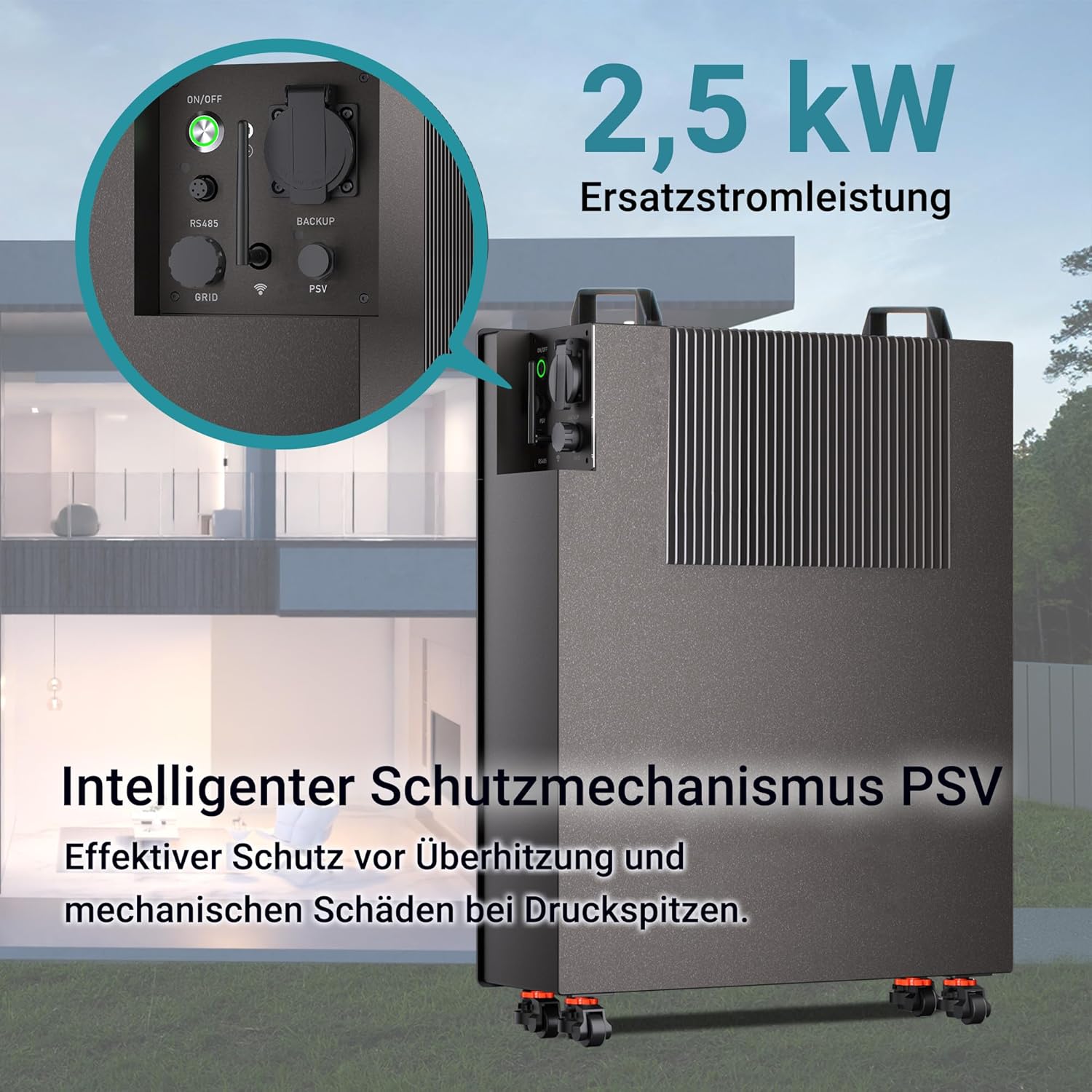
Figura 5.1: Prim-plan view of the Marstek Venus E's control panel, showing the ON/OFF switch, RS485, GRID, and BACKUP ports, and highlighting its 2.5 kW backup power capability with an intelligent PSV protection mechanism.
5.2 Controlul și monitorizarea aplicației
The Marstek app provides comprehensive control and real-time data:
- Monitorizare în timp real: View current charge status, energy consumption, grid import/export, and PV utilization.
- Moduri de operare: Select different operating modes (e.g., self-consumption, time-of-use, emergency backup priority).
- Dynamic Tariff Support: Optimize charging and discharging based on dynamic electricity tariffs to maximize savings.
- Telecomanda: Turn the unit on/off or adjust settings remotely.
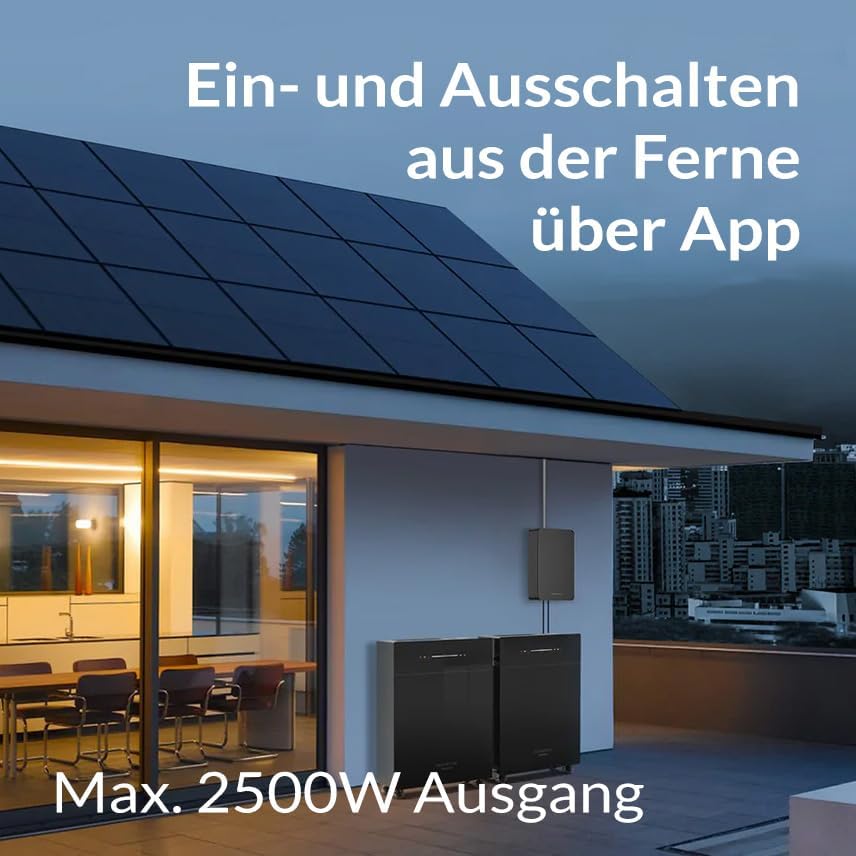
Figure 5.2: An illustration showing the Marstek Venus E unit installed outdoors with solar panels on the roof, emphasizing the ability to remotely turn the unit on and off via a smartphone app and its maximum 2500W output.
5.3 Emergency Power Function
În cazul unei rețele de alimentaretage, the Venus E automatically switches to emergency power mode, providing up to 2500W of output to connected critical loads. Ensure essential appliances are connected to the designated backup output if applicable, or that the unit is configured to power your home's critical loads circuit.

Figure 5.3: The Marstek Venus E unit connected to a refrigerator, demonstrating its reliable 24/7 power supply capability during a power outage.
5.4 Extinderea sistemului
The Marstek Venus E is designed for modular expansion. If your energy needs grow, additional Venus E units can be added to increase your total storage capacity up to 20.48kWh. Refer to the expansion kit manual for detailed instructions on adding modules.
6. Întreținere
The Marstek Venus E is designed for minimal maintenance due to its robust construction and IP65 rating. However, regular checks can ensure optimal performance and longevity.
- curatenie: Ștergeți periodic exteriorul unității cu o lavetă moale și umedă.amp cloth. Do not use abrasive cleaners or solvents. Ensure ventilation openings are free from dust and debris.
- Verificări de conectare: Occasionally inspect all electrical connections for tightness and signs of wear or corrosion.
- Actualizări de software: Keep the Marstek app and the unit's firmware updated to the latest version to ensure optimal performance, security, and access to new features. Updates are typically managed through the app.
- Sănătatea bateriei: The intelligent BMS monitors battery health. No user intervention is typically required for battery maintenance. Avoid fully discharging the battery frequently to prolong its lifespan, although the LiFePO4 chemistry is highly resilient.
7. Depanare
If you encounter issues with your Marstek Venus E, refer to the following common troubleshooting steps:
| Problemă | Cauza posibila | Soluţie |
|---|---|---|
| Unitatea nu pornește | No power from outlet; Unit is off; Internal fault. | Check wall outlet with another device. Ensure the unit's power switch is ON. If problem persists, contact support. |
| Nu se încarcă | Input cable loose; Grid power unavailable; Charging limits set in app. | Check cable connections. Verify grid power. Review app settings for charging schedules or limits. |
| Fără putere de ieșire | Unit is off; Battery is depleted; Overload protection activated. | Ensure unit is ON. Check battery level in app. Reduce connected load. Allow unit to cool if overloaded. |
| Probleme de conectivitate la aplicație | Bluetooth/Wi-Fi off; Unit too far from router/phone; App outdated. | Ensure Bluetooth/Wi-Fi is enabled on both devices. Move closer to the unit. Update the app to the latest version. Restart unit and phone. |
| Zgomote sau mirosuri neobișnuite | Defecțiune internă; Supraîncălzire. | Immediately disconnect power. Do not attempt to operate. Contact customer support. |
If the problem persists after attempting these solutions, please contact Marstek customer support for further assistance.
8. Specificații
Detailed technical specifications for the Marstek Venus E 5120Wh:
| Caracteristică | Caietul de sarcini |
|---|---|
| Model | Venus E 5120Wh |
| Tip baterie | LiFePO4 (fosfat de litiu de fier) |
| Capacitate nominală | 5.12 kWh |
| Capacitate extensibilă | Up to 20.48 kWh (with additional modules) |
| Charge/Discharge Power | 2500W (Max. Input/Output) |
| Emergency Power Output | 2500W |
| Ciclul de viață | > 6000 de cicluri |
| Evaluare de protecție la pătrundere (IP). | IP65 (protejat împotriva prafului, jeturilor de apă) |
| Conectivitate | App-controlled (Wi-Fi/Bluetooth) |
| Dimensiuni (ambalaj) | 76 x 60 x 38 cm |
| Greutate (ambalare) | 64.8 kilograme |
| Aplicație recomandată | Solar devices, Home energy storage |

Figura 8.1: Un intern view of the Marstek Venus E, showcasing its components and highlighting its maximum 2500W input and 800W/2500W output capabilities.

Figure 8.2: A detailed internal view of the Marstek Venus E, showing the arrangement of its LiFePO4 battery cells, which contribute to its high capacity and long cycle life.
9. Garanție și asistență
9.1 Informații despre garanție
The Marstek Venus E 5120Wh comes with a 10 an garanție, ensuring peace of mind regarding its performance and durability. This warranty covers defects in materials and workmanship under normal use. Please retain your proof of purchase for warranty claims.
For detailed warranty terms and conditions, please refer to the official Marstek website-ul sau contactați asistența pentru clienți.
9.2 Asistență pentru clienți
If you have any questions, require technical assistance, or need to make a warranty claim, please contact Marstek customer support. Contact information can typically be found on the official Marstek website or through the Marstek app.
When contacting support, please have your product model (Venus E 5120Wh) and purchase details ready to expedite the process.


