1. Introducere
Thank you for choosing the Dreo 110-Pint Smart Dehumidifier. This appliance is designed to efficiently remove excess moisture from large spaces up to 4500 square feet, such as basements, bedrooms, living rooms, bathrooms, and laundry rooms. Featuring smart controls, multiple operating modes, and dual drainage options, it provides a comfortable and healthy environment by maintaining optimal humidity levels. Please read this manual thoroughly before operation to ensure proper use and maintenance.
2. Instrucțiuni importante de siguranță
Pentru a reduce riscul de incendiu, electrocutare sau vătămare corporală, respectați întotdeauna măsurile de siguranță de bază atunci când utilizați acest aparat.
- Citiți toate instrucțiunile înainte de a utiliza dezumidificatorul.
- Acest aparat este destinat exclusiv utilizării în interior.
- Asigurați-vă că sursa de alimentare corespunde volumuluitage specificat pe eticheta de rating.
- Nu utilizați dezumidificatorul cu un cablu sau un ștecher deteriorat.
- Deconectați întotdeauna unitatea de la priză înainte de curățare, service sau mutare.
- Nu blocați intrările sau ieșirile de aer.
- Keep the unit upright for at least 24 hours before plugging it in after transport.
- The Dreo Dehumidifier is ETL-certified to meet stringent electrical safety standards, featuring a 90° tilt waterproof design that automatically powers off when tilted, along with comprehensive thermal protection (23°F to 248°F) to prevent overheating and 15A overcurrent protection against power surges.
3. Produs terminatview
3.1. Componente
The Dreo 110-Pint Smart Dehumidifier is designed for efficient and user-friendly operation. Below are the main components:
- Panou de control: Located on the top, with touch buttons and a digital display.
- Ieșire de aer: Top-mounted for efficient moisture expulsion.
- Admisie: Rear-mounted for air intake.
- Rezervor de apă: Front-loading, 2-gallon (8L) capacity with a visible water level indicator.
- Drain Hose Outlet: Located at the rear for continuous drainage.
- Roți pentru roți: 360° smooth-rolling wheels for easy mobility.
- Mânere de transport: Integrated on the sides for convenient lifting.
- Filtru lavabil: Easily accessible for cleaning to maintain air quality.
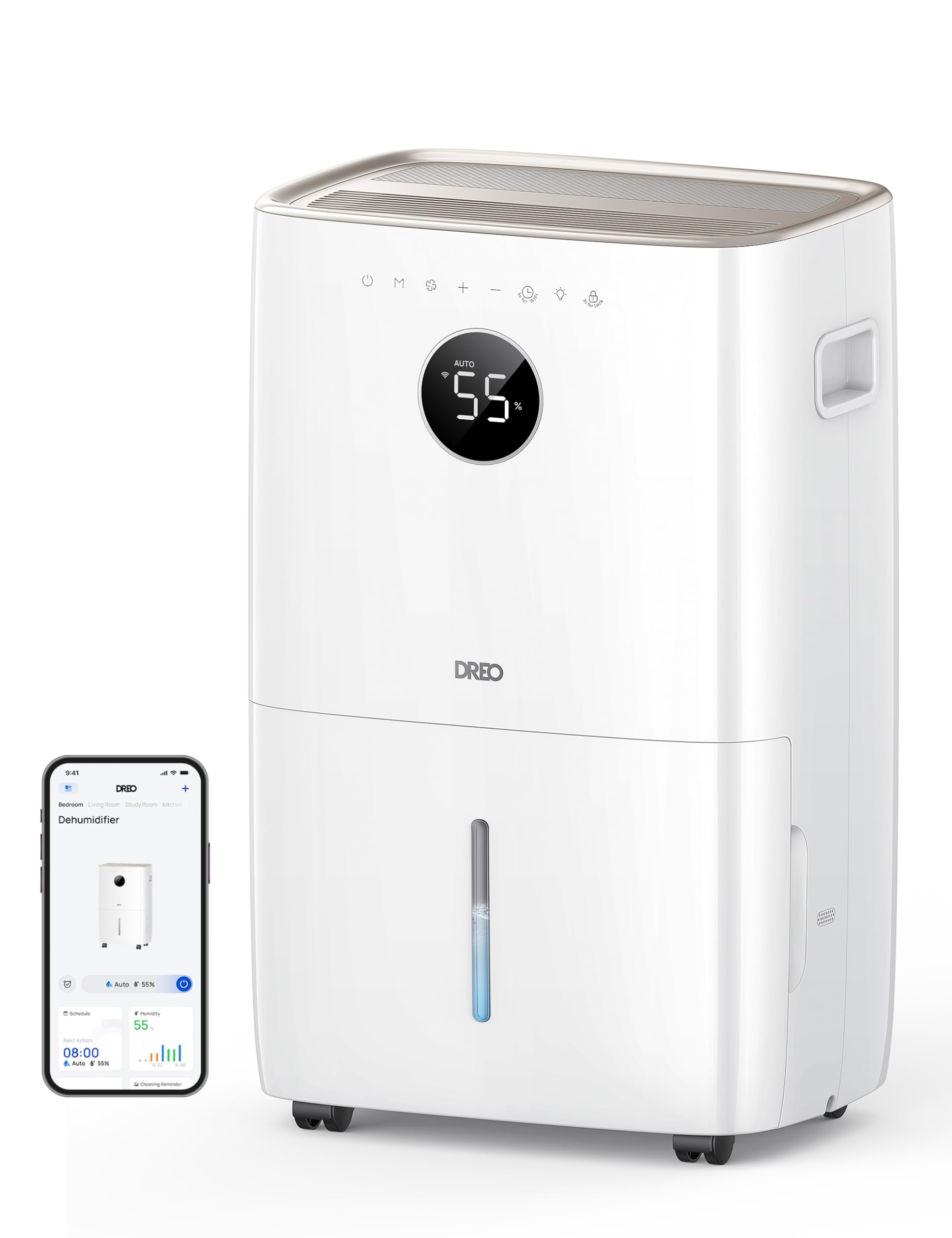
Imagine: față view of the Dreo 110-Pint Smart Dehumidifier, highlighting its compact design and dimensions (11.3"D x 15.4"W x 24.4"H).
3.2. Panoul de control
The intuitive control panel allows for easy operation and monitoring of your dehumidifier.
- Buton de alimentare: Pornește sau oprește unitatea.
- Butonul de mod: Cycles through Auto, Comfort, and Continuous modes.
- Buton pentru viteza ventilatorului: Reglează viteza ventilatorului (Mică, Medie, Mare).
- Butoane de reglare a umidității (+/-): Sets desired humidity level in Auto Mode.
- Buton cronometru: Sets a 24-hour timer for automatic on/off.
- Indicator Wi-Fi: Afișează starea conexiunii Wi-Fi.
- Buton de blocare pentru copii: Blochează panoul de control pentru a preveni modificările accidentale.
- Indicator de resetare a filtrului: Se aprinde când filtrul trebuie curățat.
- Water Full Alert: Illuminates when the water tank is full, and the unit stops operation.
- Indicator de dezghețare: Activates automatically at 41°F (5°C) for optimal performance in cold environments.

Image: Close-up of the dehumidifier's control panel, showing the digital display set to 55% humidity in Auto Mode, with various function icons.
4. Configurare
4.1. Despachetarea și plasarea
- Scoateți cu grijă dezumidificatorul din ambalaj.
- Place the unit upright on a flat, stable surface. Ensure there is at least 8 inches (20 cm) of space around the air inlets and outlets for proper airflow.
- Lăsați unitatea în poziție verticală timp de cel puțin 24 de ore înainte de a o conecta la priză, pentru a permite agentului frigorific să se depună.
4.2. Conexiune la alimentare
Plug the power cord into a grounded electrical outlet. Ensure the outlet meets the electrical requirements of the dehumidifier.
4.3. Opțiuni de drenaj
The Dreo dehumidifier offers two drainage methods: manual emptying of the water tank or continuous drainage via a hose.

Image: The dehumidifier illustrating both the manual water tank removal and the continuous drainage hose connection.
4.3.1. Drenaj manual
- When the water tank is full, the unit will automatically stop and display a "Water Full" alert.
- Trageți cu grijă rezervorul de apă din partea din față a unității folosind mânerul integrat.
- Goliți apa colectată într-o chiuvetă sau într-o scurgere.
- Introduceți rezervorul de apă gol înapoi în unitate până când se fixează în poziție cu un clic. Dezumidificatorul își va relua funcționarea.
4.3.2. Drenaj continuu
- Locate the drain hose outlet at the rear of the dehumidifier.
- Scoateți dopul de cauciuc de la priză.
- Connect the provided drain hose (or a standard garden hose) to the outlet. Ensure the connection is secure to prevent leaks.
- Route the hose to a suitable drain point (e.g., floor drain, sink, or sump pump). Ensure the hose is sloped downwards to allow gravity to drain the water and is free of kinks.
- The dehumidifier will now continuously drain water without needing to empty the tank manually.
5. Instrucțiuni de utilizare
Apăsați tasta Buton de alimentare to turn the dehumidifier on. The unit will start operating in its last used mode and settings.
5.1. Moduri de operare
Apăsați tasta Butonul de mod pentru a parcurge modurile de operare disponibile:
- Mod auto: The dehumidifier intelligently adjusts fan speed to maintain your target humidity level within a 5% tolerance. Use the Butoanele +/- to set your desired humidity (e.g., 45-55% is generally recommended).
- Mod confort: The unit operates to maintain a comfortable humidity level based on ambient temperature.
- Mod continuu: The dehumidifier runs continuously at the selected fan speed, regardless of the ambient humidity. This is ideal for very damp conditions or for continuous drainage.
5.2. Reglarea vitezei ventilatorului
In Auto or Continuous mode, press the Buton pentru viteza ventilatorului to select between Low, Medium, or High fan speeds.
5.3. Funcția Timer
Apăsați tasta Butonul Timer to set a desired operating duration (from 1 to 24 hours). The unit will automatically turn on or off after the set time has elapsed.
5.4. Smart Control (DREO App)
The Dreo 110-Pint Smart Dehumidifier can be controlled remotely via the DREO app on your smartphone or through voice assistants like Alexa and Google Home.

Image: A smartphone displaying the DREO app interface, showing remote control capabilities for the dehumidifier.
5.4.1. Connecting to the DREO App
- Download the DREO app from your smartphone's app store (available on iOS and Android).
- Creează un cont sau conectează-te.
- Follow the in-app instructions to add your Dreo 110-Pint Smart Dehumidifier (Model DH711S). Ensure your phone is connected to a 2.4GHz Wi-Fi network.
Video: This video demonstrates the process of downloading the DREO app and creating a new user account to manage your smart dehumidifier.
Video: This video provides a step-by-step guide on how to connect your Smart Dehumidifier DH711S to the DREO app for remote control and smart features.
5.4.2. Caracteristicile aplicației
Through the DREO app, you can:
- Monitor real-time humidity levels.
- Setați programe și cronometre.
- Adjust operating modes and fan speeds.
- Receive notifications (e.g., water tank full, filter cleaning reminder).
- Control the unit using voice commands with Alexa or Google Home.
6. Întreținere
Întreținerea regulată asigură performanța optimă și durata de viață a dezumidificatorului dumneavoastră.
6.1. Curățarea filtrului de aer
The filter reset indicator will light up after approximately 250 hours of operation, signaling that the filter needs cleaning.
- Deconectați dezumidificatorul de la priza de alimentare.
- Scoateți filtrul de aer din spatele unității.
- Wash the filter with clean water (no hotter than 104°F / 40°C) and a mild detergent.
- Rinse thoroughly and allow it to air dry completely before reinstalling.
- După ce filtrul este reinstalat, conectați unitatea la priză și apăsați butonul Buton de resetare a filtrului for 3 seconds to clear the indicator.

Image: A hand removing the washable air filter from the back of the dehumidifier for cleaning.
6.2. Curățarea rezervorului de apă
Curățați rezervorul de apă în mod regulat pentru a preveni apariția mucegaiului și a igrasiei.
- Remove the water tank as described in the Manual Drainage section.
- Spălați rezervorul cu apă caldă și un detergent blând.
- Clătiți bine și uscați complet înainte de a-l pune înapoi în unitate.
6.3. Curățenie generală
Ștergeți exteriorul dezumidificatorului cu un material moale, damp pânză. Nu utilizați substanțe chimice dure sau produse de curățare abrazive.
7. Depanare
Dacă întâmpinați probleme cu dezumidificatorul, consultați următoarele probleme și soluții frecvente:
| Problemă | Cauza posibila | Soluţie |
|---|---|---|
| Dezumidificatorul nu pornește. | No power, power cord loose, water tank full. | Check power connection, ensure plug is secure, empty water tank. |
| Unitatea nu colectează apă. | Nivel de umiditate prea scăzut, temperatura camerei prea scăzută, filtrul de aer înfundat. | Increase target humidity, ensure room temp is above 41°F (5°C), clean air filter. |
| Unitatea este zgomotoasă. | Unitatea nu este așezată pe o suprafață plană, filtrul de aer este înfundat. | Place on a flat surface, clean air filter. |
| Scurgeri de apă din unitate. | Water tank not properly installed, continuous drain hose is loose or kinked. | Reinstall water tank correctly, check drain hose connection and ensure no kinks. |
| Display shows fluctuating numbers. | Normal adjustment to current humidity. | This is normal operation as the sensor adjusts to ambient conditions. |
| Unit isn't defrosting automatically. | Issue with the condenser. | Contactați asistența pentru clienți pentru asistență. |
8. Specificații
| Caracteristică | Detaliu |
|---|---|
| Marca | Dreo |
| Numele modelului | DR-HDH001S |
| Capacitate | 110 Pints (at 86°F, RH 90%) / 50 Pints per Day (DOE Standard) |
| Zona de acoperire | Până la 4500 de metri pătrați |
| Volumul rezervorului de apă | 2 galoane (8 l) |
| Moduri de operare | Auto, Comfort, Continuous |
| Vitezele ventilatorului | 3 (Scăzut, Mediu, Înalt) |
| Capacitatea fluxului de aer | 210 de picioare cubi pe minut (CFM) |
| Controlul umidității | Adjustable, with ±5% precision sensor |
| Caracteristici speciale | Smart Control (DREO App, Alexa, Google Home), Auto-Defrost, 90° Tilt Waterproof Design, Thermal Protection, 15A Overcurrent Protection, Washable Filter, 360° Caster Wheels |
| Dimensiunile produsului | 11.3" D x 15.4" L x 24.4" H |
| Greutatea articolului | 43.7 lire sterline |
| Material | Metal, plastic |
| Certificari | Certificat ETL |
9. Garanție și asistență
Dreo products come with a standard warranty. For specific warranty details, please refer to the warranty card included in your product packaging or visit the official Dreo website-ul.
9.1. Asistență pentru clienți
If you have any questions, concerns, or require assistance with your Dreo 110-Pint Smart Dehumidifier, please contact Dreo Customer Support:
- E-mail: support@dreo.com
- Website: www.dreo.com
Please have your model number (DR-HDH001S) and purchase information ready when contacting support.