1. Introducere
Thank you for choosing the Camtro M6 Outdoor Security Camera. This battery-powered wireless camera is designed to provide reliable outdoor surveillance with features such as 1080p video resolution, color night vision, two-way audio, and smart AI motion detection. This manual provides essential information for setting up, operating, and maintaining your camera to ensure optimal performance.
2. Conținutul pachetului
Vă rugăm să verificați dacă toate articolele sunt prezente în coletul dumneavoastră:
- Camtro M6 Outdoor Security Camera
- Manual de instructiuni
- Șuruburi de montare
3. Produs terminatview
Familiarize yourself with the components of your Camtro M6 camera.

Figura 3.1: Faţă view of the Camtro M6 Outdoor Security Camera, showing the lens, light, and motion sensor.
The Camtro M6 features a durable, weather-resistant design suitable for outdoor use. Key components include:
- Obiectivul camerei: Capturează videoclipuri de înaltă definiție la 1080p.
- Infrared LED / Spotlight: Provides illumination for night vision and color night vision.
- Senzor de mișcare: Detects movement for smart alerts.
- Microfon: Pentru comunicare audio bidirecțională.
- Vorbitor: For two-way audio communication and alerts.
- Baza de montare: For secure installation on walls or other surfaces.

Figura 3.2: Pesteview of Camtro M6 features including AI Human Detection, Color Night Vision, Two-way Talk, and Cloud Storage.
4. Configurare
Follow these steps to set up your Camtro M6 camera:
- Încărcați camera: Before initial use, fully charge the camera battery using the provided charging cable. A full charge ensures optimal battery life.
- Descărcați aplicația: Caută the official Camtro security camera app on your smartphone's app store (iOS or Android) and install it.
- Creați un cont: Deschideți aplicația și urmați instrucțiunile de pe ecran pentru a crea un cont de utilizator nou.
- Adăugați dispozitiv: In the app, select the option to add a new device. Follow the prompts to connect your camera to your Rețea Wi-Fi de 2.4 GHz. Ensure your phone is connected to a 2.4GHz network during setup. 5GHz Wi-Fi is not supported.
- Montați camera: Choose a suitable outdoor location for mounting. Use the included mounting screws to securely attach the camera to a wall or other stable surface. Ensure the camera has a clear field of view and is within range of your Wi-Fi signal.
5. Instrucțiuni de utilizare
Once set up, you can access and control your camera through the mobile app.
5.1 În direct View
Deschide aplicația și selectează camera pentru a view the live feed. This allows you to monitor your property in real-time from anywhere.
5.2 Sunet bidirecțional

Figura 5.1: Illustration of the two-way audio function, allowing communication through the camera.
Atingeți pictograma microfonului în transmisiunea live view to enable two-way audio. You can speak through your phone, and your voice will be projected through the camera's speaker. Similarly, you can hear audio from the camera's location.
5.3 Smart AI Motion Detection

Figura 5.2: The camera's AI Human Detection feature distinguishing between human movement and other objects.
The camera features AI-powered motion detection that can distinguish between humans, animals, and other moving objects. This reduces false alarms. You will receive push notifications on your smartphone when motion is detected. Adjust sensitivity settings within the app.
Viziune nocturnă color 5.4
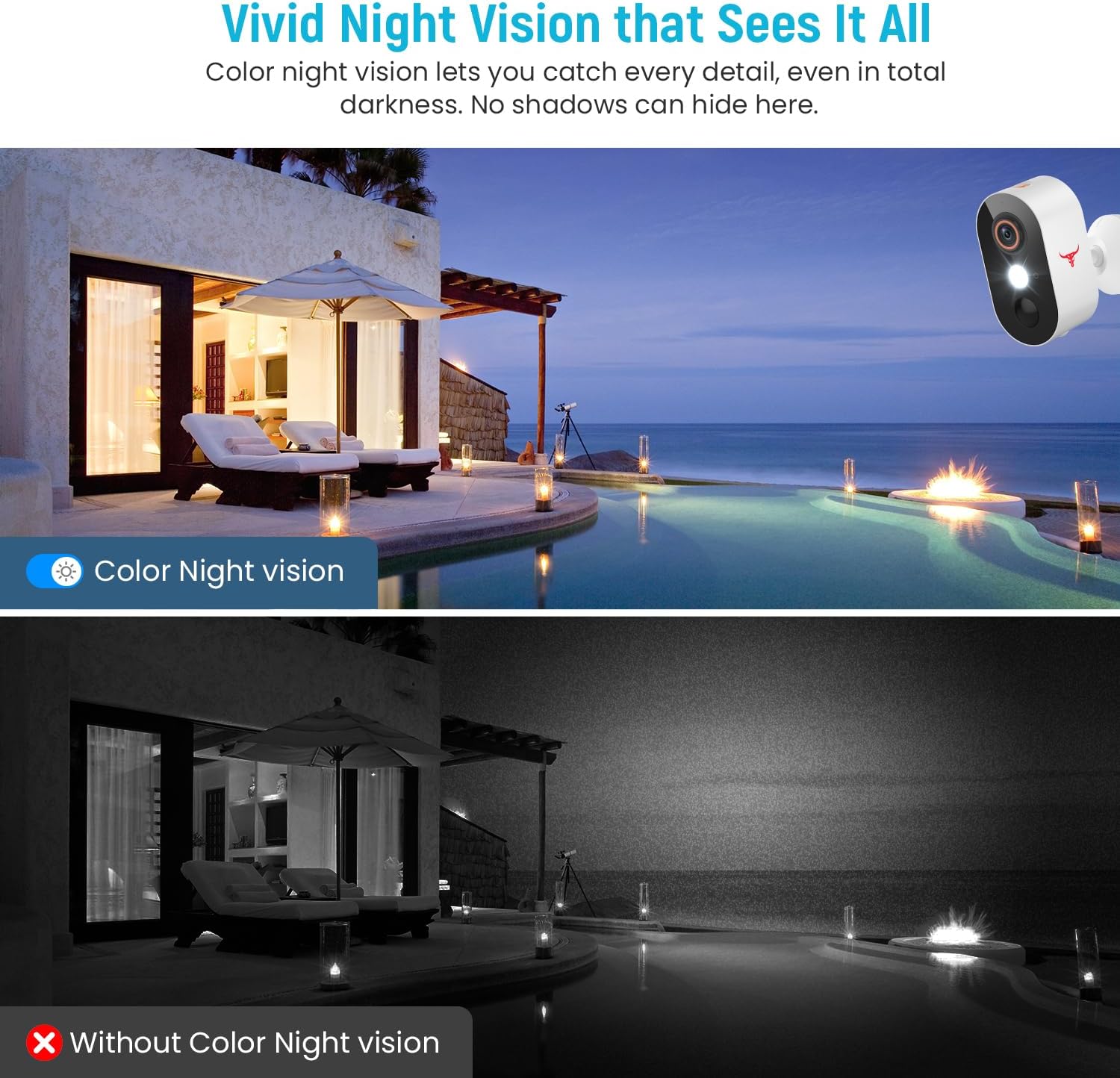
Figura 5.3: Comparison of color night vision and standard black and white night vision.
The Camtro M6 provides vivid color night vision, allowing you to see details in low-light conditions. The camera automatically switches to night vision mode when ambient light is insufficient.
5.5 Stocare în cloud

Figura 5.4: Visual representation of cloud storage for recorded video events.
The camera supports cloud storage for recording and reviewing video events. A subscription is required to access recorded footage. Please refer to the app for subscription options and details.
6. Întreținere
Regular maintenance ensures the longevity and optimal performance of your camera.
- Încărcarea bateriei: The camera is battery-powered. Monitor the battery level in the app and recharge the camera as needed. Battery life can vary based on usage and environmental factors.
- curatenie: Curățați periodic obiectivul și carcasa camerei cu o lavetă moale șiamp o lavetă pentru a îndepărta praful și resturile. Nu folosiți substanțe chimice dure.
- Actualizări firmware: Keep the camera's firmware updated through the app to access new features and improvements.

Figura 6.1: The Camtro M6 camera demonstrating its weather resistance against shine, rain, snow, and dust.
The camera is designed to withstand various weather conditions, operating effectively in temperatures ranging from 14°F to 140°F.
7. Depanare
If you encounter issues with your Camtro M6 camera, refer to the following common problems and solutions:
| Problemă | Cauza posibila | Soluţie |
|---|---|---|
| Camera nu se conectează la Wi-Fi | Incorrect Wi-Fi password, 5GHz Wi-Fi network, weak signal | Ensure correct 2.4GHz Wi-Fi password. Confirm your router is broadcasting a 2.4GHz network. Move camera closer to the router. |
| Calitate video slabă | Weak Wi-Fi signal, dirty lens | Improve Wi-Fi signal strength. Clean the camera lens. |
| Detecția de mișcare nu funcționează sau există prea multe alarme false | Incorrect sensitivity settings, camera placement | Adjust motion detection sensitivity in the app. Ensure camera is positioned to avoid unnecessary triggers (e.g., swaying branches). |
| Bateria se descarcă rapid | Frequent motion events, continuous live view, low temperature | Reduce motion detection sensitivity. Limit continuous live viewing. Ensure camera is fully charged. |
| Two-way audio unclear | Weak Wi-Fi signal, microphone/speaker obstruction | Check Wi-Fi connection. Ensure microphone and speaker are clear of obstructions. |
8. Specificații
Detailed technical specifications for the Camtro M6 Outdoor Security Camera:
- Model: M6
- Utilizare în interior/exterior: În aer liber
- Dispozitive compatibile: Smartphone (iOS, Android)
- Sursa de alimentare: Alimentat cu baterie
- Protocol de conectivitate: Wi-Fi (doar 2.4 GHz)
- Tip de montare: Montare pe perete
- Rezoluția capturii video: 1080p
- Dimensiuni articol (L x l x H): 2.8 x 1.7 x 3.4 inci
- Greutatea articolului: 6.6 uncii (0.41 lire)
- Baterii: 2 baterie non-standard (inclusă)
- Format de captură video: MP4
- Caracteristica speciala: Motion Sensor, Color Night Vision, 2-Way Audio
- Utilizări recomandate pentru produs: Securitate în aer liber
9. Garanție și asistență
For warranty information and technical support, please refer to the contact details provided with your purchase or visit the official Camtro website. Our customer service team is available to assist with any questions or issues you may encounter.


