Introducere
The Surfans F28 is a high-fidelity portable music player designed to deliver an immersive audio experience. Featuring dual ESS9018 DACs, a 4.4mm balanced output, and comprehensive Bluetooth 5.2 support including LDAC and aptX HD, the F28 supports a wide range of lossless audio formats. This manual provides detailed instructions for setting up, operating, maintaining, and troubleshooting your device to ensure optimal performance and longevity.

Figura 1: Față și spate view of the Surfans F28 HiFi Music Player.
Conținutul pachetului
Vă rugăm să verificați dacă toate articolele enumerate mai jos sunt prezente în colet:
- 1x Surfans F28 HiFi Music Player
- 1x cablu de încărcare USB-C
- 1x 128GB Micro SD Card (pre-installed or included separately)
- 1x Manual de utilizare (acest document)

Figure 2: Illustration of typical package contents.
Produs terminatview
Familiarize yourself with the various components and controls of your F28 music player.
Caracteristici cheie:
- Dual ESS9018 DACs: For high-resolution audio decoding and minimal distortion.
- Ieșire echilibrată de 4.4 mm: Provides enhanced audio quality and power for demanding headphones.
- Ieșire cu un singur capăt de 3.5 mm: Standard audio output for common headphones.
- Bidirectional Bluetooth 5.2: Supports LDAC and aptX HD for high-quality wireless audio transmission and reception.
- Ecran tactil IPS de 3.5 inci: For intuitive navigation and control.
- ALPS Analog Volume Knob: For precise volume adjustments.
- Stocare extensibilă: Supports Micro SD cards up to 512GB.
- Port USB-C: Pentru încărcare și transfer de date.

Figure 3: The F28 player showcasing its display and audio capabilities.

Figure 4: The dual ESS9018K2M DAC chips, central to the F28's high-fidelity audio.

Figure 5: Top panel with 4.4mm balanced and 3.5mm single-ended audio outputs, and the ALPS analog volume knob.
Înființat
1. Încărcarea dispozitivului
Before first use, fully charge the F28. Connect the included USB-C cable to the player's USB-C port and the other end to a USB power adapter (5V/1A recommended) or a computer's USB port. The charging indicator will show the charging status. A full charge typically takes several hours.
2. Introducerea cardului Micro SD
The F28 supports Micro SD cards up to 512GB. Locate the Micro SD card slot on the bottom of the device. Gently insert the Micro SD card with the gold contacts facing down until it clicks into place. To remove, push the card in slightly until it springs out.

Figure 6: Inserting the Micro SD card and connecting via USB-C for data transfer.
3. Transferul muzicii Files
Connect the F28 to your computer using the USB-C cable. The player will appear as a removable storage device. You can then drag and drop your music files directly into the Micro SD card's folders. The F28 supports various lossless formats including DSD (DSF/DFF), FLAC/WAV (up to 384kHz), AIFF/APE, as well as MP3/AAC.

Figure 7: Supported audio file formats for the F28 player.
Instrucțiuni de operare
1. Pornire/Oprire
- Pornire: Press and hold the power button (located on the side) until the screen illuminates.
- Oprire: Press and hold the power button until a power-off prompt appears, then confirm.
2. Navigare de bază
The F28 features a 3.5-inch IPS touchscreen for primary navigation. Swipe gestures and taps are used to select options and move between menus. Physical buttons on the side provide additional control for playback (play/pause, next/previous track) and menu navigation.
3. Redarea muzicii
From the main menu, select "My Music" or "Folder" to browse your audio files. Tap on a song to begin playback. The playback screen displays track information, progress, and playback controls.
4. Controlul volumului
Adjust the volume using the gold-colored ALPS analog knob located on the top right of the device. Rotate clockwise to increase volume and counter-clockwise to decrease. The volume level will be displayed on the screen.
5. Conectivitate Bluetooth
The F28 supports Bidirectional Bluetooth 5.2 with LDAC and aptX HD codecs for high-quality wireless audio. To pair with Bluetooth headphones or speakers:
- Go to "System Settings" and select "Bluetooth".
- Porniți Bluetooth.
- Playerul va scana dispozitivele disponibile. Selectați dispozitivul din listă pentru a-l asocia.
The F28 can also act as a Bluetooth receiver, allowing you to stream audio from your phone or PC to the player.

Figure 8: The F28 features a Bluetooth 5.2 chip for stable and high-quality wireless connections.
6. Setări egalizator
The F28 includes an equalizer to customize your sound. Navigate to the "Equalizer" option in the settings. You can choose from various presets or create a custom sound profile by adjusting the frequency bands.
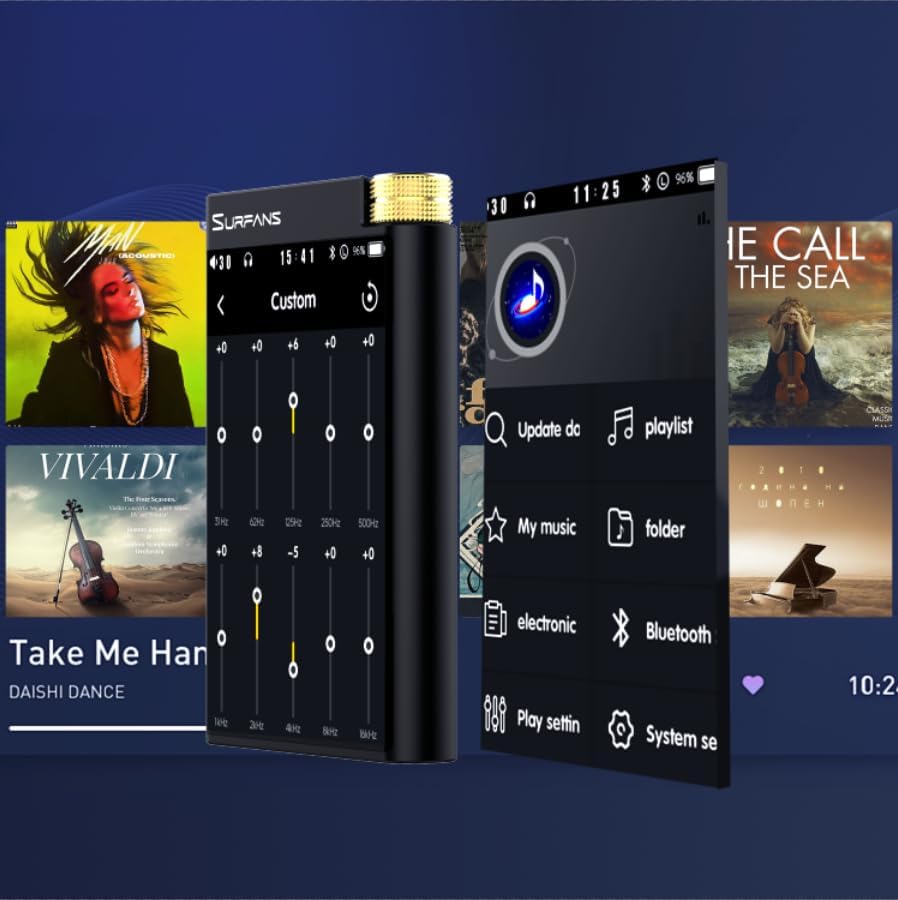
Figure 9: Customizing audio with the built-in equalizer.
7. Conectarea la dispozitive externe
Use the 4.4mm balanced or 3.5mm single-ended output to connect to headphones, amplifiers, or speakers. The USB-C port also supports USB DAC functionality, allowing the F28 to act as an external sound card for your computer.

Figure 10: The F28 can be connected to various audio systems, including acting as a USB DAC for computers.
Întreţinere
- curatenie: Folosiți o lavetă moale și uscată pentru a curăța dispozitivul. Evitați utilizarea de produse de curățare abrazive sau solvenți.
- Depozitare: Depozitați playerul într-un loc răcoros și uscat, ferit de lumina directă a soarelui și de temperaturi extreme.
- Îngrijirea bateriei: Pentru a prelungi durata de viață a bateriei, evitați descărcarea completă frecventă a acesteia. Dacă o depozitați pentru perioade lungi de timp, încărcați bateria până la aproximativ 50% la fiecare câteva luni.
Depanare
| Problemă | Cauza posibila | Soluţie |
|---|---|---|
| Dispozitivul nu pornește. | Baterie descărcată; dispozitiv blocat. | Charge the device for at least 30 minutes. If still unresponsive, try holding the power button for 10-15 seconds for a hard reset. |
| Ecranul tactil nu răspunde sau este lent. | Eroare temporară de software; interferență cu protectorul de ecran. | Restart the device. Ensure the screen is clean and free of debris. If using a screen protector, ensure it is properly applied and not too thick. |
| Probleme de asociere Bluetooth. | Device not in pairing mode; distance; interference. | Ensure both devices are in pairing mode and within range. Turn off and on Bluetooth on both devices. Clear previous pairings if necessary. |
| Low volume via Bluetooth. | Volume settings on both devices; codec compatibility. | Increase volume on both the F28 and the connected Bluetooth device. Ensure optimal codec (LDAC/aptX HD) is selected if supported by the receiving device. |
| Muzică files not recognized or played in incorrect order. | Coruptă files; file system indexing issue. | Asigura files are in supported formats. Re-scan the music library from the player's settings. If issues persist, try reformatting the Micro SD card (backup data first) and re-transferring files. Note: Some players may sort by filename alphabetically rather than track number metadata. |
Specificații
| Caracteristică | Detaliu |
|---|---|
| Numele modelului | F28 128G |
| Dimensiunile produsului | 0.7 x 2.6 x 4.7 inci |
| Greutatea articolului | 9.6 uncii |
| Chip DAC | Dual ESS9018K2M |
| Formate audio acceptate | DSD (DSF/DFF), FLAC/WAV (up to 384kHz/32-bit), AIFF/APE, MP3/AAC, WMA Lossless |
| Versiune Bluetooth | 5.2 (Bidirectional, supports LDAC/aptX HD) |
| Dimensiunea ecranului | Ecran tactil IPS de 3.5 inci |
| Stocare internă | 128GB (included Micro SD card) |
| Stocare extensibilă | Până la 512 GB prin card Micro SD |
| Baterie | 1x 12V battery (included), approx. 12-hour playback |
| Porturi de ieșire | 4.4mm Balanced, 3.5mm Single-Ended |
| Tehnologia de conectivitate | Aux, Bluetooth 5.2, USB-C |
| Caracteristica specială | Egalizator |
Garanție și suport
For warranty information and technical support, please refer to the official Surfans website-ul lor web sau contactați direct serviciul lor de asistență pentru clienți. Păstrați bonul fiscal ca dovadă a achiziției pentru reclamațiile în garanție.
You can visit the official Surfans Store on Amazon for more information and support: Surfans Audio Store


