Introducere
The LAMTTO 7-inch Baby Car Monitor is designed to enhance driving safety and convenience by integrating a baby rear camera with a wireless CarPlay and Android Auto display. This system allows you to monitor your baby in the back seat while simultaneously accessing navigation, music, and communication features on a single screen, minimizing distractions during travel.
Informații de siguranță
- Always ensure the monitor and camera are securely installed and do not obstruct your view drumului sau să interfereze cu comenzile vehiculului.
- Do not attempt to operate complex functions or make extensive adjustments while driving. Focus on the road.
- The baby camera is an aid and should not replace direct supervision of a child when the vehicle is stationary.
- Keep all cables and components away from airbags and other safety devices.
Conținutul pachetului
Verificați dacă toate articolele enumerate mai jos sunt incluse în pachetul dumneavoastră:
- 1 x Monitor cu ecran Caplay de 7 inci
- 1 x cablu de încărcare pentru mașină
- 1 x cablu auxiliar
- 1 x Suction Cup Bracket
- 1 x Baby Car Camera
- 1 x Install Manual
- Instrumente de instalare

This image provides a visual representation of all items included in the product package, helping users verify that they have received all necessary components for installation and operation.
Configurare și instalare
Follow these steps to install your LAMTTO Baby Car Monitor system:
- Montați afișajul: Attach the 7-inch monitor to your dashboard or windshield using the provided suction cup bracket. Ensure it is in a position that does not obstruct your driving view.
- Install the Baby Camera: Secure the baby car camera to a headrest in the back seat using the adjustable strap. Position it to provide a clear view of your child. The camera supports two installation modes: mirror image for rear-facing car seats and normal image for forward-facing car seats.
- Conectare alimentare: Plug the car charger cable into your vehicle's cigarette lighter socket and connect it to the monitor.
- Optional AUX Connection: If desired, connect the provided AUX cable from the monitor to your car's AUX input for enhanced audio output.

This image illustrates the flexibility of the camera's installation, allowing users to switch between mirror and normal image modes depending on whether the child is in a rear-facing or forward-facing car seat, ensuring correct orientation of the view.
Instrucțiuni de operare
This section details how to use the various functions of your LAMTTO Baby Car Monitor.
Pornire/Oprire și Navigare de bază
- The monitor powers on automatically when the vehicle's ignition is turned on.
- Use the 7-inch HD touchscreen to navigate through menus and select functions.
- Adjust brightness, access feature settings, and return to the main menu using the on-screen icons.
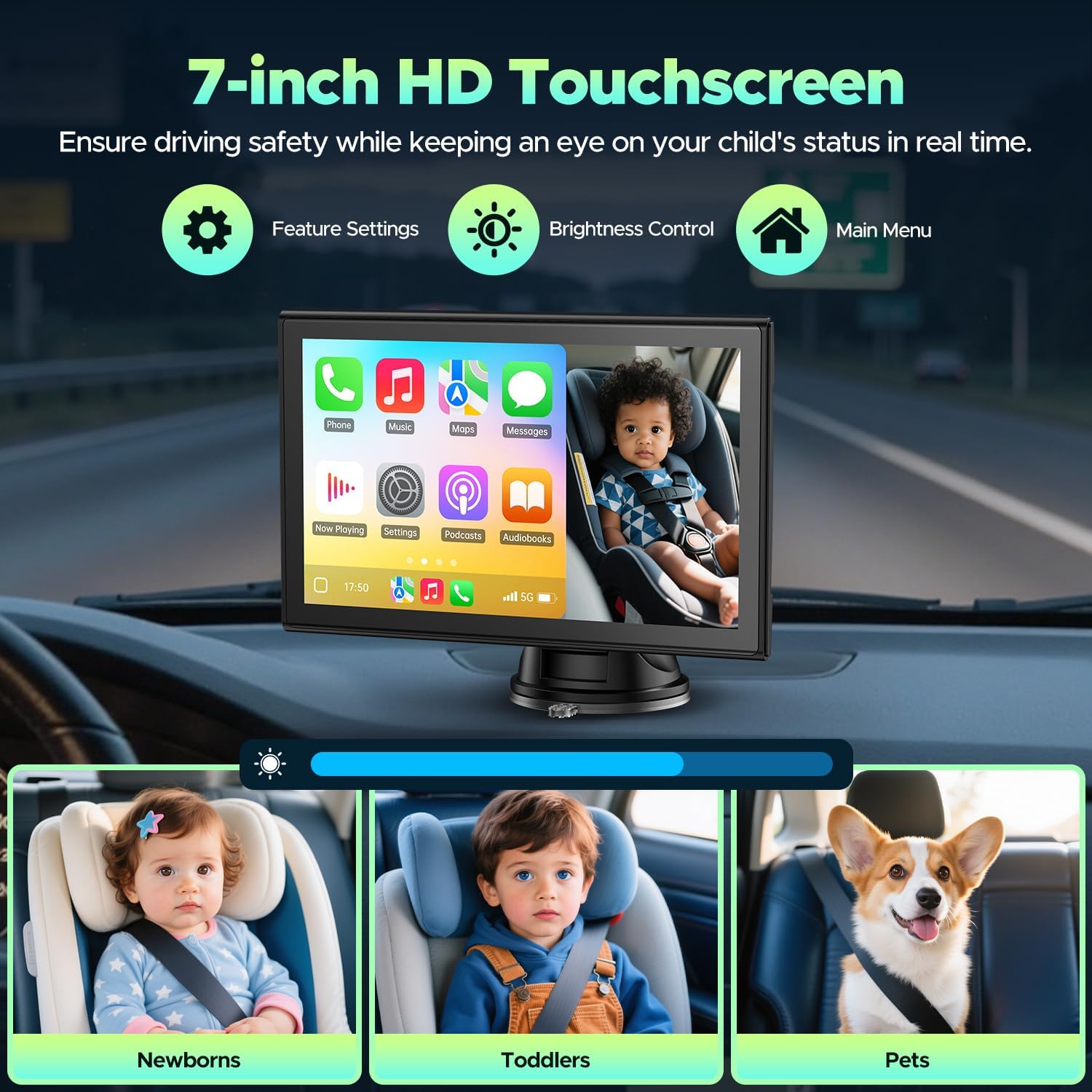
This image focuses on the monitor's touchscreen interface, demonstrating its clarity and user-friendliness. It shows a baby being monitored and highlights the accessible controls for adjusting settings and brightness directly from the screen.
Funcționalitate ecran divizat
The monitor supports a split-screen view, allowing you to simultaneously display the baby camera feed and your CarPlay/Android Auto interface. Select the split-screen option from the main menu to activate this feature.

This image illustrates the primary function of the LAMTTO car monitor, showing its 7-inch display simultaneously presenting the Apple CarPlay interface for navigation and entertainment, alongside a live feed from the baby camera, allowing for simultaneous monitoring and driving assistance.
Wireless CarPlay și Android Auto Connection
Connect your smartphone wirelessly for access to navigation, music, calls, and messages.
Pentru Apple CarPlay:
- On the monitor, click the 'Apple CarPlay' icon.
- Pe iPhone, activează Wi-Fi și Bluetooth.
- Find the Bluetooth signal name of the CarPlay screen in your iPhone's Bluetooth list and click to connect.
- Wait a few seconds for the connection to succeed. (Requires iOS version 7 or above and supports 5G Wi-Fi).

This graphic provides a visual guide for establishing a wireless Apple CarPlay connection, detailing the necessary steps on both the monitor and the iPhone, including turning on Wi-Fi and Bluetooth, finding the device, and confirming the connection.
Pentru Android Auto:
- Choose the 'Android Auto' icon on the product.
- Turn on Wi-Fi and Bluetooth on your Android Phone.
- Find the Bluetooth signal name of the car stereo screen in your mobile phone Bluetooth list and click to connect.
- Wait a few seconds for the connection to succeed. (Requires Android version 11 or above and supports 5G Wi-Fi).

This graphic outlines the process for connecting an Android device wirelessly to the monitor using Android Auto, showing how to select Android Auto on the product, enable Wi-Fi and Bluetooth on the phone, and pair the devices.
Opțiuni de ieșire audio
The monitor offers multiple ways to output audio to your car's sound system:
- Bluetooth: Connect the monitor to your car stereo via Bluetooth for an immersive audio experience.
- AUX: Use the provided AUX cable to connect directly to your car's AUX input.
- Transmițător FM: Transmit audio to your car's FM radio by tuning both devices to the same frequency.
- Boxe încorporate: The monitor has integrated speakers for direct audio output.

This image illustrates the procedure for routing audio from the LAMTTO monitor to the car's existing speaker system using a Bluetooth connection, enhancing the audio experience for calls, music, and navigation.
Vedere nocturnă IR
The baby camera is equipped with infrared night vision, which automatically activates in low-light conditions. This provides a clear and smooth image of your baby, even during night drives or in dark environments.

This image demonstrates the infrared night vision capability of the baby camera, providing a clear and smooth view of a child even in dark environments, ensuring continuous monitoring day or night.
Control vocal
Utilize Siri or Google Assistant for hands-free control of navigation, calls, and music, further enhancing driving safety.
Întreţinere
- Curățarea ecranului: Use a soft, lint-free cloth to gently wipe the monitor screen. Avoid abrasive cleaners or solvents that could damage the display.
- Curățarea camerei: Ensure the camera lens is clean for optimal image clarity. Use a soft cloth to remove dust or smudges.
- Organizare de cabluri: Periodically check all cables for secure connections and signs of wear. Ensure cables are neatly tucked away to prevent interference with driving.
- Depozitare: Dacă depozitați dispozitivul pentru o perioadă lungă de timp, deconectați-l de la priză și depozitați-l într-un loc răcoros și uscat.
Depanare
If you encounter issues with your LAMTTO Baby Car Monitor, refer to the following common problems and solutions:
- Fără putere: Ensure the car charger cable is securely plugged into both the monitor and the vehicle's cigarette lighter socket. Check if the vehicle's power outlet is functioning.
- Fără imagine de la cameră: Verify that the baby camera is properly connected and powered. Check for any obstructions blocking the camera lens.
- Wireless CarPlay/Android Auto Disconnection: Ensure your phone's Wi-Fi and Bluetooth are enabled. Try restarting both your phone and the monitor. Re-pair the devices if necessary.
- Calitate slabă audio: If using FM transmission, try a different frequency to avoid interference. If using Bluetooth or AUX, ensure connections are secure and check your car stereo's settings.
- Ecranul nu răspunde: Try restarting the monitor by disconnecting and reconnecting the power. If the issue persists, contact customer support.
Pentru asistență suplimentară, vă rugăm să consultați secțiunea Garanție și asistență.
Specificații
| Caracteristică | Caietul de sarcini |
|---|---|
| Dimensiunile produsului | 8.7 x 5.4 x 4.1 inci |
| Greutatea articolului | 2.03 lire sterline |
| Numărul de model al articolului | 7 Inch baby car monitor |
| Dimensiunea ecranului | 7 inchi |
| Tip de afișare | IPS touch |
| Conectivitate | Wireless CarPlay, Wireless Android Auto, Bluetooth, AUX, FM |
| Caracteristici speciale | Dual Function (Baby Camera + Wireless CarPlay Display), Easy Installation, Multi-Use Screen, Real-Time Monitoring, Split-Screen, IR Night Vision |
| Compatibilitate | Most 12-24V vehicles (Sedans, SUVs, Trucks) |
Garanție și suport
LAMTTO is committed to providing reliable products and excellent customer service.
- Garantie: This product is backed by a 12-month warranty from the date of purchase, covering manufacturing defects.
- POLITICA DE RETURNARE: A 30-day return policy is available for eligible purchases.
- Suport tehnic: Enjoy lifetime technical support for any operational questions or issues you may encounter.
For support inquiries, please refer to the contact information provided with your product packaging or visit the official LAMTTO website-ul.


