1. Introducere
This user manual provides comprehensive instructions for the setup, operation, and maintenance of your GMKtec Nucbox G3 Plus Mini PC. Please read this manual carefully before using the device to ensure optimal performance and longevity.
2. Ce se află în cutie
Verificați dacă toate articolele sunt prezente în colet:
- 1 x GMKtec Nucbox G3 Plus Mini PC
- 1 x adaptor de alimentare
- 1 x Manual de utilizare
- 1 x Suport VESA cu șuruburi
- 1 x cablu HDMI

Image: Retail Boxed Packaging showing the mini PC, power adapter, user manual, HDMI cable, and VESA mount with screws.
3. Produs terminatview
3.1. External Features and Ports
The GMKtec Nucbox G3 Plus is designed with a compact form factor and a variety of ports for versatile connectivity.
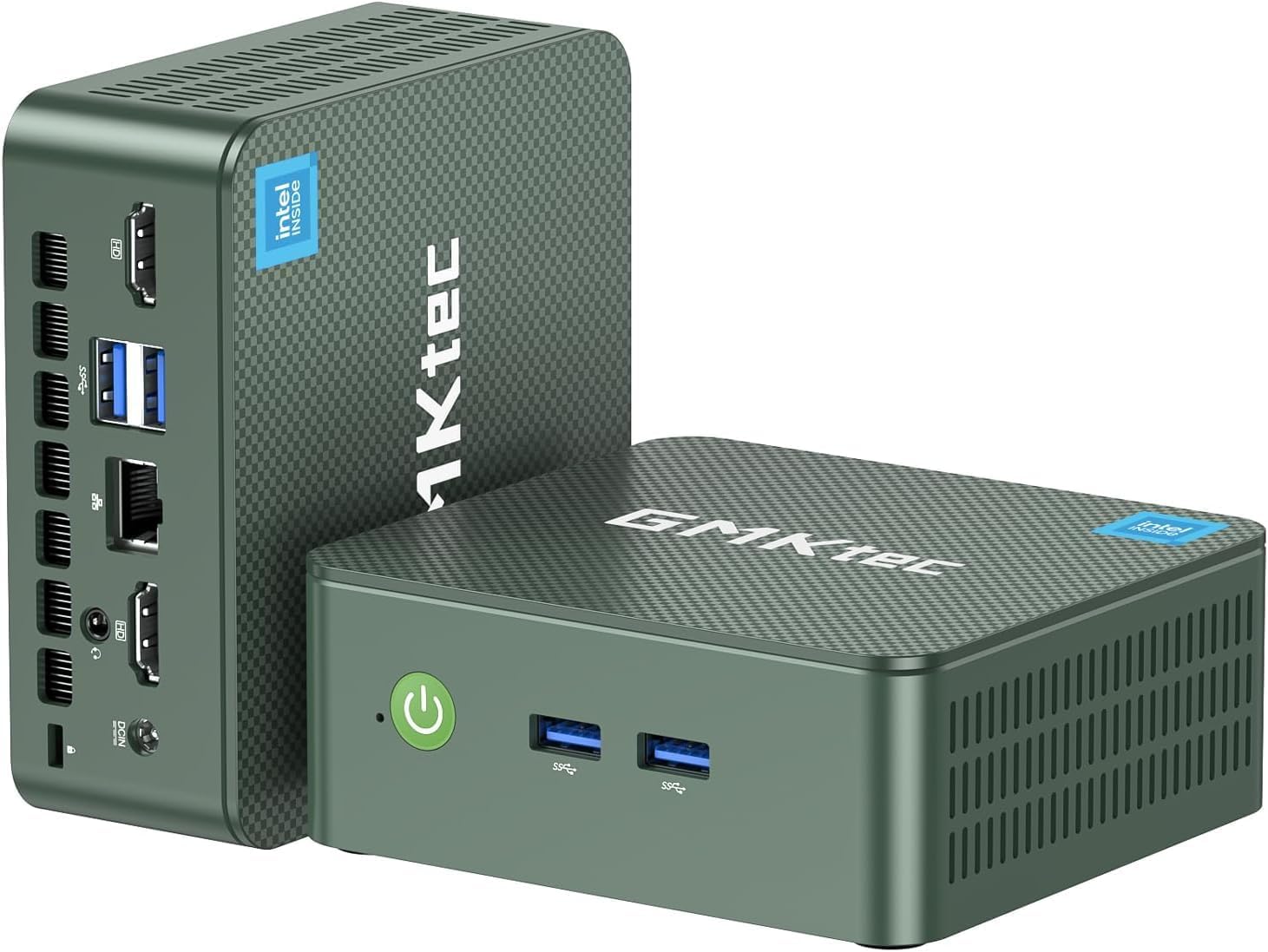
Imagine: Față și spate views of the GMKtec Nucbox G3 Plus Mini PC, highlighting its compact size and various ports.

Image: Detailed diagram showing the front and rear ports of the Nucbox G3 Plus, including Power Button, USB 3.2 ports, HDMI (4K@60Hz) ports, Giga LAN (RJ45 2.5G), 3.5mm Audio Jack, and Security Lock.
3.2. Componente interne
The internal design focuses on performance and efficient cooling.

Imagine: Explodată view illustrating the internal components of the Nucbox G3 Plus, including DDR4 RAM, M.2 2280 NVMe SSD, M.2 2242 SATA slot (not included), cooling fan, and cooling vents.
Video: O animație pesteview of the GMKtec Mini PC with Intel N150, showcasing its internal components, ports, and features like Wi-Fi 6, Bluetooth 5.2, and 2.5G LAN. The video highlights the Intel Twin Lake N150 Processor, Intel Graphics, DDR4 SO-DIMM, M.2 2280 NVMe SSD, M.2 2242 SATA, quiet cooling fan, and dual screen display capabilities.
4. Specificații
Key technical specifications of the GMKtec Nucbox G3 Plus Mini PC:
| Caracteristică | Caietul de sarcini |
|---|---|
| Procesor | Intel Twin Lake N150 (4 Core 4 Threads, up to 3.6GHz) |
| Grafică | Grafică Intel UHD (maxim 1000MHz) |
| RAM | 16GB DDR4 SO-DIMM (3200MHz) |
| Depozitare | 256GB PCIe 3.0 M.2 2280 NVMe SSD (Max 2TB), M.2 2242 SATA slot (Max 2TB) |
| Ieșire video | 2 x HDMI 2.0 (4K la 60Hz) |
| Porturi USB | 4 x USB 3.2 (până la 5 Gbps/S) |
| Reţea | Intel i226-V 2.5Gbps RJ45 Ethernet, WiFi 6 (802.11ax) |
| Bluetooth | Bluetooth 5.2 |
| Audio | 3.5mm Audio Jack |
| Sistem de operare | Windows 11 Pro (preinstalat) |
| Dimensiuni | 4.17 x 1.67 x 4.49 inci |
| Greutate | 1.8 lire sterline |
5. Ghid de instalare
Urmați acești pași pentru a configura mini-PC-ul GMKtec Nucbox G3 Plus:
Conectare la alimentare: Plug the power adapter into the DC 12V 3A port on the back of the mini PC, then connect it to a power outlet.
Conectare la afișaj: Use the provided HDMI cable to connect one of the HDMI ports on the mini PC to your monitor or TV. The device supports dual 4K@60Hz displays.

Image: The mini PC connected to two monitors, demonstrating its dual 4K display capability.
Conectați periferice: Connect your USB keyboard, mouse, and other peripherals to the available USB 3.2 ports.
Conexiune retea: For wired internet, connect an Ethernet cable to the 2.5Gbps RJ45 LAN port. For wireless internet, the device supports WiFi 6.

Image: The mini PC with an Ethernet cable connected to its 2.5G LAN port, illustrating high-speed wired connectivity.
Pornire: Apăsați butonul de alimentare situat în partea din față a mini PC-ului. Indicatorul luminos de alimentare se va aprinde.
Pornire inițială: The system will boot into Windows 11 Pro. Follow the on-screen instructions for initial Windows setup, including language, region, and network settings.
Instalare suport VESA (opțional): If desired, use the included VESA mount and screws to attach the mini PC to the back of a compatible monitor.

Image: The mini PC shown mounted on the back of a monitor using the VESA mount, demonstrating space-saving installation.
6. Instrucțiuni de utilizare
6.1. Managementul energiei
- Pornire: Apăsați butonul de pornire de pe panoul frontal.
- Închidere: Faceți clic pe butonul Start din Windows, apoi selectați Alimentare > Oprire.
- Repornire: Faceți clic pe butonul Start din Windows, apoi selectați Alimentare > Repornire.
- Modul de somn: Faceți clic pe butonul Start din Windows, apoi selectați Alimentare > Repaus.
- Trezire prin LAN (WoL): This feature allows you to power on the mini PC remotely over a network. Ensure WoL is enabled in the BIOS settings and your network adapter supports it.
- PXE Boot: Supports network boot for system deployment.
- RTC Wake: Allows the PC to power on at a scheduled time. Configure this in the BIOS.
- Pornire automată: The PC can automatically power on after a power outage. This setting is typically found in the BIOS.
6.2. Conectarea la rețele
- Conexiune prin cablu: Connect an Ethernet cable to the RJ45 port. The 2.5Gbps LAN provides high-speed internet.
- Wireless Connection (WiFi 6):
- Click the Wi-Fi icon in the system tray.
- Selectați rețeaua dorită din listă.
- Introduceți cheia de securitate a rețelei dacă vi se solicită.

Image: Diagram illustrating the high-speed WiFi 6 and Bluetooth 5.2 connectivity of the mini PC, showing faster speeds, lower latency, and wider coverage compared to older standards.
- Bluetooth 5.2:
- Accesați Setări Windows > Dispozitive > Bluetooth și alte dispozitive.
- Asigurați-vă că Bluetooth este activat.
- Click "Add Bluetooth or other device" and follow the instructions to pair your Bluetooth devices.
6.3. Extindere stocare
The Nucbox G3 Plus supports storage expansion:
- M.2 2280 NVMe SSD: The device comes with a 256GB PCIe 3.0 M.2 2280 NVMe SSD. This can be upgraded to a maximum of 2TB.
- M.2 2242 SATA: An additional M.2 2242 SATA slot is available for further storage expansion, supporting up to 2TB.
Nota: Upgrading internal components should be performed by users with technical expertise. Refer to online guides or professional assistance if unsure.
7. Întreținere
Regular maintenance helps ensure the longevity and optimal performance of your mini PC:
- Păstrați-l curat: Curățați regulat exteriorul mini PC-ului cu o cârpă moale și uscată. Evitați utilizarea de produse de curățare lichide direct pe dispozitiv.
- Ventilare: Ensure the cooling vents are not obstructed to allow for proper airflow. The upgraded cooling fan and copper turbine pipes are designed for efficient heat dissipation.
- Actualizări de software: Mențineți sistemul de operare și driverele actualizate la cele mai recente versiuni pentru îmbunătățiri de securitate și performanță.
- Îndepărtarea prafului: Periodically, and with caution, use compressed air to clear dust from the cooling vents. Do not open the casing unless you are familiar with computer hardware.
- Temperatură: Operate the mini PC in a well-ventilated area, away from direct sunlight or heat sources, to prevent overheating.

Imagine: O imagine internă view of the mini PC highlighting the quiet cooling fan and the airflow paths for heat dissipation, emphasizing the improved thermal design.
8. Depanare
This section addresses common issues you might encounter with your GMKtec Nucbox G3 Plus Mini PC.
| Problemă | Cauză/Soluție posibilă |
|---|---|
| No Power / Does not turn on |
|
| Niciun afișaj pe monitor |
|
| Fără conexiune la internet (cu fir) |
|
| No Internet Connection (Wireless) |
|
| Performanță lentă |
|
9. Garanție și asistență
GMKtec offers comprehensive support for your Nucbox G3 Plus Mini PC:
- Garantie: GMKtec provides a 1-year limited warranty for each mini PC, effective from the date of purchase. This warranty covers defects due to design and workmanship.
- Suport tehnic: For any technical issues or inquiries, you can contact the GMKtec after-sales team.
- Informații de contact:
- Asistență Amazon: Log in to your Amazon account, navigate to "Your Orders," and select "Ask Product Question" for assistance.
- Asistență prin e-mail: Trimite un e-mail la support@gmktec.com pentru asistență clienți 24/7.
- Suport tehnic pe viață: GMKtec se angajează să ofere asistență tehnică pe viață pentru produsele sale.

Image: Graphic detailing GMKtec's warranty and support options, including Amazon support and direct email support.


