1. Introducere
This manual provides detailed instructions for the proper use and maintenance of your havit OWS915 Open Ear Headphones. Please read this manual thoroughly before using the product to ensure optimal performance and longevity. Keep this manual for future reference.
2. Conținutul pachetului
Verificați dacă toate articolele enumerate mai jos sunt incluse în pachetul dumneavoastră:
- havit OWS915 Open Ear Headphones (Left and Right earbuds)
- Carcasă de încărcare
- Cablu de încărcare USB
- Manual de utilizare
Image: Contents of the havit OWS915 package, showing the earbuds, charging case, USB cable, and user manual.
3. Produs terminatview
The havit OWS915 headphones feature an open-ear design for comfort and situational awareness. Each earbud is lightweight (7.9 grams) and equipped with a flexible TPU ear hook for a secure fit. The charging case provides extended battery life.
Componente cheie:
- Căști: Stânga și dreapta, cu cârlige integrate pentru urechi și zone de control tactil.
- Carcasa de incarcare: Houses and charges the earbuds, with a USB-C charging port.
- Indicatoare LED: On earbuds and charging case for status updates.
- Microfoane: Four built-in microphones with ENC technology for clear calls.
- Difuzoare: 14.2mm dynamic drivers for audio output.

Image: The havit OWS915 Open Ear Headphones and their charging case.

Imagine: O explozie view of the havit OWS915 earbud and charging case, detailing internal components and features.
4. Configurare
4.1. Încărcarea căștilor
Before first use, fully charge the headphones and charging case. Place the earbuds into the charging case. Connect the USB charging cable to the USB-C port on the case and to a power source. The LED indicator on the case will show charging status.
A full charge of the case takes approximately 2.5 hours. The earbuds provide up to 8.5 hours of playtime at 60% volume on a single charge, with the charging case extending total playtime to 64 hours.
Video: Demonstration of how to use the HAVIT LIFE app with wireless earbuds, including a visual of the charging indicator on the case.
4.2. Asociere Bluetooth
To pair your havit OWS915 headphones with your device:
- Deschideți carcasa de încărcare. Căștile vor intra automat în modul de asociere.
- Pe dispozitivul dvs. (smartphone, tabletă etc.), activați Bluetooth.
- Caută "HAVIT OWS915" in the list of available Bluetooth devices.
- Select "HAVIT OWS915" to connect. A voice prompt will confirm successful pairing.
Căștile se vor reconecta automat la ultimul dispozitiv asociat atunci când sunt scoase din carcasă, dacă Bluetooth este activat pe dispozitiv.

Image: A diagram illustrating the Bluetooth 5.4 chip, emphasizing stable and easy pairing with various operating systems.
5. Instrucțiuni de purtare
Pentru a asigura o potrivire confortabilă și sigură, urmați acești pași:
- Identificați căștile intraauriculare stânga (L) și dreapta (R).
- Gently hook the earbud over your ear, positioning the speaker part towards your ear canal.
- Adjust the ear hook and earbud until it rests comfortably and securely on your ear. The flexible TPU material allows for slight adjustments.

Image: A visual guide demonstrating the correct method for wearing the havit OWS915 headphones.
6. Utilizarea căștilor
6.1. Atingeți Comenzi
The havit OWS915 headphones feature intuitive touch controls on each earbud:
- Redare/Pauză: Atingeți de două ori oricare dintre căști.
- Cântecul precedent: Touch and hold the left earbud for 1 second.
- Următorul cântec: Touch and hold the right earbud for 1 second.
- Răspundeți/Terminați apelul: Atingeți de două ori oricare dintre căști.
- Respinge apelul: Touch and hold either earbud for 1 second.
- Asistent vocal: Tap the left earbud thrice.
- Mod Joc/Mod Muzică: Tap the right earbud thrice.

Image: A visual representation of the touch control functions on the havit OWS915 earbuds.
6.2. HAVIT LIFE App
Enhance your listening experience by customizing settings via the HAVIT LIFE App:
- Setări egalizator: Reglați audio profiledupă preferințele dumneavoastră.
- Customize Touch Settings: Personalize earbud touch controls.
- Headphone Battery Display: Monitorizați nivelul bateriei.
- Mod joc: Optimize audio for gaming with reduced latency.
- Schimbați numele dispozitivului: Rename your headphones for easy identification.
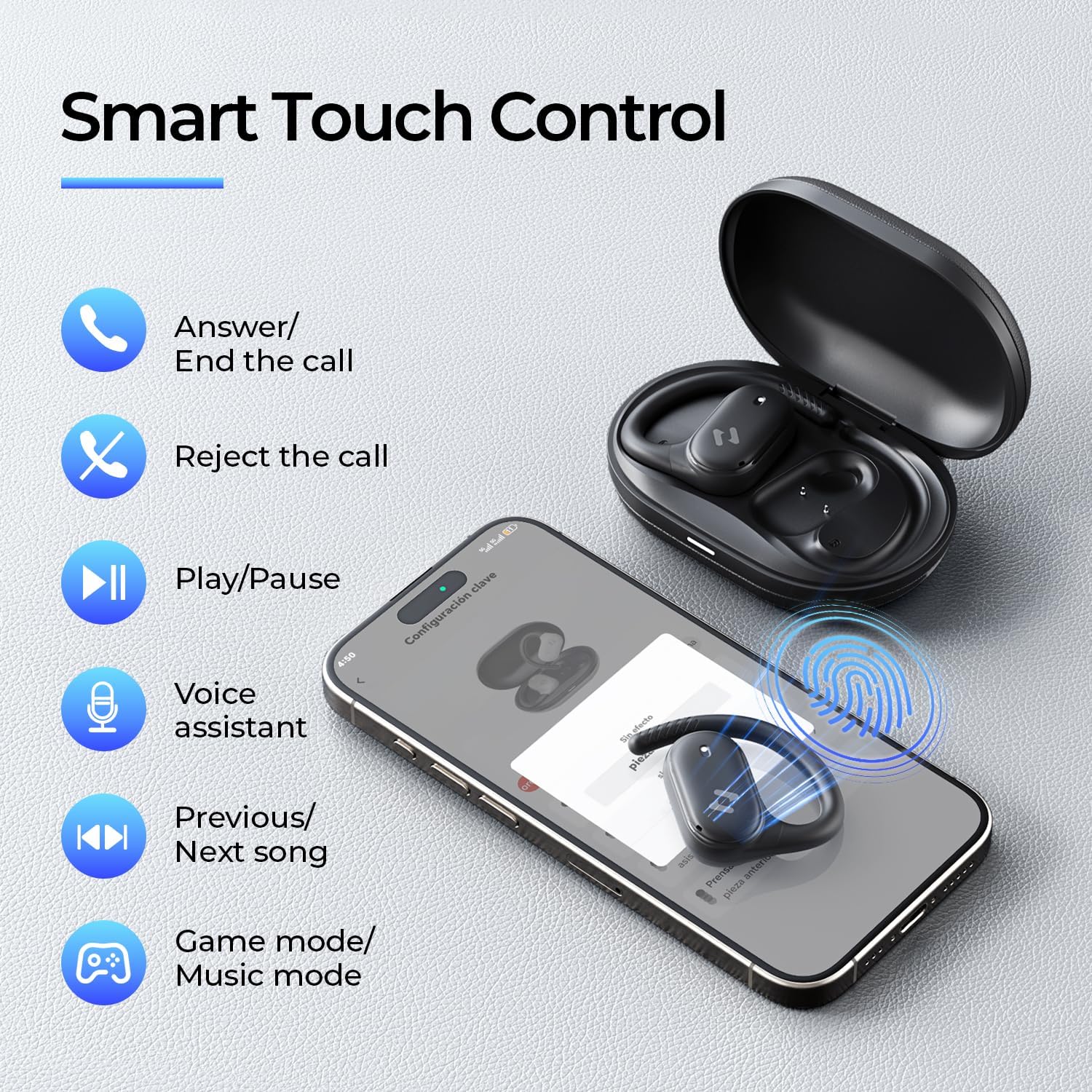
Image: Screenshots of the HAVIT LIFE App demonstrating various customization options.
Video: A guide on how to download, connect to, and customize settings within the HAVIT LIFE App.
7. Întreținere
Pentru a menține performanța și aspectul căștilor:
- curatenie: Folosește o lavetă moale și uscată pentru a curăța căștile și carcasa de încărcare. Evită utilizarea substanțelor chimice dure sau a materialelor abrazive.
- Depozitare: Depozitați căștile în carcasa lor de încărcare atunci când nu le utilizați pentru a le proteja de praf și deteriorări.
- Îngrijirea bateriei: Charge the headphones regularly, even if not in frequent use, to prolong battery life. Avoid extreme temperatures.
- Rezistenta la apa: The headphones are IPX5 waterproof, meaning they are resistant to sweat and splashes. Do not submerge them in water. Ensure they are dry before placing them back in the charging case.

Image: The havit OWS915 headphones demonstrating their IPX5 water resistance.
8. Depanare
If you encounter issues with your havit OWS915 headphones, refer to the following common solutions:
| Problemă | Soluţie |
|---|---|
| Nu se poate asocia cu dispozitivul | Ensure Bluetooth is enabled on your device. Make sure the earbuds are charged and in pairing mode. Try restarting your device and the headphones. |
| Fără sunet sau volum redus | Check the volume level on both your device and the headphones. Ensure the headphones are properly connected. Clean any debris from the speaker grilles. |
| Căștile nu se încarcă | Ensure the charging cable is securely connected to both the case and the power source. Check if the charging contacts on the earbuds and case are clean. Try a different charging cable or power adapter. |
| Conexiune instabilă | Ensure your device is within the Bluetooth range (10 meters). Avoid obstacles between the headphones and your device. Disconnect and re-pair the headphones. |
| HAVIT LIFE App connection fails | Ensure you have the latest version of the HAVIT LIFE App installed. Check your device's internet connection. Restart the app and your headphones. |
9. Specificații
| Caracteristică | Detaliu |
|---|---|
| Numele modelului | OWS915 |
| Versiune Bluetooth | 5.4 |
| Gama Bluetooth | 10 metri |
| Durata de viață a bateriei (căști) | 8.5 de ore (60% volum) |
| Timp total de redare (cu carcasă) | 64 de ore |
| Carcasă de încărcare Baterie | 1000mAh |
| Timp de încărcare a carcasei | 2.5 de ore |
| Dimensiunea driverului audio | 14.2 milimetri |
| Nivel de rezistență la apă | IPX5 (impermeabil) |
| Greutate articol (căști) | 7.9 grame (fiecare) |
| Material | PC + ABS + TPU |
| Metoda de control | Aplicație, atingere |
| Controlul zgomotului | Niciunul (Dispune de ENC pentru apeluri) |
| Raspuns in frecventa | 20 KHz |
| Sensibilitate | 118 dB |
| Impedanta | 32 ohmi |
10. Garanție și asistență
Your havit OWS915 Open Ear Headphones come with a standard manufacturer's warranty. Please refer to the warranty card included in your package for specific terms and conditions. For technical support or customer service inquiries, please contact havit customer support through their official website-ul sau informațiile de contact furnizate în documentația garanției.
11. Informații importante privind siguranța
- Protecția auzului: To protect your hearing, avoid listening at high volume levels for extended periods.
- Conștientizare a mediului: The open-ear design allows you to hear your surroundings. However, always exercise caution when using headphones in situations requiring full attention, such as driving or cycling.
- Copii: Keep the headphones and accessories out of reach of children under three years of age to prevent choking hazards.
- Încărcare: Folosiți doar cablul de încărcare furnizat și un adaptor de alimentare certificat. Nu încercați să încărcați dispozitivul dacă este ud.
- dezasamblarea: Nu încercați să dezasamblați sau să modificați căștile sau carcasa de încărcare, deoarece acest lucru poate anula garanția și poate provoca daune.


