Introducere
Welcome to the user manual for your new VAIO SX-R Laptop. This document provides essential information to help you set up, operate, maintain, and troubleshoot your device. Please read this manual thoroughly to ensure optimal performance and longevity of your laptop.
Produs terminatview
The VAIO SX-R is a high-performance laptop designed for productivity and creative tasks. It features an Intel Core Ultra 7 processor, a vibrant 14-inch WQXGA Touch Display, ampmemorie redusă și stocare rapidă.
Caracteristici cheie
- Procesor: Intel Core Ultra 7 (16-Core, AI-Boosted) for enhanced speed and responsiveness.
- Afişa: 14-inch WQXGA Touch Display (2560x1600) offering high resolution and wide color gamut.
- Memorie: 32GB LPDDR5 RAM for superior multitasking.
- Depozitare: 1TB PCIe NVMe SSD for fast data access and ample depozitare.
- Sistem de operare: Windows 11 Pro with enterprise-grade security and productivity features.
- Securitate: Integrated IR Camera and Fingerprint Reader for secure login.
- Șasiu: Durable Carbon Fiber construction.
Laptop Components and Ports

Figure 1: VAIO SX-R Laptop, illustrating the overall design.
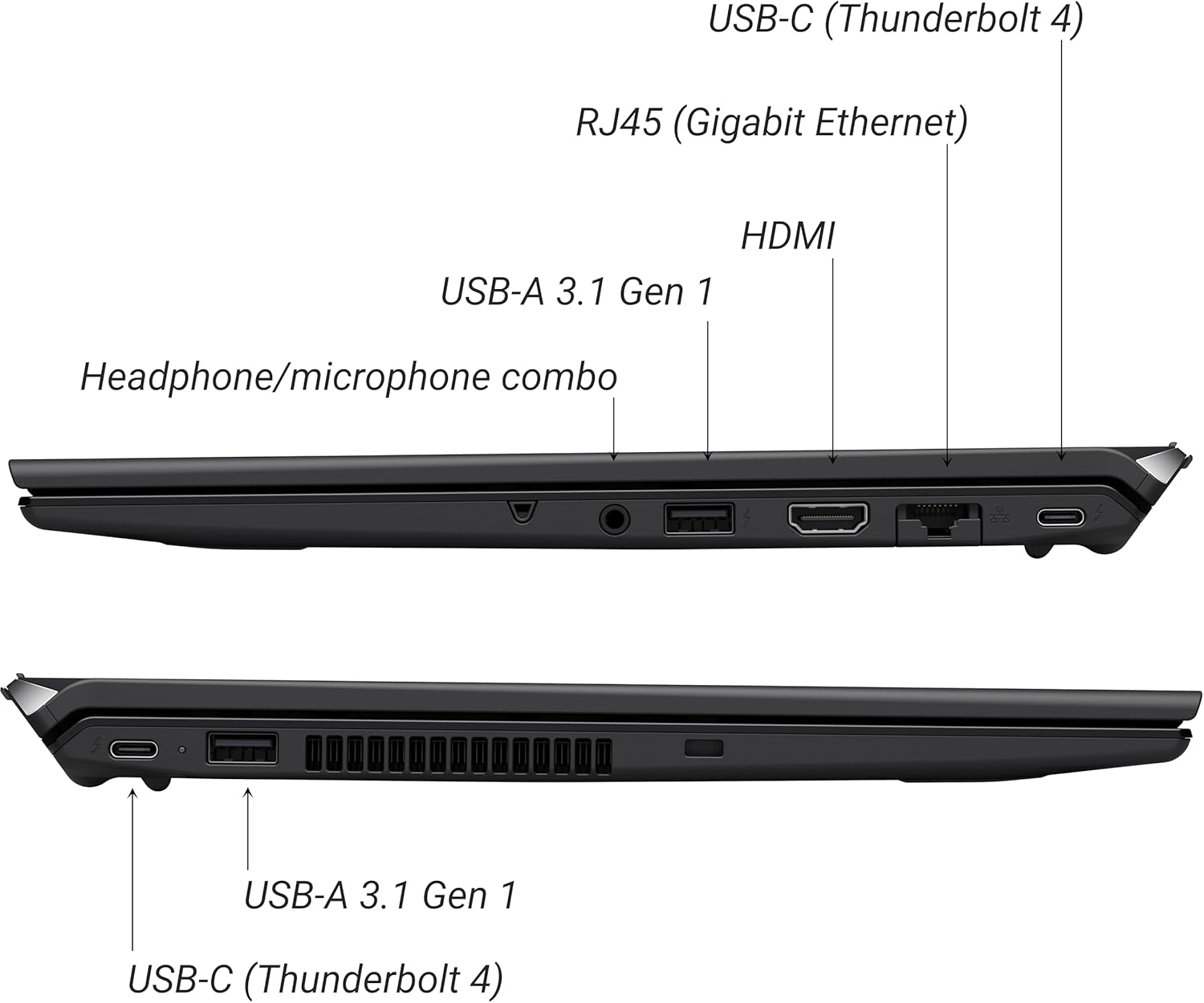
Figure 2: Port layout of the VAIO SX-R Laptop. The left side includes a headphone/microphone combo jack, USB-A 3.1 Gen 1, HDMI, RJ45 (Gigabit Ethernet), and USB-C (Thunderbolt 4). The right side features another USB-C (Thunderbolt 4) and USB-A 3.1 Gen 1 port.
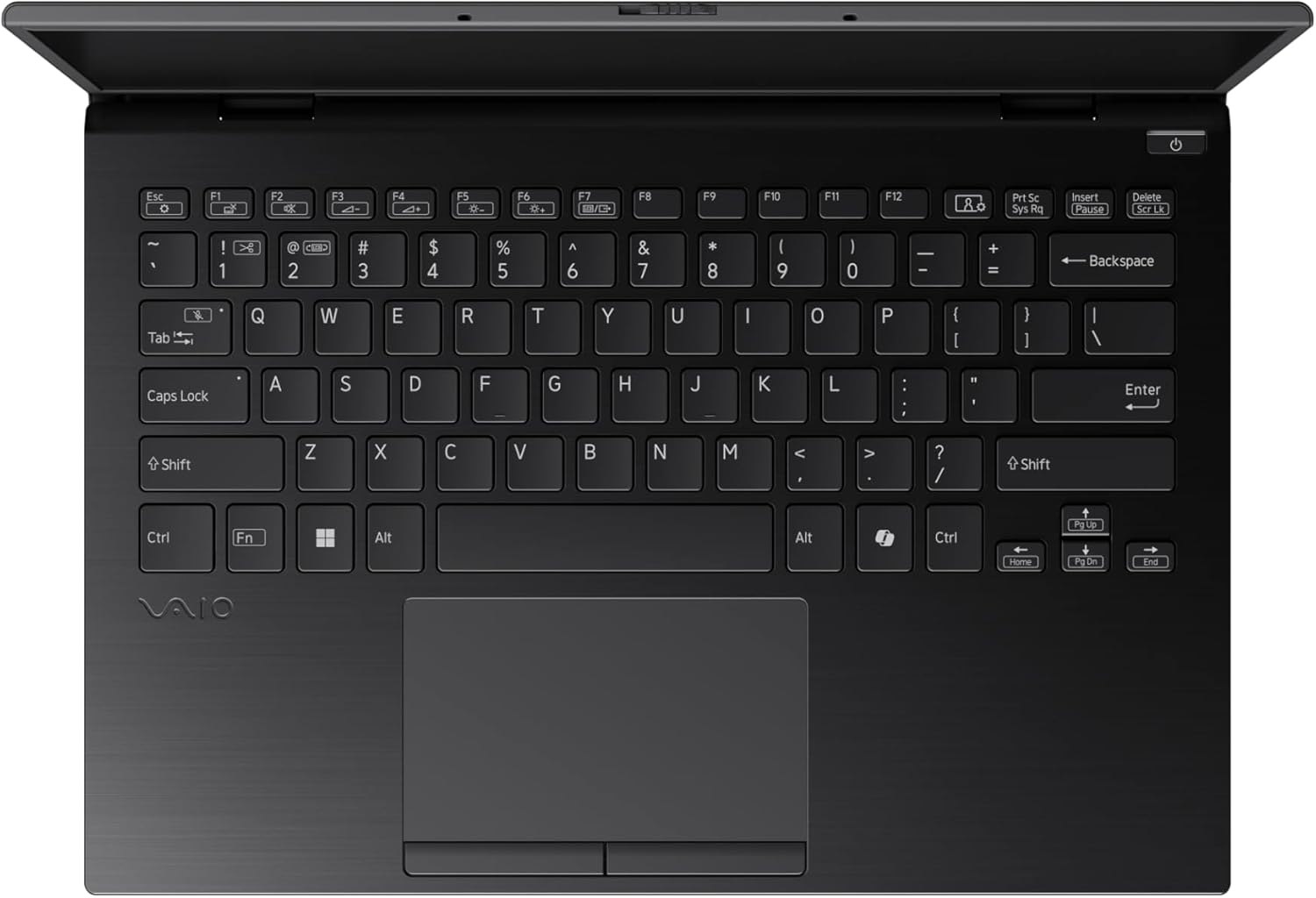
Figure 3: The VAIO SX-R Laptop keyboard and touchpad, featuring a backlit keyboard and integrated fingerprint sensor.
Înființat
1. Pornirea inițială
- Conectare alimentare: Conectați adaptorul de curent alternativ la portul de alimentare al laptopului și apoi la o priză de perete.
- Deschideți laptopul: Deschideți cu grijă capacul laptopului.
- Pornire: Press the power button, typically located on the top right of the keyboard deck. The power indicator light will illuminate.
2. Configurarea Windows 11 Pro
Follow the on-screen instructions to complete the initial Windows 11 Pro setup. This includes:
- Selectarea regiunii și a aspectului tastaturii.
- Conectarea la o rețea Wi-Fi.
- Acceptarea acordului de licență.
- Crearea sau conectarea cu un cont Microsoft.
- Setting up your PIN, fingerprint, or facial recognition (IR Camera).
3. Conectarea perifericelor
You can connect external devices such as mice, keyboards, external monitors, and USB drives to the available ports as shown in Figure 2.
Funcționează
1. Utilizare de bază
- Tastatura: Use the integrated backlit keyboard for typing. Function keys (F1-F12) often have secondary functions accessible via the 'Fn' key.
- Touchpad: Touchpad-ul de precizie acceptă gesturi multi-touch pentru navigare.
- Touch screen: Interact directly with the 14-inch WQXGA display using touch gestures.
2. Caracteristici de securitate
- Cititor de amprente: Enroll your fingerprints through Windows Settings > Accounts > Sign-in options for quick and secure login.
- Cameră IR: Utilize Windows Hello facial recognition for convenient and secure access. Set this up in Windows Settings > Accounts > Sign-in options.
3. Managementul energiei
- Modul de somn: Close the lid or press the power button briefly to put the laptop to sleep.
- Închidere: Go to Start > Power > Shut down to turn off the laptop completely.
- Repornire: Go to Start > Power > Restart to reboot the system.
Întreţinere
1. Curatenie
- Ecran: Folosiți o cârpă moale, fără scame dampclătiți cu apă sau cu un detergent de ecran. Evitați substanțele chimice dure.
- Tastatură și șasiu: Folosiți o cârpă moale. Pentru murdăria persistentă, uscați ușor.amp Se poate folosi o lavetă cu săpun delicat, asigurându-vă că nu pătrunde lichid în orificii.
- Porturi: Folosiți aer comprimat pentru a îndepărta ușor praful din porturi.

Figure 4: The VAIO SX-R features a water-resistant keyboard, designed to withstand minor spills.
2. Actualizări software
Regularly update your Windows operating system and device drivers to ensure optimal performance, security, and compatibility. Access updates via Windows Settings > Windows Update.
3. Îngrijirea bateriei
- Evitați temperaturile extreme.
- Nu descărcați complet bateria frecvent.
- Pentru depozitarea pe termen lung, încărcați bateria la aproximativ 50-60%.
Depanare
Această secțiune abordează problemele frecvente pe care le-ați putea întâmpina.
1. Laptopul nu pornește
- Asigurați-vă că adaptorul de curent alternativ este conectat corect atât la laptop, cât și la o priză funcțională.
- Verificați dacă priza funcționează conectând un alt dispozitiv.
- Dacă bateria este complet descărcată, lăsați-o să se încarce cel puțin 30 de minute înainte de a încerca să o porniți.
2. Probleme de afișare
- Fără afișare: Conectați un monitor extern la portul HDMI pentru a verifica dacă problema este la afișajul intern al laptopului.
- Flickering/Distorted Display: Update your graphics drivers. Adjust display resolution and refresh rate in Windows Settings > System > Display.
3. Probleme de conectivitate Wi-Fi
- Ensure Wi-Fi is enabled in Windows Settings > Network & internet > Wi-Fi.
- Reporniți routerul și modemul.
- Rulați Depanatorul de rețea Windows.
4. Performanță lentă
- Închideți aplicațiile inutile care rulează în fundal.
- Check Task Manager (Ctrl+Shift+Esc) for resource-intensive processes.
- Ensure your system is up to date and free from malware.
Specificații
Below are the detailed specifications for the VAIO SX-R Laptop (Model: VJS4R1X0511B).
| Caracteristică | Caietul de sarcini |
|---|---|
| Marca | VAIO |
| Numele modelului | VAIO SX-R |
| Numărul de model al articolului | VJS4R1X0511B |
| Sistem de operare | Windows 11 Pro |
| Procesor | Intel Core Ultra 7 (1.4 GHz) |
| Memoria RAM | 32 GB LPDDR5 |
| Hard Drive | SSD PCIe NVMe de 1 TB |
| Dimensiunea ecranului | 14 inchi |
| Rezoluția ecranului | 2560 x 1600 pixeli (WQXGA) |
| Placa grafica | Grafică Intel integrată |
| Tip fără fir | 802.11bgn |
| Porturi USB 3.0 | 3 |
| Durata medie a bateriei | 10 de ore |
| Greutatea articolului | 3.1 lire sterline |
| Dimensiunile produsului | 14.2 x 15 x 3.3 inci |
| Caracteristici speciale | Backlit Keyboard, Fingerprint Reader, HD Audio, Memory Card Slot, Webcam |
Garanție și suport
1. Informații despre garanție
Your VAIO SX-R Laptop is covered by a manufacturer's warranty. Please refer to the warranty card included with your product packaging for specific terms, conditions, and duration. Keep your proof of purchase for warranty claims.
2. Suport tehnic
For technical assistance, troubleshooting beyond this manual, or service inquiries, please contact VAIO customer support. You can typically find contact information on the official VAIO website or in the documentation provided with your laptop.
- Suport online: Visit the official VAIO support website for FAQs, driver downloads, and contact options.
- Asistență telefonică: Refer to your product documentation for regional support phone numbers.


