1. Introducere
Thank you for choosing the Ewent EW3295 Backlit Wireless Keyboard. This full-size keyboard offers versatile connectivity options, including Bluetooth 5.0 and 2.4GHz wireless, allowing you to connect up to three devices simultaneously. Its slim design, silent keys, and adjustable backlight provide a comfortable and efficient typing experience. This manual provides detailed instructions for setup, operation, and maintenance to ensure optimal performance of your keyboard.

Figure 1.1: Slim and sturdy design of the EW3295 keyboard.
2. Caracteristici cheie
- Wireless Multi-Device Connection: Connect up to 3 devices simultaneously via Bluetooth 5.0 (x2) or wireless 2.4 GHz. Easily switch between devices with just one button.
- Lumină de fundal reglabilă: The keyboard's backlight is dimmable and can be turned off completely, ideal for various lighting conditions.
- Flat & Quiet Design: Flat, silent keys ensure a comfortable and low-noise typing experience, suitable for quiet environments.
- 12 taste multimedia: Quick access to functions like volume control, email, and other operations.
- Baterie reîncărcabilă de lungă durată: Equipped with a 300mAh lithium battery and intelligent energy-saving function for extended use.
- Compatibilitate largă: Compatible with Windows (XP, 7, 8.1, 10, 11) and Android, suitable for PCs, laptops, and tablets.
- Design robust și durabil: Made of high-density polycarbonate, lightweight yet durable, with a compact design.
- Italian Layout: Features an Italian QWERTY keyboard layout.
3. Conținutul pachetului
Vă rugăm să verificați conținutul pachetului la despachetare:
- Ewent EW3295 Backlit Wireless Keyboard
- USB-A 2.4GHz Wireless Receiver
- Cablu de încărcare USB-C la USB-A
- Manual de utilizare (acest document)
4. Ghid de instalare
4.1 Încărcarea tastaturii
The EW3295 keyboard is equipped with a built-in rechargeable 300mAh lithium battery. Before first use, it is recommended to fully charge the keyboard.
- Locate the USB Type-C charging port on the rear panel of the keyboard.
- Connect one end of the provided USB-C charging cable to the keyboard's USB-C port.
- Connect the other end of the USB-A cable to a USB power source (e.g., computer USB port, USB wall adapter).
- The charging indicator light (if present) will illuminate during charging and turn off when fully charged. A full charge takes less than 1 hour and provides over 1 month of use.

Figure 4.1: Rear panel of the keyboard with charging port and receiver compartment.
4.2 Conectarea tastaturii
The EW3295 keyboard supports three connection modes: 2.4GHz wireless and two Bluetooth 5.0 channels (BT1, BT2). You can connect up to three devices and switch between them.
4.2.1 Conexiune wireless de 2.4 GHz
- Locate the USB-A wireless receiver, typically stored in a compartment on the rear panel of the keyboard.
- Plug the USB-A receiver into an available USB port on your computer or device.
- Apăsați tasta Fn + 1 keys on the keyboard to switch to 2.4GHz mode. The indicator light for channel 1 will illuminate.
- Tastatura ar trebui să se conecteze automat la dispozitivul dvs.

Figure 4.2: Ewent EW3295 keyboard and its USB wireless receiver.
4.2.2 Conexiune Bluetooth (BT1 / BT2)
- Apăsați tasta Fn + 2 keys to select Bluetooth channel 1 (BT1) or Fn + 3 keys to select Bluetooth channel 2 (BT2). The corresponding indicator light will flash, indicating pairing mode.
- Pe dispozitivul dvs. (PC, laptop, tabletă), activați Bluetooth și căutați dispozitive noi.
- Select "EW3295" or a similar name from the list of available Bluetooth devices.
- Follow any on-screen prompts to complete the pairing process. Once connected, the indicator light will stop flashing and remain solid.
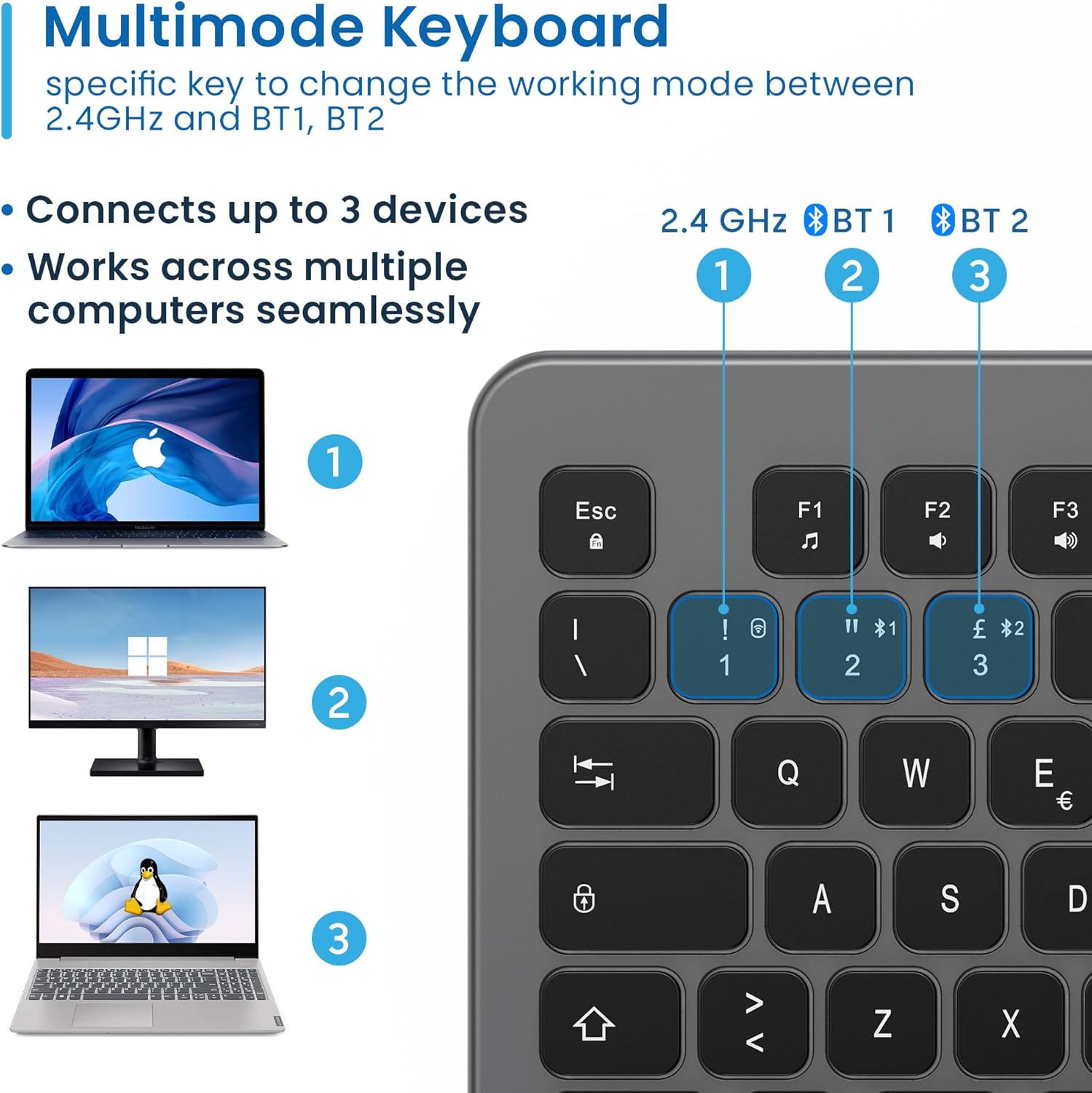
Figure 4.3: Multi-device connectivity options for the EW3295 keyboard.
4.2.3 Comutarea între dispozitivele conectate
Once multiple devices are paired, you can easily switch between them:
- Presa Fn + 1 to switch to the 2.4GHz connected device.
- Presa Fn + 2 to switch to the Bluetooth 1 connected device.
- Presa Fn + 3 to switch to the Bluetooth 2 connected device.
5. Instrucțiuni de utilizare
5.1 Noțiuni de bază de tastare
The EW3295 features a full-size Italian QWERTY layout. Its flat and silent keys provide a comfortable and precise typing experience, reducing noise in quiet environments.

Figure 5.1: Illuminated Italian QWERTY Keyboard Layout.

Figure 5.2: Silent keys for reduced noise.
5.2 Control iluminare de fundal
The keyboard features an adjustable backlight for improved visibility in low-light conditions.
- Iluminare de fundal ON/OFF: Apăsați tasta Bloc Scorr key (often labeled with a lightbulb icon) to toggle the backlight on or off.
- Backlight Brightness Up: Presa Fn + Pag ↑ pentru a crește luminozitatea iluminării de fundal.
- Backlight Brightness Down: Presa Fn + Pag ↓ pentru a reduce luminozitatea iluminării de fundal.
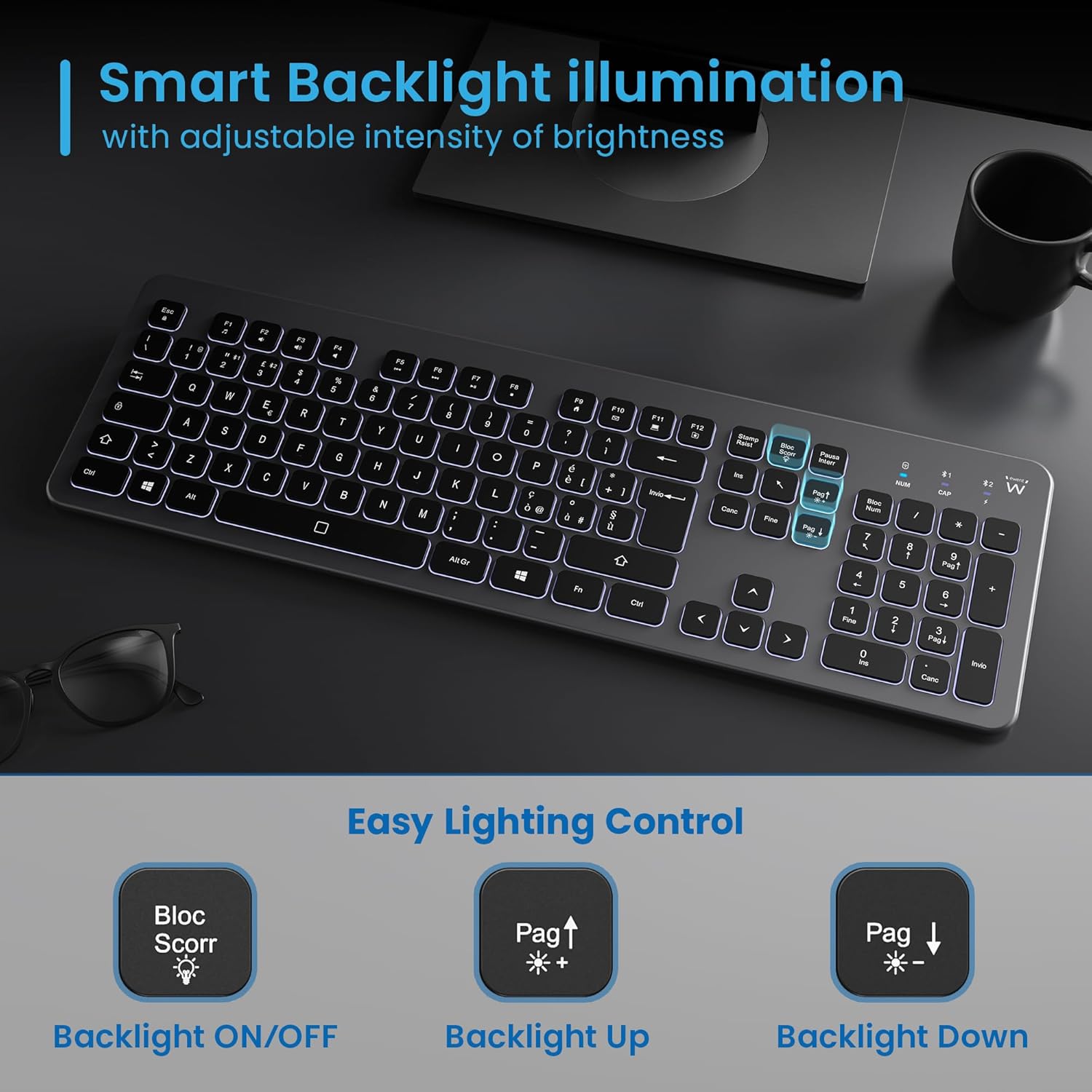
Figure 5.3: Backlight control keys.
5.3 taste multimedia
The keyboard includes 12 dedicated multimedia keys (F1-F12) that provide quick access to various functions. To use these functions, press the Fn simultan cu tasta F dorită.
| Combinație de taste | Funcţie |
|---|---|
| Fn + F1 | Media Player |
| Fn + F2 | Reducerea volumului |
| Fn + F3 | Creșterea volumului |
| Fn + F4 | Mut |
| Fn + F5 | Piesa anterioară |
| Fn + F6 | Următoarea piesă |
| Fn + F7 | Redare/Pauză |
| Fn + F8 | Stop |
| Fn + F9 | Pagina principală |
| Fn + F10 | |
| Fn + F11 | Computerul meu |
| Fn + F12 | Calculator |
6. Întreținere și îngrijire
Întreținerea corectă asigură longevitatea și performanța optimă a tastaturii dumneavoastră.
- curatenie: Folosiți o lavetă moale, uscată și fără scame pentru a curăța suprafața tastaturii. Pentru murdăria persistentă, ștergeți ușorampClătiți laveta cu apă sau cu un detergent blând, neabraziv. Evitați umiditatea excesivă.
- Evitați lichidele: Do not spill liquids on the keyboard. In case of accidental spills, immediately disconnect the keyboard and allow it to dry completely before re-using.
- Depozitare: Când nu este utilizată pentru perioade lungi de timp, depozitați tastatura într-un loc răcoros și uscat, ferit de lumina directă a soarelui și de temperaturi extreme.
- Îngrijirea bateriei: To prolong battery life, avoid fully discharging the battery frequently. Charge the keyboard when the low battery indicator appears.
- Stocare receptor: When transporting the keyboard, store the USB wireless receiver in its dedicated compartment on the rear panel to prevent loss.
7. Depanare
If you encounter issues with your EW3295 keyboard, please refer to the following common solutions:
| Problemă | Cauza posibila | Soluţie |
|---|---|---|
| Keyboard not responding (2.4GHz) | Low battery; Receiver not plugged in; Incorrect channel selected. | Charge the keyboard; Ensure USB receiver is securely plugged in; Press Fn + 1 to select 2.4GHz mode. |
| Tastatura nu răspunde (Bluetooth) | Low battery; Bluetooth not enabled on device; Not paired; Incorrect channel selected. | Charge the keyboard; Enable Bluetooth on your device; Re-pair the keyboard (see Section 4.2.2); Press Fn + 2 or Fn + 3 to select the correct Bluetooth channel. |
| Lumina de fundal nu funcționează | Lumina de fundal este oprită; baterie descărcată. | Presa Bloc Scorr to turn on/off; Increase brightness with Fn + Pag ↑; Charge the keyboard. |
| Tastele sunt lipicioase sau nu răspund | Dirt or debris under keys; Physical damage. | Clean the keyboard (see Section 6); If physical damage, contact support. |
| Durată scurtă de viață a bateriei | Frequent backlight use; Battery degradation over time. | Reduce backlight brightness or turn it off when not needed; Ensure full charge cycles. |
8. Specificații
| Caracteristică | Detaliu |
|---|---|
| Numele modelului | Tastiera Wireless Retroilluminata EW3295 |
| Numărul de model al articolului | EW3295 |
| Marca | Ewent |
| Tehnologia de conectivitate | Bluetooth 5.0 (x2), 2.4GHz Wireless |
| Descrierea tastaturii | Multimedia, Full-size, Italian Layout |
| Dispozitive compatibile | PC (Windows XP, 7, 8.1, 10, 11), Android |
| Tip baterie | Baterie reîncărcabilă cu litiu de 300 mAh |
| Iluminare de fundal | Intensitate reglabila |
| Dimensiuni (L x l x H) | Aproximativ. 432 mm x 122 mm x 22 mm |
| Greutate | Aproximativ. 390 g |
| Material | High-density Polycarbonate |

Figure 8.1: Keyboard dimensions and weight.
9. Informații despre garanție
Ewent products are designed and manufactured to the highest quality standards. This product is covered by a limited warranty from the date of purchase. Please refer to the warranty card included with your product or visit the official Ewent website for detailed warranty terms and conditions specific to your region. The warranty typically covers defects in materials and workmanship under normal use.
10. Asistență pentru clienți
For technical support, troubleshooting assistance, or any questions regarding your Ewent EW3295 keyboard, please contact Ewent customer support. You can typically find contact information (phone, email, support portal) on the official Ewent website-ul sau în ambalajul produsului.
Please have your product model number (EW3295) and purchase details ready when contacting support.


