Introducere
This user manual provides detailed instructions for the FJFJOPK 4K Video Camera Camcorder, Model HDV-3051L. Please read this manual thoroughly before operating the device to ensure proper usage and to maximize its performance. Keep this manual for future reference.

Figure 1: FJFJOPK 4K Video Camera Camcorder with included accessories like external microphone, handheld stabilizer, and remote control.
Conținutul pachetului
Verificați dacă toate articolele enumerate mai jos sunt incluse în colet. Dacă lipsesc sau sunt deteriorate articole, vă rugăm să contactați serviciul de asistență pentru clienți.
- Cameră video 4K
- Handheld Stabilizer
- Telecomanda
- Microfon
- Parasolar
- Card SD de 32 GB
- 2 x Baterii reîncărcabile
- Cablu de încărcare
- Manual de utilizare
- Camera Bag
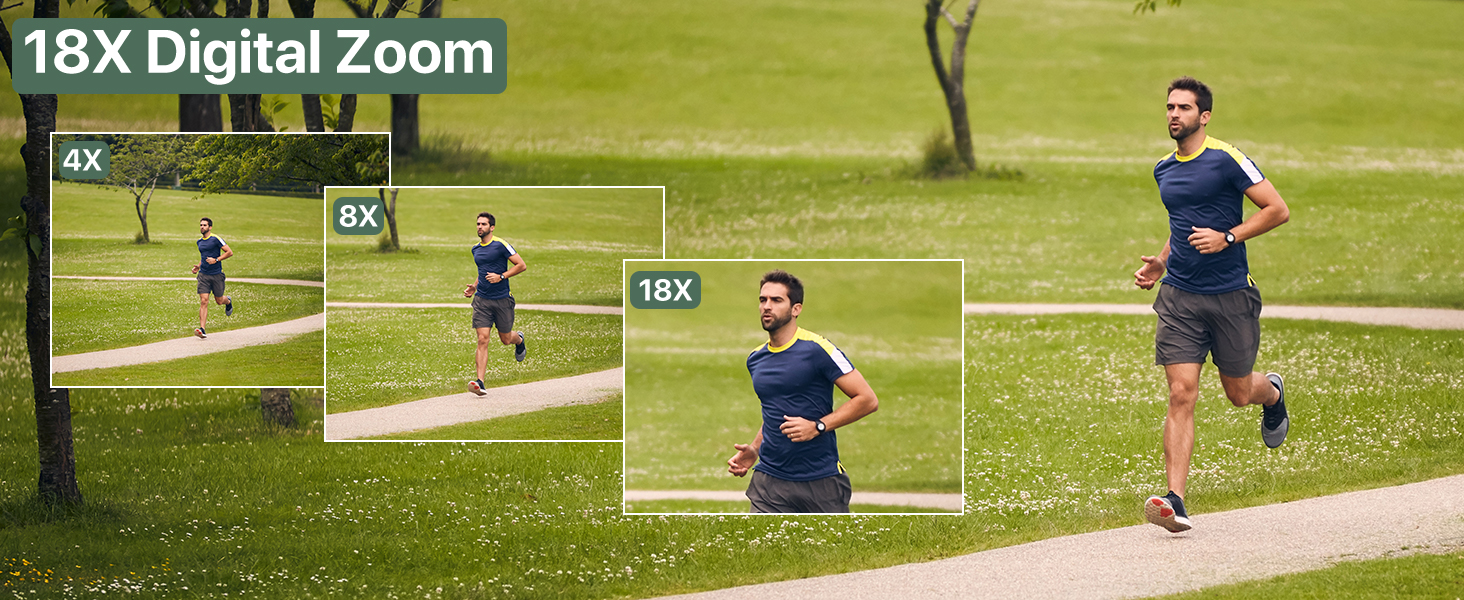
Figure 2: Visual representation of the complete packing list for the camcorder.
Ghid de instalare
1. Instalarea bateriei
The camcorder uses two long-lasting rechargeable batteries. Ensure batteries are fully charged before first use.
- Localizați compartimentul bateriei de pe camera video.
- Deschideți capacul compartimentului bateriei.
- Insert the charged batteries according to the polarity indicators inside the compartment.
- Închideți bine capacul compartimentului bateriei.

Figure 3: Proper insertion of batteries into the camcorder.
2. Instalarea cardului SD
A 32GB SD card is included for immediate use. The camcorder supports SD cards for storing your videos and photos.
- Localizați slotul pentru cardul SD, de obicei lângă compartimentul bateriei.
- Insert the SD card with the metal contacts facing down until it clicks into place.
- Pentru a scoate cardul, apăsați ușor până când acesta iese.
3. Atașarea accesoriilor
Enhance your recording experience by attaching the included accessories.
- External Stereo Microphone: Attach the microphone to the hot shoe mount on top of the camcorder. Connect the microphone cable to the designated audio input port. This ensures clear audio capture.
- Stabilizator portabil: The anti-shake handheld stabilizer can be attached to the bottom tripod mount of the camcorder. This accessory helps in achieving smooth and steady shots, especially during movement.
- Parasolar: Screw the lens hood onto the front of the camcorder's lens. The lens hood is designed to reduce glare and lens flare, improving image quality in bright outdoor conditions.

Figure 4: Handheld stabilizer attached for improved stability.

Figure 5: External microphone for enhanced audio recording.

Figure 6: The lens hood reduces glare for clearer outdoor shots.
Instrucțiuni de operare
1. Pornire/Oprire
To power on the camcorder, open the LCD screen. To power off, close the LCD screen or press and hold the Power button.
2. Using the 3.0-inch Touch Screen
The camcorder features a 3.0-inch IPS touch screen that is 270° rotatable, allowing for versatile viewing angles, including selfie-angle recording.
- Navigare: Tap on-screen icons to navigate menus and settings.
- Rotaţie: Gently rotate the screen to your desired angle for comfortable viewing or self-recording.

Figure 7: The 270° rotatable touch screen provides flexible viewing and recording options.
3. Înregistrarea videoclipurilor și realizarea fotografiilor
The camcorder supports 4K Ultra HD video recording and 64MP still image capture.
- Înregistrare video: Press the Record button to start and stop video recording. The camcorder captures every detail with stunning clarity.
- Captură foto: Switch to photo mode and press the Shutter button to take 64MP high-definition photos.
- Zoom digital 18X: Use the zoom controls to magnify your subject up to 18 times. This feature allows for clear footage even from a distance.
- Viziune de noapte IR: Activate IR Night Vision mode for clear recording in low-light conditions or complete darkness.

Figure 8: Experience superior image and video quality with 4K UHD and 64MP resolution.

Figure 9: The 18X digital zoom allows for detailed capture of distant subjects.

Figure 10: IR Night Vision provides clear visibility in low-light or dark environments.
4. Caracteristici avansate
- Anti tremurat: The built-in anti-shake function, complemented by the handheld stabilizer, ensures smooth and stable footage even during dynamic movements.
- Time-Lapse Fotografie: Capture stunning time-lapse videos by setting the desired interval in the camera settings.
- Detectare facială: The camcorder can detect faces in the frame, optimizing focus and exposure for portraits and group shots.
- One-Click Live Streaming: Connect the camcorder to your computer via USB to use it as a webcam for live streaming.
- Înregistrare în timpul încărcării: The camcorder supports recording while connected to a power source, ideal for extended shooting sessions.
- Telecomanda fara fir: Use the included remote control for convenient wireless operation, perfect for self-recording or group shots.

Figure 11: Explore various shooting modes including anti-shake, slow motion, and time-lapse.

Figure 12: Continuous recording is possible while the camcorder is charging.
Întreţinere
- curatenie: Folosiți o lavetă moale și uscată pentru a curăța corpul camerei. Pentru obiectiv, folosiți o lavetă și o soluție specială pentru curățarea obiectivelor. Evitați materialele abrazive.
- Depozitare: Depozitați camera video într-un loc răcoros și uscat, ferit de lumina directă a soarelui și de temperaturi extreme. Scoateți bateriile dacă o depozitați pentru perioade lungi de timp.
- Îngrijirea bateriei: Fully charge batteries before storage and recharge them every few months to maintain their lifespan.
Depanare
Dacă întâmpinați probleme cu camera video, consultați următoarele soluții comune:
| Problemă | Cauza posibila | Soluţie |
|---|---|---|
| Camera nu pornește. | Low or uncharged battery; incorrectly inserted battery. | Charge batteries fully. Ensure batteries are inserted correctly. |
| Calitate slabă a imaginii/videoului. | Lentilă murdară; iluminare insuficientă; setări incorecte. | Clean the lens. Use IR Night Vision in low light. Adjust exposure settings. |
| Eroare card SD. | SD card full; incorrectly inserted; incompatible card. | Şterge files or use a new SD card. Reinsert card correctly. Ensure card is compatible (up to 32GB). |
| No audio recording. | External microphone not connected properly or turned off. | Check microphone connection and ensure it is powered on if applicable. |
Specificații
| Caracteristică | Detaliu |
|---|---|
| Marca | FJFJOPK |
| Numărul de model | HDV-3051L |
| Rezoluție captură video | 4K |
| Tehnologia senzorului foto | CMOS |
| Distanța focală maximă | 64 milimetri |
| Diafragma maximă | 7.36 f |
| Tip memorie flash | SD (32GB included) |
| Format de captură video | AVI |
| Dimensiunea ecranului | 3 Inches (270° Rotatable IPS Touch Screen) |
| Caracteristici speciale | Anti-Shake, Image Stabilization, IR Night Vision, 18X Digital Zoom, External Microphone Support, Webcam Function, Time-Lapse, Face Detection, Recording While Charging, Wireless Remote Control |
| Greutatea articolului | 2.05 lire sterline |
| Dimensiuni pachet | 7.48 x 5.87 x 4.21 inci |
Garanție și suport
For warranty information and customer support, please refer to the warranty card included in your package or contact FJFJOPK customer service directly. Optional protection plans are available for purchase to extend coverage beyond the standard manufacturer's warranty.
- Plan de protecție pe 2 ani: Disponibil pentru acoperire extinsă.
- Plan de protecție pe 3 ani: Disponibil pentru acoperire extinsă.
- Protecție completă: Plan lunar care acoperă achizițiile trecute și viitoare eligibile.


