1. Produs terminatview
The ALIENTEK DM40 series is a professional 4.5-digit digital multimeter (59999 count Max) designed for fast and accurate measurements. It integrates the functions of a multimeter, oscilloscope, and signal generator into a single handheld device. Equipped with a high-precision 5ppm reference source, it ensures long-term stability and reliability for various applications, from automotive diagnostics to industrial and scientific use.
Caracteristici cheie
- Professional 4.5-Digit Multimeter: Offers 59999 counts maximum, ensuring high precision and accuracy.
- Integrated 3-in-1 Functionality: Combines a digital multimeter, oscilloscope, and signal generator.
- Măsurare automată: Features auto mV/V and μA/mA/A gear measurement, eliminating the need for manual range switching.
- AC+DC Mixed Measurement: DM40B/C models can display both AC and DC components simultaneously for complex signal analysis.
- Ultra-Fast Continuity & Diode Test: Provides quick continuity checks and innovative diode function with multiple voltage drop measurements and distinct audible indicators.
- High-Resolution IPS Touchscreen: A 3.5-inch (480*320) screen offers fine display and convenient interactive control.
- Oscilloscope Specifications: 10-bit ADC, 50MHz sampling rate, and 10MHz bandwidth.
- Generator de semnal: Built-in function for generating various waveforms.
- Managementul datelor: Supports auto-measurement, relative measurement, data logging, data hold, and trend graph display.

Figure 1: The ALIENTEK DM40 series combines multimeter, oscilloscope, and signal generator functions.

Figura 2: Pesteview of the DM40's high-quality features, including various measurement modes and display options.
2. Ce se află în cutie
Please check the contents of your package upon receipt to ensure all items are present:
- ALIENTEK DM40A/B/C Digital Multimeter
- MP01 Test Leads (Red and Black)
- Probe Leads
- Cablu USB-C
- 1 baterie de 9V (inclusă)
3. Configurare
3.1 Instalarea și încărcarea bateriei
The DM40 series multimeter is equipped with an internal rechargeable battery. Ensure the battery is properly installed and charged before initial use. Connect the device using the provided USB-C cable to a suitable power source (e.g., USB wall adapter, computer USB port) for charging. A full charge provides over 10 hours of continuous operation for multimeter functions and 10 hours for oscilloscope functions.
3.2 Conectarea cablurilor de testare
Proper connection of test leads is crucial for accurate and safe measurements. Refer to the following guidelines:
- Pentru majoritatea măsurătorilor (Voltage, Resistance, Capacitance, Diode, Continuity, Frequency, Temperature), insert the black test lead into the COM (Common) port and the red test lead into the VΩHz port.
- For current measurements (μA, mA, A), insert the black test lead into the COM port and the red test lead into the A mA μA port. Ensure the correct port is used to avoid damage to the device or circuit.
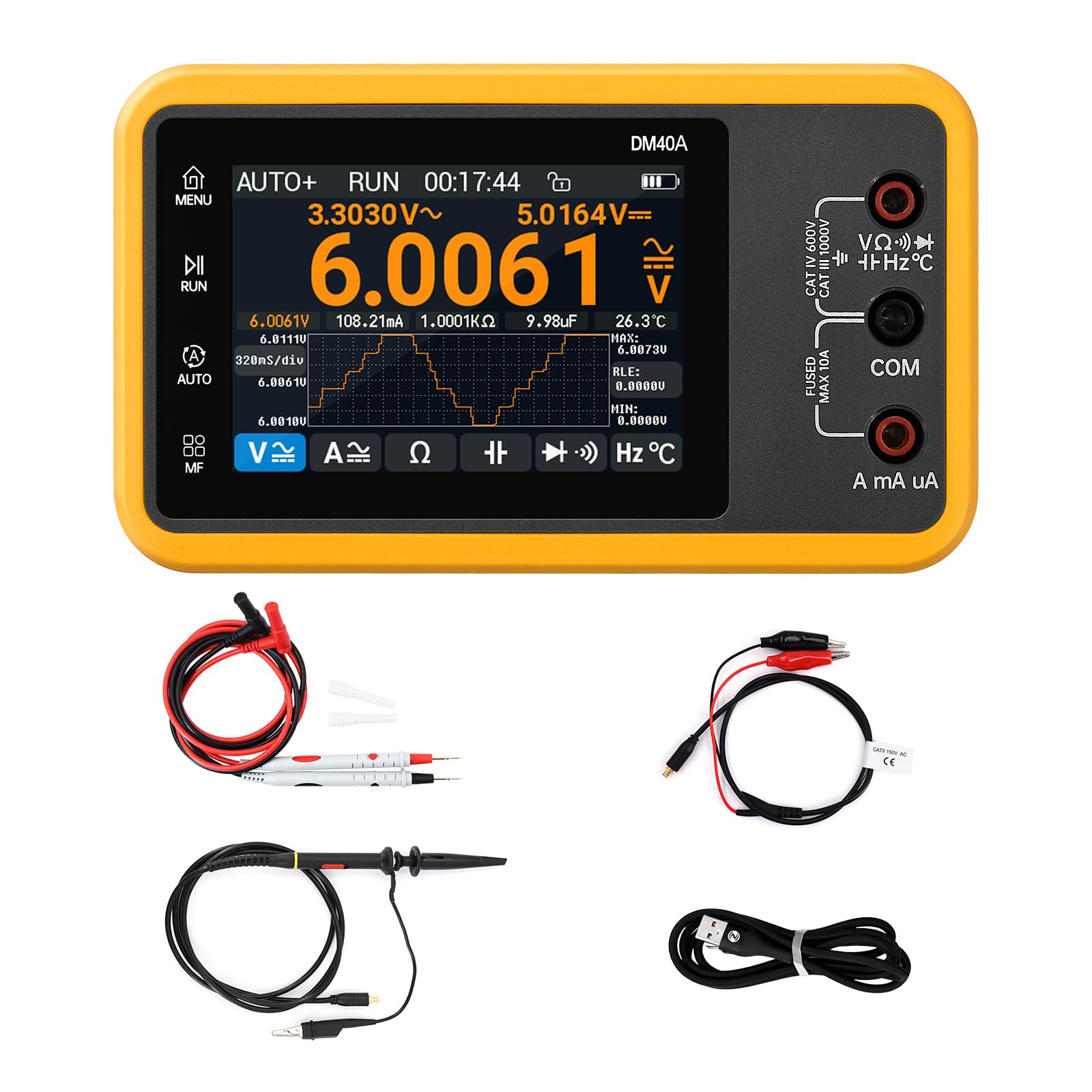
Figure 3: Proper connection of test leads for voltage, resistance, and other measurements.
4. Instrucțiuni de utilizare
4.1 Pornire/Oprire
To power on the device, press and hold the power button located on the side or front panel until the screen illuminates. To power off, press and hold the same button until the screen shuts down.
4.2 Mod de măsurare automată
The DM40 series excels in its automatic measurement capabilities. In AUTO mode, the multimeter intelligently detects the type of measurement (DC/AC voltage, current, resistance, etc.) and automatically switches to the appropriate range. This feature significantly simplifies operation, especially for users who need to quickly assess various parameters without manual configuration.

Figura 4: Volum automattage measurement in progress, showing auto-ranging capabilities.
4.3 voitage Measurement (DC, AC, AC+DC)
Pentru a măsura voltage, ensure test leads are connected to the VΩHz and COM ports. The multimeter automatically detects DC or AC voltage. For AC+DC mixed measurements (available on DM40B/C models), the device displays both AC and DC components simultaneously, providing a comprehensive view of complex signals. The small text on the top left and right of the display shows the AC and DC voltage values respectively.
Safety Warning: When the measured voltage exceeds 30V, the display font will turn red, and a red lightning symbol will appear, indicating potentially hazardous voltage levels. Always exercise extreme caution when working with high voltages.

Figure 5: AC+DC mixed measurement and trend chart display on the DM40 multimeter.
4.4 Current Measurement (DC, AC, AC+DC)
For current measurements, insert the red test lead into the A mA μA port and the black lead into the COM port. Use the current range button to cycle through DC, AC, or AC+DC measurement modes. The device supports automatic range switching for current, from microamperes (μA) to amperes (A).
4.5 Testarea diodei
The innovative diode test function allows for precise voltage drop measurement across diodes. The device provides distinct audible indicators for different voltage drop ranges, making it easy to identify diode characteristics. This test is performed with high accuracy.

Figure 6: Diode test function displaying voltage drop measurements.
4.6 Test de continuitate
The ultra-fast continuity test allows you to quickly check for open or closed circuits. An audible beep indicates a continuous path, while no sound suggests an open circuit. This function is highly responsive, with quick measurements typically less than 1 microsecond.
4.7 Funcția osciloscopului
The integrated oscilloscope function provides advanced waveform analysis capabilities. With a 10-bit ADC, 50MHz sampling rate, and 10MHz bandwidth, it allows for detailed observation of electrical signals. Key features include various time scales, vertical scales, coupling options (AC/DC), and mathematical functions like FFT/ABS.
4.8 Generator de semnal
The built-in signal generator can produce various waveforms, including sine, sawtooth, triangular, and square waves. This is useful for testing circuits, calibrating other equipment, or generating specific signals for experimental setups. Frequencies range from 1Hz to 10MHz depending on the waveform type.
4.9 IPS Touchscreen Interaction
The 3.5-inch IPS touchscreen provides an intuitive interface for navigating menus, selecting functions, and viewing measurement data. Its high resolution (480*320) ensures a clear and detailed display, enhancing user experience.

Figure 7: The high-resolution 3.5-inch IPS touchscreen for clear display and interaction.
4.10 Data Logging and Trend Graph
The DM40 supports essential data management features such as data logging, data hold, and relative measurement. The trend graph function allows users to visualize measurement data periodically, with adjustable time bases (160ms/320ms/640ms), aiding in the observation of signal changes and stability over time.
4.11 Videoclip oficial al produsului
Video 1: This video demonstrates the voltage and current measurement capabilities of the ALIENTEK DM40 Digital Oscilloscope Multimeter, including auto-ranging, AC/DC measurements, and safety warnings for high voltage.
5. Întreținere
5.1 Curățare
To maintain the device's performance and appearance, wipe the exterior with a soft, damp lavetă. Nu utilizați produse de curățare abrazive, solvenți sau substanțe chimice dure, deoarece acestea pot deteriora casing or screen. Ensure the device is powered off and disconnected from any power source before cleaning.
5.2 Îngrijirea bateriei
The DM40 series features a high-capacity rechargeable battery designed for over 10 hours of use. For optimal battery life and performance:
- Evitați descărcarea completă frecventă a bateriei.
- Încărcați dispozitivul în mod regulat, chiar dacă nu îl utilizați constant.
- Depozitați dispozitivul într-un loc răcoros și uscat atunci când nu îl utilizați pentru perioade lungi de timp.
- The multimeter communication is fully isolated, ensuring safety during operation and charging.
5.3 Depozitare
Store the multimeter in a dry, dust-free environment away from direct sunlight, extreme temperatures, and high humidity. Keep it away from strong magnetic fields and corrosive gases. If storing for a long period, ensure the battery has a partial charge (around 50%) to prolong its lifespan.
6. Depanare
This section addresses common issues you might encounter with your ALIENTEK DM40 multimeter.
6.1 "OL" Display (Overload)
If the display shows "OL" (Overload), it indicates that the measured value exceeds the current range or maximum input limit of the selected function. To resolve this:
- If in manual range mode, switch to a higher measurement range.
- Ensure the input is within the device's specified maximum limits for the selected function.
- For current measurements, verify that the test lead is inserted into the correct current measurement port (A mA μA) and not the voltagport.
6.2 No Reading or Inaccurate Readings
- Check Test Lead Connections: Ensure the test leads are securely inserted into the correct ports on the multimeter and are making good contact with the circuit being measured.
- Nivel baterie: Verify that the battery is sufficiently charged. A low battery can affect measurement accuracy.
- Correct Mode Selection: Confirm that the appropriate measurement mode (e.g., DC Voltage, AC Current, Resistance) is selected for the task.
- Damaged Leads: Inspect the test leads for any signs of damage (e.g., frayed wires, broken insulation). Replace damaged leads immediately.
6.3 Dispozitivul nu pornește
- Încărcați bateria: Connect the multimeter to a power source using the USB-C cable and allow it to charge for some time.
- Buton de alimentare: Asigurați-vă că butonul de alimentare este apăsat și ținut apăsat corect.
7. Specificații
Detailed technical specifications for the ALIENTEK DM40A/B/C Digital Multimeter are provided below.
7.1 Informații de bază
| Parametru | Valoare |
|---|---|
| Model | DM40A/B/C |
| Ecran | Full Touch 3.5" IPS (480*320) |
| Durata de viață a bateriei | 12H (Multimeter) / 10H (Oscilloscope) |
| Dimensiuni | 5.5 x 3 x 1 inchi (140 x 83 x 25 mm) |
| Greutatea articolului | 1.89 lire (260 g) |
| Interfață | USB-C, MCX, Banana Seat |
| Sursa de alimentare | Alimentat cu baterii (1 baterie de 9V inclusă) |
| Specificație Met | CE, FCC |
7.2 Oscilloscope / Signal Generator Technical Parameters
| Parametru | Valoare |
|---|---|
| Sample Rate | 50MSa / s |
| Lățimea de bandă | 10MHz |
| Adâncimea memoriei | 64Kpts |
| Scala de timp | 100ns ~ 50s |
| Scară verticală | 10mV ~ 10V/div (X1) |
| Rezoluţie | 10 biți |
| Cuplare | AC/DC |
| Impedanta de intrare | 1MΩ |
| Mod bază de timp | Auto/Normal/Single |
| Modul Sweep | Creștere/Descreștere |
| Funcții matematice | FFT/ABS |
| Tipuri de forme de undă | Sinusoidală, Pătrată, Triunghiulară, Dinți de fierăstrău |
7.3 Intervale de măsurare și precizie
| Funcţie | DM40A Range | DM40B Range | DM40C Range | Precizie |
|---|---|---|---|---|
| DC Voltage | 400mV/4V/40V/400V/1000V | 500mV/5V/50V/500V/1000V | 600mV/6V/60V/600V/1000V | ±(0.03%+5d) |
| AC Voltage | 400mV/4V/40V/400V/750V | 500mV/5V/50V/500V/750V | 600mV/6V/60V/600V/750V | ±(0.3%+15d) |
| Curent DC | 400μA/4000μA/40mA/400mA, 4A/10A | 500μA/5000μA/50mA/500mA, 5A/10A | 600μA/6000μA/60mA/600mA, 6A/10A | ±(0.15%+5d) (μA/mA), ±(0.2%+5d) (A) |
| Curent alternativ | 400μA/4000μA/40mA/400mA, 4A/10A | 500μA/5000μA/50mA/500mA, 5A/10A | 600μA/6000μA/60mA/600mA, 6A/10A | ±(0.5%+15d) (μA/mA), ±(0.75%+15d) (A) |
| Rezistenţă | 400Ω/4KΩ/40KΩ/400KΩ/4MΩ/40MΩ | 500Ω/5KΩ/50KΩ/500KΩ/5MΩ/50MΩ | 600Ω/6KΩ/60KΩ/600KΩ/6MΩ/60MΩ | ±(0.1%+5d) (Ω), ±(0.2%+10d) (MΩ) |
| Capacitate | 4nF/40nF/400nF/4μF/40μF/400μF/4mF | 5nF/50nF/500nF/5μF/50μF/500μF/5mF | 6nF/60nF/600nF/6μF/60μF/600μF/6mF | ±(2.5%+30d) (nF-μF), ±(3.5%+30d) (mF) |
| Frecvenţă | 10 Hz ~ 40 MHz | 10 Hz ~ 50 MHz | 10 Hz ~ 60 MHz | ±(0.01%+5d) |
| Temperatură | -40°C ~ 1000°C (-40°F ~ 1832°F) | -40°C ~ 1000°C (-40°F ~ 1832°F) | -40°C ~ 1000°C (-40°F ~ 1832°F) | ±(1.0%+5°C) (probe range -20°C~300°C), ±(1.5%+5°F) |
| Continuitate | 0Ω ~ 1KΩ | 0Ω ~ 1KΩ | 0Ω ~ 1KΩ | ±(0.2%+5d) |
| Dioda | 0V ~ 3.0V, 0Ω ~ 1KΩ | 0V ~ 3.0V, 0Ω ~ 1KΩ | 0V ~ 3.0V, 0Ω ~ 1KΩ | ±(1%+5d) |
7.4 Special Features Comparison
| Caracteristică | DM40A | DM40B | DM40C |
|---|---|---|---|
| Maximum Display (Counts) | 39999 | 49999 | 59999 |
| Mod auto | ✓ | ✓ | ✓ |
| TRMS | ✓ | ✓ | ✓ |
| Raspuns in frecventa | 10KHz | 10KHz | 10KHz |
| Măsurare AC+DC | ✓ | ✓ | |
| Duty Cycle Measure | 5%~95% | 5%~95% | 5%~95% |
| Reținere date (HOLD) | ✓ | ✓ | ✓ |
| Relative Measurement (RLE) | ✓ | ✓ | ✓ |
| Extreme Value Measurement (Max/Min) | ✓ | ✓ | ✓ |
| Trend Chart (WAVE) | ✓ | ✓ | ✓ |
7.5 Signal Generator Waveform Parameters
| Parametru | Undă sinusoidală | Val din dinte de fierăstrău | Val triunghiular | Val pătrat |
|---|---|---|---|---|
| Proiect | DM40A/B/C | |||
| Frecvenţă | 1Hz ~ 50KHz | 100KHz ~ 10MHz | ||
| Amplititudine | 0.5V ~ 3.0Vpp | 3.0 Vpp | ||
| Ciclul de funcționare | Nu este reglabil | 0 ~ 100% | ||
8. Informații de siguranță
Respectați întotdeauna următoarele măsuri de siguranță pentru a preveni vătămările corporale sau deteriorarea multimetrului sau a echipamentului testat.
- Evaluări de siguranță: The DM40 series is rated for CAT IV 600V and CAT III 1000V. Always ensure your measurements are within these categories and voltage limite.
- Maximum Limits: Nu încercați să măsurați volumultages or currents that exceed the specified maximums for each range. Refer to the specifications table.
- Isolated Communication: The multimeter features fully isolated communication, enhancing safety during operation.
- Inspectați cablurile de testare: Always inspect test leads for any signs of damage (e.g., cracks, frayed insulation) before each use. Replace damaged leads immediately.
- Înalt Voltage Avertisment: La măsurarea volumuluitages above 30V, the device will display a red warning on the screen. Exercise extreme caution and use appropriate personal protective equipment.
- Proper Port Usage: Always connect test leads to the correct input jacks for the desired measurement. Incorrect connections can lead to damage or injury.
9. Garanție și asistență
9.1 Planuri de protecție
Optional protection plans are available to extend the coverage of your ALIENTEK DM40 Digital Multimeter:
- Plan de protecție pe 3 ani: Provides extended coverage for three years.
- Plan de protecție pe 4 ani: Provides extended coverage for four years.
- Protecție completă: A comprehensive plan that covers all eligible past and future purchases (available with monthly billing).
Please refer to the specific terms and conditions of each protection plan for full details.
9.2 Asistență pentru clienți
For technical assistance, warranty claims, or any further inquiries regarding your ALIENTEK DM40 Digital Multimeter, please contact ALIENTEK customer support through your purchase platform or visit the official ALIENTEK website for contact information. Our support team is available to help you with any questions or issues you may have.


