1. Introducere
Thank you for choosing the Infiniity DM56 Sport Smartwatch. This device is designed to enhance your active lifestyle with advanced fitness tracking, health monitoring, and smart connectivity features. Equipped with a vibrant 1.43-inch AMOLED display, built-in GPS, and comprehensive health sensors, the DM56 is your reliable companion for both daily wear and intense workouts.
This manual provides detailed instructions on how to set up, operate, maintain, and troubleshoot your smartwatch to ensure optimal performance and longevity.

Imaginea 1.1: Față view of the Infiniity DM56 Sport Smartwatch, showcasing its round AMOLED display and rugged design.
2. Ce se află în cutie
Upon opening your Infiniity DM56 Sport Smartwatch package, please ensure all the following items are present:
- Infiniity DM56 Sport Smartwatch
- Cablu de încărcare
- Manual de utilizare (acest document)
3. Configurare
3.1 Încărcarea ceasului inteligent
Before first use, fully charge your DM56 smartwatch. A full charge typically takes approximately 2 hours.
- Connect the magnetic charging cable to the charging contacts on the back of the smartwatch. Ensure the pins align correctly.
- Conectați capătul USB al cablului de încărcare la un adaptor de alimentare USB standard (se recomandă 5V/1A) sau la portul USB al unui computer.
- The watch display will show a charging indicator. Once fully charged, the indicator will change or disappear.
3.2 Împerecherea cu smartphone-ul
To unlock the full potential of your DM56 smartwatch, you need to pair it with your smartphone via Bluetooth using the dedicated companion application. The DM56 is compatible with Android 5.0+ and iOS 11 and above.
- Descărcați aplicația: Caută the official Infiniity companion app (refer to the packaging or quick start guide for the exact app name) on the Google Play Store (for Android) or Apple App Store (for iOS) and install it.
- Activați Bluetooth: Asigurați-vă că Bluetooth este activat pe smartphone-ul dvs.
- Deschideți aplicația: Lansați aplicația însoțitoare pe smartphone și urmați instrucțiunile de pe ecran pentru a crea un cont sau a vă conecta.
- Adăugați dispozitiv: Within the app, navigate to the 'Add Device' or 'Pair Device' section. The app will search for available smartwatches.
- Select DM56: Select 'DM56' from the list of found devices. A pairing request may appear on both your phone and the watch. Confirm the pairing on both devices.
- Configurare completă: Once paired, the app will guide you through initial settings, such as profile information, notification permissions, and data synchronization.
4. Utilizarea ceasului inteligent
4.1 Navigare de bază
The DM56 features a responsive touchscreen and physical buttons for intuitive control.
- Touch screen: Glisați în sus, în jos, la stânga sau la dreapta pentru a naviga prin meniuri și notificări. Atingeți pentru a selecta elemente.
- Butoane fizice: The watch has multiple buttons, typically labeled 'SPORT', 'SEL', 'BACK', and a dedicated 'GPS' button. Their functions may vary depending on the current screen or mode.
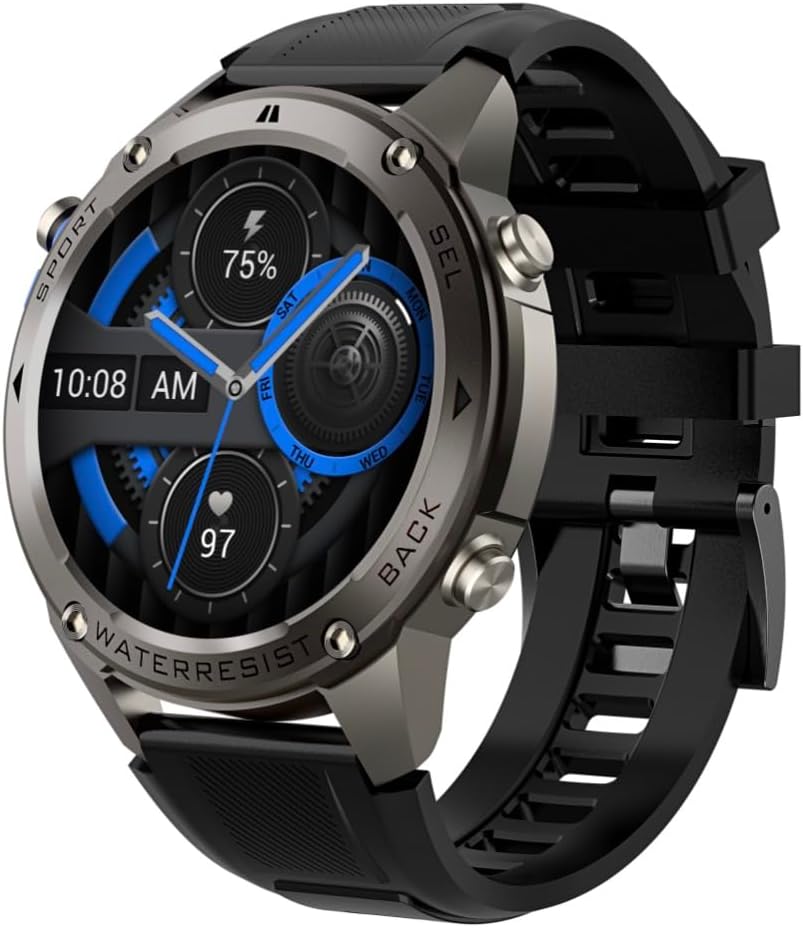
Imaginea 4.1: Laterală view of the Infiniity DM56 Sport Smartwatch, highlighting the physical control buttons.
4.2 Caracteristici de afișare
The 1.43-inch AMOLED display offers vibrant colors and deep blacks with a resolution of 466x466 pixels.
- Afișaj permanent: The DM56 supports Always-On Display functionality, allowing you to see the time and essential information at a glance without needing to raise your wrist or press a button. This feature can be configured in the watch settings.

Image 4.2: The Infiniity DM56 Sport Smartwatch display, showcasing a typical watch face with various data points.
4.3 Built-in GPS & Compass
The DM56 features dual-frequency GPS (L1+L5) and supports multiple satellite systems (GPS, GLONASS, BDS, Galileo, NAVIC, QZSS) for precise outdoor tracking. A built-in compass further aids navigation.
- Urmărire GPS: When starting an outdoor activity (e.g., running, cycling), the watch will automatically attempt to acquire a GPS signal. Ensure you are in an open area for faster signal acquisition. Your route, distance, and pace will be recorded.
- Busolă: Access the compass feature from the watch's menu to get real-time directional information.

Image 4.3: The Infiniity DM56 Sport Smartwatch from an angle, highlighting the dedicated GPS button on the side.

Imaginea 4.4: Un prim-plan view of the GPS button on the Infiniity DM56 Sport Smartwatch, indicating its function.
4.4 Monitorizarea stării de sănătate pe tot parcursul zilei
The DM56 is equipped with the VC30F sensor for continuous health monitoring.
- Monitorizarea ratei cardiace: Track your heart rate in real-time throughout the day. View your current heart rate on the watch face or in the dedicated heart rate app.
- Monitorizarea oxigenului din sânge (SpO2): Măsurați-vă nivelul de saturație a oxigenului din sânge.
- Urmărirea somnului: The watch automatically monitors your sleep patterns, including deep sleep, light sleep, and awake times. View analiză detaliată a somnului în aplicația asociată.
- Urmărirea stresului: Monitorizează-ți nivelul de stres pe parcursul zilei.
- Pedometru: Counts your daily steps, distance, and estimated calories burned.
Note: The Infiniity DM56 Smartwatch is NOT A MEDICAL DEVICE. All health monitoring data is for reference only and should not be used for medical diagnosis or treatment.
4.5 de moduri sportive
The DM56 offers over 170 customizable sports modes, with 14 built-in modes such as outdoor running, cycling, and swimming. You can add up to 10 additional modes manually via the companion app.
- Începerea unei activități: Navigate to the 'Workout' or 'Sports' menu on the watch, select your desired activity, and tap to start.
- În timpul activității: The watch will display real-time metrics such as duration, distance, heart rate, and calories burned.
- Ending Activity: Swipe or press the designated button to pause or end the activity. Your workout data will be saved and synchronized with the app.
4.6 Smart Notifications & Calls
Once paired with your smartphone, the DM56 can receive notifications and handle calls directly on your wrist.
- Notificări: Receive alerts for incoming calls, SMS messages, and app notifications (e.g., social media, email). Configure which app notifications you want to receive in the companion app.
- Make/Answer Call: The DM56 allows you to make and answer calls directly from the watch, utilizing its built-in microphone and speaker. Ensure the watch is connected to your phone via Bluetooth.
5. Întreținere
Clasificare impermeabilitate 5.1
The DM56 has a 5ATM waterproof rating, meaning it can withstand water pressures equivalent to a depth of 50 meters. This makes it suitable for swimming, showering, and other water-based activities. However, it is not recommended for diving or high-pressure water activities.
- Avoid exposing the watch to hot water, steam, or strong detergents.
- După expunerea la apă sărată, clătiți ceasul cu apă curată și uscați-l bine.
5.2 Curățare și îngrijire
Pentru a menține aspectul și funcționalitatea ceasului inteligent:
- Curățați regulat corpul și cureaua ceasului cu o lavetă moale șiamp pânză.
- Asigurați-vă că contactele de încărcare de pe spatele ceasului sunt curate și uscate înainte de încărcare.
- Evitați utilizarea agenților de curățare abrazivi sau a solvenților.
5.3 Optimizarea duratei de viață a bateriei
The DM56 is powered by a 500mAh high-voltage battery, offering extended usage. To maximize battery life:
- Reglați luminozitatea ecranului la un nivel mai scăzut.
- Limit the use of Always-On Display if not essential.
- Dezactivați notificările inutile.
- Dezactivați monitorizarea continuă a ritmului cardiac dacă nu este necesară 24/7.
6. Depanare
If you encounter issues with your Infiniity DM56 smartwatch, try the following common solutions:
- Ceasul nu se pornește: Asigurați-vă că ceasul este complet încărcat. Conectați-l la încărcător și așteptați câteva minute înainte de a încerca să-l porniți din nou.
- Nu se poate conecta la telefon:
- Asigurați-vă că Bluetooth este activat pe telefon și pe ceas.
- Asigurați-vă că ceasul se află în raza de acțiune Bluetooth a telefonului.
- Reporniți atât ceasul, cât și telefonul.
- Ștergeți memoria cache Bluetooth de pe telefon (Android) sau uitați de dispozitiv și reconectați-l.
- Asigurați-vă că aplicația însoțitoare este actualizată la cea mai recentă versiune.
- Date inexacte privind sănătatea:
- Asigurați-vă că ceasul este purtat strâns pe încheietura mâinii, nici prea strâmt, nici prea lejer.
- Curățați senzorul de pe spatele ceasului.
- Note that environmental factors and individual physiology can affect readings. Remember, it is not a medical device.
- Notificări neprimite:
- Verificați setările de notificare în aplicația însoțitoare.
- Asigurați-vă că aplicația are permisiunile necesare pe telefon (de exemplu, acces la notificări).
- Verify that the watch is connected to your phone.
- Durată scurtă de viață a bateriei: Refer to Section 5.3 for battery optimization tips.
Dacă problema persistă după ce ați încercat acești pași, vă rugăm să contactați serviciul de asistență pentru clienți pentru asistență suplimentară.
7. Specificații
| Caracteristică | Caietul de sarcini |
|---|---|
| Numărul de model | DM 56 |
| Afişa | AMOLED de 1.43 inci, 466x466 pixeli |
| Senzori | Heart Rate (VC30F), Accelerometer (STK8321), Magnetometer (Compass), Barometer+Altitude (SPL07-03) |
| Conectivitate | Bluetooth 5.3 |
| Capacitatea bateriei | 500mAh |
| Nivel impermeabil | 5ATM |
| Compatibilitate | Android 5.0+ and iOS 11 and above |
| Greutatea articolului | 3 uncii |
| Dimensiuni pachet | 4.25 x 4.25 x 2.8 inci |
| Sistem de operare | Android Wear 2.7 (Note: This refers to the underlying OS, not necessarily full Android Wear functionality) |
| GPS | Built-in GPS (L1+L5 dual-frequency) |
| Formă | Rundă |
| Tip baterie | Nonstandard Battery, Lithium Ion |
8. Garanție și asistență
The Infiniity DM56 Sport Smartwatch comes with a standard manufacturer's warranty. Please refer to the warranty card included in your product packaging for specific terms and conditions, including warranty duration and coverage details.
For technical support, troubleshooting assistance beyond what is covered in this manual, or warranty claims, please contact Infiniity customer service through the contact information provided on the product packaging or the official Infiniity website-ul.
Vă rugăm să păstrați dovada achiziției în scopul garanției.


