Introducere
This manual provides detailed instructions for the safe and effective operation, setup, and maintenance of your Dasqua 8400-0020 Digital Levelling Box. Please read this manual thoroughly before using the device to ensure proper handling and to prevent damage or injury.
Instrucțiuni de siguranță
Măsuri generale de siguranță:
- Always handle the device with care to avoid dropping or impact, which can affect its accuracy.
- Keep the device away from strong magnetic fields, except for its integrated magnet, to prevent interference with internal components.
- Nu expuneți dispozitivul la temperaturi extreme, umiditate sau lumina directă a soarelui.
- Curățați dispozitivul cu o lavetă moale și uscată. Nu utilizați substanțe de curățare abrazive sau solvenți.
- Acest dispozitiv nu este impermeabil. Evitați contactul cu lichide.
- A nu se lăsa la îndemâna copiilor.
Produs terminatview
The Dasqua 8400-0020 is a compact digital levelling box designed for precise angle measurements. It features a clear digital display, intuitive controls, and a magnetic base for secure attachment to ferrous surfaces.
Componente și comenzi
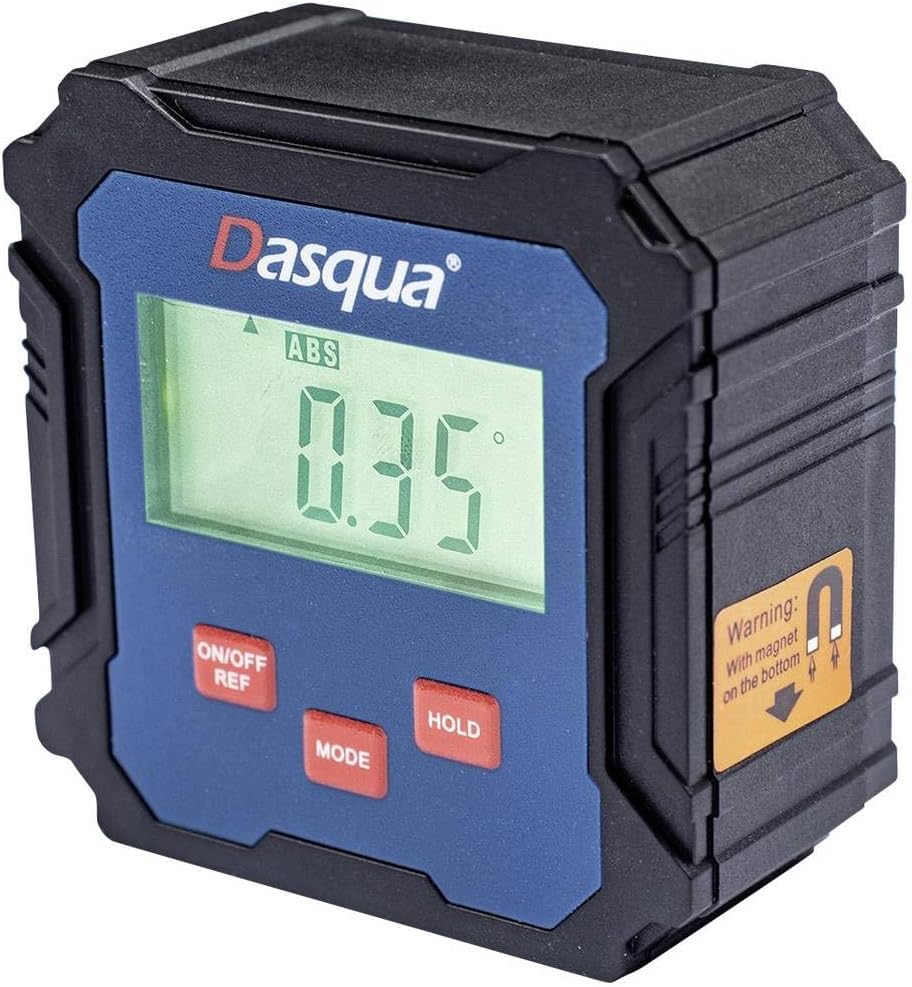
Figure 1: Dasqua 8400-0020 Digital Levelling Box. This image shows the front face of the device, highlighting the digital display, control buttons, and a warning label for the magnetic base.
- 1. Afișaj digital: Shows angle readings in degrees, absolute (ABS) or relative (REF) mode, and battery indicator.
- 2. ON/OFF REF Button: Powers the unit on or off. Also used to set a relative zero point (REF).
- 3. Buton MODE: Switches between absolute (ABS) and relative (REF) measurement modes.
- 4. Buton HOLD: Îngheață citirea curentă de pe afișaj.
- 5. Magnetic Base: Located on the bottom of the unit, allows for secure attachment to metal surfaces for hands-free operation.
Înființat
Before first use, ensure the device has sufficient power. The Dasqua 8400-0020 typically uses standard AAA batteries. Open the battery compartment, insert batteries with correct polarity, and close the compartment securely.
Instalare baterie:
- Locate the battery compartment cover on the back or side of the unit.
- Deschide capacul.
- Insert [Number] AAA batteries (not included) observing the correct polarity (+/-).
- Închideți ferm capacul compartimentului bateriei.
Note: The exact battery type and quantity should be confirmed from the product packaging or device itself.
Instrucțiuni de operare
1. Pornire/Oprire:
Apăsați tasta ON/OFF REF button to turn the device on. Press and hold the ON/OFF REF apăsat butonul timp de câteva secunde pentru a-l opri.
2. Absolute Measurement (ABS Mode):
When the device is powered on, it typically defaults to Absolute (ABS) mode. In this mode, the display shows the angle relative to a true horizontal (0°) or vertical (90°) plane. The "ABS" indicator will be visible on the display.
3. Relative Measurement (REF Mode):
To measure an angle relative to a specific surface (e.g., to find the difference between two angles), use the Relative (REF) mode:
- Place the device on the first surface you wish to set as your reference.
- Apăsați tasta ON/OFF REF button briefly. The display will show "0.00°" and the "REF" indicator will appear, indicating that this position is now your zero reference.
- Move the device to the second surface. The display will now show the angle difference between the first and second surfaces.
- To exit REF mode and return to ABS mode, press the MOD buton.
4. Funcția Hold:
Apăsați tasta ȚINE button to freeze the current reading on the display. This is useful when taking measurements in hard-to-see areas. Press the ȚINE Apăsați din nou butonul pentru a elibera citirea și a relua măsurarea în timp real.
5. Calibration (Self-Calibration):
For optimal accuracy, it is recommended to perform a self-calibration periodically or if you suspect the readings are inaccurate. Refer to the device's specific instructions for calibration, which usually involves placing the unit on a flat, level surface and following a sequence of button presses.
Note: Consult the manufacturer's full instructions for detailed calibration procedures if available.
Întreţinere
curatenie:
Wipe the device with a soft, dry, lint-free cloth. Do not use liquid cleaners, aerosols, or solvents. Ensure no dust or debris accumulates around the display or buttons.
Depozitare:
When not in use, store the digital levelling box in a dry, cool place, away from direct sunlight and extreme temperatures. If storing for an extended period, remove the batteries to prevent leakage and potential damage to the device.
Depanare
| Problemă | Cauza posibila | Soluţie |
|---|---|---|
| Dispozitivul nu pornește. | Low or dead batteries. Incorrect battery polarity. | Replace batteries with new ones. Ensure batteries are inserted with correct polarity. |
| Citiri inexacte. | Device not calibrated. Device exposed to strong magnetic fields (other than its base magnet). Physical damage. | Perform self-calibration. Move device away from other magnetic sources. Inspect for damage; if damaged, contact support. |
| Afișajul este întunecat sau pâlpâie. | Putere scăzută a bateriei. | Înlocuiți bateriile. |
| Butoanele nu răspund. | Device frozen. Low battery. | Remove and reinsert batteries to reset. Replace batteries. |
Specificații
| Caracteristică | Detaliu |
|---|---|
| Numărul de model | 8400-0020 |
| Marca | Dasqua |
| Interval de măsurare | 90° x 4 (360°) |
| Rezoluţie | 0.1° |
| Dimensiunile produsului | 13.3 x 12.5 x 5.5 cm |
| Greutate | 140 g |
| Caracteristici | Digital display, Magnetic base, ABS/REF mode, Hold function |
Garanție și suport
For warranty information and technical support, please contact Dasqua customer service or refer to the official Dasqua webPăstrați bonul fiscal ca dovadă a achiziției pentru orice reclamații în garanție.
Manufacturer: Dasqua


