Introducere
This user manual provides important information for the safe and efficient operation of your Technaxx TX-315 10000mAh 3-in-1 Wireless Fast Charging Power Bank. Please read this manual thoroughly before using the device and keep it for future reference.
Instrucțiuni de siguranță
- Nu expuneți bateria externă la temperaturi extreme, la lumina directă a soarelui sau la foc.
- Nu dezasamblați, reparați și modificați dispozitivul singur. Apelați la personal calificat pentru toate lucrările de service.
- Țineți banca de alimentare departe de apă și alte lichide.
- Nu scăpați, nu loviți și nu supuneți dispozitivul la impacturi puternice.
- Asigurați o ventilație corespunzătoare în timpul încărcării sau descărcării.
- A nu se lăsa la îndemâna copiilor.
- Aruncați bateria externă conform reglementărilor locale privind deșeurile electronice.
Produs terminatview
Familiarize yourself with the components of your Technaxx TX-315 power bank:
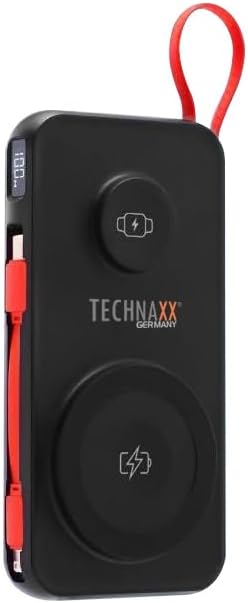
Image: The Technaxx TX-315 power bank, a black rectangular device with a red lanyard. It features a digital display on the side, a USB-C port, a USB-A port, a built-in red USB-C cable, a magnetic wireless charging pad for smartphones, and a smaller wireless charging pad for smartwatches. The Technaxx logo is visible on the front.
- Ecran digital: Afișează procentul baterieitage.
- Magnetic Wireless Charging Pad (15W): Pentru smartphone-uri compatibile.
- Smartwatch Wireless Charging Pad (3W): For compatible smartwatches.
- USB-A Output Port (22.5W): For wired charging of various devices.
- USB-C Input/Output Port (20W PD): For charging the power bank or wired charging of devices.
- Cablu USB-C încorporat: Convenabil pentru încărcarea dispozitivelor.
- Buton de alimentare: Activates the display and charging functions.
Înființat
Încărcarea Power Bank-ului
- Connect the power bank to a USB wall charger (not included) using the built-in USB-C cable or a separate USB-C to USB-C cable via the USB-C port.
- Afișajul digital va afișa progresul încărcării, indicând procentul bateriei.tage.
- Acumulatorul extern este complet încărcat când afișajul arată „100%”.
Funcționează
Charging Smartphones Wirelessly (15W)
- Apăsați butonul de pornire pentru a activa banca de alimentare.
- Place your MagSafe-compatible or Qi-enabled smartphone onto the larger magnetic wireless charging pad. Ensure proper alignment for optimal charging.
- The phone's charging indicator will confirm charging has begun.
Charging Smartwatches Wirelessly (3W)
- Apăsați butonul de pornire pentru a activa banca de alimentare.
- Place your compatible smartwatch onto the smaller wireless charging pad.
- The smartwatch's display will indicate that it is charging.
Wired Charging via USB-A or USB-C Ports
- Apăsați butonul de pornire pentru a activa banca de alimentare.
- Connect your device to the USB-A port or the USB-C port using an appropriate charging cable.
- Acumulatorul extern va începe automat încărcarea dispozitivului.
- The built-in USB-C cable can also be used for convenient wired charging.
Înțelegerea afișajului digital
The digital display shows the current battery percentage of the power bank. This allows you to monitor the remaining power and know when to recharge the unit.
Întreţinere
- Curățați bateria externă cu o lavetă moale și uscată. Nu utilizați substanțe de curățare abrazive sau solvenți.
- Depozitați bateria externă într-un loc răcoros și uscat, ferit de lumina directă a soarelui și de temperaturi extreme.
- Dacă nu este utilizată pentru perioade lungi de timp, încărcați bateria externă cel puțin o dată la trei luni pentru a menține starea de funcționare a bateriei.
Depanare
| Problemă | Cauza posibila | Soluţie |
|---|---|---|
| Bateria externă nu se încarcă. | Cable not connected properly; charger not working; power bank battery depleted. | Check cable connections; try a different charger; allow power bank to charge for a few minutes. |
| Dispozitivul nu se încarcă de la bateria externă. | Power bank not activated; device not compatible; cable faulty; power bank battery low. | Press power button; ensure device supports wireless/wired charging; try a different cable; recharge power bank. |
| Wireless charging is slow or intermittent. | Misalignment of device; thick phone case; foreign objects between device and pad. | Realign device on charging pad; remove thick phone case; remove any metal objects or cards. |
| Afișajul digital nu funcționează. | Power bank battery depleted; internal fault. | Recharge power bank; if issue persists, contact support. |
Specificații
- Nume model: TX-315
- Capacitate baterie: 10000mAh
- Compoziția celulei bateriei: Polimer de litiu
- Wireless Charging (Smartphone): 15W (Magnetic)
- Wireless Charging (Smartwatch): 3W
- Ieșire USB-A: 22.5W
- Intrare/ieșire USB-C: Putere de livrare 20W (PD)
- Dimensiuni produs: 144 x 73 x 16 mm (approx. 7.2L x 2W x 14Th centimetres)
- Greutatea articolului: 250g (approx. 0.56 Pounds)
- Producător: Technaxx
- Țara de origine: China
Garanție și suport
Your Technaxx TX-315 Power Bank comes with a standard manufacturer's warranty. For detailed warranty information, please refer to the warranty card included in the product packaging or visit the official Technaxx website. If you encounter any issues or require technical assistance, please contact Technaxx customer support or your retailer.
The product package includes the Powerbank 10000mAh TX-315 and this user manual.


