Produs terminatview
The ARENTI GO3G Kit3 is a modern 4G LTE mobile outdoor surveillance camera featuring pan and tilt functionality, specifically designed for environments without Wi-Fi access. It provides a robust wireless security solution for various remote locations such as construction sites, holiday homes, or farms. Powered by high-capacity batteries and an included 8W solar panel, it ensures continuous, low-maintenance operation.
This camera delivers 2K 3MP Ultra HD resolution (2304 × 1296) for detailed images and smooth video, day and night. It includes advanced features like digital WDR, color and infrared night vision up to 10 meters, and an advanced PIR sensor with AI-assisted detection for people, vehicles, and animals. Two-way audio allows real-time communication, and flexible storage options include microSD card support up to 256GB and cloud storage. Data security is ensured with AES 128 encryption, and its IP65 weather resistance makes it suitable for year-round outdoor use.
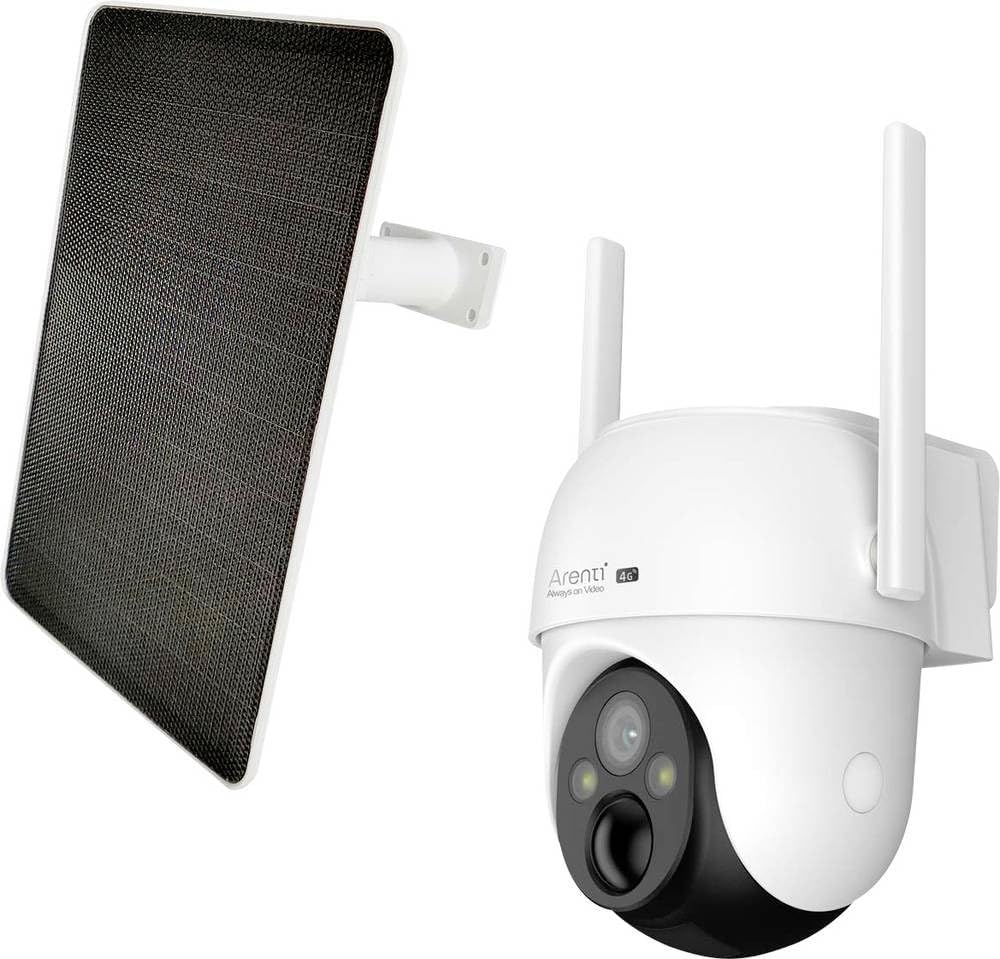
This image displays the ARENTI GO3G Kit3-4G LTE surveillance camera and its accompanying solar panel. The camera is white with black accents around the lens, featuring two adjustable antennas. The solar panel is black with a white frame, designed for outdoor power supply.
Componente incluse
- Arenti Solar Panel
- Universal Joint for Solar Panel
- Suport pentru cameră
- Set of 2 Screws
- Ghid de pornire rapidă x 2
- SIM Card (Note: Power adapter not included)
- Arenti GO3G Kit3 Surveillance Camera
- Cablu de alimentare
Specificații
| Caracteristică | Detaliu |
|---|---|
| Numele modelului | Arenti GO3G Kit3 |
| Tehnologia de conectivitate | 4G LTE (Wi-Fi not supported) |
| Rezoluție de înregistrare video | 2K 3 Megapixel (2304 x 1296) |
| Sursa de alimentare | Battery Powered (10400 mAh) with 8W Solar Panel |
| Gama de vedere nocturnă | Up to 10 meters (Infrared and Color) |
| Viewunghiul ing | 110 de grade |
| Pan/Tilt Functionality | Pan 350°, Tilt -90° to 30° |
| Detectarea mișcării | PIR Sensor with AI-assisted detection (people, vehicles, animals) |
| Audio bidirecțional | Integrated Microphone and Speaker |
| Opțiuni de stocare | Card MicroSD (până la 256 GB), Stocare în cloud |
| Criptarea datelor | AES 128 |
| Rezistență la intemperii | IP65 (impermeabil) |
| Dimensiuni (L x l x H) | 13.4 x 12.4 x 13.8 cm |
| Greutate | 637 de grame |
| Tip de instalare | Montare pe perete |
Ghid de instalare
1. Initial Charging and SIM Card Insertion
Before initial use, ensure the camera's internal battery is sufficiently charged. Although the solar panel provides continuous power, a full initial charge is recommended. Insert the provided 4G LTE SIM card into the designated slot on the camera. This camera operates exclusively on the 4G LTE mobile network and does not support Wi-Fi connections.
2. Instalarea aplicației mobile
Download and install the official ARENTI mobile application on your smartphone or tablet. The app is essential for camera setup, live viewing, and accessing recorded footage. Follow the on-screen instructions within the app to pair your camera.
3. Montarea camerei și a panoului solar
Select an optimal outdoor location for mounting the camera, ensuring it has a clear view of the area you wish to monitor. Mount the solar panel in a location that receives maximum direct sunlight throughout the day to ensure continuous charging. Use the provided camera bracket and universal joint for secure installation. Connect the solar panel to the camera using the power cable.
4. Data Test Plan Activation
A free 100 MB data test plan is included for immediate commissioning. Follow the instructions provided with the SIM card or within the app to activate this plan and verify connectivity.
Instrucțiuni de operare
1. în direct View și control panoramic/înclinat
Open the ARENTI app and select your camera to access the live video feed. Use the on-screen controls to remotely pan the camera 350° horizontally and tilt it from -90° to 30° vertically, allowing for flexible surveillance without blind spots.
2. Detectarea mișcării și alertele
The camera features an advanced PIR sensor with AI-assisted detection to accurately identify people, vehicles, and animals, minimizing false alarms. Customize motion detection zones within the app to focus surveillance on specific areas. Real-time push notifications will be sent to your smartphone upon detection.
3. Moduri de vedere nocturnă
The camera supports both infrared and color night vision, providing clear images up to 10 meters even in total darkness. The automatic infrared switching feature adjusts lighting based on ambient conditions for optimal night surveillance.
4. Comunicare audio bidirecțională
Utilize the built-in microphone and speaker for two-way audio communication. This allows you to speak to individuals near the camera or deter unwanted visitors directly through the app.
5. Video Storage and Playback
Recordings can be stored locally on a microSD card (up to 256GB, not included) or via the optional cloud storage service. Access and review inregistrat footage through the ARENTI app. An automatic overwrite function ensures continuous recording by managing storage space.
Întreţinere
1. Solar Panel Cleaning
Periodically clean the surface of the solar panel to ensure optimal sunlight absorption. Dust, dirt, or debris can reduce charging efficiency. Use a soft, damp o lavetă pentru a șterge ușor panoul.
2. Camera Lens and Housing
Keep the camera lens clean for clear image quality. Use a lens cleaning cloth or a soft, lint-free cloth. The IP65 weather-resistant housing requires minimal maintenance, but occasional inspection for any physical damage or blockages is recommended.
3. Sănătatea bateriei
The intelligent power management system optimizes battery life. While the solar panel provides continuous charging, monitor battery levels via the app, especially during prolonged periods of low sunlight or heavy usage, to ensure uninterrupted operation.
Depanare
1. No Network Connection (4G LTE)
- Ensure the 4G LTE SIM card is correctly inserted and activated.
- Verify that the SIM card has an active data plan.
- Check the signal strength indicator in the app. If signal is weak, try relocating the camera or adjusting antennas.
- Important: This camera does not support Wi-Fi. Ensure you are not attempting to connect via Wi-Fi.
2. Camera nu pornește
- Verificați nivelul bateriei în aplicație.
- Asigurați-vă că panoul solar este curat și primește suficientă lumină solară.
- Verify the connection between the solar panel and the camera.
- If necessary, charge the camera directly using a compatible power adapter (not included).
3. Probleme legate de detectarea mișcării
- Ajustați setările de sensibilitate a detectării mișcării în aplicație.
- Ensure motion detection zones are correctly configured.
- Clean the camera lens and PIR sensor area to prevent obstructions.
- Verify that push notifications are enabled on your smartphone and within the app.
4. Calitate slabă a imaginii
- Curățați obiectivul camerei.
- Asigurați-vă că nu există obstacole în fața lentilei.
- Check for sufficient lighting conditions, especially at night.
- Verify the camera's position for optimal viewunghiuri de ing.
Garanție și suport
For detailed warranty information and technical support, please refer to the official ARENTI website or contact their customer service directly. Specific warranty terms and conditions may vary by region and retailer. Keep your purchase receipt as proof of purchase for any warranty claims.
For further assistance, consult the FAQ section on the ARENTI support page or reach out to their dedicated support team via the contact methods provided on their official website-ul.


