Introducere
Welcome to the user manual for your new TABWEE W90 Android 15 Tablet. This guide provides comprehensive instructions on setting up, operating, maintaining, and troubleshooting your device. Please read this manual carefully to ensure optimal performance and longevity of your tablet.

Imagine: Față și verso view of the TABW90 tablet, showcasindesignul său elegant și modulul camerei.
Înființat
1. Încărcarea inițială
Before first use, fully charge your tablet using the provided USB-C cable and power adapter. The charging indicator will show progress.
2. Pornire/Oprire
- To power on: Press and hold the Power button until the TABWEE logo appears.
- Pentru a opri: Apăsați și mențineți apăsat butonul de pornire, apoi selectați „Oprire” din opțiuni.
3. Instalarea cartelei SIM și a cardului MicroSD
The TABWEE W90 supports 4G SIM cards for cellular connectivity and MicroSD cards (up to 2TB) for expanded storage.
- Localizați suportul pentru cartela SIM/MicroSD pe lateralul tabletei.
- Introduceți instrumentul de ejectare a cartelei SIM în orificiul mic de lângă tavă pentru a o deschide.
- Carefully place the Nano-SIM card(s) and/or MicroSD card into the designated slots, ensuring correct orientation.
- Împingeți ușor tava înapoi în tabletă până când se fixează în poziție cu un clic.
Instrucțiuni de operare
1. Afișaj și navigare
The 11-inch Full HD display (1920x1200 pixels) offers a clear and immersive viewing experience. Navigate using touch gestures: tap, swipe, pinch-to-zoom.

Image: The 11-inch display of the TABWEE W90, highlighting its 1920x1200 resolution, 84.9% screen-to-body ratio, 350 nits brightness, and TÜV Rheinland Low Blue Light certification for eye comfort.
2. Conectivitate
- Wifi: Go to Settings > Network & internet > Wi-Fi to connect to available networks. Supports 802.11ac.
- Cellular Data (4G): If a SIM card is installed, enable mobile data in Settings > Network & internet > Mobile network.
- Bluetooth: Pair with Bluetooth devices (headphones, keyboards) via Settings > Connected devices > Bluetooth.
- USB-C: Folosește portul USB-C pentru încărcare și transfer de date.
3. Performanță și multitasking
Powered by an Octa-Core Unisoc T615 processor and 24GB RAM (8GB physical + 16GB virtual), the W90 ensures smooth multitasking and app performance.

Image: Diagram illustrating the powerful Octa-Core Unisoc T615 Chipset, featuring 2x A75@2.2GHz and 6x A55@1.8GHz cores, Mali-G57 GPU, and LPDDR4+ UFS memory for smooth multitasking.
Android 15 offers enhanced multitasking features. You can use split-screen mode for two applications simultaneously or utilize floating windows for quick access.
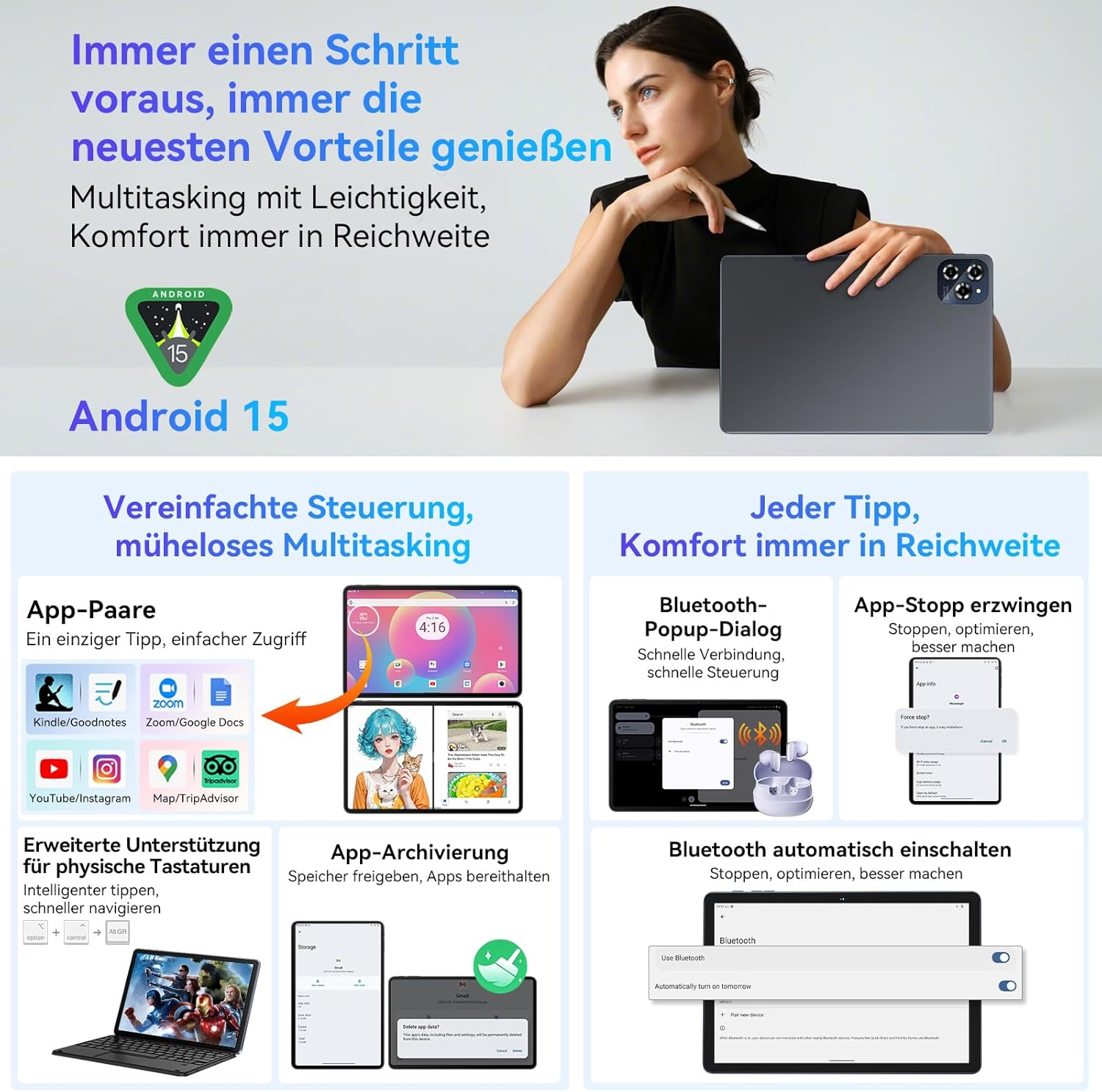
Image: Visual representation of Android 15's multitasking capabilities on the TABWEE W90, including app pairing for split-screen, Bluetooth pop-up dialogs, force-stopping apps, and automatic Bluetooth activation.
4. Managementul stocării
The tablet comes with 256GB of internal storage, expandable up to 2TB via a MicroSD card. Manage your storage in Settings > Storage.

Image: Infographic detailing the TABWEE W90's memory specifications: up to 24GB RAM (8GB physical + 16GB expansion) and 256GB ROM with 2TB TF expansion. It also shows estimated storage capacity for photos, songs, and short videos.
5. Gemini AI Integration
Leverage the integrated Gemini AI for smart chats, content creation, and enhanced productivity. Access Gemini AI features through dedicated apps or system integrations.

Image: Screenshot demonstrating Gemini AI capabilities on the TABWEE W90, including smart chat interactions, text and image processing, and various sharing and archiving options.
6. Widevine L1 Support
With Widevine L1 support, the TABWEE W90 allows you to stream high-definition content from popular platforms like Netflix, Prime Video, and YouTube in full resolution.
7. Face ID
Set up Face ID for convenient and secure unlocking of your tablet. Go to Settings > Security & privacy > Face unlock to configure.
Întreţinere
- curatenie: Folosiți o lavetă moale, fără scame, pentru a curăța ecranul și carcasa. Evitați substanțele de curățare abrazive sau solvenții.
- Îngrijirea bateriei: To prolong battery life, avoid extreme temperatures and do not let the battery fully discharge frequently.
- Actualizări de software: Keep your tablet's software updated to ensure optimal performance and security. Check for updates in Settings > System > System update.
- Managementul stocării: Curățați regulat inutilul files and cache to maintain performance.
Depanare
Probleme comune și soluții:
- Tableta nu pornește: Asigurați-vă că bateria este încărcată. Dacă nu, conectați încărcătorul și așteptați câteva minute înainte de a încerca să o porniți din nou.
- Aplicațiile se blochează sau se blochează: Închideți aplicațiile din fundal. Ștergeți memoria cache a aplicației (Setări > Aplicații > [Nume aplicație] > Stocare și memorie cache > Ștergeți memoria cache). Reporniți tableta.
- Probleme de conectivitate Wi-Fi: Restart your Wi-Fi router. Forget the network on your tablet and reconnect. Ensure Wi-Fi is enabled.
- Performanță lentă: Free up storage space. Close unused apps. Restart the tablet.
- Bateria se descarcă rapid: Reduceți luminozitatea ecranului. Dezactivați funcțiile neutilizate, cum ar fi Bluetooth sau GPS. Închideți aplicațiile din fundal.
- Cartela SIM nu a fost detectată: Ensure the SIM card is correctly inserted. Restart the tablet. Check if the SIM card is active with your carrier.
Specificații
| Caracteristică | Detaliu |
|---|---|
| Marca | TABWEE |
| Numele modelului | W90 |
| Sistem de operare | Android 15 |
| Procesor | Unisoc T615 Octa-core |
| RAM | 24 GB (8 GB fizic + 16 GB virtual) |
| Stocare internă | 256 GB |
| Stocare extensibilă | Până la 2 TB (MicroSD) |
| Dimensiunea ecranului | 11 inchi |
| Rezoluția ecranului | 1920 x 1200 pixeli |
| Capacitatea bateriei | 8000 mAh |
| Putere de încărcare | 18 W |
| Camera spate | 16 MP |
| Cameră frontală | 8 MP |
| Conectivitate | 4G SIM, Wi-Fi (802.11ac), Bluetooth, USB-C |
| Caracteristici speciale | Gemini AI, Widevine L1, Face ID, TÜV Rheinland Certified |
| Dimensiuni (L x l x H) | 25.65 x 17.02 x 0.76 cm |
| Greutate | 534 grame |
Garanție și suport
Your TABWEE W90 Tablet comes with a 2-year warranty, as indicated in the product title. For warranty claims, technical support, or service inquiries, please contact TABWEE customer service through their official website-ul sau comerciantul de unde ați achiziționat dispozitivul.
Vă rugăm să păstrați dovada achiziției pentru validarea garanției.


