Introducere
Mulțumesc pentru achizițieasing the SKMEI 1762 Digital Watch. This manual provides detailed instructions on how to set up, operate, and maintain your watch. Please read this manual carefully to ensure proper use and to enjoy all the features of your new timepiece.
The SKMEI 1762 is a versatile digital watch designed for daily wear and outdoor activities, featuring water resistance, an alarm, calendar, stopwatch, and backlight.
Produs terminatview
The SKMEI 1762 watch features a clear digital display and four control buttons for various functions.
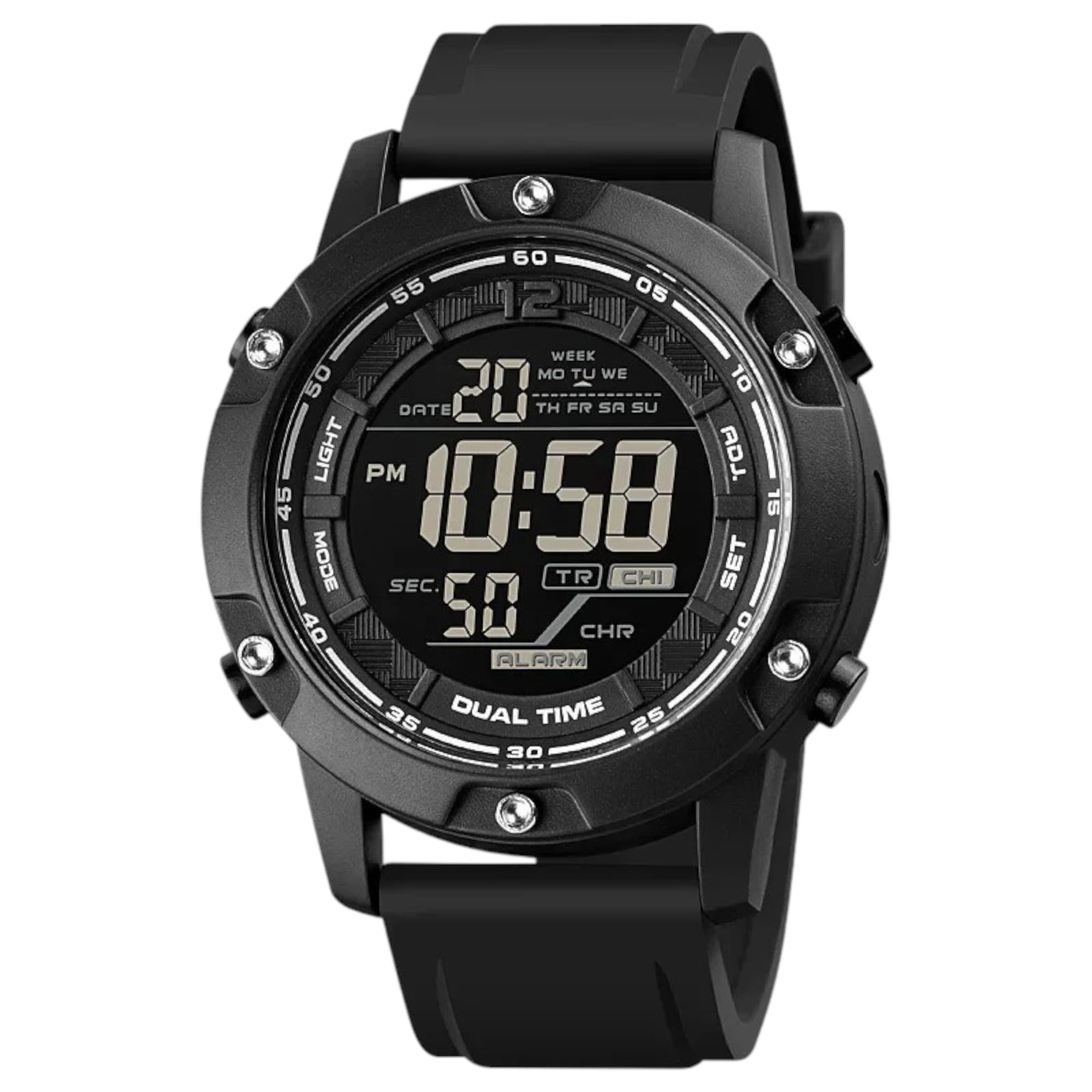
This image displays the front of the SKMEI 1762 digital watch, highlighting its digital display and the four control buttons located on the sides of the watch case.
Funcții butoane:
- LUMINĂ (Stânga sus): Activează lumina de fundal pentru iluminare în condiții de lumină slabă.
- MOD (Stânga jos): Cycles through different modes: Time, Chronograph (Stopwatch), Alarm, and Dual Time.
- ADJ (Top Right): Used to adjust settings within a mode (e.g., incrementing values).
- SET (Bottom Right): Used to confirm settings or move to the next setting item.
Elemente de afișare:
- Afișare timp: Shows hours, minutes, and seconds. Can be set to 12-hour or 24-hour format.
- Afișare dată: Arată luna și ziua.
- Ziua săptămânii: Indică ziua curentă.
- Indicator de alarma: Icon displayed when the alarm is active.
- Chronograph Display: Shows elapsed time in stopwatch mode.
Înființat
Setarea orei și datei:
- Din modul Oră, apăsați butonul MOD Apăsați butonul în mod repetat până când secundele încep să clipească. Aceasta indică faptul că vă aflați în modul de setare a orei.
- Apăsați tasta SET button to cycle through the settings: seconds → hours → minutes → 12/24-hour format → month → day → year.
- Utilizați ADJ button to increase the flashing value. Hold ADJ to quickly advance the numbers.
- După ce toate setările sunt ajustate, apăsați butonul MOD pentru a ieși din modul de setare și a reveni la afișajul normal al orei.
Setarea alarmei:
- Din modul Oră, apăsați butonul MOD button until you reach the Alarm Mode (usually indicated by an 'AL' or alarm icon).
- Țineți apăsat butonul SET apăsați butonul până când orele alarmei încep să clipească.
- Utilizați ADJ pentru a seta ora dorită a alarmei.
- Apăsați tasta SET button to move to the alarm minutes. Use the ADJ pentru a seta minutele dorite ale alarmei.
- Apăsați tasta MOD pentru a ieși din modul de setare a alarmei.
- Pentru a activa/dezactiva alarma, în modul Alarmă, apăsați butonul ADJ O pictogramă de alarmă va apărea/dispăre pe afișaj.
Setarea orei duble:
- Din modul Oră, apăsați butonul MOD button repeatedly until you reach Dual Time Mode (often indicated by 'DT' or a second time display).
- Țineți apăsat butonul SET button until the dual time hours start flashing.
- Utilizați ADJ button to set the desired dual time hour.
- Apăsați tasta SET button to move to the dual time minutes. Use the ADJ button to set the desired dual time minutes.
- Apăsați tasta MOD pentru a ieși din modul de setare a orei duale.
Moduri de operare
Mod oră:
This is the default display mode, showing the current time, date, and day of the week. Press the ADJ button in Time Mode to switch between 12-hour and 24-hour formats.
Mod cronograf (cronometru):
- Apăsați tasta MOD button until you reach the Chronograph Mode (usually indicated by 'ST' or 'CH').
- Presa ADJ pentru a porni cronometrul.
- Presa ADJ din nou pentru a întrerupe cronometrul.
- Presa SET pentru a reseta cronometrul la zero în timp ce este în pauză.
- Presa MOD to return to Time Mode.
Mod de alarmă:
In Alarm Mode, you can view the set alarm time and toggle the alarm ON or OFF using the ADJ buton.
Modul orar dublu:
In Dual Time Mode, you can view the second time zone you have set. This is useful for tracking time in another region.
Utilizarea luminii de fundal:

This image illustrates the SKMEI 1762 digital watch with its luminous display activated, showing how the backlight illuminates the screen for visibility in the dark.
Apăsați tasta APRINDE button (top left) at any time to illuminate the display for a few seconds, allowing you to read the time in dark environments.
Întreţinere
curatenie:
- Ștergeți carcasa și cureaua ceasului cu o lavetă moale șiamp pânză.
- Avoid using chemical cleaners, as they may damage the watch's finish or seals.
Rezistenta la apa:

This image shows the SKMEI 1762 digital watch being splashed with water, demonstrating its water-resistant capabilities suitable for swimming and outdoor activities.
- The SKMEI 1762 is water-resistant up to 10 ATM (100 meters). This means it is suitable for swimming and showering.
- Do NOT press any buttons while the watch is submerged in water, as this can compromise the water resistance.
- Evitați expunerea ceasului la apă fierbinte sau abur, deoarece acest lucru poate deteriora garniturile.
Înlocuire baterie:
- The watch uses a CR123A battery.
- Când afișajul devine întunecat sau funcțiile devin neregulate, ar putea fi timpul să înlocuiți bateria.
- Battery replacement should ideally be performed by a qualified watch technician to ensure the water resistance seal is properly maintained.
Depanare
- Afișajul este gol sau slab iluminat: Bateria poate fi descărcată sau descărcată. Înlocuiți bateria.
- Ora este incorectă: Re-set the time and date according to the instructions in the "Setting Time and Date" section. Ensure the 12/24-hour format is correctly selected.
- Alarma nu sună: Check if the alarm is activated (alarm icon visible on display). Ensure the alarm time is set correctly.
- Apă în interiorul ceasului: If moisture appears inside the watch, stop using it immediately and have it inspected by a professional. This indicates a compromised water seal.
Dacă întâmpinați probleme care nu sunt menționate aici, vă rugăm să contactați serviciul de asistență pentru clienți.
Specificații
| Caracteristică | Caietul de sarcini |
|---|---|
| Marca | SKMEI |
| Numărul de model | 1762 |
| Tip de afișare | Digital |
| Circulaţie | Cuarț japonez |
| Rezistenta la apa | 10 ATM (100 de metri) |
| Materialul carcasei | Oţel inoxidabil |
| Tipul materialului benzii | Silicon |
| Tip de închidere | Cataramă |
| Watch Glass Material | Sticla minerala |
| Componente incluse | Curea de cauciuc |
| Greutatea articolului | 90 de grame |
| Tip baterie | 1 CR123A (inclus) |
Garanție și suport
Your SKMEI 1762 Digital Watch is covered by a standard manufacturer's warranty against defects in materials and workmanship. Please refer to the warranty card included with your purchase for specific terms and conditions.
For technical support, warranty claims, or further assistance, please contact your retailer or visit the official SKMEI website pentru informații despre serviciul clienți.