1. Produs terminatview
The Grandstream WP816 is a compact, portable Wi-Fi phone designed for clear communication. It features dual-band Wi-Fi 6 for reliable connectivity, supports two SIP accounts and two lines, and delivers HD voice quality with dual microphones, Acoustic Echo Cancellation (AEC), and Noise Shield Technology. The phone includes integrated Bluetooth for headset connectivity, a long-lasting 1500mAh rechargeable battery providing 6 hours of talk time and 120 hours of standby time, and a configurable push-to-talk button. It is equipped with a Type C USB port for fast charging and a 3.5mm headset jack. Additional features include an accelerometer and an emergency button.
Caracteristici cheie:
- Dual-band Wi-Fi 6 with efficient antenna design and advanced roaming support.
- Suportă 2 conturi SIP și 2 linii.
- HD voice with dual MIC design, AEC, and Noise Shield Technology.
- Integrated Bluetooth for headset connection.
- Rechargeable 1500mAh battery: 6 hours talk time, 120 hours standby.
- Buton configurabil pentru funcționalitatea apasă-și-vorbește.
- Type C USB port (supports fast charging) and 3.5mm headset jack.
- Built-in accelerometer and emergency button.
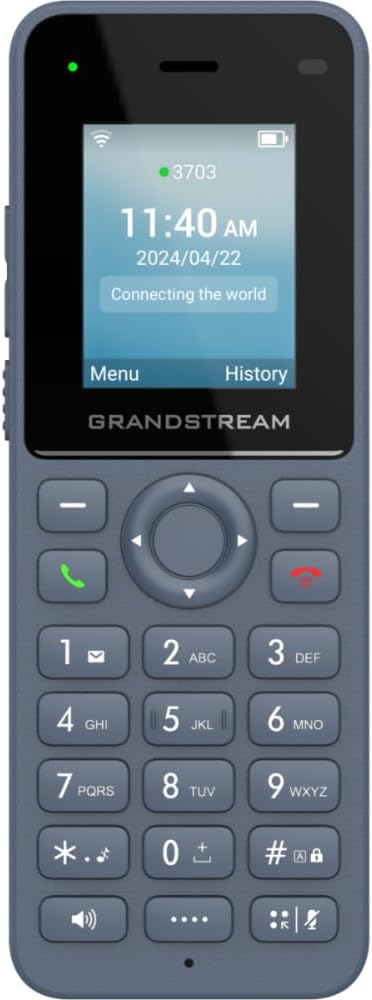
Figura 1: Față view of the Grandstream WP816 Wi-Fi Phone, displaying its screen, keypad, and branding.
2. Configurare
2.1. Ce se află în cutie:
- Grandstream WP816 Wi-Fi Phone
- (Additional accessories such as power adapter, charging cradle, and battery are typically included but not explicitly detailed in the provided 'whats_in_the_box' field, which only states "Phone". Assuming standard phone accessories.)
2.2. Încărcarea telefonului:
- Connect the power adapter to the charging cradle and a power outlet.
- Place the WP816 phone into the charging cradle. Ensure the phone is seated correctly and the charging indicator illuminates.
- Allow the phone to charge fully before initial use. This typically takes several hours. The Type C USB port also supports fast charging.
2.3. Configurare inițială:
- Pornire: Apăsați și mențineți apăsat butonul Pornire/Închidere apel până când ecranul se aprinde.
- Conexiune Wi-Fi: Navigate to the "Settings" menu, then "Wi-Fi". Select your desired Wi-Fi network and enter the password if prompted. The phone supports dual-band Wi-Fi 6.
- SIP Account Configuration: Access the "Settings" menu to configure your SIP accounts. The phone supports 2 SIP accounts. Refer to your VoIP service provider for specific SIP settings (SIP server, User ID, Password).
- Data și ora: Ensure the date and time are correctly set, either manually or via network synchronization.
3. Instrucțiuni de utilizare
3.1. Efectuarea apelurilor:
- Apelare: Introduceți numărul de telefon folosind tastatura.
- Inițiază apelul: Press the Green Call button to place the call.
- Terminare apel: Press the Red End Call button to terminate the conversation.
3.2. Primirea apelurilor:
- Când sună telefonul, apăsați butonul verde de apel pentru a răspunde.
- To reject an incoming call, press the Red End Call button.
3.3. Speakerphone Function:
- During a call, press the Speaker button (often indicated by a speaker icon) to activate the speakerphone.
- Press the Speaker button again to switch back to the earpiece.
3.4. Push-to-Talk (PTT):
- The WP816 features a configurable button for Push-to-Talk functionality.
- Consult your system administrator or service provider for configuration details and usage of the PTT feature.
3.5. Bluetooth Headset Connectivity:
- Ensure your Bluetooth headset is in pairing mode.
- On the WP816, navigate to "Settings" > "Bluetooth".
- Turn Bluetooth on and scan for available devices.
- Select your headset from the list and follow any on-screen prompts to complete pairing.
4. Întreținere
4.1. Îngrijirea bateriei:
- Pentru a maximiza durata de viață a bateriei, evitați temperaturile extreme.
- Charge the phone regularly. Do not let the battery completely drain for extended periods.
- Dacă telefonul nu va fi utilizat pentru o perioadă lungă de timp, încărcați-l la aproximativ 50% și depozitați-l într-un loc răcoros și uscat.
4.2. Curățare:
- Folosiți o lavetă moale și uscată pentru a curăța exteriorul telefonului.
- Evitați utilizarea de substanțe chimice dure, solvenți de curățare sau detergenți puternici.
5. Depanare
5.1. Fără alimentare:
- Asigurați-vă că bateria este introdusă și încărcată corect.
- Verificați dacă suportul de încărcare este conectat corect la o sursă de alimentare.
5.2. Cannot Connect to Wi-Fi:
- Verificați dacă rețeaua Wi-Fi este activă și se află în raza de acțiune.
- Confirm the Wi-Fi password is entered correctly.
- Restart the phone and the Wi-Fi router.
5.3. Poor Call Quality:
- Ensure you are within good Wi-Fi signal range.
- Verificați viteza și stabilitatea conexiunii la internet.
- Verify SIP account settings with your service provider.
5.4. Phone Not Responding:
- Perform a soft reset by removing and reinserting the battery.
- If the issue persists, a factory reset might be necessary (refer to advanced settings, note this will erase all data).
6. Specificații
| Caracteristică | Detaliu |
|---|---|
| Model | WP816 |
| Marca | Grandstream |
| Dimensiunile produsului | 7 x 5 x 4 inci |
| Greutatea articolului | 13.8 uncii (390 grame) |
| baterii | Necesită 1 baterie non-standard |
| Conectivitate | Dual-band Wi-Fi 6, Integrated Bluetooth |
| Conturi SIP | 2 conturi SIP, 2 linii |
| Funcții vocale | HD voice, Dual MIC design with AEC and Noise Shield Technology |
| Capacitatea bateriei | 1500mAh |
| Timp de vorbire | 6 de ore |
| Timp de așteptare | 120 de ore |
| Porturi | Type C USB (fast charging support), 3.5mm headset jack |
| Caracteristici suplimentare | Accelerometer, Emergency button, Configurable Push-to-Talk button |
| Culoare | Gri |
| Material | Plastic |
| Tip de telefon | Fără fir |
| Tip de apelator | Apelare prin ton |
| Operațiune multilinie | Operare pe mai multe linii |
7. Garanție și asistență
Pentru informații despre garanție și asistență tehnică, vă rugăm să consultați documentația furnizată odată cu achiziția sau să vizitați site-ul oficial Grandstream. webPăstrați dovada achiziției pentru reclamații în garanție.


