1. Introducere
This user manual provides essential information for the safe and efficient installation, operation, and maintenance of your Marstek Venus-E 5.12 kWh All-in-One Solar Energy Storage System. Please read this manual thoroughly before using the product and keep it for future reference. Adhering to these guidelines will ensure optimal performance and extend the lifespan of your device.
The Marstek Venus-E is designed to store solar energy, optimize energy costs, and provide reliable power for various applications, from balcony power plants to larger household systems.
2. Instrucțiuni de siguranță
WARNING: Failure to follow these safety instructions may result in electric shock, fire, serious injury, or property damage.
- Always disconnect the system from all power sources before performing any installation, maintenance, or troubleshooting.
- Numai personal calificat trebuie să instaleze și să întrețină acest echipament.
- Do not expose the unit to excessive moisture, rain, or direct water spray. The unit has an IP65 rating, but proper installation is crucial.
- Asigurați o ventilație adecvată în jurul unității pentru a preveni supraîncălzirea.
- Do not disassemble, repair, or modify the unit yourself. Contact authorized service personnel.
- Țineți materialele inflamabile departe de unitate.
- Asigurați-vă că toate conexiunile electrice sunt sigure și respectă codurile electrice locale.
- Do not insert foreign objects into any openings of the unit.
3. Produs terminatview
The Marstek Venus-E is a compact and powerful all-in-one solar energy storage solution. It features a robust design suitable for various environments and offers intelligent energy management capabilities.
3.1 Caracteristici cheie
- Capacitate: Base storage capacity of 5.12 kWh, expandable up to 20.48 kWh.
- Durabilitate: IP65 protection class, ensuring reliable performance in demanding environmental conditions.
- Temperatura de functionare: Wide operating temperature range from -20°C to +55°C.
- Eficienţă: Optimizes energy costs by charging during off-peak hours and utilizing stored energy during peak times.
- Monitorizare: Real-time monitoring and control via the Marstek App, allowing for energy trading and excess energy negotiation.
- Durata de viață a bateriei: Features an ESS-class LFP storage battery with over 6000 charge cycles and an estimated lifespan of 15 years.
- Intelligent Management: Equipped with an Intelligent Battery Management System (BMS) for enhanced safety and performance.
- Instalare: Designed for quick 5-second plug & play installation.
- Putere de rezervă: Provides 2.5 kW backup power capacity for uninterrupted supply.
3.2 Product Components and Indicators
The main unit includes various ports and indicators for status monitoring and connectivity.

Figura 3.1: Față view of the Marstek Venus-E unit, highlighting the 5120Wh capacity and status indicators (MAIN, SRO, BACKUP, BATTERY, CT, WIFI, BT).

Figure 3.2: Illustration of the 5kW high-performance plug-and-play storage system, showing AC-coupled energy storage and island operation for grid-independent use. Also highlights IP65 rating and 10-year warranty.
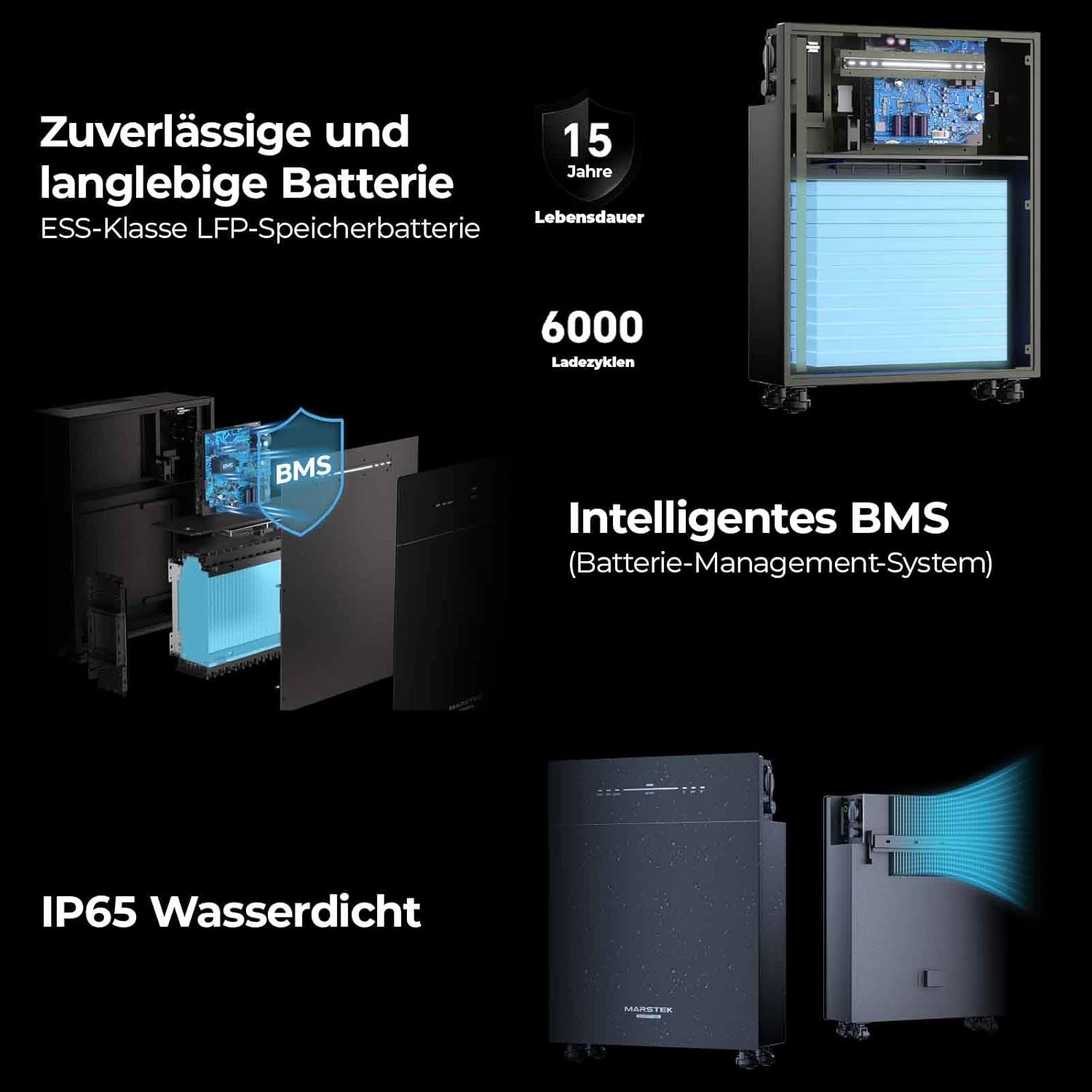
Figura 3.3: Detaliat view of the reliable and durable battery, intelligent BMS (Battery Management System), and IP65 waterproof design. Shows internal battery cells and cooling system.
4. Configurare și instalare
The Marstek Venus-E is designed for quick and easy installation. Follow these steps for a successful setup.
4.1 Despachetarea și inspecția inițială
- Carefully unpack the unit and all accessories from the packaging.
- Inspect the unit for any visible damage. If damage is found, do not proceed with installation and contact customer support.
- Asigurați-vă că sunt prezente toate componentele enumerate în lista de ambalare.
4.2 Plasarea
Choose a suitable location for the Venus-E unit. Consider the following:
- Ventilare: Asigurați un flux de aer adecvat în jurul unității.
- Mediu: While IP65 rated, avoid direct exposure to extreme weather conditions if possible. The unit can be placed in various locations such as a garden, balcony, garage, or living room.
- Stabilitate: Place the unit on a flat, stable surface. Attach the provided wheels for easy mobility if desired.

Figura 4.1: Examples of flexible energy supply locations for the Marstek Venus-E, including garden, balcony, garage, and living room setups.
4.3 Electrical Connection (Plug & Play)
The Venus-E is designed for simple plug & play installation, often taking as little as 5 seconds for initial setup.
- Connect the AC input cable from your solar inverter or grid connection to the designated AC input port on the Venus-E.
- Connect the AC output cable from the Venus-E to your household electrical system or designated loads.
- Asigurați-vă că toate conexiunile sunt securizate înainte de a continua.

Figure 4.2: Illustration demonstrating the 5-second plug & play installation process and the backup power connection with 2.5 kW capacity.
4.4 Marstek App Setup
For real-time monitoring and advanced control, download and set up the Marstek App.
- Download the "Marstek" app from your smartphone's app store (iOS or Android).
- Deschideți aplicația și urmați instrucțiunile de pe ecran pentru a crea un cont sau pentru a vă conecta.
- Use the app's pairing function (via Dual Bluetooth and WiFi modules) to connect to your Venus-E unit.
- Once connected, you can monitor energy flow, battery status, and configure operating modes.

Figure 4.3: Screenshot of the Marstek App interface, showing options for energy trading mode, self-adjustment mode, and manual mode, along with real-time data display.
5. Funcționare
The Marstek Venus-E offers flexible operation modes to optimize your energy usage.
5.1 Operating Modes via Marstek App
The Marstek App provides comprehensive control over your energy storage system:
- Energy Trading Mode: Allows for automated charging and discharging based on electricity tariffs, optimizing cost savings.
- Self-Adjustment Mode: The system intelligently adapts to your energy consumption patterns.
- Modul manual: Provides direct control over charging and discharging parameters.
The app also displays real-time data such as power input/output, battery charge level, and cumulative energy discharged.

Figure 5.1: Diagram illustrating how the Venus-E optimizes energy costs by charging when electricity is cheap (e.g., at night) and discharging when it's expensive (e.g., during the day).
5.2 Backup Power Function
În cazul unei grile outage, the Venus-E can provide backup power to connected loads. Ensure critical appliances are connected to the designated backup output. The system offers 2.5 kW backup capacity.
6. Întreținere
Regular maintenance ensures the longevity and optimal performance of your Marstek Venus-E system.
- Încărcare regulată: To maintain optimal performance and battery lifespan, charge the battery at least every three months, even if it is not currently in use.
- curatenie: Periodically clean the exterior of the unit with a soft, dry cloth. Do not use abrasive cleaners or solvents. Ensure vents are clear of dust and debris.
- Inspecţie: Verificați periodic cablurile și conexiunile pentru a depista orice semne de uzură sau deteriorare.
- Actualizări de software: Keep the Marstek App updated to the latest version to benefit from new features and performance improvements.
7. Depanare
This section addresses common issues you might encounter with your Marstek Venus-E system. For problems not listed here, please contact customer support.
| Problemă | Cauza posibila | Soluţie |
|---|---|---|
| Unitatea nu pornește. | No power input; main switch off; faulty cable. | Check AC input connection; ensure main power switch is ON; inspect cables for damage. |
| Red warning light illuminated. | Internal fault; short circuit; overcurrent. | Disconnect from power, wait 5 minutes, then reconnect. If the light persists, contact support. Do not attempt to open the unit. |
| Marstek App not connecting. | Bluetooth/WiFi off; unit not in pairing mode; app outdated. | Ensure Bluetooth/WiFi is enabled on your device and the Venus-E. Restart the app and unit. Update the app to the latest version. |
| Battery not charging/discharging. | Incorrect operating mode; solar input insufficient; grid connection issue. | Check operating mode in the app. Verify solar panel connection and output. Ensure grid connection is stable. |
8. Specificații
Technical specifications for the Marstek Venus-E 5.12 kWh system.
| Categorie | Parametru | Valoare |
|---|---|---|
| Model & Battery Information | Model | VENUS-E |
| Vol. Evaluattage | 51.2V (16S) | |
| Capacitate | 5120Wh | |
| Cycle Life (Cycles) | >6000 (25°C) | |
| Tip baterie | LiFePO₄ | |
| DOD (Depth of Discharge) | 90% | |
| AC Input/Output (On-Grid) | Putere nominală de intrare | 2.5kVA / 800VA |
| Putere nominală de ieșire | 2.5kVA / 800VA | |
| Faza de operare | 1 / H / PE | |
| Vol. Evaluattage | 230V | |
| Grid Voltage Gama | 187V - 253V | |
| Frecvența nominală a rețelei | 50 Hz | |
| Curent nominal de ieșire al rețelei | 10.9A | |
| Factorul de putere | >0.99 (Standard) / 0.8 leading - 0.8 lagging (adjustable) | |
| Backup (Off-Grid) | Putere nominală de ieșire | 2.5 kVA |
| Max. Putere aparentă de ieșire | 3.5 kVA | |
| Vol. Evaluattage | 230V | |
| Curent nominal de ieșire | 10.9A | |
| Vol. De ieșire nominalătage Frecvență | 50 Hz | |
| Efficiency & Protection | Max. AC Side Efficiency | >93.5% |
| Nivel de protecție | I | |
| General & Environmental | Interval de temperatură de funcționare | -20°C ~ +55°C (Storage: -30°C ~ +85°C) |
| Umiditatea relativă | 0 - 95% | |
| Tip de protecție | IP65 | |
| Răcire | Convecție naturală | |
| Max. Altitudine de operare | 2000m | |
| Standard de conexiune la rețea | NFEN50549-1, VDE4105/0124,G98,CEI0-21,PETREL,PN-EN50549-1/-2,TORRES,UNI217001/217002,NT5631, AS47772 | |
| Regulation/EMC | IEC62040,IEC62477,IEC/EN 61000-6-1/-2/-3/-4,IEC/EN 61000-3-2/-3,EN 300 328,EN 301 489 -1 / -17, EN 50665, CB 62619 | |
| Dimensions & Connectivity | Dimensiuni | 560 x 201 x 890 mm |
| Greutate | 60 ± 0.5 kg | |
| Grid-Tied AC Connection | Three-pole household plug (Euro 16A) | |
| Interfață de comunicare acceptată | WiFi & Bluetooth & RS485 (Waterproof Aviation Plug) |
Figure 8.1: Detailed technical specifications of the Marstek Venus-E.
9. Garanție și asistență
Marstek is committed to providing high-quality products and excellent customer service.
- Garantie: The Marstek Venus-E comes with a 10-year warranty, ensuring peace of mind regarding your investment. The battery itself has an estimated lifespan of 15 years.
- Manual online: For the latest version of the product manual and additional resources, please visit the official product page: Marstek Venus-E Online Manual
9.1 Informații de contact
For technical support, warranty claims, or any inquiries, please contact Marstek Energy Co., Limited:
- Adresa: Clădirea nr. A, Parcul Industrial Changfang, Șoseaua Guihua a 5-a nr. 2, districtul Pingshan, Shenzhen, Guangdong, China
- Tel: 86-755-28398778
- E-mail: market@marstekenergy.com
- Web: www.marstekenergy.com

Figure 9.1: Marstek Energy Co., Limited contact details and a QR code for the product manual.


